





Thursday, 22 October 2026 · 11 Jumada I 1448 AH Sun – Thu · 9:00 – 18:00
+971 56 914 9477 العربية
WhatsApp

MSketch

Yealink MSketch AI Whiteboard Camera for Meeting Rooms

WhatsApp
Priceon request
QuotationWithin 1 working day
DeliveryConfirmed with your quote, based on stock
PDFDownload datasheet (MSketch DataSheet.pdf)
Overview

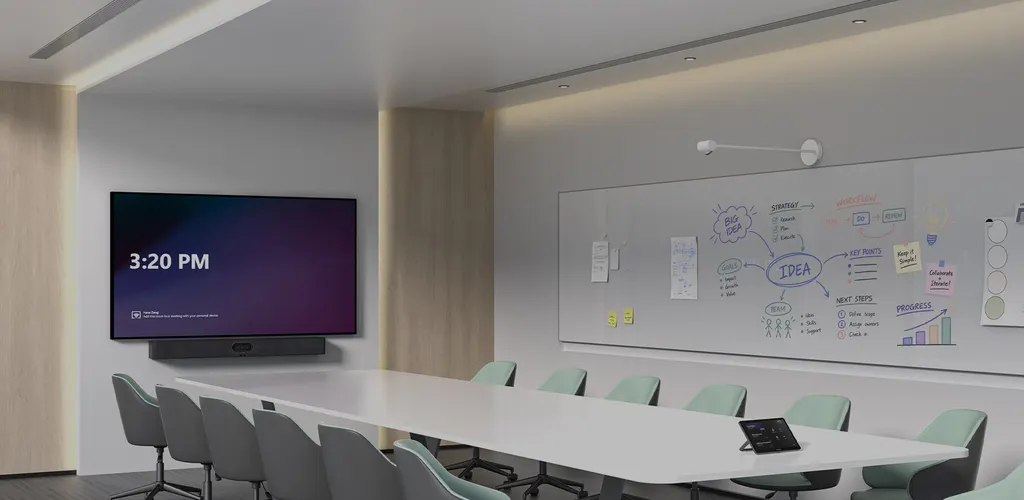
The Yealink MSketch is an AI-powered whiteboard camera that corrects whiteboard images, enhances handwriting and crops to the writing area for remote participants. It connects over a single CAT5e network cable, which also carries power over PoE, and offers gesture recognition with one-touch sharing through a Bluetooth ShareButton. It suits Yealink meeting rooms in Doha, Lusail and Education City where teams draw and annotate during calls.

What the MSketch does on a whiteboard

The Yealink MSketch is a content camera made for Yealink meeting room solutions. It captures whiteboard content in real time and processes the image so remote participants read the writing rather than glare, skew or faint strokes. An onboard AI chip corrects the board image, restores unclear handwriting and locates the areas where writing actually appears, so only those parts are shared. That matters in rooms where the board may also hold notes that should not reach a call.

Specifications that shape the installation

  • Connection: one CAT5e network cable links the camera to the host, replacing a separate USB data cable and DC power supply.
  • Power: PoE listed at 48V 0.27A on the network port.
  • Camera: HFOV 110, VFOV 75 and an 8MP Sony sensor.
  • Body: 139.54 x 139.54 x 747.26 mm, net weight 1.136 kg.
  • Wireless: Bluetooth LE 1M and LE 2M, Wi-Fi on 2.4GHz and 5GHz.

Sharing from the room

Gesture recognition and the Bluetooth ShareButton let a presenter start sharing from the room rather than from the host device. The ShareButton is a separate 42 g unit measuring 72.02 mm across and 15.66 mm thick, and it pairs over Bluetooth Low Energy. Teaching rooms and workshop spaces where the board changes hands often benefit most, because one press starts sharing without a trip to the host.

Where it fits in Qatar

An engineering team in the Industrial Area that holds design reviews with colleagues in Doha can use the camera to share sketches and calculations as they are drawn. At a university in Education City, a lecturer running a hybrid seminar can keep the whiteboard readable for students joining from elsewhere. In a ministry or corporate boardroom in West Bay, the selective sharing helps keep working notes off a call that does not need them.

Planning the deployment

Before ordering, confirm that the host device has a network port within reach of where the camera will sit, and that the PoE source on that port matches the 48V 0.27A rating. Measure the board width and the seating distance so the 110 HFOV covers the writing area without placing the camera too close. Check that the host is a Yealink Windows or Android solution, since compatibility is listed for those platforms. Schools fitting out several rooms should send a room list with their host models. SmartRooms Qatar offers a free site survey, and quotations usually follow within one working day. Request a quote and we will confirm the setup for your room.

Highlights

  • AI image correction, handwriting enhancement and intelligent cropping
  • Single CAT5e network cable connection to the host device
  • PoE listed at 48V 0.27A on the network port
  • HFOV 110, VFOV 75 and an 8MP Sony sensor
  • Gesture recognition and Bluetooth one-touch ShareButton
  • Compatible with Yealink Windows and Android solutions

Room fit

Tell us the room size and platform (Teams, Zoom or BYOD) and we confirm the right combination with your quotation.

Estimated timeline

Quotation within 1 working day · delivery timing depends on stock availability, and we confirm it with your quotation.

Specifications

8 specifications · Source: manufacturer · checked Oct 2026
Package Content1
Details
MSketch ShareButton
MSketch5
N.W
1.136 kg
POE
48V 0.27A
Bluetooth
LE 1M, LE 2M; S6621
Wifi
2.4Ghz, 5Ghz; S6621
Details
Camera: HFOV 110; VFOV 75 8MP Sony sensor AI Feature: Gesture recognition Intelligent cropping Dimension: 139.54 x 139.54 x 747.26mm MSketch Port: 1 x Network port 1 x Bluetooth button 1 x Reset button Power Supply: Wireless Specification: Wireless Module:
ShareButton2
72.02 mm (diameter) × 15.66 mm, Weight
42 g
Details
BLE pairing Dimension:

Downloads

4 files from the manufacturer

Questions about MSketch

What is the Yealink MSketch used for?
The Yealink MSketch is an AI-powered whiteboard camera for Yealink meeting room solutions. It captures what is written on a board in real time, corrects the image, enhances handwriting and crops to the writing area so remote participants can follow. It suits rooms where people draw, annotate or sketch during video calls, such as a boardroom in West Bay or a training room in Msheireb where the whiteboard is a main tool.
Would it suit a West Bay boardroom that shares sketches with a team in another city?
Yes, that is its core use. The MSketch adjusts the whiteboard picture and sharpens handwriting so a colleague in another city can read diagrams drawn during the meeting. Its listed 110 HFOV horizontal field of view helps cover a wide board, and gesture recognition plus one-touch sharing let the presenter start sharing without leaving the board. Ask SmartRooms Qatar to confirm the board size before you request a quote.
Does the MSketch need a separate power adapter?
The specification lists power as PoE at 48V 0.27A through the network port, and the power supply field in the manufacturer data is blank. Before ordering, confirm which PoE source your host or network switch provides in the room. SmartRooms Qatar can check this during the free site survey, so installation does not stall on a missing power source.
How many cables does installation need?
The MSketch connects to the host device with a single CAT5e network cable, which replaces the separate USB data cable and DC power supply. In one room, that means one cable run from the camera position to the host network port. Plan the route before work starts, check cable length against the wall or ceiling layout, and ask our team to confirm the route during a free site survey.
Is the MSketch compatible with Yealink Windows and Android solutions?
Yes, compatibility is listed for Yealink Windows solutions and Android solutions, so the camera can be used across different Yealink meeting room systems. When you request a quote, state the host model in your room so compatibility is checked before purchase. SmartRooms Qatar can match the MSketch to your current host or to a new host included in the quotation.
What field of view does it give for a long whiteboard?
The manufacturer lists a horizontal field of view (HFOV) of 110 and a vertical field of view (VFOV) of 75, with an 8MP Sony sensor. The horizontal figure is the one that matters most for a long board. Measure the board width, the distance from the camera position to the board and the seating area before you request a quote, so the framing suits the room.
How does the ShareButton work with the camera?
The ShareButton is a separate 42 g unit, 72.02 mm in diameter and 15.66 mm thick, that pairs with the system over Bluetooth Low Energy. A presenter presses it for one-touch content sharing. The camera also supports gesture recognition, so presenters have two ways to start sharing. Ask the installer to confirm Bluetooth pairing with the host in the room during setup.
Can a lecturer in Education City use it for hybrid seminars?
Yes, if the seminar relies on a whiteboard as the main writing surface. A lecturer writing equations or diagrams can keep the board readable for students joining from another campus, because the camera corrects the image and enhances handwriting. Confirm which Yealink host fits your seminar room when you request a quote.
Can it keep private board notes off a call in a Doha ministry meeting room?
The MSketch identifies the areas where handwriting actually appears and shares only those parts, so blank or unrelated board space is not sent to remote participants. That helps in government meeting rooms in Doha, where a board may hold sensitive working notes. It does not replace your own confidentiality procedures, so agree with your team how the board is cleared before each meeting.
Would it suit a site office at Ras Laffan or the Industrial Area with dust and heat?
The manufacturer data does not list an operating temperature range or dust rating for the MSketch, so it should not be assumed suitable for an unconditioned site office. Confirm the environment with the SmartRooms Qatar team before installation. Summer temperatures in Qatar can exceed 45°C, so check the room cooling and keep the camera away from direct sunlight and dust-prone openings.
Can a private school in Al Wakrah buy several units with an LPO?
Yes. SmartRooms Qatar accepts purchase orders (LPOs) and government tenders, including Monaqasat, and payment can be made by bank transfer, cheque or purchase order. For several classrooms, send a list of rooms and host models with your LPO request so each camera is quoted with the right host. Quotations usually come within one working day, and any lead time is confirmed with the quotation.
What are the dimensions and weight, and what should I check before mounting?
The MSketch measures 139.54 x 139.54 x 747.26 mm and has a net weight of 1.136 kg. Before mounting, check that the wall, ceiling or support can carry the weight and length, and that the cable from the camera reaches the host network port. Book a free site survey with SmartRooms Qatar to confirm the position before drilling or fixing.

Similar models

Biamp Vidi 100 Biamp Vidi 100 4K Conferencing Camera
Cameras
Biamp Vidi 150 Biamp Vidi 150 4K Conferencing Camera
Cameras
Biamp Vidi 250 Biamp Vidi 250 4K Conferencing Camera
120 Degrees Zoom Certified
Biamp Vidi 280 Biamp Vidi 280 4K Conferencing Camera with Dual Sensors
Ultrawide Lens Zoom Certified
Biamp Vidi Content Cam 250 Biamp Vidi Content Cam 250 4K Whiteboard Content Camera Kit
120° Up to 5x digital zoom
Email Call




