






Biamp
Evoko Kleeo Desk Manager 6-pack + 1yr license
Biamp Evoko Kleeo Desk Manager 6-Pack (910-01972) Desk Booking Display
MTouch Plus-EXT
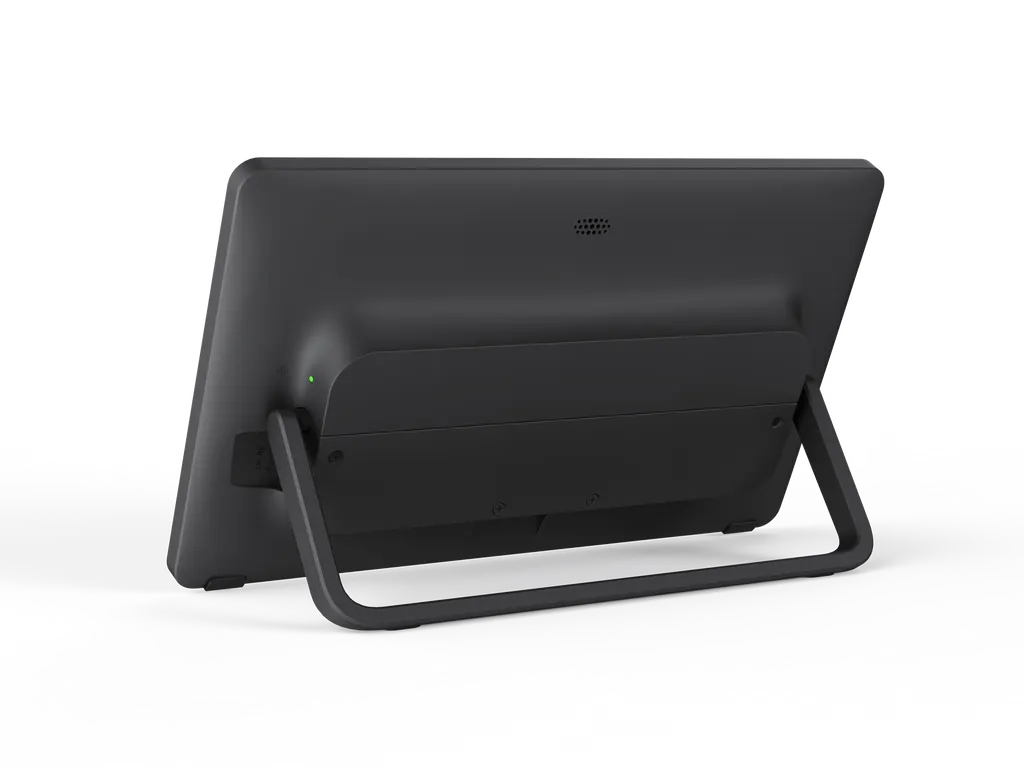
Yealink MTouch Plus-EXT 11.6-inch Touch Console Extension Screen
Priceon request
QuotationWithin 1 working day
DeliveryConfirmed with your quote, based on stock
Overview
The Yealink MTouch Plus-EXT is an 11.6-inch extension touch screen for the MTouch Plus control panel. It lets one room run up to five touch panels that control the same session. The 1920 × 1080 IPS display is anti-glare and anti-fingerprint, and the unit is powered through a single PoE network cable. It suits boardrooms in Doha, West Bay and Lusail that run Yealink video systems. Request a quote.
What the MTouch Plus-EXT adds to a Yealink console setup
The MTouch Plus-EXT is a second touch screen built to pair with a Yealink MTouch Plus control panel. Rather than replacing the main console, it gives participants in other parts of the room their own 11.6-inch touch surface, so the same meeting can be managed from several positions. It shares the MTouch Plus design, which keeps the meeting room visually consistent.
Key specifications that matter for planning
- Display: 11.6-inch capacitive IPS touchscreen at 1920 × 1080 resolution, with a narrow bezel and an 80% screen-to-body ratio.
- Surface: anti-glare and anti-fingerprint finish, which reduces glare from ceiling lights and windows.
- Scaling: one MTouch Plus can extend to four MTouch Plus-EXT units, giving five touch panels in one room.
- Power and data: one network cable supplies power and carries data through PoE (IEEE 802.3af). Each unit needs 8Mbps of bandwidth.
- Ports: one PoE power port and one Type-C debug port.
Where it fits in Qatar
A boardroom in West Bay with a long table can place an extension panel at the far end, so a presenter or chair can start a session without walking to the main console. In an Education City seminar room, a second panel near the lectern lets the facilitator control cameras and layouts while a colleague handles the room from the other side. A government ministry meeting room in Msheireb that hosts sessions in Arabic and English can give officials on both sides of the table a panel within arm's reach.
Planning the installation
The MTouch Plus-EXT supports three deployment options: wall-mount, fixed on the desktop, or placed freely on the desktop. The package includes a mounting bracket, double-coating tape, a 7.5m network cable and a 3m network cable. Because the unit must sit on the same network as its MTouch Plus, check the location of the PoE port and the cable route before choosing each mounting position.
Wall-mounting an 11.6-inch panel is light work, but the wall, the cable route and the sightline should still be confirmed. SmartRooms Qatar offers free site surveys before installation, which is useful for a room that will have more than one panel. An organisation ordering several units can raise one purchase order (LPO) covering the full set, with the mounting option for each room listed in the quotation.
Environment and network checks
The manufacturer data does not give an operating temperature range for the MTouch Plus-EXT. Before placing it in a lobby, a room with large windows or a space that is not air-conditioned, confirm the environment with the SmartRooms Qatar team. Summer temperatures in Doha can exceed 45°C, so this check matters.
Ask your IT team to confirm that the switch ports supply PoE to each panel and that the network can carry the 8Mbps per unit that the MTouch Plus-EXT requires.
Request a quote
If you are equipping a meeting room with an MTouch Plus and need one or more extension screens, request a quote from SmartRooms Qatar. Tell us the room layout, the number of panels and the video system you use, and we will return a quotation, usually within one working day.
Highlights
- 11.6-inch capacitive IPS touchscreen at 1920 × 1080
- Up to four MTouch Plus-EXT units per MTouch Plus
- Five touch panels controlling one meeting room
- Power and data over one PoE network cable (IEEE 802.3af)
- Wall-mount, fixed desktop or free desktop placement
- Anti-glare and anti-fingerprint screen surface
Room fit
Tell us the room size and platform (Teams, Zoom or BYOD) and we confirm the right combination with your quotation.
Estimated timeline
Quotation within 1 working day · delivery timing depends on stock availability, and we confirm it with your quotation.
Specifications
8 specifications · Source: manufacturer · checked Oct 2026
Package Content1
- Details
- MTouch Plus-EXT Touch Panel 1* 7.5m Internet Cable 1* 3m Internet Cable YL PoE30 (IEEE 802.3af) Mounting Bracket Double-Coating Tape
MTouch Plus-EXT Interface1
- Details
- 1 * Type-C Debug Port 1 * PoE Power Port
Logistic Information6
- Weight
- 0.908 kg
- Qty/CTN
- 3 PCS
- N.W/CTN
- 6.470 kg
- G.W/CTN
- 7.008 kg
- Giftbox
- 327 × 220 × 105 mm
- Carton Meas
- 335 × 320 × 230 mm
Downloads
12 files from the manufacturer
PDF
Yealink MTouch Plus-EXT datasheets (PDF, 204 KB)
PDF
Yealink MTouch Plus-EXT manuals & guides (PDF, 550 KB)
PDF
Yealink MTouch Plus-EXT manuals & guides (PDF, 3.7 MB)
URL
Yealink MTouch Plus-EXT manuals & guides (URL)
DXF
Yealink MTouch Plus-EXT drawings & cad (DXF)
STP
Yealink MTouch Plus-EXT drawings & cad (STP)
5 -
Yealink MTouch Plus-EXT software & firmware (5 - FIRMWARE & RELEASE NOTE)
PDF
Yealink MTouch Plus-EXT other documents (PDF, 65 KB)
PDF
Yealink MTouch Plus-EXT other documents (PDF, 1.0 MB)
MP4
Yealink MTouch Plus-EXT other documents (MP4)
URL
Yealink MTouch Plus-EXT other documents (URL)
URL
Yealink MTouch Plus-EXT other documents (URL)
Questions about MTouch Plus-EXT
What is the Yealink MTouch Plus-EXT?
The MTouch Plus-EXT is an extension touch screen for the Yealink MTouch Plus control panel. It has an 11.6-inch capacitive IPS display at 1920 × 1080 and gives a second person in the same meeting room a separate place to control calls, cameras and layouts. The product data describes it as typically used in video conferencing environments. Request a quote from SmartRooms Qatar if you already run an MTouch Plus or are specifying a full console setup.
Can the MTouch Plus-EXT work without an MTouch Plus?
No. The MTouch Plus-EXT is an accessory designed to pair with the MTouch Plus and extend that console rather than replace it. Each extension is linked to one MTouch Plus, which can support up to four extension units. If your room does not yet have an MTouch Plus, include the main console in your quotation request so the SmartRooms Qatar team can confirm the full set before ordering.
How many touch panels can one room run with this extension?
One MTouch Plus can be extended by up to four MTouch Plus-EXT units, creating a five-screen control setup in a single room. Participants in different parts of a large room can start meetings, switch layouts and control cameras from the panel nearest them. For a boardroom or lecture hall with several seating zones, decide the panel positions before ordering so the quotation matches the room layout.
Which Yealink video systems is it designed to work with?
The manufacturer data says the MTouch Plus-EXT is particularly useful when paired with Yealink video conferencing systems, and names the MVC series as an example. Before ordering, confirm that the specific Yealink video system in your room supports the MTouch Plus console configuration you plan to use. Send the model of your video system with your quotation request so the SmartRooms Qatar team can check it against your planned setup.
How is the MTouch Plus-EXT powered and connected?
The panel is powered through its network cable using Power over Ethernet under IEEE 802.3af, so one cable carries both power and data. The package includes a YL PoE30 (IEEE 802.3af) item, a 7.5m cable and a 3m cable, and the unit has a PoE power port and a Type-C debug port. It must sit on the same network as its MTouch Plus, so check the PoE port location at each planned position.
How much network bandwidth does each extension use?
The manufacturer data states that each MTouch Plus-EXT requires 8Mbps of bandwidth. A room with four extensions therefore needs 32Mbps for the extension panels alone, before the video system and other traffic are counted. In an office where one switch serves several meeting rooms, ask your IT team to confirm the uplink capacity and the PoE budget at each network point before installation.
What mounting options does the MTouch Plus-EXT offer?
It supports three deployment methods: wall-mount, fixed on the desktop, and free placement on the desktop. The box includes a mounting bracket and double-coating tape. Wall-mounting frees desk space in a crowded boardroom, while desktop placement suits rooms that are rearranged often. Before drilling into a wall in a West Bay or Lusail office, ask SmartRooms Qatar for a free site survey to confirm the wall, cable route and sightline.
Is it a good fit for a boardroom in West Bay?
Yes, a boardroom with a long table is one of the clearest uses for it. An extension placed near the far end lets a chair or presenter start a session, change the layout or end a call without leaning across to the main console. Because the screen is 11.6 inches, it works best as a secondary control panel, so check seating positions and sightlines during the site survey.
Can it be used in a seminar room in Education City?
It suits a seminar room where the facilitator moves between the lectern and the back of the room. A second touch panel near the lectern lets the facilitator control cameras and layouts, while a co-facilitator operates the room from the far side. Plan a wall or desktop position for each panel, and confirm the network points for the PoE cable before the room is fitted out.
How could a ministry meeting room in Msheireb use it?
A ministry meeting room in Msheireb that hosts sessions in Arabic and English, with colleagues joining from other sites, can give officials on both sides of the table their own control point. Because the source data does not list interface languages, confirm the language settings with SmartRooms Qatar before ordering. Government buyers can order by purchase order (LPO) or through a government tender, and the quotation can cover the full room.
Would it suit a developer's meeting room in Lusail that connects to teams abroad?
Yes. In a Lusail head office where meetings connect Doha with teams abroad, the extension lets a host manage the call from a second position while the main console runs the room. Each extension needs 8Mbps, so check the wired network path to the video system as well as the room layout. Ask for a quotation that lists the number of panels and their positions so your team can review the plan.
Can it be placed in a lobby, a room with large windows or an unconditioned space?
The manufacturer data does not give an operating temperature range or environmental rating for the MTouch Plus-EXT. Plan it for an air-conditioned meeting room, and confirm any lobby, window-facing or unconditioned position with the SmartRooms Qatar team first. Summer temperatures in Doha can exceed 45°C, so the environment matters for a touch panel that will be used every day.
Similar models



Biamp
Evoko Liso Freestand Mount - Boltable
Biamp Evoko Liso Freestand Mount (Boltable) 910-01935 Floor Stand
