






Biamp
Evoko Kleeo Desk Manager 6-pack + 1yr license
Biamp Evoko Kleeo Desk Manager 6-Pack (910-01972) Desk Booking Display
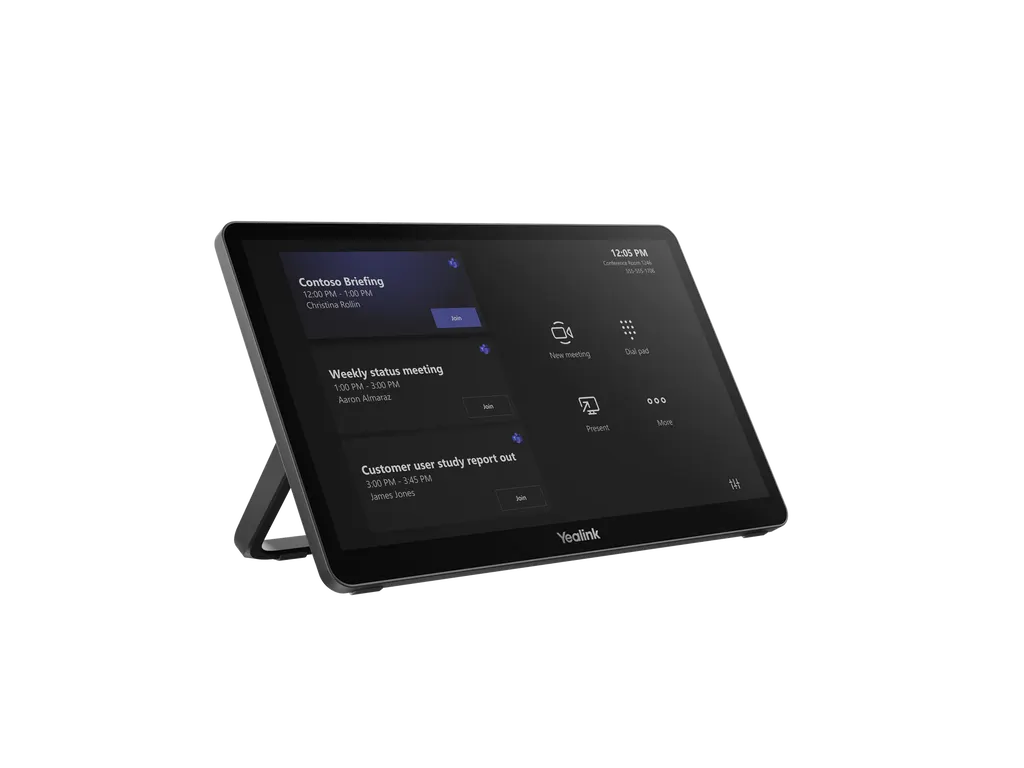
MTouch Plus
Yealink MTouch Plus 11.6-inch 1080P Touch Control Panel
Priceon request
QuotationWithin 1 working day
DeliveryConfirmed with your quote, based on stock
Overview
The Yealink MTouch Plus is an 11.6-inch 1080P IPS touch control panel for running Yealink MVC video conferencing systems. Its anti-fingerprint, anti-glare screen supports 10-point multi-touch, and it can be wall-mounted, laid flat or set on a desktop. A RoomSensor can wake it automatically when people enter. It suits meeting rooms, boardrooms and training rooms across Qatar where staff need one-touch control. Request a quote from SmartRooms Qatar.
A touch control panel for Yealink video conferencing rooms
The MTouch Plus is a touch control panel, not a display screen. It gives participants a compact 11.6-inch touchscreen from which they can manage a Yealink MVC video conferencing system, so the room can be run from the table or from a wall position without relying on a remote. The panel uses an IPS screen with a 1920 × 1080 resolution, so menus and call controls stay sharp when viewed up close.
The specifications that matter for a meeting room buyer
- Screen: 11.6-inch IPS panel, 1920 × 1080 resolution, 290 cd/m² brightness and a contrast figure of 1000
- Touch: 10-point multi-touch on an anti-fingerprint, anti-glare, scratch-resistant surface
- Video input: HDMI 2.0 ingest for sharing a laptop screen
- Wireless: Wi-Fi 802.11 a/b/g/n/ac/ax and Bluetooth 5.2
- Ports: MCore Pro/VCH port, USB 2.0 Type-C, USB 2.0 Type-C PD, 3.5 mm headset port, two USB 2.0 Type-A ports, and an RJ-45 external touch port
The ports cover both sides of a meeting. The USB-C connection and HDMI input let a laptop share content, while one Type-A port is reserved for the optional WPP30 wireless sharing dongle. The manufacturer also lists Airplay, Miracast and Google Cast sharing, and notes that some of these options will arrive in later software versions, so confirm the current firmware when the quotation is prepared.
Where it fits in Qatar
In many boardrooms the video system sits far from the chair at the head of the table, which leaves the control point out of reach of the person running the call. A panel beside the seat lets that person start calls and switch layouts without walking across the room. Three typical settings in Qatar are:
- Ministry, authority and corporate boardrooms in West Bay or Msheireb, where the chair manages the call from the table.
- Staff meeting rooms in an international school in Lusail, where a wall-mounted panel near the door gives staff one-touch control and the RoomSensor wakes the panel as they walk in.
- Meeting rooms in a Doha hotel or serviced apartment, where a panel placed flat on the table is used by visiting teams calling colleagues abroad.
What to plan before you order
Plan the mounting first. The package includes a mounting bracket and double-coating tape, and the manufacturer supports wall, flat-surface and desktop placement through an expansion bracket. A free site survey from SmartRooms Qatar is the right time to check the wall or table, the depth of the mounting position and the cable route. The source data does not list an operating temperature range for this panel, so confirm the room conditions with the SmartRooms Qatar team, especially for a spot near a window in the summer. The panel weighs 0.967 kg and includes a 7.5 m Ethernet cable. If you want to charge a laptop through the USB-C PD port, the 65W PD power supply is an optional accessory and should be included in the quotation. Multi-unit orders are packed three panels per carton, which helps when several rooms are being fitted out together.
Send us your room layout and the Yealink MVC model already installed, and the SmartRooms Qatar team will prepare a quotation, usually within one working day. Request a quote for the MTouch Plus today.
Highlights
- 11.6-inch IPS screen at 1920 × 1080 resolution
- 290 cd/m² brightness with anti-glare, anti-fingerprint surface
- 10-point multi-touch for Yealink MVC meeting rooms
- Wall, flat or desktop installation via expansion bracket
- RoomSensor automatic wake-up when people enter
- USB-C PD port for laptop charging with optional 65W supply
Room fit
Tell us the room size and platform (Teams, Zoom or BYOD) and we confirm the right combination with your quotation.
Estimated timeline
Quotation within 1 working day · delivery timing depends on stock availability, and we confirm it with your quotation.
Specifications
11 specifications · Source: manufacturer · checked Oct 2026
Package Content1
- Details
- MTouch Plus Touch Panel Mounting Bracket Double-Coating Tape USB Type-C Cable (with HDMI Adapter) 7.5m Ethernet Cable WPP30 (Optional) 65W PD Power Supply (Optional)
MTouch Plus4
- Screen Contrast
- 1000
- WiFi
- IEEE 802.11 a/b/g/n/ac/ax.
- Bluetooth
- BT 5.2
- Details
- 1 MCore Pro Port VCH Port 1 USB 2.0 Type-C Port 1 USB 2.0 Type-C PD Port 1 3.5 mm Headset Port 1 * USB 2.0 Type-A Port (for WPP30) 1 USB 2.0 Type-A Port 1 Ext Touch Port RJ-45 Screen Brightness 290 cd/m² HDMI 2.0 ingest Scratch resistent screen
Logistic Information6
- Weight
- 0.967 kg
- Qty/CTN
- 3 PCS
- N.W/CTN
- 5.7 kg
- G.W/CTN
- 6.2 kg
- Giftbox
- 327 × 105 × 220 mm
- Carton Meas
- 350 × 335 × 260 mm
Downloads
26 files from the manufacturer
PDF
Yealink MTouch Plus datasheets (PDF, 307 KB)
PDF
Yealink MTouch Plus manuals & guides (PDF, 4.1 MB)
URL
Yealink MTouch Plus manuals & guides (URL)
URL
Yealink MTouch Plus manuals & guides (URL)
URL
Yealink MTouch Plus manuals & guides (URL)
URL
Yealink MTouch Plus manuals & guides (URL)
URL
Yealink MTouch Plus manuals & guides (URL)
URL
Yealink MTouch Plus manuals & guides (URL)
URL
Yealink MTouch Plus manuals & guides (URL)
URL
Yealink MTouch Plus manuals & guides (URL)
DXF
Yealink MTouch Plus drawings & cad (DXF)
STP
Yealink MTouch Plus drawings & cad (STP)
DXF
Yealink MTouch Plus drawings & cad (DXF)
PDF
Yealink MTouch Plus certificates & compliance (PDF, 416 KB)
10 -
Yealink MTouch Plus software & firmware (10 - FIRMWARE & RELEASE NOTE)
10 -
Yealink MTouch Plus software & firmware (10 - FIRMWARE & RELEASE NOTE)
40 -
Yealink MTouch Plus software & firmware (40 - FIRMWARE & RELEASE NOTE)
50 -
Yealink MTouch Plus software & firmware (50 - FIRMWARE & RELEASE NOTE)
5 -
Yealink MTouch Plus software & firmware (5 - FIRMWARE & RELEASE NOTE)
PDF
Yealink MTouch Plus other documents (PDF, 65 KB)
PDF
Yealink MTouch Plus other documents (PDF, 1.0 MB)
MP4
Yealink MTouch Plus other documents (MP4)
MP4
Yealink MTouch Plus other documents (MP4)
URL
Yealink MTouch Plus other documents (URL)
URL
Yealink MTouch Plus other documents (URL)
MP4
Yealink MTouch Plus other documents (MP4)
Questions about MTouch Plus
What is the Yealink MTouch Plus used for?
The Yealink MTouch Plus is a touch control panel for managing video conferencing in meeting rooms and conference spaces. Users start and manage meetings from its 11.6-inch touchscreen rather than from a remote or a laptop. It is designed for organisations running a Yealink MVC system and suits boardrooms, meeting rooms and conference areas where several people need to control the call.
Which Yealink video conferencing systems does it work with?
The MTouch Plus is designed for managing Yealink video conferencing systems such as the MVC series. The manufacturer lists the MVC S50, S80, S90 and S98 as related systems, aimed at medium to large rooms, large rooms, boardrooms and ProAV rooms. Before ordering, confirm the exact Yealink system you run with the SmartRooms Qatar team so the panel matches your current setup.
What are the screen size, resolution and brightness?
The screen is an 11.6-inch IPS panel with a 1920 × 1080 resolution. The source data lists a brightness of 290 cd/m² and a contrast figure of 1000. The surface is anti-fingerprint and anti-glare and is described as scratch-resistant, which helps in rooms with bright windows or frequent handling by many users during the working week.
Can it be mounted on a wall, flat on a table or on a desk?
Yes. The MTouch Plus supports three deployment methods: on the wall, flat on a surface, or fixed on a desktop, using an expansion bracket. A training centre in Education City setting up a control point beside a lectern can place it on a desk, while a meeting room in Al Sadd can wall-mount it beside the door. The package includes a mounting bracket and double-coating tape.
How does the automatic wake-up with RoomSensor work?
When paired with the Yealink RoomSensor, the MTouch Plus can wake up automatically when the sensor detects people entering the room. The control panel is ready when the first participants arrive, without anyone pressing a button. The manufacturer notes that the wake-up area stays fixed even if the panel is moved, which suits larger rooms where the panel position may change during installation.
Can several panels run in one large room?
Yes. With the MTouch Plus-EXT, you can set up multiple touch panels in the same room. Participants at different points in the room can control the camera and switch layouts at the same time. This suits a large conference room in Ras Laffan or Mesaieed where people sit in separate zones. The panel includes an RJ-45 external touch port, which is relevant to this multi-panel setup.
How do people share content from laptops or phones?
The panel accepts HDMI 2.0 input, and a USB Type-C cable with an HDMI adapter is included in the package. For wireless sharing, the optional WPP30 dongle plugs into a Type-A port, and the manufacturer also lists Airplay, Miracast and Google Cast. Some of these wireless options are noted as coming in later software versions, so confirm current support before ordering.
Can the panel charge a laptop while content is shared?
Yes, when the MTouch Plus is connected to a PD power supply, a laptop connected over USB-C can receive power while it shares content. The source data lists a 65W PD power supply as an optional accessory, so it is not included as standard. Choose this option when presenters regularly connect laptops during long sessions, such as board meetings in West Bay.
Is it suitable for a boardroom in West Bay with glass walls?
A boardroom with glass walls and bright daylight suits the anti-glare screen, which reduces reflections when people look at the controls. Place the panel within reach of the chair at the head of the table, where the call is usually managed. The source data gives no operating temperature range, so confirm the room environment with the SmartRooms Qatar team during a free site survey before mounting.
Would a staff meeting room at an international school in Lusail suit it?
Yes, for a staff room where teachers start calls with colleagues or external experts. A wall-mounted panel near the door can be woken by the RoomSensor as staff arrive, and the 11.6-inch screen is easy to reach from a seat. If several classrooms or meeting rooms are being fitted out at the same time, request one quotation covering all of them, since units are packed three per carton.
Is it a good fit for a hotel meeting room in Doha that gets strong afternoon sun?
Strong sun is a concern for any touch device near windows. The MTouch Plus has an anti-glare surface and 290 cd/m² brightness, which helps readability, but the source data lists no operating temperature range. Position it away from direct sunlight and ask the SmartRooms Qatar team to review the room during a site survey, especially in summer when outdoor temperatures in Doha can exceed 45°C.
How do I request a quote for several units for a government project?
Send the list of rooms, the Yealink MVC system in each room and the number of panels needed in each. SmartRooms Qatar usually returns a quotation within one working day. We support purchase orders (LPOs) and government tenders, including Monaqasat, and accept payment by bank transfer, cheque or purchase order. Products are covered by the manufacturer's warranty.
Similar models



Biamp
Evoko Liso Freestand Mount - Boltable
Biamp Evoko Liso Freestand Mount (Boltable) 910-01935 Floor Stand
