





Thursday, 22 October 2026 · 11 Jumada I 1448 AH Sun – Thu · 9:00 – 18:00
+971 56 914 9477 العربية
WhatsApp

MTower

Yealink MTower Center-View Intelligent Companion Camera

WhatsApp
Priceon request
QuotationWithin 1 working day
DeliveryConfirmed with your quote, based on stock
PDFDownload datasheet (Yealink MTower Datasheet.pdf)
Overview

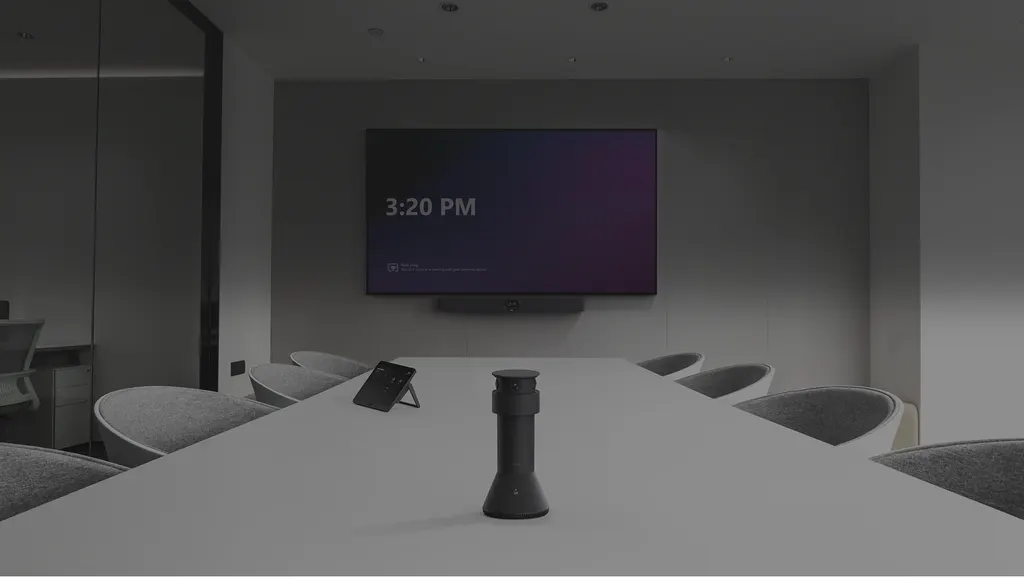
The Yealink MTower is a tabletop camera for small and medium meeting rooms that already use an MTR system. It combines three 8MP Sony-sensor cameras, an 84.4° telephoto lens and two 151° wide-angle lenses with 6+1 beamforming microphones and AI best-view switching. A magnetic levitation cover closes over all three lenses for privacy. Qatari boardrooms, classrooms and training rooms can add it as a companion camera.

What the MTower adds to an MTR meeting room

The MTower is a tabletop companion camera that sits alongside the main camera of an MTR meeting room system. Instead of one fixed lens, it uses three 8MP cameras with Sony sensors arranged in a ring, so people around the table are captured from several angles. When it works with an MTR camera at the front of the room, its AI selects the best frontal view of each participant, so remote colleagues feel they are looking at the room face to face.

Three lenses built for the meeting table

The central camera is a telephoto lens with an 84.4° horizontal field of view, which brings detail to participants sitting further from the unit. The two side cameras each cover 151° horizontally, so people at the edges of the table stay in shot. The unit measures 142.5 mm in diameter and 303 mm high and weighs 1.23 kg, a compact footprint for a table in a small or medium room.

Audio pickup and call controls

The 6+1 microphone array sits on top of the unit and uses beamforming to locate the speaker more accurately. The datasheet gives a 3-metre quality voice pickup range, with echo cancellation and intelligent noise cancellation built in. The unit also has a camera mute button, two microphone mute buttons, a reset button and a VCH port with an RJ-45 connector, so the most common controls stay within reach.

Where it fits in Qatar

  • A ministry meeting room in Doha: teams in other cities join by video, and the MTower keeps each speaker framed for remote attendees.
  • A seminar room in Education City: visiting researchers and lecturers join from abroad, and the mute buttons help the facilitator manage the feed during a session.
  • A larger training room in Lusail: two units can be paired with an MVC S50 or MeetingBar A50 for wider audio and video coverage.

What to plan before installation

The package includes a tabletop fixed bracket and a 7.5m CAT5e cable, so measure the route from the table to the MTR system before ordering. The data does not list an operating temperature range, so ask the SmartRooms Qatar team to confirm conditions for your room, especially near windows or air outlets in Qatar's summer heat. A free site survey can check cable routes and table positions before installation is planned.

Request a quote from SmartRooms Qatar for the Yealink MTower in your meeting room. Quotations usually arrive within one working day, and we supply, deliver to all eight municipalities of Qatar, install professionally and accept purchase orders and LPOs.

Highlights

  • Three 8MP Sony-sensor cameras arranged in a ring
  • Telephoto center lens with 84.4° horizontal field of view
  • Two 151° wide-angle side cameras for edge-of-table coverage
  • 6+1 beamforming microphones with 3-metre voice pickup range
  • Magnetic levitation privacy cover for all three lenses
  • Qualcomm QCS8550 processor for AI best-view switching

Room fit

Tell us the room size and platform (Teams, Zoom or BYOD) and we confirm the right combination with your quotation.

Estimated timeline

Quotation within 1 working day · delivery timing depends on stock availability, and we confirm it with your quotation.

Specifications

7 specifications · Source: manufacturer · checked Oct 2026
Package Content1
Details
MTower Tabletop fixed bracket 7.5m CAT5e cable
Physical Features2
Dimensions
Φ142.5mm * H303 mm
Weight
1.23 kg
Telephoto Camera1
Details
8MP, Sony sensor 93.5°DFOV, 84.4°HFOV, 53.1°VHOV Magnetic levitation automatic privacy cover
Wide-angle Camera1
Details
8MP, Sony sensor 182°DFOV, 151°HFOV, 81°VHOV Magnetic levitation automatic privacy cover
Audio1
Details
Built-in 6+1 mics beamforming array Echo canceller technology Intelligent noise cancellation technology 3-meter quality voice pickup range
Button & Interfaces1
Details
1* Camera mute 2* Mic mute 1* Reset 1* VCH port (RJ-45)

Downloads

26 files from the manufacturer
PDF Datasheets Yealink MTower Datasheet.pdf 252 KB Yealink MTower datasheets (PDF, 252 KB) PDF Manuals & guides MTower Deployment via CTP.pdf 2.6 MB Yealink MTower manuals & guides (PDF, 2.6 MB) PDF Manuals & guides MTower Deployment.pdf 1.4 MB Yealink MTower manuals & guides (PDF, 1.4 MB) PDF Manuals & guides Yealink MTower Quick Start Guide (EN,DE,FR,ES) V1.2.pdf 11.8 MB Yealink MTower manuals & guides (PDF, 11.8 MB) URL Manuals & guides · Opens on manufacturer site IntelliVision (MeetingBar USB Mode) Yealink MTower manuals & guides (URL) URL Manuals & guides · Opens on manufacturer site IntelliVision (MeetingBoard Pro) Yealink MTower manuals & guides (URL) URL Manuals & guides · Opens on manufacturer site IntelliVision (Yealink Intelligent Camera) Yealink MTower manuals & guides (URL) URL Manuals & guides · Opens on manufacturer site IntelliVision for MeetingBoard Pro Yealink MTower manuals & guides (URL) URL Manuals & guides · Opens on manufacturer site IntelliVision for Yealink MeetingBar Yealink MTower manuals & guides (URL) DXF Drawings & CAD · Opens on manufacturer site MTower CAD Drawings.dxf Yealink MTower drawings & cad (DXF) STP Drawings & CAD · Opens on manufacturer site MTower CAD Drawings.stp Yealink MTower drawings & cad (STP) 4 - Software & firmware · Opens on manufacturer site MTower 322.320.0.4 - Firmware & Release Note (For MeetingBar A40) Yealink MTower software & firmware (4 - FIRMWARE & RELEASE NOTE (FOR MEETINGBAR A40)) 5 - Software & firmware · Opens on manufacturer site MTower 322.320.0.5 - Firmware & Release Note (For MeetingBar A50) Yealink MTower software & firmware (5 - FIRMWARE & RELEASE NOTE (FOR MEETINGBAR A50)) 6 - Software & firmware · Opens on manufacturer site MTower 322.320.0.6 - Firmware & Release Note (For MeetingBar A50) Yealink MTower software & firmware (6 - FIRMWARE & RELEASE NOTE (FOR MEETINGBAR A50)) 7 - Software & firmware · Opens on manufacturer site MTower 322.320.0.7 - Firmware & Release Note (For MeetingBar A40) Yealink MTower software & firmware (7 - FIRMWARE & RELEASE NOTE (FOR MEETINGBAR A40)) 5 - Software & firmware · Opens on manufacturer site MTower 322.340.0.5 - Firmware & Release Note (For MeetingBar A50) Yealink MTower software & firmware (5 - FIRMWARE & RELEASE NOTE (FOR MEETINGBAR A50)) 5 - Software & firmware · Opens on manufacturer site MTower 322.340.0.5 - Firmware & Release Note (For MeetingBar A50) Yealink MTower software & firmware (5 - FIRMWARE & RELEASE NOTE (FOR MEETINGBAR A50)) 5 - Software & firmware · Opens on manufacturer site MTower 322.411.0.5 - Firmware & Release Note (For SmartVision 40) Yealink MTower software & firmware (5 - FIRMWARE & RELEASE NOTE (FOR SMARTVISION 40)) 10 - Software & firmware · Opens on manufacturer site MTower 322.412.0.10 - Firmware & Release Note (For SmartVision 40) Yealink MTower software & firmware (10 - FIRMWARE & RELEASE NOTE (FOR SMARTVISION 40)) 5 - Software & firmware · Opens on manufacturer site MTower 322.412.0.5 - Firmware & Release Note (For SmartVision 40) Yealink MTower software & firmware (5 - FIRMWARE & RELEASE NOTE (FOR SMARTVISION 40)) PDF Other documents Yealink Regulatory Notice V1.2.pdf 1.0 MB Yealink MTower other documents (PDF, 1.0 MB) URL Other documents · Opens on manufacturer site Audio Input and Output Compatibility Lists Yealink MTower other documents (URL) URL Other documents · Opens on manufacturer site Rooms Accessories Compatibility Lists Yealink MTower other documents (URL) URL Other documents · Opens on manufacturer site Rooms Product Family Yealink MTower other documents (URL) MP4 Other documents · Opens on manufacturer site Yealink MTower Intellivision Best Practices V1.0.mp4 Yealink MTower other documents (MP4) MP4 Other documents · Opens on manufacturer site Yealink MTower Unboxing V1.1.mp4 Yealink MTower other documents (MP4)

Questions about MTower

What is the Yealink MTower designed for?
The MTower is a tabletop companion camera for small and medium meeting rooms. It works with MTR meeting room systems to capture participants around the table from several angles, so remote attendees see the people in the room rather than a single fixed frame. It suits organisations that already run an MTR system and want better table coverage, including government offices, schools and companies that hold regular video calls with teams abroad.
How wide are the MTower's camera fields of view?
The MTower has three 8MP cameras with Sony sensors. The telephoto center camera has an 84.4° horizontal field of view and 93.5° diagonal, while each of the two wide-angle side cameras has a 151° horizontal and 182° diagonal field of view. The datasheet lists 53.1° vertical for the telephoto lens and 81° vertical for the wide-angle lenses, which together cover the table from one unit.
Does the MTower choose the best view automatically?
Yes, when the MTower is paired with an MTR camera at the front of the room. Its IntelliVision feature selects the best frontal view of each participant from the combined angles, so the image keeps the best perspective of each person. The unit is built around a Qualcomm QCS8550 processor. Ask the SmartRooms Qatar team to confirm this pairing for your room before you finalise the specification.
How does the microphone array perform in a medium-sized room?
The 6+1 microphone array sits on top of the unit and uses beamforming to locate the speaker. The datasheet gives a 3-metre quality voice pickup range, with echo cancellation and intelligent noise cancellation built in. Place the MTower centrally on the table so that people at both ends are within that range, and test the setup during the site survey before the room is signed off.
Can the MTower be wall-mounted or ceiling-mounted?
The package includes a tabletop fixed bracket, and the data lists no wall or ceiling mounting kit. Plan for a table or shelf position where the three lenses face the seats. The unit measures 142.5 mm in diameter and 303 mm high and weighs 1.23 kg, so check that the table surface is stable enough to carry it.
What cable is supplied, and how should I plan the run?
The package includes a 7.5m CAT5e cable, and the unit's VCH port is an RJ-45 port. Measure the distance from the table to the MTR system and to any cable trays or floor boxes before ordering. If the run is longer than 7.5 metres, tell the SmartRooms Qatar team during the free site survey so the cabling can be planned in advance.
Is the MTower suitable for a boardroom in West Bay?
It suits boardrooms with small to medium tables, because the MTower is designed for rooms of that size. If your table is very large or long, check the layout first. The site survey will confirm whether one unit covers every seat or whether a dual setup is needed, so the quotation reflects the room you actually have.
Is the MTower useful for a ministry meeting room in Doha that hosts teams abroad?
Yes, in a medium-sized room where staff in other cities or countries join by video. The three cameras keep each person at the table in view, and AI switching helps remote colleagues see the speaker from a front-facing angle. The privacy cover opens and closes automatically with the meeting status, which suits confidential briefings where cameras should not be exposed when not in use.
How could a university seminar room in Education City use the MTower?
A seminar room that hosts visiting researchers or links lectures with partner institutions abroad can use the MTower to show each speaker around the table. The microphone array's 3-metre pickup range suits a room of this size. The camera and microphone mute buttons on the unit let the facilitator control the feed during the session.
Can two MTower units be used in a larger training room in Lusail?
Yes. The datasheet lists the dual MTower configuration as compatible with the MVC S50 or MeetingBar A50, bringing a more natural front-facing view, AI auto-switching and wider audio and video coverage to larger meeting spaces. A training centre in Lusail planning a bigger room should confirm the compatible devices and cabling during a site survey before requesting a quote.
Can the MTower sit near a window in an Al Sadd meeting room that gets afternoon sun?
The data does not give an operating temperature range for the MTower, so this cannot be confirmed from the specifications. Meeting rooms in Doha are usually air-conditioned, but a unit placed in strong afternoon sun or in window glare should be checked first. Ask the SmartRooms Qatar team to confirm the room conditions during the site survey.
How do I request a quote for the MTower from SmartRooms Qatar?
Send your room size, your existing MTR system and the number of units you need, and SmartRooms Qatar will usually reply with a quotation within one working day. Payment can be made by bank transfer, cheque or purchase order, and government buyers can raise an LPO. Delivery covers all eight municipalities of Qatar, and professional installation and a free site survey are available.

Similar models

Biamp Vidi 100 Biamp Vidi 100 4K Conferencing Camera
Cameras
Biamp Vidi 150 Biamp Vidi 150 4K Conferencing Camera
Cameras
Biamp Vidi 250 Biamp Vidi 250 4K Conferencing Camera
120 Degrees Zoom Certified
Biamp Vidi 280 Biamp Vidi 280 4K Conferencing Camera with Dual Sensors
Ultrawide Lens Zoom Certified
Biamp Vidi Content Cam 250 Biamp Vidi Content Cam 250 4K Whiteboard Content Camera Kit
120° Up to 5x digital zoom
Email Call



