





MVC S40
Yealink MVC S40 Microsoft Teams Rooms on Windows Conferencing System
- Field of view
- 120°
- Speakers
- 78.78dBSPL@0.5m
The Yealink MVC S40 is a Microsoft Teams Rooms on Windows kit for small to medium meeting rooms. Its SmartVision 40 camera combines two 48MP lenses, a 120° field of view and a 6-meter voice pickup range, while an MCore 4 mini-PC and an 11.6-inch MTouch Plus panel handle control. It suits Qatari offices, schools and ministries wanting a Teams room. Request a quote for your meeting room.
What the MVC S40 is and how it is built
The Yealink MVC S40 is a Microsoft Teams Rooms on Windows system built for small to medium meeting rooms. It is supplied as four parts that work together: the MCore 4 mini-PC, the MTouch Plus touch panel, the SmartVision 40 all-in-one camera and audio unit, and the RoomSensor occupancy sensor.
Camera and audio for smaller rooms
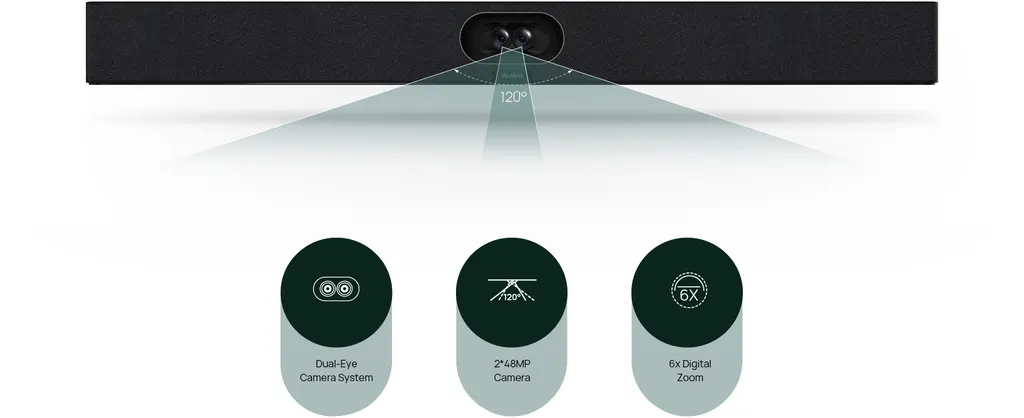
The SmartVision 40 uses two 48 MP cameras with a 120° diagonal and 111° horizontal field of view. Its tracking options include IntelliFocus, Multi-Stream IntelliFrame on the device and Video Fence, which sets a virtual boundary so remote participants see and hear only what is inside it. Audio comes from an eight-microphone MEMS array, two 10 W stereo speakers and AI-enhanced noise cancellation, with a voice pickup range of 6 meters. Two expansion microphones can be added to cover a larger table.
Processing, touch control and content sharing
The MCore 4 runs an Intel Ultra 5 125H processor with 16 GB of DDR5 memory and a 256 GB SSD, and it comes preloaded with Windows 11 IoT Enterprise, the Microsoft Teams Rooms app and Yealink RoomConnect. Its three HDMI outputs (one 2.1 and two 2.0) support CEC and EDID, and an HDMI-in port accepts 4K auxiliary content. The MTouch Plus is an 11.6-inch IPS panel at 1920 x 1080 that can sit on a desk, be fixed to a desk or be wall-mounted. Wireless sharing uses the WPP30 adapter, while wired sharing works over HDMI or USB-C.
Where it fits in Qatar
- A private school in Al Wakrah equipping a staff meeting room or a mid-sized classroom for parent and teacher conferences.
- A government office in West Bay setting up a small boardroom for meetings with colleagues in other departments.
- A consultancy team in Lusail joining Doha meetings with partners abroad from a mid-sized room.
What to plan before ordering
Settle the mounting first. The MCore 4 can sit on a table or be wall or TV mounted, while the SmartVision 40 can stand on a flat surface, be wall-mounted, embedded in a wall or fixed to a tabletop mount. The SmartVision 40 is listed at 650 x 62 x 80 mm with a net weight of 5.54 kg. A single CAT5e or higher cable carries both data and power to the MTouch Plus, and the cable between the mini-PC and the touch panel can run up to 40 m but cannot be extended. The room needs a display with 1080p resolution or higher and an HDMI port, a Microsoft Teams Rooms account and a wired network. A mouse is needed for first-time setup. The RoomSensor is rated for 0 to 40°C, so confirm the environment for other units with the SmartRooms Qatar team, especially in rooms with windows during Qatar summers.
Request a quote for your room
Tell us the room size, the display you plan to use and where the camera will sit, and request a quote. Quotations usually arrive within one working day. We supply the system, deliver to all eight municipalities of Qatar, provide professional installation and accept purchase orders (LPOs) and government tenders. The product is covered by the manufacturer's warranty, and lead times are confirmed with your quotation.
Highlights
- Two 48MP cameras with 120° DFOV in one SmartVision 40 unit
- 6-meter voice pickup with an eight-microphone MEMS array
- Intel Ultra 5 125H, 16GB DDR5 and 256GB SSD in MCore 4
- 11.6-inch IPS MTouch Plus panel at 1920 x 1080
- Wireless sharing via WPP30 adapter and wired sharing via HDMI or USB-C
- Single CAT5e cable carries data and power to the touch panel
Room fit
Tell us the room size and platform (Teams, Zoom or BYOD) and we confirm the right combination with your quotation.
Estimated timeline
Quotation within 1 working day · delivery timing depends on stock availability, and we confirm it with your quotation.
Specifications
Package Content1
- Details
- MCore 4 MTouch plus RoomSensor SmartVision 40, all-in-one audio and video integration machine
Preload1
- Details
- Windows 11 IoT enterprise X64 Windows 11 IoT enterprise license Microsoft Teams rooms app Yealink RoomConnect
MCore 4, Gen-4 Mini-PC6
- Processor
- Intel Ultra5 125H
- Memory
- 16GB(2*8GB) DDR5
- Storage
- 256GB SSD
- WiFi
- IEEE 802.11 a/b/g/n/ac/ax
- Bluetooth
- BT 5.2
- Details
- BIOS feature: 3x HDMI video output - CEC - EDID TPM2.0 Kernel DMA Interface: 1 x HDMI-Out 2.1 port 2 x HDMI-Out 2.0 port 1 x HDMI-In port 4 x USB3.0 type-A port 1 x MTouch port (RJ-45) 1 x LAN port for AV network 1 x 10/100/1000 Gigabit Ethernet port 1 x power supply port 1 x 3.5mm headphone port 1 x reset port 1 x security slot
MTouch Plus1
- Details
- Physical features: 11.6-inch narrow bezel IPS display Angle between screen and desktop (30° ~ 70°) Adjustable angle of support frame (50° ~ 180°) Function features: 1920 x 1080 video resolution Support wired and wireless (with WPP30) content sharing Support an external PD power supply to power the sharing device Support HDMI/USB-C video input Support desktop placement, desktop fixed, and wall-mounted deployment
RoomSensor4
- Detection angle
- 120°
- Adjustable detection angle
- ±20°
- Operating temperature
- 0-40℃
- Operating humidity
- 10-95%
SmartVision 404
- DFOV
- 120°
- HFOV
- 111°
- Speaker
- 78.78dBSPL@0.5m
- Details
- Camera: 2x 48 MP camera Speakers: 2 x 10W stereo speakers Interfaces: 1x USB3.0 Type-B port 1x USB2.0 Type-A port 1x USB-C port 1x Yealink VCH port(RJ-45) 1x 3.5mm line-in & line-out port 1x power port 1x security lock slot 1x reset slot 1x HDMI-out Function features: Built-in Wi-Fi Support IntelliFocus Support Multi-Stream IntelliFrame (on device) Support video fence Support 2 x expansion microphone




