






Barco
ClickShare Power Supply 100W
Barco ClickShare Power Supply 100W, 100-Watt Video Conferencing Accessory
RCH240
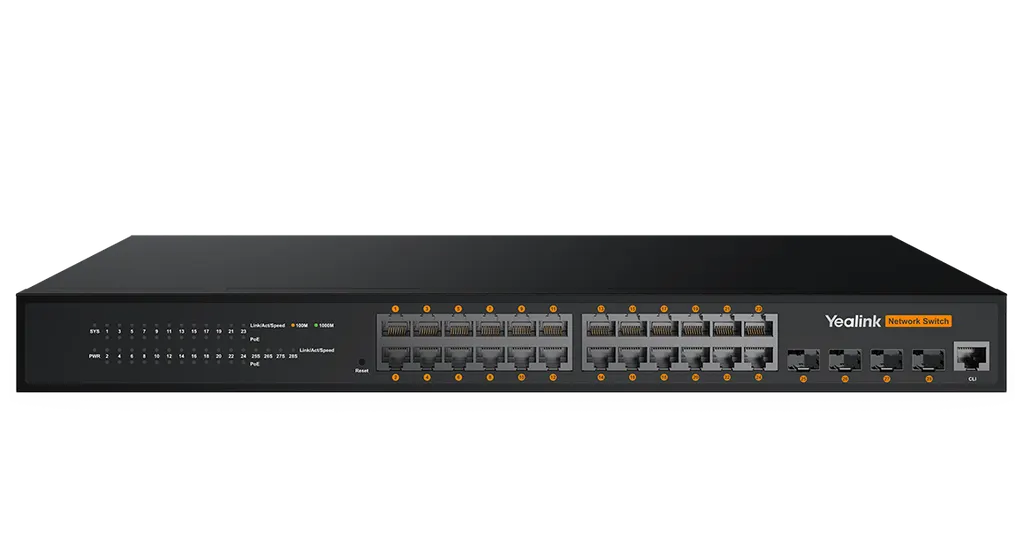
Yealink RCH240 24-Port L2+ Managed PoE+ AV Switch
Priceon request
QuotationWithin 1 working day
DeliveryConfirmed with your quote, based on stock
Overview
The Yealink RCH240 is a 24-port Gigabit L2+ web-managed PoE+ switch for AV over IP meeting rooms. It provides a 370W PoE budget for cameras, encoders and audio devices, plus four SFP fibre uplinks and support for Dante and AES67. It suits IT and AV teams in Qatar equipping boardrooms, lecture halls and conference floors.
An AV over IP switch built around Yealink room systems
The Yealink RCH240 is a 24-port Gigabit switch that carries audio, video and control traffic for AV over IP installations. It connects Yealink MTR room systems, cameras, Pro Audio equipment and AVoIP encoders and decoders such as the EN300 and DE300, and it powers the devices that accept power over Ethernet, so each endpoint needs only one cable. It is a Layer 2+ switch managed from a web browser, so VLANs, multicast and access rules can be set without a command-line session.
Port count, PoE budget and fibre uplinks
- 24 Gigabit PoE ports for cameras, encoders and other endpoints
- 370W PoE power budget supporting 802.3af and 802.3at devices
- 4 Gigabit SFP fibre uplinks for links between floors or buildings
- 56Gbps switching capacity and 42Mpps packet forwarding rate
The power budget is the number to check first. Add up the rated PoE draw of every device you intend to power from the switch and keep headroom below the 370W limit. The smaller RCH80 offers 8 PoE ports and a 130W budget, so it suits compact setups, while the RCH240 suits larger rooms or a cluster of rooms served from one comms cabinet.
Management, multicast and resilience
The switch supports up to 4K VLAN entries, including Voice VLAN, Private VLAN and QinQ, so AV traffic can be kept separate from office data. IGMP v2 and v3 snooping with Fast Leave manages multicast streams, and 802.1p and DSCP priority marking supports QoS. For loop prevention it supports STP, RSTP, MSTP and ERPS ring protection. Access control, DHCP and 802.1x authentication are included. According to the manufacturer, EEE is disabled by default and IGMP snooping is enabled by default, so Yealink AV over IP devices need no configuration for basic operation.
Where it fits in Qatar
A government authority in West Bay can use the RCH240 in a boardroom where a Yealink MTR system, a camera and Pro Audio equipment share one switch, with the video traffic placed on its own VLAN. A university in Education City can use the fibre uplinks to connect a central AV control room with lecture theatres in separate buildings. A hotel or conference centre near the Hamad International Airport area can run several meeting rooms from a single cabinet, keeping each room's devices powered and isolated.
What to plan before you order
The RCH240 can be rack-mounted or used on a desktop. Its dimensions are 440 × 208 × 44 mm, power consumption is below 17 W, and it has two fans. The operating range is -10°C to 50°C at 10% to 90% relative humidity, non-condensing. Qatar summer temperatures can exceed 45°C, so place it in an air-conditioned comms room with clear airflow rather than in a sealed, unventilated cabinet. Its input range of 100 to 240 V AC at 50 Hz with ±10% tolerance covers Qatar's 240 V, 50 Hz mains supply.
SmartRooms Qatar offers a free site survey to check rack space, cable routes, PoE load and the room environment before you commit. Quotations are usually issued within one working day. Government ministries and schools can order through a purchase order (LPO), and we handle government tenders, including Monaqasat. Professional installation can be included in the quotation.
Send us your room list, the devices you plan to power and any fibre distances, and request a quote for the Yealink RCH240 with installation included. The SmartRooms Qatar team will respond with a quotation, usually within one working day.
Highlights
- 24 Gigabit PoE ports plus 4 Gigabit SFP fibre uplinks
- 370W PoE power budget for 802.3af and 802.3at devices
- Dante and AES67 support for AV over IP installations
- L2+ management with VLAN, IGMP snooping, QoS and 802.1x
- Operating range from -10°C to 50°C, non-condensing
- Rack-mounted or desktop use, 440 × 208 × 44 mm
Room fit
Tell us the room size and platform (Teams, Zoom or BYOD) and we confirm the right combination with your quotation.
Estimated timeline
Quotation within 1 working day · delivery timing depends on stock availability, and we confirm it with your quotation.
Specifications
Source: manufacturer · checked Oct 2026
The full specification and datasheet for this model are available on request; we send them with your quotation.
Downloads
9 files from the manufacturer
PDF
Yealink RCH240 datasheets (PDF, 132 KB)
PDF
Yealink RCH240 manuals & guides (PDF, 1.2 MB)
URL
Yealink RCH240 manuals & guides (URL)
URL
Yealink RCH240 manuals & guides (URL)
URL
Yealink RCH240 manuals & guides (URL)
STP
Yealink RCH240 drawings & cad (STP)
DXF
Yealink RCH240 drawings & cad (DXF)
PDF
Yealink RCH240 other documents (PDF, 1.0 MB)
URL
Yealink RCH240 other documents (URL)
Questions about RCH240
What is the Yealink RCH240 used for?
The RCH240 is a 24-port Gigabit L2+ managed PoE+ switch made for AV over IP rooms. It connects Yealink MTR room systems, cameras, Pro Audio equipment and AVoIP encoders and decoders such as the EN300 and DE300 on one managed network. It suits meeting rooms and conference floors that need more powered devices than a small switch can serve.
How much power can the RCH240 supply to connected devices?
It provides a 370W PoE power budget and supports 802.3af and 802.3at powered devices. Before ordering, add up the rated draw of every device you plan to power and keep headroom below the 370W limit. The SmartRooms Qatar team can review that load during the free site survey.
How many ports and uplinks does the switch have?
It has 24 Gigabit PoE ports and 4 Gigabit SFP fibre uplinks. The fibre uplinks suit links between a comms room and another floor or building, where long distances make copper cable impractical. Switching capacity is 56Gbps with a packet forwarding rate of 42Mpps.
Does the RCH240 support Dante and AES67?
Yes. The manufacturer states it supports Yealink's AV protocols as well as Dante and AES67, so it can be used in Pro AV workflows that combine conferencing and professional audio. Before purchase, list the exact Dante or AES67 devices in your design so the team can confirm the integration for your project.
Does it need configuration before use with Yealink devices?
For basic operation, no. EEE is disabled by default and IGMP snooping is enabled by default, which means Yealink AV over IP devices work plug-and-play. Settings such as VLANs, QoS and 802.1x authentication can still be configured in the web interface when your IT team requires segmentation or access control.
Can I manage the switch from a web browser?
Yes, the RCH240 supports web-based management from a browser. Your IT team can configure VLANs, IGMP snooping and fast leave, QoS priority mapping, DHCP and 802.1x authentication from the interface. Keep a record of the settings used for each room so future changes and fault finding stay simple.
Where would this switch be used in Qatar?
Typical sites include a government boardroom in West Bay, a university AV control room in Education City and a hotel conference floor near the Hamad International Airport area. In each case the switch sits in a comms cabinet, powers the cameras and audio devices in the rooms it serves and carries their traffic over a managed network.
Can the RCH240 be installed in a rack or on a desk?
It supports both rack-mounted and desktop installation. The unit measures 440 × 208 × 44 mm and draws less than 17 W. Check the depth of your comms cabinet and the cable bend radius at the rear before ordering, since the switch has two fans and needs room for airflow.
Will the switch cope with Qatar's summer heat?
Its operating range is -10°C to 50°C at 10% to 90% relative humidity, non-condensing. Qatar summer temperatures can exceed 45°C, so install it in an air-conditioned comms room rather than an unventilated cabinet in a hot corner. Ask the team to check the cabinet environment during your site survey.
What power supply does it need?
The input is 100 to 240 V AC at 50 Hz with a ±10% tolerance, which covers Qatar's 240 V, 50 Hz mains supply. Power consumption is under 17 W. Confirm the plug and socket arrangement for your rack PDU or desk power point during installation planning.
Does SmartRooms Qatar help with planning and purchase?
Yes. We offer a free site survey to check rack space, cable routes, PoE load and the room environment before quotation. Quotations are usually provided within one working day. Government ministries and schools can order by purchase order, and we handle government tenders, including Monaqasat.
How should a school plan a multi-room order?
Schools fitting out several classrooms or halls can list each room with its devices and PoE load, then request one quotation covering all the switches. Specify any fibre runs between buildings so the number of SFP uplinks is correct. Purchase orders are accepted, and the team can plan installation across rooms in the same quotation.



