






Barco
ClickShare Power Supply 100W
Barco ClickShare Power Supply 100W, 100-Watt Video Conferencing Accessory
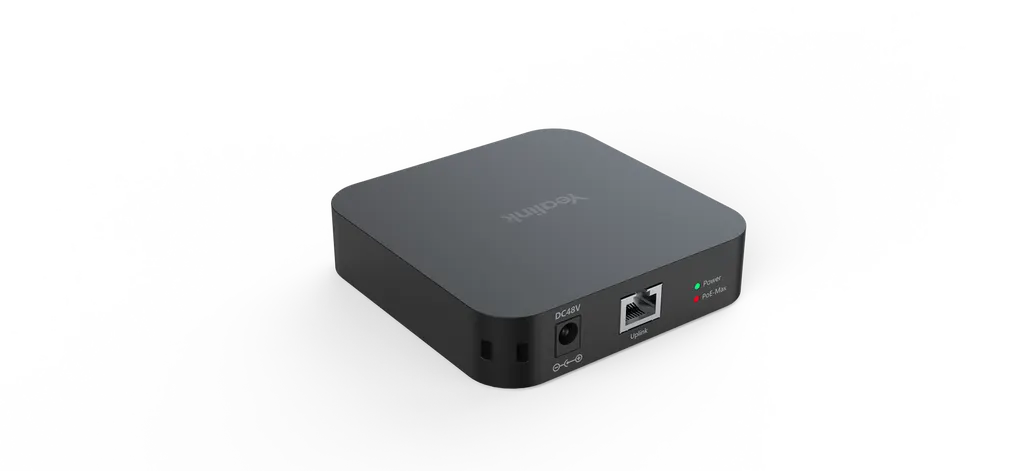
RCH40
Yealink RCH40 Room Cable Hub PoE Switch
Priceon request
QuotationWithin 1 working day
DeliveryConfirmed with your quote, based on stock
Overview
The Yealink RCH40 is a compact PoE switch built to power the audio and video devices in a meeting room over the network cable. It offers four 10/100/1000 Mbps downlink ports and one Gigabit uplink, with up to 30W per port and a 90W total PoE budget. Its 100 x 100 x 23 mm body and PoE priority control suit meeting rooms in Doha offices and schools.
What the Yealink RCH40 does in a meeting room
The Yealink RCH40 is a Room Cable Hub: a compact Power over Ethernet switch that sits between your network and the audio and video devices in a meeting room. Instead of running a separate power cable to each device, you run one Ethernet cable from the RCH40 to each device, and the switch supplies power through that same cable. In rooms where ceilings, walls and cable trays are already crowded, that means fewer cables to plan and less clutter at the equipment point.
Ports, power budget and standards
The switch provides four 10/100/1000 Mbps downlink ports for end devices and one Gigabit Ethernet uplink port for the connection back to your network. It supports the 802.3af and 802.3at PoE standards, with up to 30W available on each downlink port and a total PoE budget of 90W across the unit. PoE priority control is included so you can manage how that power is allocated when several devices are connected at once.
- Downlink: four 10/100/1000 Mbps ports
- Uplink: one Gigabit Ethernet port
- Power: up to 30W per port, 90W total budget
- Status: one LED for power state and one LED for PoE budget
Compact sizing and power supply
At 100 x 100 x 23 mm, the RCH40 has a small footprint, which helps where equipment cabinets and wall boxes are already crowded. The package contains the switch, a 48V 2A power supply and a quick start guide. When connected to a compatible Yealink VCH port, the RCH40 can use EasyConnect and receive power without its own adapter, which reduces the number of cables at the cabinet.
Before ordering, confirm the plug type and mains requirements of the supplied adapter with the SmartRooms Qatar team, because Qatar mains supply is 240 V at 50 Hz. The listed operating humidity range is 5% to 90%, but no operating temperature range is given. Ask us to confirm suitability before installing it in a warm equipment cupboard, since summer temperatures in Qatar can exceed 45°C.
Where it fits in Qatar
A six-seat meeting room in West Bay with a camera and a microphone needs both devices connected to one network point in the cabinet. The RCH40 carries power and data to each of them over Ethernet from a single location, keeping the wall and table neat. A clinic in Al Sadd setting up a room for video consultations with specialists abroad can use the same approach, with the switch placed in a ventilated cabinet. A government office in Msheireb fitting out several meeting rooms in one project can order identical units for every room under one purchase order.
Planning the installation
Measure the cable route from the switch to each device, and list which devices will draw power so you can compare them with the 30W per port and 90W total limits. A free site survey from SmartRooms Qatar lets our team check the room layout, cabinet space and cable routes before anything is installed. Send your room plan and device list to request a quote. Quotations are usually issued within one working day, and we supply to all eight municipalities of Qatar, with professional installation and support for purchase orders (LPOs).
Highlights
- Four 10/100/1000 Mbps downlink ports
- One Gigabit Ethernet uplink port
- 802.3af/at PoE, up to 30W per port
- 90W total PoE budget across the unit
- One LED each for power state and PoE budget
- EasyConnect powers it from a compatible Yealink VCH port
Room fit
Tell us the room size and platform (Teams, Zoom or BYOD) and we confirm the right combination with your quotation.
Estimated timeline
Quotation within 1 working day · delivery timing depends on stock availability, and we confirm it with your quotation.
Specifications
6 specifications · Source: manufacturer · checked Oct 2026
Features1
- Details
- 4 x 10/100/1000Mbps port 802.3af-compliant Multiple deployment methods 90w total PoE budget (30w per port)
Physical Feature4
- Power adapter
- PSE 48V 2A
- Dimension(W x D x H)
- 100mm x 100mm x 23mm
- Operating humidity
- 5%-90%
- Details
- 1 x LED indicator power state 1 x LED indicator PoE budget Support standard PoE supply(802.3af)
Package include1
- Details
- RCH40 switch 48V 2A power supplier Quick start guide
Downloads
5 files from the manufacturerQuestions about RCH40
What is the Yealink RCH40 used for?
The RCH40 is a Room Cable Hub, a PoE switch that carries network connectivity and power over one Ethernet cable to audio and video devices in a video conference system. It has four 10/100/1000 Mbps downlink ports and one Gigabit uplink port, so a single network connection can serve several room devices. It suits meeting rooms in Doha offices, schools and clinics where cable clutter is a concern.
How much power can each port deliver?
Each of the four downlink ports supports 802.3af/at and can deliver up to 30W. The unit has a total PoE budget of 90W, so three devices each drawing the full 30W would use the whole budget. Add up the power draw of every device before choosing your port layout, and use the PoE budget LED to check the status of the budget during setup.
Does the RCH40 support both 802.3af and 802.3at?
The RCH40 is listed as 802.3af/at-compliant, so it can supply power to devices that use either standard, up to 30W per port. The physical specifications refer specifically to standard 802.3af PoE supply, so confirm with the SmartRooms Qatar team that the requirements of each end device are covered before you order.
Can the RCH40 be used with Dante devices, the CM20 or the CS10?
The manufacturer states that Dante devices, the CM20 and the CS10 work only with the RCH40 E2 edition, because they require Energy Efficient Ethernet to be disabled. The standard RCH40 is not the edition listed for them, so do not specify it for those devices without checking first. Ask SmartRooms Qatar to match your device list against the correct edition before you request a quote.
Does the standard RCH40 include QoS?
No. The manufacturer's comparison lists QoS as not supported on the standard RCH40 and supported on the RCH40 E2, which also includes a DSCP-based priority queue table. If your network team relies on QoS marking to prioritise meeting traffic, ask SmartRooms Qatar to confirm which edition fits your network design before ordering.
What comes in the box with the RCH40?
The package includes the RCH40 switch, a 48V 2A power supply and a quick start guide. Confirm the adapter's plug type and mains requirements with the SmartRooms Qatar team before installation, since Qatar mains supply is 240 V at 50 Hz. If you connect the RCH40 through EasyConnect to a compatible Yealink VCH port, the adapter is not used for that connection.
How do I plan where the RCH40 will be installed?
The RCH40 measures 100 x 100 x 23 mm, so it needs only a small space in an AV cabinet, wall box or ceiling void. Before ordering, measure the cable route from the switch to each device and check that the cabinet allows airflow and access for maintenance. A free site survey from SmartRooms Qatar can confirm the best location before installation begins.
Can the RCH40 operate in a hot equipment cupboard in Qatar?
The listed operating humidity range is 5% to 90%, but the manufacturer's data gives no operating temperature range. Summer temperatures in Qatar can exceed 45°C, so do not place the switch in an unventilated cupboard until the environment has been confirmed with SmartRooms Qatar. A ventilated, air-conditioned cabinet is the safer planning choice for any equipment room.
How does the RCH40 suit a meeting room in West Bay?
A six-seat meeting room in West Bay with a camera and a microphone needs both devices connected to a single network point. The RCH40 sends power and data to each device over Ethernet from one cabinet, keeping cabling tidy. Check each device's power draw against the 30W per port and 90W total budget, then ask SmartRooms Qatar to confirm the layout during the site survey.
Is the RCH40 suitable for a clinic consultation room in Al Sadd?
A clinic in Al Sadd preparing a room for video consultations with specialists abroad can use the RCH40 to power and connect its room devices through one Ethernet cable per device. Its compact 100 x 100 x 23 mm body fits a small wall cabinet, and the four downlink ports cover a typical set of room devices. Confirm the cabinet environment and power plan with SmartRooms Qatar before installation.
Can SmartRooms Qatar supply and install the RCH40 for a government project?
Yes. SmartRooms Qatar supplies the RCH40 with delivery to all eight municipalities of Qatar, professional installation and a free site survey. For ministries and authorities we accept purchase orders (LPOs) and government tenders, including those on Monaqasat. Quotations are usually issued within one working day, so include the number of rooms and the device list when you request a quote.



