





Thursday, 22 October 2026 · 11 Jumada I 1448 AH Sun – Thu · 9:00 – 18:00
+971 56 914 9477 العربية
WhatsApp

SmartVision 40

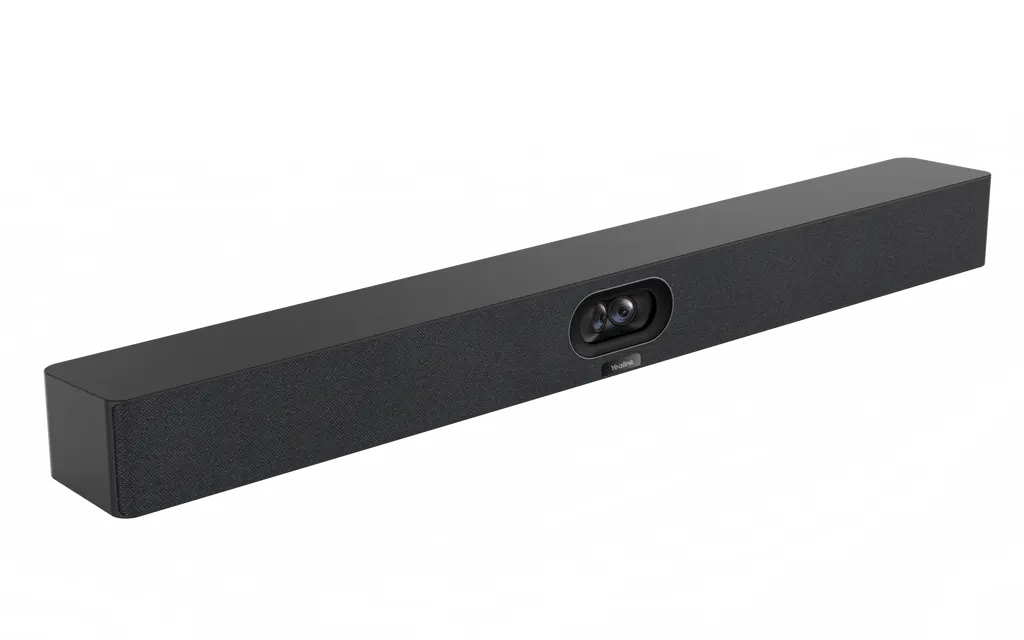
Yealink SmartVision 40 All-in-One Conference Camera

WhatsApp
Priceon request
QuotationWithin 1 working day
DeliveryConfirmed with your quote, based on stock
PDFDownload datasheet (Yealink SmartVision 40 Datasheet.pdf)
Overview

The Yealink SmartVision 40 is an all-in-one conference camera made for small to medium Microsoft Teams Rooms. Two 48MP lenses combine into one image with a 120° field of view and 4K output at 30 fps. It includes an 8-microphone array with a 6-meter voice pickup, IntelliFocus close-ups, and an automatic privacy lens cover. Suits meeting rooms in Doha, Lusail and Education City. Request a quote from SmartRooms Qatar.

An all-in-one camera for small to medium Teams rooms

The Yealink SmartVision 40 combines a conference camera, microphone array and speakers in one unit, designed for small to medium Microsoft Teams Rooms. Instead of mounting a separate camera, microphone bar and speakers, a room gets one device that handles the picture and most of the sound. It suits meeting spaces where a few people sit close to the lens and remote colleagues need to see faces clearly.

Yealink also lists the MVC S40 bundle, which pairs the camera with an MCore Pro mini-PC and an MTouch E2 touch panel for small to medium conference rooms. Ask the SmartRooms Qatar team whether the camera on its own or the bundle better matches your room.

Dual 48MP lenses and automatic framing

Two 48MP lenses cover a 120° diagonal field of view, and their images are combined into a picture with higher pixel density. The camera outputs 4K at 30 fps and offers 6x digital zoom, with up to nine camera presets for quick switching between views. An automatic lens cover protects privacy when the camera is not in use.

The AI features keep the picture focused on the conversation. Auto Framing and Speaker Tracking follow participants as they move, IntelliFocus shows close-ups of recent speakers, and Video Fence marks the edges of the meeting space so people outside it are excluded. Multi-Stream IntelliFrame, Multi-Focus, Picture-in-Picture and Image Super Resolution add further options.

Audio for real meeting tables

The eight-microphone MEMS array provides a 6-meter voice pickup range and a 4-meter range for good-quality voice. Two expansion microphones can be added when some seats sit far from the camera. Full-duplex operation with noise cancellation and echo cancellation lets both ends of a call speak at the same time.

  • Two 10W stereo speakers
  • Full-duplex audio with noise and echo cancellation
  • Support for two expansion microphones in larger rooms
  • 3.5mm line-in and line-out connection

Where it fits in Qatar

  • Department meeting room in Msheireb or West Bay: a team holds regular calls with colleagues in other cities or abroad, with attendees seated close to the camera.
  • Leadership room at a private school in Al Wakrah: a compact room being fitted out for calls with departments and partner institutions.
  • Project office in Lusail or the Industrial Area: hybrid reviews with suppliers and head office, where clear faces and close-up speaker views help remote participants follow discussions.

Planning the installation

The camera measures 650 × 62 × 80 mm and weighs 5.54 kg net (6.086 kg gross). A standard wall mount bracket is included, and an optional TV wall mount is available. The operating range is 0-40°C with 10-95% humidity, so install it in an air-conditioned room away from direct sunlight and windows, because Qatar summer heat can exceed 45°C outside. Include the 2.5-meter USB cable in your cable plan, and check routes to the room computer and display. Networked units can be managed remotely through a device management platform.

SmartRooms Qatar provides a free site survey before wall mounting, which helps confirm wall construction, height and cable runs. Quotations are usually issued within one working day, and we supply, deliver and install across all eight municipalities of Qatar.

To check the SmartVision 40 against your room layout, display and Teams setup, request a quote from SmartRooms Qatar today.

Highlights

  • Dual 48MP lenses with 120° diagonal field of view
  • 4K at 30 fps with 6x digital zoom
  • 8-microphone MEMS array with 6-meter voice pickup range
  • Supports two expansion microphones for larger tables
  • IntelliFocus, Video Fence, Auto Framing and Speaker Tracking
  • Automatic lens cover and 0-40°C operating temperature range

Room fit

Tell us the room size and platform (Teams, Zoom or BYOD) and we confirm the right combination with your quotation.

Estimated timeline

Quotation within 1 working day · delivery timing depends on stock availability, and we confirm it with your quotation.

Specifications

13 specifications · Source: manufacturer · checked Oct 2026
Camera1
Details
2× 48MP DFOV 120° 4K at 30 fps 6x digital zoom Automatic lens cover Up to 9 camera presets
Audio4
- Frequency response
100-20 kHz
- Sensitivity
86dB SPL @1W@0.5m
- Sampling rate
48 kHz
Details
8 MEMS microphone array 6-meter voice pickup range 4-meter quality voice range Supports 2 expansion microphones Noise cancellation and echo cancellation Full-duplex Speakers: - 2x 10W stereo - THD
AI Feature1
Details
IntelliFocus Multi-Stream IntelliFrame (on device) Video Fence Auto Framing Speaker Tracking Image Super Resolution Multi-Focus Picture-in-Picture
Connections1
Details
1x USB3.0 Type-B port 1x USB2.0 Type-A port 1x USB-C port 1x Yealink VCH port (RJ-45) 1x 3.5mm line-in/out 1x power port 1x security lock slot 1x reset slot 1x HDMI-out Built-in Wi-Fi
Package Features4
SmartVision 40
650 × 62 × 80 mm
Net Weight
5.54 kg
Gross Weight
6.086 kg
Details
Wall mount (ADA standard)
Physical Specifications2
Operating humidity
10-95%
Operating temperature
0-40°C

Downloads

42 files from the manufacturer
PDF Datasheets Yealink SmartVision 40 Datasheet.pdf 331 KB Yealink SmartVision 40 datasheets (PDF, 331 KB) PDF Manuals & guides Wired BYOD Deployment (Via CTP25).pdf 606 KB Yealink SmartVision 40 manuals & guides (PDF, 606 KB) PDF Manuals & guides Wired BYOD Deployment (Via Yealink VCH Sharing Box).pdf 120 KB Yealink SmartVision 40 manuals & guides (PDF, 120 KB) PDF Manuals & guides Yealink SmartVision 40 Quick Start Guide (EN, CN, DE, ES, FR) V1.2.pdf 6.2 MB Yealink SmartVision 40 manuals & guides (PDF, 6.2 MB) URL Manuals & guides · Opens on manufacturer site Audio Fence Yealink SmartVision 40 manuals & guides (URL) URL Manuals & guides · Opens on manufacturer site Auto Framing (Yealink Intelligent Camera) Yealink SmartVision 40 manuals & guides (URL) URL Manuals & guides · Opens on manufacturer site Basic Settings Yealink SmartVision 40 manuals & guides (URL) URL Manuals & guides · Opens on manufacturer site Connect Device to YDMP or YMCS Yealink SmartVision 40 manuals & guides (URL) URL Manuals & guides · Opens on manufacturer site HDMI Out (Yealink Intelligent Camera) Yealink SmartVision 40 manuals & guides (URL) URL Manuals & guides · Opens on manufacturer site Image Settings Yealink SmartVision 40 manuals & guides (URL) URL Manuals & guides · Opens on manufacturer site IntelliFocus Yealink SmartVision 40 manuals & guides (URL) URL Manuals & guides · Opens on manufacturer site IntelliFrame (Yealink Intelligent Camera) Yealink SmartVision 40 manuals & guides (URL) URL Manuals & guides · Opens on manufacturer site IntelliVision (Yealink Intelligent Camera) Yealink SmartVision 40 manuals & guides (URL) URL Manuals & guides · Opens on manufacturer site Line-out Output (Hearing aid system) Yealink SmartVision 40 manuals & guides (URL) URL Manuals & guides · Opens on manufacturer site Video Fence (Yealink Intelligent Camera) Yealink SmartVision 40 manuals & guides (URL) URL Manuals & guides · Opens on manufacturer site Virtual Background Yealink SmartVision 40 manuals & guides (URL) URL Manuals & guides · Opens on manufacturer site Wired BYOD (Via Yealink VCH51 Pro) Yealink SmartVision 40 manuals & guides (URL) DXF Drawings & CAD · Opens on manufacturer site SmartVision 40 & UVC40 E2 Rotary Bracket CAD Drawings.dxf Yealink SmartVision 40 drawings & cad (DXF) STP Drawings & CAD · Opens on manufacturer site SmartVision 40 & UVC40 E2 Rotary Bracket CAD Drawings.stp Yealink SmartVision 40 drawings & cad (STP) DXF Drawings & CAD · Opens on manufacturer site SmartVision 40 CAD Drawings.dxf Yealink SmartVision 40 drawings & cad (DXF) STP Drawings & CAD · Opens on manufacturer site SmartVision 40 CAD Drawings.stp Yealink SmartVision 40 drawings & cad (STP) DXF Drawings & CAD · Opens on manufacturer site SmartVision 40 Table Top Mount CAD Drawings.dxf Yealink SmartVision 40 drawings & cad (DXF) STP Drawings & CAD · Opens on manufacturer site SmartVision 40 Table Top Mount CAD Drawings.stp Yealink SmartVision 40 drawings & cad (STP) PDF Certificates & compliance SmartVision-40-PCF-EN.pdf 417 KB Yealink SmartVision 40 certificates & compliance (PDF, 417 KB) 25 - Software & firmware · Opens on manufacturer site SmartVision 40 286.414.0.25 - Firmware & Release Note Yealink SmartVision 40 software & firmware (25 - FIRMWARE & RELEASE NOTE) 45 - Software & firmware · Opens on manufacturer site SmartVision 40 286.414.0.45 - Firmware & Release Note Yealink SmartVision 40 software & firmware (45 - FIRMWARE & RELEASE NOTE) 55 - Software & firmware · Opens on manufacturer site SmartVision40 286.410.0.55 - Firmware & Release Note Yealink SmartVision 40 software & firmware (55 - FIRMWARE & RELEASE NOTE) 75 - Software & firmware · Opens on manufacturer site SmartVision40 286.410.0.75 - Firmware & Release Note Yealink SmartVision 40 software & firmware (75 - FIRMWARE & RELEASE NOTE) 20 - Software & firmware · Opens on manufacturer site SmartVision40 286.412.0.20 - Firmware & Release Note Yealink SmartVision 40 software & firmware (20 - FIRMWARE & RELEASE NOTE) 30 - Software & firmware · Opens on manufacturer site SmartVision40 286.413.0.30 - Firmware & Release Note Yealink SmartVision 40 software & firmware (30 - FIRMWARE & RELEASE NOTE) 90 - Software & firmware · Opens on manufacturer site SmartVision40 286.413.0.90 - Firmware & Release Note Yealink SmartVision 40 software & firmware (90 - FIRMWARE & RELEASE NOTE) 15 - Software & firmware · Opens on manufacturer site SmartVision40 286.414.0.15 - Firmware & Release Note Yealink SmartVision 40 software & firmware (15 - FIRMWARE & RELEASE NOTE) PDF Other documents Mounts Bracket Compatibility Lists.pdf 65 KB Yealink SmartVision 40 other documents (PDF, 65 KB) PDF Other documents Yealink Regulatory Notice V1.2.pdf 1.0 MB Yealink SmartVision 40 other documents (PDF, 1.0 MB) URL Other documents · Opens on manufacturer site Audio Input and Output Compatibility Lists Yealink SmartVision 40 other documents (URL) URL Other documents · Opens on manufacturer site DSP Device Compatible List Yealink SmartVision 40 other documents (URL) URL Other documents · Opens on manufacturer site HTTPS API Yealink SmartVision 40 other documents (URL) URL Other documents · Opens on manufacturer site Rooms Accessories Compatibility Lists Yealink SmartVision 40 other documents (URL) URL Other documents · Opens on manufacturer site Rooms Product Family Yealink SmartVision 40 other documents (URL) URL Other documents · Opens on manufacturer site Rooms Product Family Yealink SmartVision 40 other documents (URL) URL Other documents · Opens on manufacturer site Rooms Supported Features List Yealink SmartVision 40 other documents (URL) URL Other documents · Opens on manufacturer site Socket API Yealink SmartVision 40 other documents (URL)

Questions about SmartVision 40

What is the Yealink SmartVision 40 and who is it for?
The Yealink SmartVision 40 is an all-in-one conference camera made for small to medium Microsoft Teams Rooms. It pairs two 48MP lenses with automatic framing, so the camera follows active speakers and presents them clearly to remote colleagues. Its built-in stereo speakers and 8-microphone array mean one unit covers both the picture and the sound in a meeting room. Quotes are available from SmartRooms Qatar.
Which rooms suit the SmartVision 40 best?
It is made for small and medium-sized meeting rooms, not large halls. In an office in Msheireb or West Bay, it suits a department meeting room where a handful of people sit within a few metres of the camera and remote colleagues join from other cities or abroad. For a large boardroom or lecture space, ask the SmartRooms Qatar team to review the room layout before you request a quote.
How do the dual 48MP lenses work?
The SmartVision 40 has two 48MP cameras that cover a 120° diagonal field of view between them. The image from both lenses is combined to produce a higher pixel-density picture, and the camera supports 4K at 30 fps with 6x digital zoom. Because the two lenses cover a wide angle, several participants can sit across the table and remain in frame.
What do IntelliFocus and Video Fence actually do?
IntelliFocus shows real-time close-up shots of recent speakers, so remote viewers can see expressions and gestures clearly. Video Fence sets a boundary around the meeting space, so only people inside it are seen and heard by the far side. In a Doha office where the meeting room door opens beside a busy open-plan area, this stops passers-by and side conversations from appearing in a call. Both features are listed in the AI feature set.
How far can it pick up voices in a meeting room?
The microphone array, built into the camera, has a 6-meter voice pickup range and a 4-meter range for good-quality voice pickup. It supports two expansion microphones for longer tables or rooms where the camera sits far from some seats. Full-duplex audio with noise cancellation and echo cancellation helps both sides talk at once. Ask SmartRooms Qatar to confirm the table layout before you buy, so you know whether expansion microphones are needed.
Can it run in a Doha meeting room during summer heat?
The SmartVision 40 has an operating temperature range of 0-40°C and an operating humidity range of 10-95%. Qatar summers regularly exceed 45°C outside, so it should be installed in an air-conditioned meeting room, not in a glazed corner, a sunlit lobby or anywhere near an outdoor window. Keep the room cooled whenever the system runs, and ask SmartRooms Qatar to confirm the installation location before you request a quote.
What ports and connections does it have?
The camera has one USB 3.0 Type-B port, one USB 2.0 Type-A port, one USB-C port, one HDMI-out, one Yealink VCH port (RJ-45), one 3.5mm line-in/out and a power port. It also has built-in Wi-Fi, and a 2.5-meter USB cable is included. A security lock slot and a reset slot complete the list. Compare these ports with your Teams room computer and display before you request a quote from SmartRooms Qatar.
Is the SmartVision 40 designed for Microsoft Teams Rooms, and is there a complete kit?
Yes, it is positioned for small to medium Microsoft Teams Rooms installations. Yealink also lists a bundle called MVC S40 for Microsoft Teams Rooms, which combines the SmartVision 40 with an MCore Pro mini-PC and an MTouch E2 touch panel for small to medium conference rooms. Choose the camera alone if you already have a compatible room system, or the bundle if you are starting from scratch. SmartRooms Qatar can help you decide.
How heavy is it, and how should it be mounted in a Lusail office?
The SmartVision 40 measures 650 × 62 × 80 mm and weighs 5.54 kg net (6.086 kg gross). A standard wall mount bracket is included, and an optional TV wall mount is available. Before mounting above a display in a new Lusail office, SmartRooms Qatar offers a free site survey to check wall type, height and cable routes. This matters most where walls are glass or plasterboard.
Can IT teams manage several SmartVision 40 units at once at a university?
Yes. Networked SmartVision 40 units connect to a device management platform for remote configuration and updates. For a university with several meeting rooms across Education City, this lets an IT team configure and update cameras without visiting each room. Plan a network connection in every room during design, and SmartRooms Qatar can confirm integration requirements with your other equipment when you request a quote.
Can a school or government entity buy the SmartVision 40 through an LPO or tender?
Yes. SmartRooms Qatar accepts purchase orders (LPOs), supports government tender requirements including Monaqasat, and accepts payment by bank transfer, cheque or purchase order. A school in Al Rayyan equipping several classrooms or meeting rooms can request one quote covering every unit, and the team will confirm availability and an estimated lead time with that quotation.

Similar models

Biamp Vidi 100 Biamp Vidi 100 4K Conferencing Camera
Cameras
Biamp Vidi 150 Biamp Vidi 150 4K Conferencing Camera
Cameras
Biamp Vidi 250 Biamp Vidi 250 4K Conferencing Camera
120 Degrees Zoom Certified
Biamp Vidi 280 Biamp Vidi 280 4K Conferencing Camera with Dual Sensors
Ultrawide Lens Zoom Certified
Biamp Vidi Content Cam 250 Biamp Vidi Content Cam 250 4K Whiteboard Content Camera Kit
120° Up to 5x digital zoom
Email Call




