





Thursday, 22 October 2026 · 11 Jumada I 1448 AH Sun – Thu · 9:00 – 18:00
+971 56 914 9477 العربية
WhatsApp

SmartVision 60

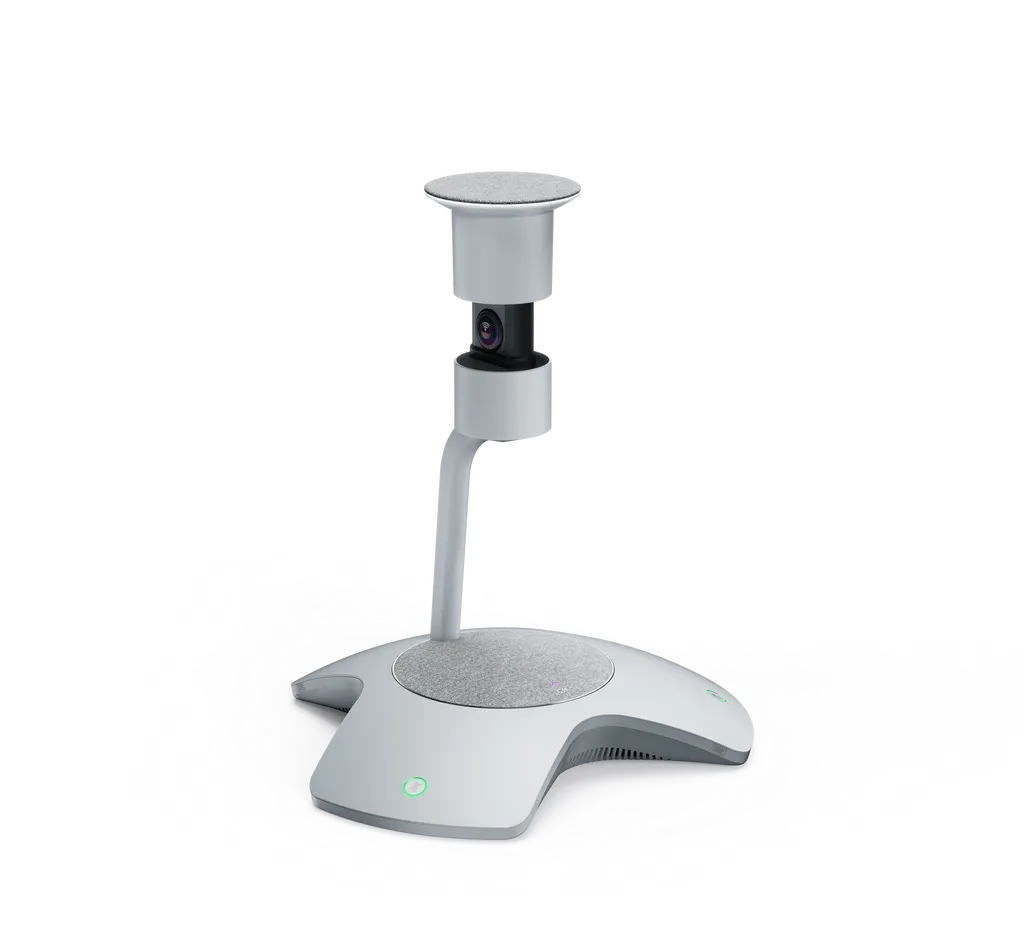
Yealink SmartVision 60 360° All-in-One Conference Camera

WhatsApp
Priceon request
QuotationWithin 1 working day
DeliveryConfirmed with your quote, based on stock
PDFDownload datasheet (Yealink SmartVision 60 Datasheet.pdf)
Overview

The Yealink SmartVision 60 is an all-in-one 360° conference camera with a 10K panoramic camera, a 6 m microphone array and built-in Microsoft AI features such as live transcription, real-time translation and Cortana voice control. Designed for small-to-medium Microsoft Teams Rooms, it suits medium-sized boardrooms in Doha, West Bay and Lusail. Request a quote from SmartRooms Qatar.

One device for camera, microphones and speaker

The SmartVision 60 combines a camera, microphone array and speaker in a single unit built for small-to-medium Microsoft Teams Rooms and medium-sized boardrooms. Its 10K panoramic camera covers a 360° horizontal field of view and a 60° vertical field of view, so every seat around the table stays in frame, including the chairs at the far end. Remote colleagues see the room from a centre-of-the-table position rather than one fixed angle. The electric privacy cover has LED status indicators that synchronise with meeting status.

Audio pickup and intelligent speech recognition

Sound is handled by two microphone arrays. A 6 x MEMS microphone array at the base provides a 6 m sound pickup range, while a 6+1 microphone array at the top runs intelligent speech recognition. The device has two microphone mute/unmute buttons and a camera mute/unmute button, so participants can control privacy without opening a laptop. The speaker has a maximum power of 5 W and a rated impedance of 4 ohms.

Microsoft AI features that help after the meeting

The unit includes several AI functions:

  • Multi-Stream IntelliFrame gives up to four in-room active speakers their own video feeds alongside the panoramic view.
  • Phonetic transcription converts speech to text with speakers identified by name.
  • Automatic translation provides real-time subtitles for multilingual meetings.
  • Cortana voice assistant lets people control meeting functions by voice.
  • Participant identification links names with faces and voices.

Where it fits in Qatar

The SmartVision 60 suits rooms where the people at the table and the people on the call both matter. Three examples:

  • A boardroom in West Bay where executives join calls with colleagues in other countries.
  • A training room in Education City where remote lecturers need a clear view of the attendees.
  • A staff meeting room at a school in Al Rayyan where speakers switch between languages during the same meeting.

Planning the installation

Before ordering, measure the distance from the proposed camera position to the furthest chair. The manufacturer recommends a 0.5 m to 2 m working range, so the room layout should be reviewed if seats fall outside it. Allow one power point for the external adapter, which accepts 100-240 V AC input, and a cable route for the USB Type-C 3.0 connection. Yealink certifies 15 m and 30 m USB 3.0 cables for longer runs and asks users to rely on Yealink-certified cables to keep the product stable.

The environment matters too. The operating temperature range is 0-40°C and operating humidity is 10-95%. Summer temperatures outside in Qatar can pass 45°C, so mount the unit in an air-conditioned room away from direct sunlight and large glazed walls. The net weight is 3.246 kg and the shipping carton measures 402 mm x 390 mm x 430 mm.

Request a quote for your meeting room

SmartRooms Qatar supplies the SmartVision 60 with delivery to all 8 municipalities of Qatar, professional installation and a free site survey. Purchase orders (LPOs) and government tenders are accepted, and quotations are usually issued within one working day. Products are covered by the manufacturer's warranty. Send us your room size, seating and PC setup, and request a quote.

Highlights

  • 360° horizontal and 60° vertical field of view with 10K panoramic camera
  • 6 x MEMS microphone array with 6 m sound pickup range
  • Multi-Stream IntelliFrame feeds up to four in-room active speakers
  • Live transcription, real-time translation and Cortana voice assistant
  • Single USB Type-C 3.0 connection; 0-40°C operating temperature
  • Net weight 3.246 kg with electric privacy cover

Room fit

Tell us the room size and platform (Teams, Zoom or BYOD) and we confirm the right combination with your quotation.

Estimated timeline

Quotation within 1 working day · delivery timing depends on stock availability, and we confirm it with your quotation.

Specifications

17 specifications · Source: manufacturer · checked Oct 2026
Camera Specifications1
Details
360° HFOV, 60° VFOV 10K Panoramic Camera Adaptive Digital Zoom 0.5m-2m recommended range Electric Privacy Cover
Audio Specifications8
- Sensitivity
-46±2dB (0 dB=1V/Pa); -37 dB (0 dB=1V/Pa); 78±3 dB SPL @ 1W @ 1 meter
- SNR
56 dB; 66 dB
- Frequency Response
100-10 kHz; 100-8 kHz; 120-20 kHz
- Maximum Power
5 W
- Sampling Rate
48 kHz
- Sound Emission Angle
Upward-facing
- Rated Impedance
4 ohms
Details
6 x MEMS Microphone Array 6+1 Intelligent Speech Recognition Microphone Array Speaker Specifications
Buttons & Interfaces1
Details
2 x Microphone Mute/Unmute Buttons 1 x Camera Mute/Unmute Button 1 x USB Type-C 3.0 Interface 1 x 15V/2.4A DC Power Port 1 x Reset Button
AI Features1
Details
Multi-Stream IntelliFrame (on device) Cortana Voice Assistant Phonetic Transcription Automatic Translation Participant Identification
Physical Specifications3
External Yealink Power Adapter
AC 100-240V input, DC 15V/2.4A output
Operating Humidity
10-95%
Operating Temperature
0-40℃
Package Features3
Net Weight
3.246 kg
Gross Weight
5.524 kg
Carton Dimensions
402 mm x 390 mm x 430 mm

Downloads

15 files from the manufacturer
PDF Datasheets Yealink SmartVision 60 Datasheet.pdf 301 KB Yealink SmartVision 60 datasheets (PDF, 301 KB) PDF Manuals & guides SmartVision60 Installation and Deployment.pdf 5.4 MB Yealink SmartVision 60 manuals & guides (PDF, 5.4 MB) PDF Manuals & guides Yealink SmartVision 60 Quick Start Guide (EN,CN,DE,ES,FR) V1.2.pdf 3.0 MB Yealink SmartVision 60 manuals & guides (PDF, 3.0 MB) URL Manuals & guides · Opens on manufacturer site Auto Framing (Yealink Intelligent Camera) Yealink SmartVision 60 manuals & guides (URL) URL Manuals & guides · Opens on manufacturer site IntelliFrame (Yealink Intelligent Camera) Yealink SmartVision 60 manuals & guides (URL) DXF Drawings & CAD · Opens on manufacturer site SmartVision 60 CAD Drawings.dxf Yealink SmartVision 60 drawings & cad (DXF) STP Drawings & CAD · Opens on manufacturer site SmartVision 60 CAD Drawings.stp Yealink SmartVision 60 drawings & cad (STP) 15 - Software & firmware · Opens on manufacturer site SmartVision 60 279.411.0.15 - Firmware & Release Note Yealink SmartVision 60 software & firmware (15 - FIRMWARE & RELEASE NOTE) 25 - Software & firmware · Opens on manufacturer site SmartVision 60 279.411.0.25 - Firmware & Release Note Yealink SmartVision 60 software & firmware (25 - FIRMWARE & RELEASE NOTE) PDF Other documents Yealink Regulatory Notice V1.2.pdf 1.0 MB Yealink SmartVision 60 other documents (PDF, 1.0 MB) URL Other documents · Opens on manufacturer site HTTPS API Yealink SmartVision 60 other documents (URL) URL Other documents · Opens on manufacturer site Rooms Product Family Yealink SmartVision 60 other documents (URL) URL Other documents · Opens on manufacturer site SmartVision 60 Ignore Region Tool Yealink SmartVision 60 other documents (URL) URL Other documents · Opens on manufacturer site Socket API Yealink SmartVision 60 other documents (URL) MP4 Other documents · Opens on manufacturer site Yealink SmartVision 60 Introduction V1.0.mp4 Yealink SmartVision 60 other documents (MP4)

Questions about SmartVision 60

What is the Yealink SmartVision 60 and who is it for?
The SmartVision 60 is an all-in-one audio and video device that combines a 360° camera, microphone array and speaker in one unit. Yealink co-developed it with Microsoft for intelligent conference rooms. It suits small-to-medium Microsoft Teams Rooms, such as medium-sized boardrooms in Doha or West Bay. Organisations that run Microsoft Teams meetings with in-room and remote participants at the same time will get the most from it.
What camera coverage does the SmartVision 60 offer?
The camera has a 360° horizontal field of view and a 60° vertical field of view, built around a 10K panoramic camera. Adaptive digital zoom keeps the people around the table in focus, and an electric privacy cover with LED status indicators protects the lens. The manufacturer recommends a working distance of 0.5 m to 2 m from participants. Placing the unit at the centre of the table gives remote attendees a clear view of everyone in the room.
How far does the microphone pick up voices?
The base carries a 6 x MEMS microphone array with a 6 m sound pickup range, covering a medium-sized room. A separate 6+1 microphone array on top handles intelligent speech recognition. Two microphone mute/unmute buttons on the device let a presenter silence the room quickly. The speaker has a maximum power of 5 W with a rated impedance of 4 ohms, and audio is sampled at 48 kHz.
What does Multi-Stream IntelliFrame do?
Multi-Stream IntelliFrame runs on the device and provides individual video feeds of up to four in-room active speakers, while still showing the panoramic view of the room. Remote attendees can see several people clearly instead of one group shot. In a leadership meeting at a Lusail office where several executives speak in turn, each speaker keeps a dedicated frame. Check your Microsoft Teams meeting layout before ordering to confirm it suits how your team meets.
Which AI features are included?
The SmartVision 60 includes the Cortana voice assistant for voice control of meetings, phonetic transcription with speakers identified by name, automatic real-time translation of subtitles, and participant identification. A one-click unmanned transcription mode records meeting text without a dedicated note-taker. The source data does not list supported translation languages, so ask SmartRooms Qatar for that information before you place an order.
Is it suitable for a large conference hall?
The unit is positioned for small-to-medium Microsoft Teams Rooms and medium-sized boardrooms, where its 10K camera and 6 m pickup range are best matched. A large hall needs checking first for seating distance, speaker position and whether additional sound reinforcement is required. During a free site survey, SmartRooms Qatar can review your room plan and confirm whether this unit fits the space.
How does it connect to a PC?
The device uses a single USB Type-C 3.0 interface, so one cable carries the connection to the host PC. Yealink certifies 15 m and 30 m USB 3.0 cables for longer runs, which helps when the PC sits outside the meeting room or in a comms cabinet. The manufacturer asks users to rely on Yealink-certified cables to keep the product stable. Confirm the cable length you need before the site survey.
What power supply does it need in Qatar?
The SmartVision 60 uses an external Yealink power adapter that accepts 100-240 V AC input and outputs DC 15 V at 2.4 A to the device. That input range covers Qatar's 240 V mains supply. Plan a power point near the adapter and check the plug fitting with your electrician, because the source data does not describe the adapter plug type. Keep the power cable out of the path of people walking around the table.
Can it run in Qatar's heat?
The operating temperature range is 0-40°C, with operating humidity of 10-95%. Outdoor summer temperatures in Qatar can pass 45°C, so the camera should sit in an air-conditioned meeting room away from direct sunlight and hot glazed walls. Dust storms also make sealed, cooled rooms the safer choice. If the space is semi-open, such as a lobby, ask the SmartRooms Qatar team to confirm the environment before ordering.
What are the weight and shipping dimensions?
The net weight is 3.246 kg and the gross weight with packaging is 5.524 kg. The shipping carton measures 402 mm x 390 mm x 430 mm. These figures help facilities teams plan how the unit reaches the room and whether it can be placed safely on a table or shelf. The source data does not list packing contents, so confirm them with your quotation.
Can a government office or school buy it on an LPO?
Yes. SmartRooms Qatar accepts purchase orders (LPOs) and supplies against government tenders, including Monaqasat. Payment can be made by bank transfer, cheque or purchase order. A school fitting out a boardroom in Al Wakrah, or a ministry equipping a meeting room in Doha, can raise one LPO that covers the unit, cables and installation. Quotations are usually issued within one working day.
Do I need a site survey before installation?
A free site survey is worth booking before installation. The survey checks the distance from the camera to the furthest seat against the 0.5 m to 2 m recommended range, the table layout, the USB cable route and the power point position. For a medium-sized boardroom in West Bay or Msheireb, this avoids moving furniture after the unit arrives. Installation planning is then confirmed in the quotation.

Similar models

Biamp Vidi 100 Biamp Vidi 100 4K Conferencing Camera
Cameras
Biamp Vidi 150 Biamp Vidi 150 4K Conferencing Camera
Cameras
Biamp Vidi 250 Biamp Vidi 250 4K Conferencing Camera
120 Degrees Zoom Certified
Biamp Vidi 280 Biamp Vidi 280 4K Conferencing Camera with Dual Sensors
Ultrawide Lens Zoom Certified
Biamp Vidi Content Cam 250 Biamp Vidi Content Cam 250 4K Whiteboard Content Camera Kit
120° Up to 5x digital zoom
Email Call




