






Barco
ClickShare Power Supply 100W
Barco ClickShare Power Supply 100W, 100-Watt Video Conferencing Accessory
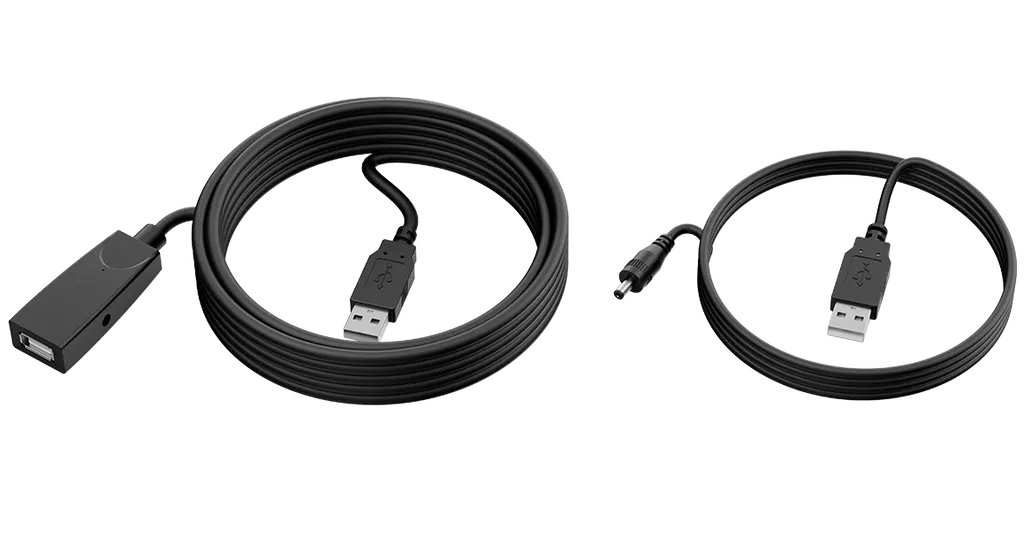
USB2-EXT-10M
Yealink USB2-EXT-10M 10m USB 2.0 Extension Cable Kit
Priceon request
QuotationWithin 1 working day
DeliveryConfirmed with your quote, based on stock
Overview
The Yealink USB2-EXT-10M is a USB 2.0 extension kit that carries USB signals over an RJ45 network cable from a transmitter to a receiver with two USB Type-A ports. It runs at 480 Mbps, and its 48V/0.7A power adapter accepts 100 to 240V AC, which covers Qatar mains. Its 0 to 40°C rating means air-conditioned rooms. It suits rooms where a camera or hub sits far from the PC.
What the USB2-EXT-10M does in a meeting room
The Yealink USB2-EXT-10M moves a USB 2.0 connection over network cabling instead of a long run of USB cable. A transmitter sits at the host computer, a receiver with two USB Type-A ports sits at the far end, and the two are linked by an RJ45 cable. A webcam, speakerphone or other USB accessory can therefore be placed where the room needs it, not where the PC happens to be.
Specifications that matter for planning
- Transfer rate: USB 2.0 High Speed, rated at 480 Mbps on the transmitter.
- Reach: the manufacturer's datasheet states the kit can extend a USB signal up to 40 metres over CAT5e cable.
- Receiver ports: two USB Type-A ports, plus an RJ45 port and an interface protective cover.
- Power: a 48V/0.7A adapter with an AC 100 to 240V input, and a 1.8m USB-A to 3.5mm DC power cable for a peripheral that needs its own supply.
- Operating conditions: 0 to 40°C and 10 to 95% humidity.
- Package: transmitter, receiver, interface protective cover, power adapter and quick start guide.
Where it fits in Qatar
A private school in Al Wakrah fitting out a staff meeting room can mount the camera on a wall bracket while the presenter's PC stays on the table, with the receiver close to the camera. In a boardroom in West Bay, a ceiling camera and a USB speakerphone can share the two receiver ports. A government office in the Industrial Area that keeps its computer in a locked, cooled cabinet away from the meeting room can run the transmitter inside that cabinet and the receiver in the room.
What to plan for the cable run and environment
Qatar summers can push ambient temperatures above 45°C, and the listed operating range is 0 to 40°C. Keep the transmitter, receiver and power adapter in air-conditioned spaces, not in hot ceiling voids, uncooled cabinets or areas exposed to dust from windows. Measure the route before ordering. The product listing describes a 10m USB 2.0 extension cable, while the datasheet describes extending USB up to 40 metres over CAT5e, so confirm the configuration your room needs. Check that your camera, speakerphone or hub works with the kit, since the manufacturer describes it as suitable for nearly all USB peripherals but your exact devices should be tested.
Getting a quote for your rooms
Send us the room locations, the distance between each host PC and its device, and the number of rooms involved. SmartRooms Qatar offers free site surveys across Qatar, with quotations usually within one working day. Purchase orders (LPOs) and government tenders are accepted. Request a quote and our team will confirm the right cable configuration for your installation.
Highlights
- USB 2.0 High Speed transmission rated at 480 Mbps
- Extends a USB signal up to 40 metres over CAT5e
- Two USB Type-A ports on the receiver unit
- 48V/0.7A power adapter with 100 to 240V AC input
- Operating range 0 to 40°C, humidity 10 to 95%
- Transmitter, receiver, power adapter and quick start guide included
Room fit
Tell us the room size and platform (Teams, Zoom or BYOD) and we confirm the right combination with your quotation.
Estimated timeline
Quotation within 1 working day · delivery timing depends on stock availability, and we confirm it with your quotation.
Specifications
10 specifications · Source: manufacturer · checked Oct 2026
Package includes1
- Details
- Extender Transmitter Extender Receiver Interface Protective Cover Power Adapter (48V/0.7A) Quick Start Guide
Extender Transmitter2
- Transmision Rate
- USB2.0 highspeed 480Mbps
- Details
- 1x 0.1m USB Type-A cable 1x RJ45 port 48V/0.7A Power port
Extender Receiver1
- Details
- 1x RJ45 port 2x USB Type-A port Interface Protective Cover
Package Features3
- N.W/CTN
- 0.36 kg
- G.W/CTN
- 0.41kg
- Giftbox Size
- 180 mm x 119 mm x 56 mm
Other Physical Features3
- External Yealink Power Adapter
- AC 100~240V input and DC 48V/0.7A Output
- Operating humidity
- 10~95%
- Operating temperature
- 0~40℃
Downloads
3 files from the manufacturerQuestions about USB2-EXT-10M
What is the Yealink USB2-EXT-10M used for?
It carries a USB 2.0 connection over RJ45 cabling so a USB accessory can sit well away from the host computer. In meeting rooms, typical examples are a USB camera or conference speakerphone mounted on a wall or ceiling, without running a long USB cable across the floor. The kit is a transmitter and receiver pair, so it suits rooms where the PC is kept in a cabinet or on a distant desk.
Is it a 10m cable or a 40m extender?
The product listing describes a 10m USB 2.0 Type-A extension cable, while the manufacturer's datasheet states that the transmitter and receiver pair boosts a USB signal up to 40 metres over CAT5e cable. The two descriptions differ, so measure the route from the host computer to the device before ordering. Confirm the right configuration with the SmartRooms Qatar team to avoid choosing the wrong length.
What USB speed does it support?
The transmitter is rated for USB 2.0 High Speed at 480 Mbps, as listed by the manufacturer. That speed suits common meeting room accessories such as webcams, speakerphones and USB hubs. Devices that depend on USB 3.0 throughput will not gain that speed through this kit, so check the requirements of your device before placing an order.
What power supply does it need in Qatar?
The power adapter is rated 48V/0.7A with an AC input of 100 to 240V, a range that covers Qatar's 240V mains supply. The transmitter has a 48V/0.7A power port, and the kit includes a 1.8m USB-A to 3.5mm DC power cable for a peripheral that needs its own supply. The plug type and its fit with BS 1363 sockets are not stated in the source data, so confirm with the team before installing.
Can it be installed in a hot ceiling void or outdoors?
No, it is not designed for outdoor or unconditioned spaces. The listed operating range is 0 to 40°C with 10 to 95% humidity, while Qatar summer temperatures can exceed 45°C. Keep the transmitter, receiver and power adapter inside air-conditioned rooms, and avoid hot ceiling voids, uncooled cabinets and spots exposed to dust from windows.
Can a private school in Al Wakrah mount its camera on a wall and keep the PC on the table?
Yes, provided the cable path stays within the reach your installer confirms after a survey. The transmitter connects to the PC, while the receiver sits close to a wall-mounted camera and links to the transmitter by RJ45 cable. The receiver's two USB ports can serve the camera and one more device, which suits a staff meeting room where the presenter works from the table.
Will it work for a boardroom in West Bay with a ceiling camera and a USB speakerphone?
Yes, the two receiver ports can take a ceiling camera and a USB speakerphone at the same time. If you need more than two devices, you will require an additional USB hub. The manufacturer describes the kit as suitable for nearly all USB peripherals, but test the camera and speakerphone together before the installation is signed off.
Can a government office in the Industrial Area keep its PC in a locked cabinet?
It can, if the cabinet is air-conditioned and stays within the 0 to 40°C operating range. The transmitter goes inside the cabinet, and the receiver connects to the camera in the meeting room by RJ45 cable. Measure the distance first, because the listing and datasheet give different lengths, and confirm the setup with the SmartRooms Qatar team before ordering.
Is it suitable for a hotel conference room in The Pearl with an AV cabinet in the basement?
It can be suitable if the basement cabinet stays within the listed temperature range. Place the transmitter inside or beside the cooled AV cabinet and run the RJ45 cable up to the receiver in the conference room. An uncooled plant room is not a suitable location for the transmitter, so arrange cooling first and confirm the actual route length before purchase.
What should an installer check for a lecture hall camera at Education City?
The installer should check the route length between the computer and the camera position, the temperature control of the hall, and the USB devices in actual use. The receiver's two ports can serve a camera and a USB microphone, for example. A site survey lets the installer confirm the cable path, mounting position and where the 48V adapter will be connected.
What is included in the box?
The package includes a transmitter with a 0.1m USB Type-A cable, an RJ45 port and a 48V/0.7A power port, and a receiver with two USB Type-A ports and an RJ45 port. It also includes an interface protective cover, a 48V/0.7A power adapter and a quick start guide. The product description also refers to a 1.8m USB-A to 3.5mm DC power cable, so check the delivered items against your order.
How do I request a quote for several meeting rooms?
Send the room locations, the distance from each host PC to its device, and the number of rooms. SmartRooms Qatar supplies and delivers to all eight municipalities of Qatar, offers professional installation and free site surveys, and usually provides quotations within one working day. We accept purchase orders (LPOs) and government tenders, and payment is by bank transfer, cheque or purchase order. Request a quote to start.



