





Thursday, 22 October 2026 · 11 Jumada I 1448 AH Sun – Thu · 9:00 – 18:00
+971 56 914 9477 العربية
WhatsApp

UVC30 Content Camera

Yealink UVC30 Content Camera Whiteboard Kit for Teams Rooms

WhatsApp
Priceon request
QuotationWithin 1 working day
DeliveryConfirmed with your quote, based on stock
PDFDownload datasheet (Yealink UVC30 Datasheet.pdf)
Overview

The Yealink UVC30 Content Camera is a 4K camera kit that captures a whiteboard for live sharing in Microsoft Teams Rooms on Windows, so the board you already have joins the meeting. Its 120° diagonal field of view and length-adjustable wall bracket suit whiteboards 6 to 9 ft wide. It suits meeting rooms, classrooms and training spaces in Doha, Lusail and Al Rayyan. Request a quote from SmartRooms Qatar.

What the UVC30 Content Camera adds to a Teams Rooms setup

Many meeting rooms already have a whiteboard, but remote participants cannot read what is written on it. The Yealink UVC30 Content Camera is a dedicated 4K camera that points at the board and feeds its image into a Microsoft Teams Rooms system running on Windows. People in the room keep using their existing board, while people on the call see the writing and diagrams as the session happens.

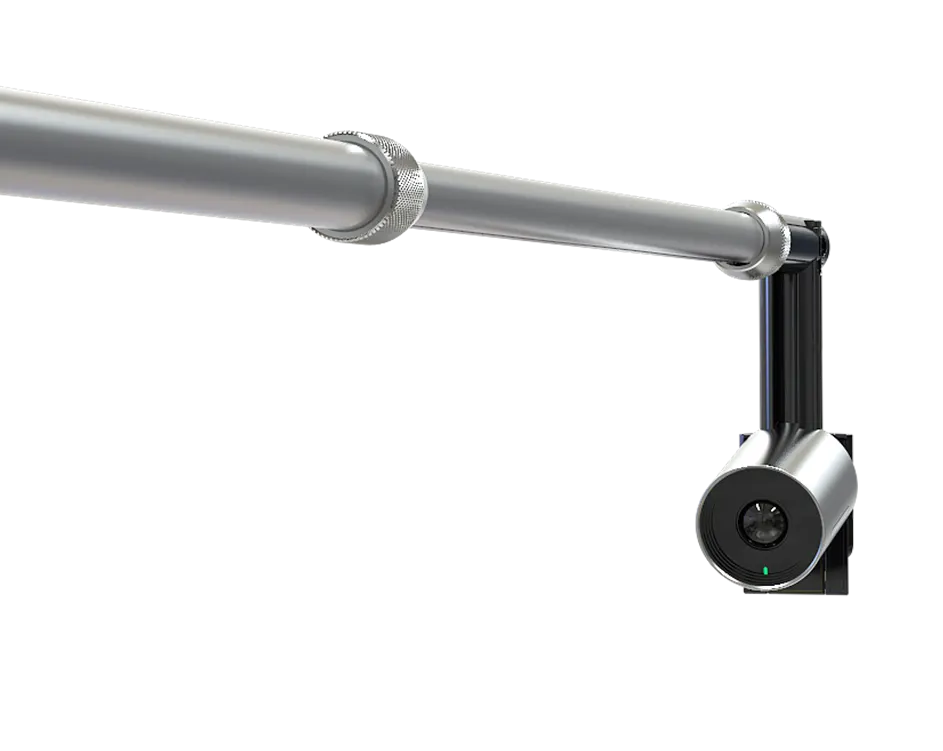
The kit is sold as a content camera for whiteboard capture, not as a general room camera. The box includes a UVC30 room camera, a length-adjustable wall mount bracket for the camera, the necessary screws and a quick start guide.

Specifications that matter when you plan the room

  • 4K content camera for detailed whiteboard capture
  • 120° diagonal field of view to take in the writing area
  • Length-adjustable wall bracket for whiteboards 6 to 9 ft (about 1.8 to 2.7 m) wide
  • Microsoft Teams Rooms on Windows as the listed platform
  • 2-year limited manufacturer hardware warranty

The bracket is the detail that shapes the installation. Because it adjusts in length, the same kit can be set up for a narrow board in a small huddle room or a wide board in a training room, provided the board falls within the 6 to 9 ft range. Measure the board before ordering and give the team its width, since that is the measurement the bracket is matched to.

Where it fits in Qatar

A training room in Msheireb that runs staff workshops around a wall-mounted whiteboard can share the working session with colleagues in other cities or abroad, without photographing or retyping the board afterwards. A private school in Al Rayyan fitting out a staff meeting room can use the same board for planning sessions with teachers joining from home. In West Bay, a corporate boardroom running brainstorms with a regional team can keep the whiteboard central to the meeting instead of switching to a separate document camera.

What to plan before installation

Check that the wall behind the board can take a bracket and that the board width sits within 6 to 9 ft. Confirm that the room runs Microsoft Teams Rooms on Windows, because that is the platform this kit is built for. Ask the SmartRooms Qatar team to confirm the full specification of the kit and the environment it will be used in before you order, since the source data for this kit does not give an operating temperature range. A free site survey lets our engineers check the wall, the board position and the cable route before any drilling starts.

Larger projects, such as several classrooms in a school or a ministry training programme, are usually raised on a local purchase order (LPO). Request a quote from SmartRooms Qatar and we will confirm the kit, the quantities and the delivery plan for your site, with a quotation usually within one working day.

Highlights

  • 4K content camera for whiteboard capture
  • 120° diagonal field of view
  • Length-adjustable wall bracket for 6–9 ft whiteboards
  • Built for Microsoft Teams Rooms on Windows
  • Kit includes UVC30 room camera, bracket and screws
  • 2-year limited manufacturer hardware warranty

Room fit

Tell us the room size and platform (Teams, Zoom or BYOD) and we confirm the right combination with your quotation.

Estimated timeline

Quotation within 1 working day · delivery timing depends on stock availability, and we confirm it with your quotation.

Specifications

3 specifications · Source: manufacturer · checked Oct 2026
OverView3
Keywords
• UVC30 Camera • Easy-to-deploy • Length-adjustable wall mount bracket • Suit different size whiteboards
Key Features
UVC30 Camera • 120º Diagonal field of view • 4K content camera Included in the box • UVC30 Room camera • Length adjustable wall mount bracket for camera • Necessary accessories including screws • Quick Start Guide Applicability • Support 6ft-9ft width whiteboard
Introduction
Featuring easy-to-deploy, reusing existing traditional whiteboard, the UVC30 Teams Content Camera allows for real-time collaboration in Microsoft Teams meetings. With a length-adjustable wall mount bracket, it is flexible enough that users can suit different size whiteboards.


Downloads

20 files from the manufacturer
PDF Datasheets Yealink UVC30 Datasheet.pdf 1020 KB Yealink UVC30 Content Camera datasheets (PDF, 1020 KB) PDF Datasheets Yealink UVC30_Desktop Datasheet V1.1.pdf 497 KB Yealink UVC30 Content Camera datasheets (PDF, 497 KB) PDF Datasheets · Opens on manufacturer site Yealink UVC30 4K USB Camera Datasheet (FR).pdf Yealink UVC30 Content Camera datasheets (PDF) PDF Manuals & guides Yealink UVC30 Room Quick Start Guide V1.3 (EN, CN).pdf 3.4 MB Yealink UVC30 Content Camera manuals & guides (PDF, 3.4 MB) URL Manuals & guides · Opens on manufacturer site Auto Framing Yealink UVC30 Content Camera manuals & guides (URL) URL Manuals & guides · Opens on manufacturer site Camera Preset Yealink UVC30 Content Camera manuals & guides (URL) URL Manuals & guides · Opens on manufacturer site General Settings Yealink UVC30 Content Camera manuals & guides (URL) URL Manuals & guides · Opens on manufacturer site Image Settings Yealink UVC30 Content Camera manuals & guides (URL) URL Manuals & guides · Opens on manufacturer site UVC30 Content Camera Yealink UVC30 Content Camera manuals & guides (URL) DXF Drawings & CAD · Opens on manufacturer site UVC30 CAD Drawings.dxf Yealink UVC30 Content Camera drawings & cad (DXF) STP Drawings & CAD · Opens on manufacturer site UVC30 CAD Drawings.stp Yealink UVC30 Content Camera drawings & cad (STP) DXF Drawings & CAD · Opens on manufacturer site UVC30 Mounting Bracket CAD Drawings.dxf Yealink UVC30 Content Camera drawings & cad (DXF) 20 - Software & firmware · Opens on manufacturer site UVC30 105.422.0.20 - Firmware & Release Note Yealink UVC30 Content Camera software & firmware (20 - FIRMWARE & RELEASE NOTE) PDF Other documents UVC30DESKTOP,UVC30ROOM-CE.pdf 336 KB Yealink UVC30 Content Camera other documents (PDF, 336 KB) PDF Other documents Yealink Regulatory Notice V1.2.pdf 1.0 MB Yealink UVC30 Content Camera other documents (PDF, 1.0 MB) MP4 Other documents · Opens on manufacturer site How to Use the Content Camera V1.0.mp4 Yealink UVC30 Content Camera other documents (MP4) URL Other documents · Opens on manufacturer site Rooms Product Family Yealink UVC30 Content Camera other documents (URL) MP4 Other documents · Opens on manufacturer site Yealink UVC30 Room Unboxing V1.0.mp4 Yealink UVC30 Content Camera other documents (MP4) MP4 Other documents · Opens on manufacturer site Yealink UVC30 Room Unboxing V1.0.mp4 Yealink UVC30 Content Camera other documents (MP4) MP4 Other documents · Opens on manufacturer site Zoom-How to Use UVC30 Camera as a Whiteboard Camera with MeetingBar V1.0.mp4 Yealink UVC30 Content Camera other documents (MP4)

Questions about UVC30 Content Camera

What is the Yealink UVC30 Content Camera used for?
It captures a physical whiteboard and shares the image with remote participants in a Microsoft Teams Rooms meeting on Windows. It suits teams that brainstorm, sketch or work through diagrams in the room, because the board stays in normal use and people on the call can read what is written in real time. The kit uses a 4K content camera with a 120° diagonal field of view.
Which meeting platform is it designed for?
The listed platform is Microsoft Teams Rooms System on Windows, so the kit is designed for Teams meetings in rooms running that setup. If your room uses a different platform, or you are not sure how the room system is configured, tell the SmartRooms Qatar team before you order so we can confirm compatibility for your site.
What size whiteboard does the bracket support?
The kit supports whiteboards 6 to 9 ft wide, which is about 1.8 to 2.7 m. The wall mount bracket is length-adjustable, so it is set to match the board within that range. Measure the board itself rather than the wall, and confirm the figure before ordering. For example, a 7 ft board in a training room in Msheireb falls well within the range.
What comes in the box?
The kit includes a UVC30 room camera, a length-adjustable wall mount bracket for the camera, the necessary accessories including screws, and a quick start guide. Ask the SmartRooms Qatar team to check this packing list against your room layout before ordering, so you know exactly what is needed for installation.
Is the UVC30 room camera included, or do I need to buy it separately?
The UVC30 room camera is included in the kit, so you do not need a separate camera for this setup. The listing names one edition, the UVC30 Content Camera (Standard). If you are comparing this kit with a standalone room camera, its main role is whiteboard capture, and our team can explain how the two work together in your room.
How is the camera mounted?
The camera mounts on a length-adjustable wall bracket, and screws are included in the kit. Because mounting means drilling into a wall, the position should be set with the board width and wall construction in mind. SmartRooms Qatar offers free site surveys and professional installation, so the team can check the wall and cable route before work begins.
Will the 120° field of view capture the whole board?
The 120° diagonal field of view is designed to take in the writing area of a full-width board, but actual coverage depends on the mounting position, distance and height. A site survey is the most reliable way to confirm coverage before installation. Ask us to check wider boards, such as a 9 ft board, since that is the upper limit the bracket supports.
What warranty does the kit come with?
The kit comes with a 2-year limited manufacturer hardware warranty, and the terms are set by the manufacturer. Products supplied through SmartRooms Qatar are covered by that manufacturer warranty. Keep your purchase order and invoice with your asset records so the warranty details are easy to reference if you need support later.
How would a private school in Al Rayyan use it?
A private school in Al Rayyan refitting a staff meeting room could use the kit so teachers joining from home can see the planning board during sessions. If the school needs several kits for classrooms or meeting rooms, it can raise a local purchase order (LPO) for the full quantity, and the quotation will list the kits. Engineers can confirm wall positions during a free site survey.
Can it be used in an outdoor or very hot area?
The kit is designed for meeting rooms and is not presented as an outdoor product. The source data does not give an operating temperature range for this kit, so SmartRooms Qatar cannot confirm performance in areas that exceed 45°C, such as a window-facing room with weak air conditioning. Please confirm the room environment with our team before ordering.
How could a university seminar room in Education City use it?
A seminar room in Education City can connect a session with colleagues abroad over Microsoft Teams Rooms while the lecturer keeps writing on the existing whiteboard. The camera captures the writing itself, so remote participants can follow each working step, not only the lecturer. Request a quote and we will confirm the room runs the Teams Rooms on Windows setup.
What should a boardroom in West Bay check before ordering?
A corporate boardroom in West Bay should confirm three things before ordering: that the whiteboard width falls between 6 and 9 ft, that the room already runs Microsoft Teams Rooms on Windows, and that the wall behind the board can take a bracket. A free site survey settles the last point. Once these are confirmed, request a quote and the team will send the quotation, usually within one working day.

Similar models

Biamp Vidi 100 Biamp Vidi 100 4K Conferencing Camera
Cameras
Biamp Vidi 150 Biamp Vidi 150 4K Conferencing Camera
Cameras
Biamp Vidi 250 Biamp Vidi 250 4K Conferencing Camera
120 Degrees Zoom Certified
Biamp Vidi 280 Biamp Vidi 280 4K Conferencing Camera with Dual Sensors
Ultrawide Lens Zoom Certified
Biamp Vidi Content Cam 250 Biamp Vidi Content Cam 250 4K Whiteboard Content Camera Kit
120° Up to 5x digital zoom
Email Call


