Thursday, 22 October 2026 · 11 Jumada I 1448 AH Sun – Thu · 9:00 – 18:00
+971 56 914 9477 العربية
WhatsApp

UVC34

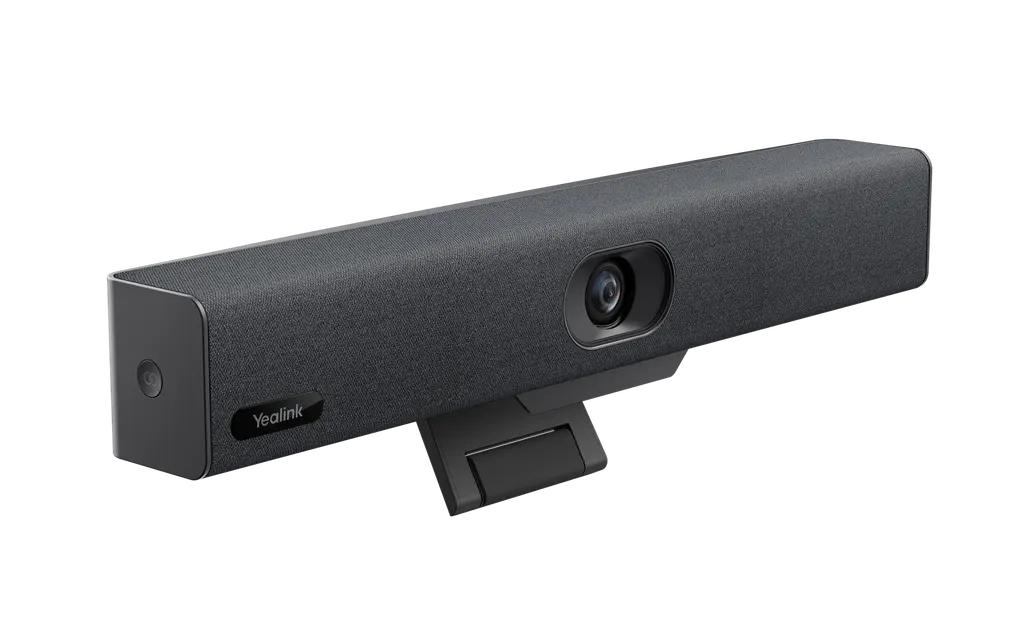
Yealink UVC34 4K All-in-One USB Video Bar

WhatsApp
Priceon request
QuotationWithin 1 working day
DeliveryConfirmed with your quote, based on stock
PDFDownload datasheet (Yealink UVC34 Datasheet (FR Custom-made) .pdf)
Overview

The Yealink UVC34 is an all-in-one USB video bar that packs a 4K camera, an 8-microphone array and a 5W speaker into one unit. Its 120° lens keeps everyone in view without camera adjustment, and 5x digital zoom helps show detail. It works with Microsoft Teams, Zoom and Google Meet, and suits huddle rooms and home offices across Qatar.

What the Yealink UVC34 is and how it connects

The Yealink UVC34 is a single USB video bar that brings a camera, a microphone array and a speaker into one compact unit. Connect it to a laptop or room PC with the 7m USB-B to USB-A cable in the box, and the meeting application treats it as a standard camera, microphone and speaker. The device follows the UVC1.0 and UAC1.0 standards, so there is no separate driver to install.

Video that keeps everyone in frame

An 8MP sensor captures 4K at 30fps, and the unit can also output 1440p, 1080p and 720p at 30fps so the picture suits different displays. The 120° super-wide-angle lens covers participants across a small room without moving the unit, and 5x digital zoom lets a presenter or whiteboard be framed closer when needed.

  • Auto Framing and Speaker Tracking adjust the view as people move.
  • AI Face Enhancement and automatic brightness optimisation help faces stay clear in dim or backlit rooms.
  • Nine camera presets let a host recall set views for different seating layouts.
  • An electric privacy shutter opens when a conference starts and closes when it is idle.

Audio for small rooms and calls from home

The built-in array of eight MEMS microphones uses beamforming to pick up voices within a 5m range, while Yealink Noise Proof Technology, echo cancellation and full-duplex operation keep both sides of a call clear. The high-fidelity speaker is rated at 5W with an 8W maximum, which suits small rooms and desk-based calls.

Where it fits in Qatar

In a Doha or Lusail office, a huddle room can host a weekly call with colleagues abroad, with the bar mounted above a screen and a single USB cable running to the room PC. In a home office in Al Rayyan or Al Khor, the unit is light enough to pack into a backpack when you move it between rooms. In a government department in Msheireb, it suits short internal meetings where sensitive papers may be visible, since the shutter stays closed between calls.

What to plan before ordering

  • Keep the room within the operating range of 0 to 40°C and 10 to 95% humidity. Avoid outdoor, unventilated or sun-exposed positions, which can exceed that range in Qatar's summer.
  • Check the host computer: Windows 7, 8.1 or 10, or Mac OS 10.10 or later, with a USB 2.0 Type-A port.
  • The box includes a VCR20 remote with two AAA batteries, a power adapter and the 7m cable. A mounting bracket is not listed, so confirm mounting hardware in the quote.
  • The external adapter accepts AC 100 to 240V input and outputs DC 48V/0.7A. Confirm the plug arrangement for BS 1363 sockets before ordering.
  • For several rooms, Yealink RoomConnect, USB Connect and the Yealink Management Cloud Service support remote configuration, diagnosis and upgrades over the built-in Wi-Fi.

SmartRooms Qatar offers free site surveys before you mount a bar on a wall or TV, delivers to all eight municipalities, and usually issues quotations within one working day. Request a quote for the UVC34 today, and ask about purchase orders or government tenders if you are equipping several rooms.

Highlights

  • 8MP camera with 4K video and 120° field of view
  • 5x digital zoom with Auto Framing and Speaker Tracking
  • Eight-microphone array with a 5m voice pickup range
  • Built-in 5W speaker with full-duplex and echo cancellation
  • Electric privacy shutter and built-in Wi-Fi
  • Works with Microsoft Teams, Zoom, Google Meet and more

Room fit

Tell us the room size and platform (Teams, Zoom or BYOD) and we confirm the right combination with your quotation.

Estimated timeline

Quotation within 1 working day · delivery timing depends on stock availability, and we confirm it with your quotation.

Specifications

21 specifications · Source: manufacturer · checked Oct 2026
Package Content1
Details
UVC34 all-in-one USB video bar VCR20 Remote Control, 2 x AAA battery Power adapter 7m USB-B to USB-A cable
Camera1
Details
8MP Camera with 1/2.8-inch CMOS 4K 30FPS 120° field of view 5x e-PTZ camera Electric privacy shutter 9 x Camera presets
Audio9
-Frequency Response
100-20kHz
-Sensitivity
84dB SPL @ 1W @ 0.5 meter
-Sampling Rate
16kHz, 32kHz, 48kHz
-Sound emission angle
Forward-facing
-Total Harmonic Distortion (THD)
at 5W, 1kHz, <5%
-Rated Impedance
4 ohms
-Rated Power
5W
-Maximum Power
8W
Details
Built-in 8 MEMS microphone array 5m voice pickup range Yealink Noise Proof Technology Beamforming directed voice pickup technology Full-deplex Echo cancellation Speaker:   -Built-in 5W High-Fidelity Speaker
AI Technologies1
Details
Auto Framing Speaker Tracking AI Face Enhancement
System Requirement1
Details
Windows7, Windows8.1,Windows10, Mac OS 10.10 or higher Support for standard audio and video device drivers  - UAC1.0  - UVC1.0
UVC34 Connections1
Details
1 x USB 2.0 Type-A port, support USB 2.0 and USB 3.0 protocol 1 x USB 2.0 Type-B port, support USB 2.0 and USB 3.0 protocol 1 x Yealink microphone port (RJ-45) 1 x Power port 1 x Security lock slot 1 x Reset slot Built-in Wi-Fi Bluetooth 4.2
Manageability1
Details
Yealink RoomConnect management tool Yealink USB Connect management tool Yealink Management Cloud Service/Device Management Platform
Compatibility1
Details
UVC34 is applicable to most video conferencing platforms, including but not limited to the following:  -Microsoft Teams and Skype for Business  -Zoom Room and Zoom client  -BlueJeans  -Google Meet  -Cisco Webex  -Tencent VooV Meeting  -DingTalk  -Yealink Meeting  -GoToMeeting  -Huawei Cloud WeLink
Product Dimension (W.D.H)2
UVC34
380 x 55 x 55 mm
N.W/CTN
1.28Kg
Other Physical Features3
External Yealink Power Adapter
AC 100 - 240V input and DC 48V/0.7A Output
Operating humidity
10 - 95%
Operating temperature
0 - 40℃

Downloads

25 files from the manufacturer
PDF Datasheets Yealink UVC34 Datasheet (FR Custom-made) .pdf 1.5 MB Yealink UVC34 datasheets (PDF, 1.5 MB) PDF Datasheets Yealink UVC34 Datasheet.pdf 536 KB Yealink UVC34 datasheets (PDF, 536 KB) URL Datasheets · Opens on manufacturer site Download Yealink UVC34 datasheets (URL) URL Datasheets · Opens on manufacturer site  Download Yealink UVC34 datasheets (URL) URL Datasheets · Opens on manufacturer site  Download Yealink UVC34 datasheets (URL) PDF Manuals & guides Yealink UVC34 Quick Start Guide (EN, CN, DE, FR, ES) V1.2.pdf 1.5 MB Yealink UVC34 manuals & guides (PDF, 1.5 MB) URL Manuals & guides · Opens on manufacturer site Auto Framing Yealink UVC34 manuals & guides (URL) URL Manuals & guides · Opens on manufacturer site Basic Settings Yealink UVC34 manuals & guides (URL) URL Manuals & guides · Opens on manufacturer site Camera Preset Yealink UVC34 manuals & guides (URL) URL Manuals & guides · Opens on manufacturer site General Settings Yealink UVC34 manuals & guides (URL) URL Manuals & guides · Opens on manufacturer site Image Settings Yealink UVC34 manuals & guides (URL) URL Manuals & guides · Opens on manufacturer site Image Settings Yealink UVC34 manuals & guides (URL) URL Manuals & guides · Opens on manufacturer site Speaker Tracking Yealink UVC34 manuals & guides (URL) DXF Drawings & CAD · Opens on manufacturer site UVC34 CAD Drawings.dxf Yealink UVC34 drawings & cad (DXF) STP Drawings & CAD · Opens on manufacturer site UVC34 CAD Drawings.stp Yealink UVC34 drawings & cad (STP) 15 - Software & firmware · Opens on manufacturer site UVC34 265.410.0.15 - Firmware & Release Note Yealink UVC34 software & firmware (15 - FIRMWARE & RELEASE NOTE) 35 - Software & firmware · Opens on manufacturer site UVC34 265.410.0.35 - Firmware & Release Note Yealink UVC34 software & firmware (35 - FIRMWARE & RELEASE NOTE) 55 - Software & firmware · Opens on manufacturer site UVC34 265.410.0.55 - Firmware & Release Note Yealink UVC34 software & firmware (55 - FIRMWARE & RELEASE NOTE) PDF Other documents Mounts Bracket Compatibility Lists.pdf 65 KB Yealink UVC34 other documents (PDF, 65 KB) PDF Other documents UVC34 CE.pdf 376 KB Yealink UVC34 other documents (PDF, 376 KB) PDF Other documents Yealink Regulatory Notice V1.2.pdf 1.0 MB Yealink UVC34 other documents (PDF, 1.0 MB) URL Other documents · Opens on manufacturer site Rooms Accessories Compatibility Lists Yealink UVC34 other documents (URL) URL Other documents · Opens on manufacturer site Rooms Product Family Yealink UVC34 other documents (URL) URL Other documents · Opens on manufacturer site Rooms Product Family Yealink UVC34 other documents (URL) URL Other documents · Opens on manufacturer site Rooms Supported Features List Yealink UVC34 other documents (URL)

Questions about UVC34

What kind of room is the Yealink UVC34 designed for?
The UVC34 suits small meeting rooms, huddle rooms and home offices where one camera, one microphone array and one speaker are enough. In Qatar, that means a small meeting room in a Doha or Lusail office, or a home workspace in The Pearl or Al Sadd. For boardrooms and lecture halls, a larger system is usually a better fit, and the SmartRooms Qatar team can advise during the quote.
How wide is the camera view, and does it zoom?
The camera uses a 120° super-wide-angle lens, so people seated across a small room can be captured without moving the unit. It also offers 5x digital zoom, Auto Framing, Speaker Tracking and nine camera presets. This combination helps when participants move around, or when a host needs to focus on the person speaking without adjusting the camera by hand.
Does the UVC34 record in 4K?
Yes. The 8MP sensor delivers 4K at 30fps. The unit can also output 1440p, 1080p and 720p at 30fps, so you can match the resolution to the display in each room or to the meeting platform you use. Choosing a lower setting can help where a link to a remote site has limited speed.
How many microphones are built in, and how far do they pick up sound?
The bar has a built-in array of eight MEMS microphones with beamforming and a 5m voice pickup range. Yealink Noise Proof Technology, echo cancellation and full-duplex operation help speech stay clear for both sides of a call. For the best pickup, seat participants within about 5m of the bar, and test the seating layout during a site survey before installation.
Which video conferencing platforms does it support?
The product data lists Microsoft Teams, Skype for Business, Zoom Room, Zoom client, Google Meet, Cisco Webex, GoToMeeting, BlueJeans, Tencent VooV Meeting, DingTalk, Yealink Meeting and Huawei Cloud WeLink. Because it uses standard UVC and UAC interfaces, it is designed for most platforms. Ask the SmartRooms Qatar team to confirm the app version your IT team uses before you order.
How do I connect it to a laptop or room PC?
Plug the Type-B end of the supplied 7m USB-B to USB-A cable into the bar, and the Type-A end into a USB 2.0 or USB 3.0 port on the computer. The unit supports Windows 7, 8.1 and 10, and Mac OS 10.10 or later. It also has built-in Wi-Fi and Bluetooth 4.2 for network connection and remote device management.
Does it need drivers or extra software to start a call?
No extra drivers or software are needed for standard calls, because the bar works with UAC1.0 and UVC1.0 device standards. Administrators managing several rooms can use Yealink RoomConnect, USB Connect or the Yealink Management Cloud Service and Device Management Platform for remote configuration, diagnosis and upgrades across the fleet.
How does the unit protect privacy when no meeting is running?
The electric privacy shutter opens when a video conference starts and stays closed when it is not in use. In a government ministry office in Msheireb or a bank meeting room in West Bay, that keeps the lens covered between calls, which matters when sensitive papers or screens may be visible to the camera.
Can it be mounted on a TV or monitor, and what size is it?
Yes, the product data confirms it can be hung on a TV or monitor. The dimensions are 380 x 55 x 55 mm and the listed weight is 1.28 kg. The package does not include a mounting bracket, so confirm the fixing hardware and position before ordering. SmartRooms Qatar offers free site surveys to check the wall or screen and the cable route.
What power supply does it need, and is it compatible with Qatar's 240 V mains?
The external adapter accepts AC 100 to 240V input and outputs DC 48V/0.7A, so its input range covers Qatar's 240 V supply. The source data does not state the plug type, so confirm the adapter arrangement for BS 1363 sockets with the quotation before ordering.
Can it be used in a hot room or outdoors during Qatar's summer?
The operating range is 0 to 40°C with 10 to 95% humidity, while outdoor summer temperatures in Qatar can rise above 45°C. Install the bar in an air-conditioned meeting room, away from direct sunlight through windows, and not in an outdoor kiosk, a sealed cabinet or an unventilated corridor. If you are unsure about a room's climate, ask the SmartRooms Qatar team before ordering.
We are equipping several classrooms or meeting rooms. How do we order?
Send the number of rooms and the platforms in use, and SmartRooms Qatar usually returns a quotation within one working day. We accept purchase orders (LPOs), government tenders including Monaqasat, and payment by bank transfer, cheque or purchase order. A free site survey and professional installation can be included in the same quotation.

Similar models

Biamp Parlé ABC 2500a Biamp Parlé ABC 2500a All-in-One Conferencing Audio Bar
Zoom Certified Microsoft Teams Certified
Biamp Parlé CBC 2500 CM Biamp Parlé CBC 2500 CM Ceiling-Mounted Conferencing Bar
Zoom Certified Microsoft Teams Certified
Biamp Parlé CBC 2500 PM Biamp Parlé CBC 2500 PM Pole-Mounted Conferencing Bar
Zoom Certified Microsoft Teams Certified
Biamp Parlé N 100 Biamp Parlé N 100 Network and USB Expander for Parlé Conferencing Bars
TAA Compliant
Biamp Parlé PMA 2000-DM Biamp Parlé PMA 2000-DM Display Mount Kit for Parlé 2000 Video Bars
Video bars
Email Call