





Thursday, 22 October 2026 · 11 Jumada I 1448 AH Sun – Thu · 9:00 – 18:00
+971 56 914 9477 العربية
WhatsApp

UVC86

Yealink UVC86 4K Dual-Eye Tracking PTZ Camera for Meeting Rooms

WhatsApp
Priceon request
QuotationWithin 1 working day
DeliveryConfirmed with your quote, based on stock
PDFDownload datasheet (Yealink UVC86 Datasheet (VN).pdf)
Overview

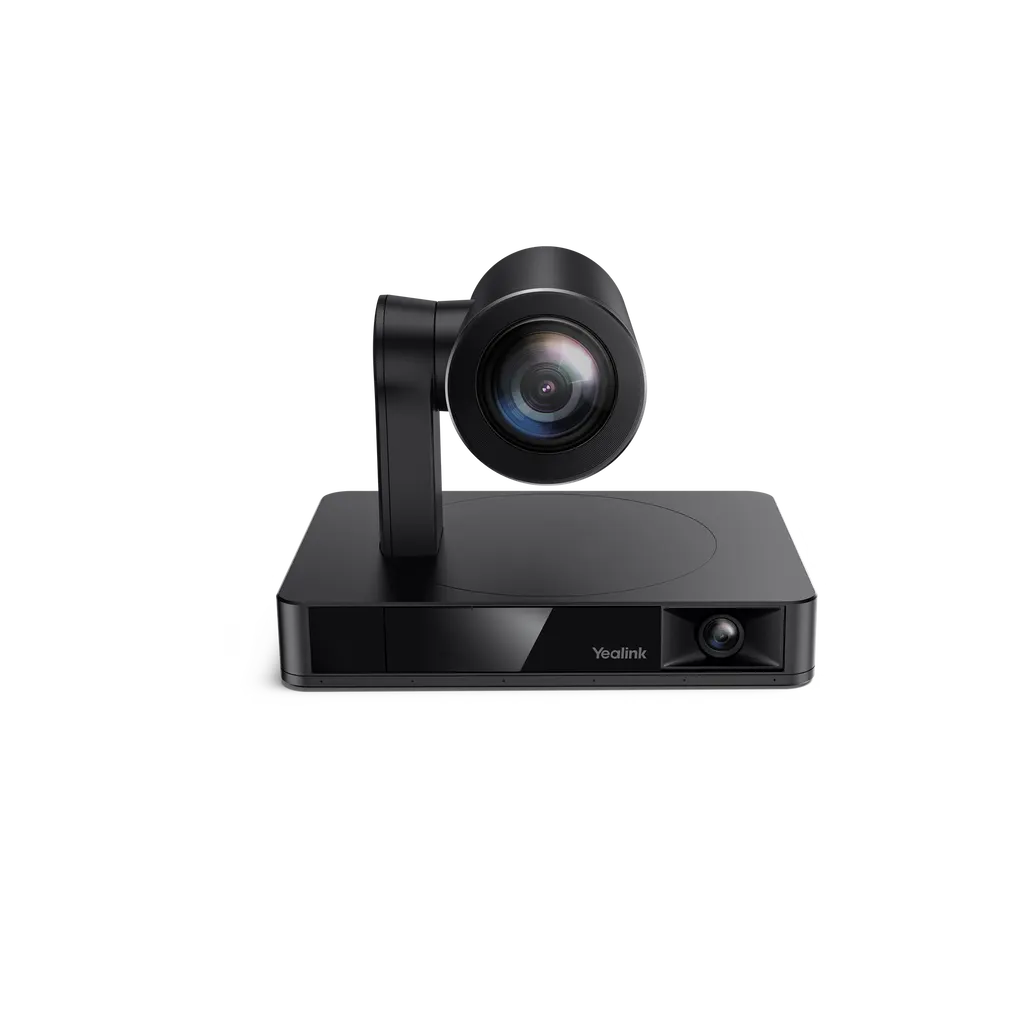
The Yealink UVC86 is a 4K dual-eye PTZ camera built for medium and large meeting rooms. A 120° panoramic lens detects everyone present while a 90° PTZ lens delivers close views, with Auto Framing, Speaker Tracking and Presenter Tracking. It offers 12x optical zoom and USB and VCH connections. It suits boardrooms, training rooms and hybrid meeting spaces in Doha and Lusail where every participant must be visible to remote colleagues.

A dual-camera 4K PTZ camera for medium and large rooms

The Yealink UVC86 combines two cameras in one unit. A panoramic lens with a 120° field of view watches the whole room and detects participants, while a PTZ lens with a 90° field of view supplies the close picture. Both use 8MP Sony sensors, and the system outputs 4K video at 30 frames per second. In a boardroom or training room where one wide shot makes faces too small for remote colleagues, this split design is the main reason to choose it.

The specifications that matter when you compare

The PTZ lens offers 12x optical zoom, with a total of 20.4x HD zoom that includes 1.7x digital zoom. It pans ±100° and tilts +40° and -90°, and nine camera presets let the operator return to set views quickly. Auto Framing counts and positions attendees, Speaker Tracking brings up a close view of whoever is talking, and Presenter Tracking keeps a presenter centred, with wide area, stage and segment modes.

  • Video: 4K at 30 frames per second
  • Optics: 12x optical zoom on the PTZ lens
  • Control: remote control or the Yealink camera control plug-in
  • Connections: USB3.0 Type-B, USB2.0 Type-A, VCH RJ45, 3.5mm line-in and HDMI out

Where it fits in Qatar

In a boardroom in West Bay or The Pearl, where a senior team meets clients and colleagues abroad, automatic framing removes the need to readjust the camera during the meeting. In Education City, a lecture hall or university training centre can use Presenter Tracking so a lecturer walking the front of the room stays in frame for students joining remotely. In a government office in Msheireb or a meeting room in the Industrial Area, the electric lens cap keeps the camera closed when no meeting is running.

What to plan before installation

The camera measures 210 mm by 156 mm by 156 mm when working, with a working height of 156 mm to 192 mm and a sleeping height of 183 mm. It weighs 3.27 kg. It can sit on a conference table, a TV stand, a tripod or on top of a TV, or it can be fixed to a wall or ceiling using the supplied bracket. Plan the position of the power adapter and the route for the 7m USB cable (2.5m with the MVC bundle). Check whether your codec connects through the VCH port or HDMI out, because the HDMI out works with VCS devices but not MVC devices. SmartRooms Qatar offers a free site survey to confirm sightlines and cable routes before you order.

Buying through SmartRooms Qatar

SmartRooms Qatar supplies the UVC86 with delivery to all eight municipalities of Qatar and professional installation. Ministries, schools and companies can order by purchase order (LPO) or through government tenders, including Monaqasat, and pay by bank transfer, cheque or purchase order. Products are covered by the manufacturer's warranty. Request a quote and our team will confirm the configuration, mounting and cabling for your room.

Highlights

  • 4K video at 30 frames per second
  • Panoramic and PTZ cameras, each with an 8MP Sony sensor
  • 12x optical zoom with a 90° PTZ field of view
  • Auto Framing, Speaker Tracking and Presenter Tracking
  • Pan ±100°, tilt +40° and -90°, with nine camera presets
  • USB3.0 Type-B, USB2.0 Type-A and Yealink VCH RJ45 ports

Room fit

Tell us the room size and platform (Teams, Zoom or BYOD) and we confirm the right combination with your quotation.

Estimated timeline

Quotation within 1 working day · delivery timing depends on stock availability, and we confirm it with your quotation.

Specifications

13 specifications · Source: manufacturer · checked Oct 2026
Package Content1
Details
UVC86 Camera VCR20 Remote Control Power Adapter Wall Bracket and Accessories 7m USB Cable (2.5m for MVC bundle)
PTZ Camera3
Pan
±100°, Tilt: +40°, -90°
Focal length
1m - infinity
Details
8MP Sony Sensor Auto Focus 90° DFOV, 81° HFOV, 50° VFOV 20.4x HD zoom (12x optical, 1.7x digital) 9 Camera Presets
Panoramic Camera2
Manual Tilt
±9°
Details
8MP Sony Sensor 120° DFOV, 110° HFOV, 78° VFOV
AI Features1
Details
Auto Framing Speaker Tracking PIP Multi Focus Presenter Tracking (Wide Area, Stage, and Segment Tracking)
UVC86 Connections1
Details
1 x USB3.0 Type-B Port 1 x USB2.0 Type-A Port 1 x Yealink VCH Port (RJ45) for Audio devices, BYOD Extender, or Yealink Codec 1 x 3.5mm Line-In Port 1 x Power Port 1 x Security Lock Slot 1 x Reset Slot 1 x HDMI Out Port*
Product Specifications5
- Sleeping Dimensions (W.D.H)
210 mm x 156 mm x 183 mm
- Working Dimensions (W.D.H)
210 mm x 156 mm x 156 mm
- Working Height
156 mm - 192 mm
N.W
3.27 kg
Details
UVC86 Camera:

Downloads

50 files from the manufacturer
PDF Datasheets Yealink UVC86 Datasheet (VN).pdf 525 KB Yealink UVC86 datasheets (PDF, 525 KB) PDF Datasheets Yealink UVC86 Datasheet.pdf 303 KB Yealink UVC86 datasheets (PDF, 303 KB) PDF Datasheets · Opens on manufacturer site Yealink UVC86 USB PTZ Camera Datasheet (IT).pdf Yealink UVC86 datasheets (PDF) URL Datasheets · Opens on manufacturer site  Download Yealink UVC86 datasheets (URL) URL Datasheets · Opens on manufacturer site  Download Yealink UVC86 datasheets (URL) URL Datasheets · Opens on manufacturer site  Yealink UVC86 Demo Video Yealink UVC86 datasheets (URL) PDF Manuals & guides Pair UVC86 with Yealink MeetingBar.pdf 566 KB Yealink UVC86 manuals & guides (PDF, 566 KB) PDF Manuals & guides Pair UVC86 with Yealink MeetingBoard.pdf 341 KB Yealink UVC86 manuals & guides (PDF, 341 KB) PDF Manuals & guides Pair UVC86 with Yealink MeetingEye.pdf 286 KB Yealink UVC86 manuals & guides (PDF, 286 KB) PDF Manuals & guides Yealink UVC86 Quick Start Guide (EN, CN, DE, FR, ES) V1.5.pdf 3.9 MB Yealink UVC86 manuals & guides (PDF, 3.9 MB) URL Manuals & guides · Opens on manufacturer site Auto Framing Yealink UVC86 manuals & guides (URL) URL Manuals & guides · Opens on manufacturer site Basic Settings Yealink UVC86 manuals & guides (URL) URL Manuals & guides · Opens on manufacturer site Camera Preset Yealink UVC86 manuals & guides (URL) URL Manuals & guides · Opens on manufacturer site Image Settings Yealink UVC86 manuals & guides (URL) URL Manuals & guides · Opens on manufacturer site Lens Calibration Yealink UVC86 manuals & guides (URL) URL Manuals & guides · Opens on manufacturer site Manual Controls Yealink UVC86 manuals & guides (URL) URL Manuals & guides · Opens on manufacturer site Multi-Focus Yealink UVC86 manuals & guides (URL) URL Manuals & guides · Opens on manufacturer site Picture-in-Picture (PiP) Mode Yealink UVC86 manuals & guides (URL) URL Manuals & guides · Opens on manufacturer site Presenter Tracking Yealink UVC86 manuals & guides (URL) URL Manuals & guides · Opens on manufacturer site Speaker Tracking Yealink UVC86 manuals & guides (URL) URL Manuals & guides · Opens on manufacturer site Video Fence (Yealink UVC Camera) Yealink UVC86 manuals & guides (URL) MP4 Manuals & guides · Opens on manufacturer site Yealink UVC8X Mount kits Unboxing V1.0 .mp4 Yealink UVC86 manuals & guides (MP4) DXF Drawings & CAD · Opens on manufacturer site UVC86 CAD Drawings.dxf Yealink UVC86 drawings & cad (DXF) STP Drawings & CAD · Opens on manufacturer site UVC86 CAD Drawings.stp Yealink UVC86 drawings & cad (STP) 30 - Software & firmware · Opens on manufacturer site UVC86 151.434.0.30 - Firmware & Release Note Yealink UVC86 software & firmware (30 - FIRMWARE & RELEASE NOTE) 55 - Software & firmware · Opens on manufacturer site UVC86 151.434.0.55 - Firmware & Release Note Yealink UVC86 software & firmware (55 - FIRMWARE & RELEASE NOTE) 30 - Software & firmware · Opens on manufacturer site UVC86 151.435.0.30 - Firmware & Release Note Yealink UVC86 software & firmware (30 - FIRMWARE & RELEASE NOTE) 45 - Software & firmware · Opens on manufacturer site UVC86 151.435.0.45 - Firmware & Release Note Yealink UVC86 software & firmware (45 - FIRMWARE & RELEASE NOTE) 66 - Software & firmware · Opens on manufacturer site UVC86 151.435.0.66 - Firmware & Release Note Yealink UVC86 software & firmware (66 - FIRMWARE & RELEASE NOTE) 85 ( Software & firmware · Opens on manufacturer site UVC86 151.435.0.85 (For AVONE Solution Only) - Firmware&Release Note Yealink UVC86 software & firmware (85 (FOR AVONE SOLUTION ONLY) - FIRMWARE&RELEASE NOTE) 90 - Software & firmware · Opens on manufacturer site UVC86 151.435.0.90 - Firmware & Release Note Yealink UVC86 software & firmware (90 - FIRMWARE & RELEASE NOTE) 35 - Software & firmware · Opens on manufacturer site UVC86 151.440.0.35 - Firmware & Release Note Yealink UVC86 software & firmware (35 - FIRMWARE & RELEASE NOTE) PDF Other documents Mounts Bracket Compatibility Lists.pdf 65 KB Yealink UVC86 other documents (PDF, 65 KB) PDF Other documents Yealink Regulatory Notice V1.2.pdf 1.0 MB Yealink UVC86 other documents (PDF, 1.0 MB) URL Other documents · Opens on manufacturer site Audio Input and Output Compatibility Lists Yealink UVC86 other documents (URL) URL Other documents · Opens on manufacturer site DSP Device Compatible List Yealink UVC86 other documents (URL) URL Other documents · Opens on manufacturer site HTTPS API Yealink UVC86 other documents (URL) MP4 Other documents · Opens on manufacturer site How to Use Auto Framing and Speaker Tracking V1.0.mp4 Yealink UVC86 other documents (MP4) MP4 Other documents · Opens on manufacturer site How to Use Picture-in-Picture Mode V1.0.mp4 Yealink UVC86 other documents (MP4) MP4 Other documents · Opens on manufacturer site How to Use Presenter Tracking V1.0.mp4 Yealink UVC86 other documents (MP4) MP4 Other documents · Opens on manufacturer site How to Use UVC86 Multi Focus V1.0.mp4 Yealink UVC86 other documents (MP4) URL Other documents · Opens on manufacturer site Rooms Accessories Compatibility Lists Yealink UVC86 other documents (URL) URL Other documents · Opens on manufacturer site Rooms Product Family Yealink UVC86 other documents (URL) URL Other documents · Opens on manufacturer site Rooms Supported Features List Yealink UVC86 other documents (URL) URL Other documents · Opens on manufacturer site Socket API Yealink UVC86 other documents (URL) MP4 Other documents · Opens on manufacturer site Yealink MVC S90 Multi-Camera Speaker Tracking Feature Demo V1.0.mp4 Yealink UVC86 other documents (MP4) MP4 Other documents · Opens on manufacturer site Yealink Mic-Camera Linkage with Shure Ceiling Mic Feature Demo V1.0.mp4 Yealink UVC86 other documents (MP4) MP4 Other documents · Opens on manufacturer site Yealink UVC86 PT Segment Tracking V1.0.mp4 Yealink UVC86 other documents (MP4) MP4 Other documents · Opens on manufacturer site Yealink UVC86 Unboxing V2.0.mp4 Yealink UVC86 other documents (MP4) MP4 Other documents · Opens on manufacturer site Yealink Video Fence Feature Demo V1.0.mp4 Yealink UVC86 other documents (MP4)

Questions about UVC86

What is the Yealink UVC86 built for?
The UVC86 is a 4K camera made for medium and large meeting rooms. It uses a panoramic lens to detect people in the room and a PTZ lens to frame the close view, so one fixed camera does not have to cover a long table. Typical settings include a boardroom in West Bay or a training room where remote colleagues need to see everyone seated.
How many cameras does the UVC86 contain and what video does it output?
The UVC86 has two cameras, each with an 8MP Sony sensor. The panoramic camera has a 120° DFOV lens and the PTZ camera has a 90° DFOV lens. Together they output 4K video at 30 frames per second, which suits a room with a large display where small faces in a wide shot would be hard for remote participants to read.
Does the UVC86 follow speakers and presenters automatically?
Yes. Speaker Tracking frames a close-up of whoever is speaking, Presenter Tracking keeps a presenter centred as they move, and Auto Framing adjusts when attendees join or leave. Presenter Tracking offers wide area, stage and segment modes. In an Education City lecture hall, a lecturer who walks the front of the room stays in frame for students joining remotely.
What zoom and field of view does the UVC86 offer?
The PTZ camera provides 12x optical zoom and 20.4x HD zoom in total, including 1.7x digital zoom. Its field of view is 90° DFOV, 81° HFOV and 50° VFOV, and the panoramic lens gives 120° DFOV. Pan reaches ±100°, tilt runs +40° and -90°, and nine camera presets let you return to set views. Check seating distance against these angles during your site survey.
Can the UVC86 be mounted on a wall or ceiling in a Doha meeting room?
Yes. The package includes a wall bracket and accessories, and the camera can also sit on a conference table, a TV stand, a tripod or on top of a TV. Working height is 156 mm to 192 mm and the camera weighs 3.27 kg. Before fixing a bracket to a wall or ceiling in a Doha office, a free site survey from SmartRooms Qatar confirms the mounting position and cable route.
What comes in the UVC86 package?
The box contains the UVC86 camera, a VCR20 remote control, a power adapter, a wall bracket with accessories and a 7m USB cable. For the MVC bundle the USB cable is 2.5m. Compare the cable length with the distance from the camera position to your PC or codec before you order, so you know whether the supplied cable is long enough for your room.
Which ports does the UVC86 have for connecting to a codec or PC?
The UVC86 has a USB3.0 Type-B port, a USB2.0 Type-A port, a Yealink VCH RJ45 port for audio devices, a BYOD extender or a Yealink codec, a 3.5mm line-in port, a power port, a security lock slot, a reset slot and an HDMI out port. The HDMI out works with VCS devices but not MVC devices, so confirm your codec model before ordering.
Does the UVC86 work with Yealink audio devices?
Yes. The source data says the UVC86 integrates audio with Yealink devices, naming the VCM34 array microphone, the VCM38 ceiling microphone and the MSpeaker II soundbar. For a medium meeting room in Al Sadd, the camera and microphone can be planned and quoted together as one installation, with the audio device connected through the VCH port.
Can the UVC86 be used as a BYOD camera with a laptop?
The source describes a BYOD mode for the UVC86. The camera connects by USB with a plug-and-play setup, and its VCH port also accepts a BYOD extender. This suits rooms where staff bring their own laptops instead of using a dedicated codec. Confirm the software and driver steps for your laptop with the SmartRooms Qatar team before installation day.
What privacy features does the UVC86 include?
The panoramic camera's electric lens cap opens when a video conference starts. When the camera is not in use, the lens cap stays closed and the PTZ camera flips down to ensure privacy. This suits government offices and bank meeting rooms where cameras should not be live outside scheduled meetings. Ask the SmartRooms Qatar team to confirm how the lens cap works with your meeting setup.
What should I plan before installing the UVC86 in a Lusail meeting room?
Plan the mounting point, the power adapter position and the USB cable route, and decide whether your codec connects through VCH or HDMI out. The camera's working dimensions are 210 mm by 156 mm by 156 mm. A free site survey from SmartRooms Qatar checks the sightline to the table and screen, and quotations are usually returned within one working day.
Can a school or ministry order several UVC86 units on a purchase order?
Yes. SmartRooms Qatar accepts purchase orders (LPOs) and government tenders, including through Monaqasat, with payment by bank transfer, cheque or purchase order. A school or ministry equipping several meeting rooms can list each room's mounting and cable needs in one quotation. Products are covered by the manufacturer's warranty.

Similar models

Biamp Vidi 100 Biamp Vidi 100 4K Conferencing Camera
Cameras
Biamp Vidi 150 Biamp Vidi 150 4K Conferencing Camera
Cameras
Biamp Vidi 250 Biamp Vidi 250 4K Conferencing Camera
120 Degrees Zoom Certified
Biamp Vidi 280 Biamp Vidi 280 4K Conferencing Camera with Dual Sensors
Ultrawide Lens Zoom Certified
Biamp Vidi Content Cam 250 Biamp Vidi Content Cam 250 4K Whiteboard Content Camera Kit
120° Up to 5x digital zoom
Email Call




