





Thursday, 22 October 2026 · 11 Jumada I 1448 AH Sun – Thu · 9:00 – 18:00
+971 56 914 9477 العربية
WhatsApp

UVC8X Mount Kit

Yealink UVC8X Mount Kit for UVC84 and UVC86 Cameras

WhatsApp
Priceon request
QuotationWithin 1 working day
DeliveryConfirmed with your quote, based on stock
PDFDownload datasheet (Yealink UVC8X Mount Kits Datasheet.pdf)
Overview

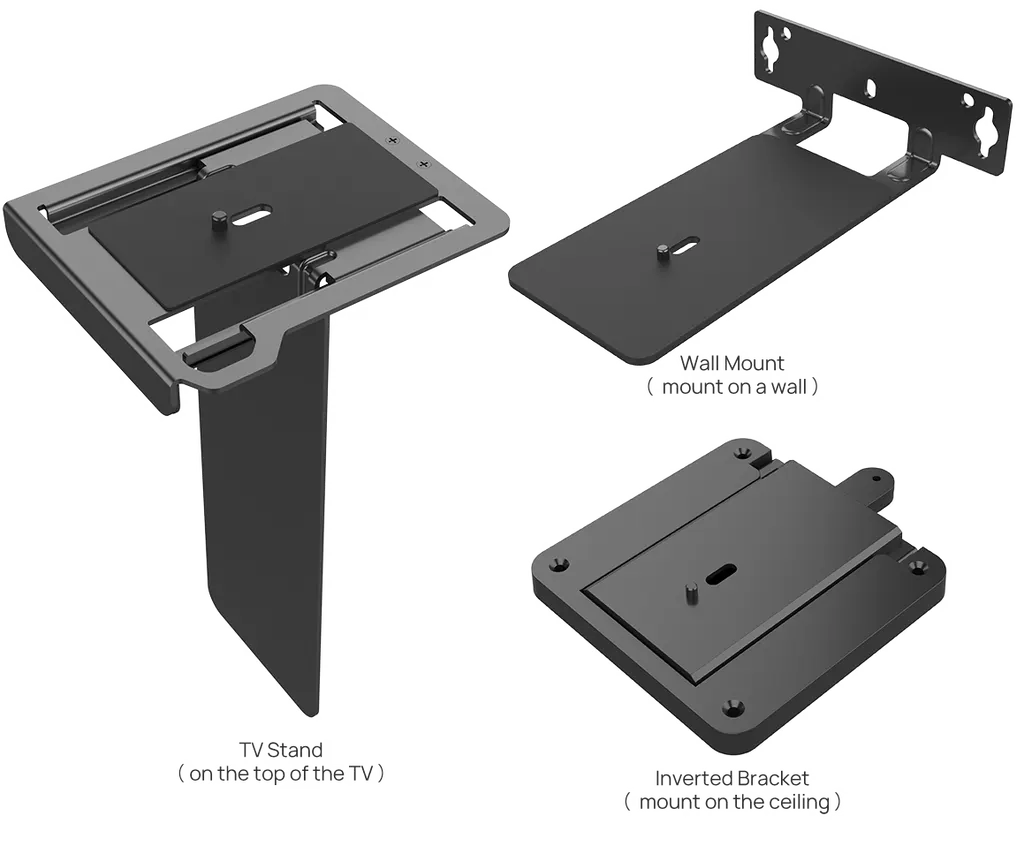
The Yealink UVC8X Mount Kit is an optional accessory for the UVC84 and UVC86 cameras. It offers three set-ups: a stand on top of a TV, a wall mount, or an inverted bracket for a ceiling. It suits meeting rooms, classrooms and training rooms across Qatar where the room layout decides where the camera goes. Request a quote and we will confirm the right set-up with you.

What the UVC8X Mount Kit adds to a UVC84 or UVC86 camera

The UVC8X Mount Kit is an optional accessory designed for the Yealink UVC84 and UVC86 cameras. Its job is to hold the camera in the position the room needs, whether that is on top of a display, on a wall or hanging from a ceiling. The right position often decides whether the camera frames every participant or cuts off the edge of the table.

Three set-ups from one kit

The kit covers three mounting routes. Each uses a different bracket with its own footprint:

  • TV stand: the camera sits on top of a display. The bracket measures 113.5 x 131 x 232 mm.
  • Wall mount: the camera is fixed to a wall. The bracket measures 144 x 185 x 46.6 mm.
  • Inverted bracket: the camera hangs from a ceiling. The bracket measures 133 x 163 x 14.8 mm.

The manufacturer lists these dimensions as width x depth x height. Compare them with the space above your display or the clearance at a ceiling point before you choose a set-up.

Weight, carton and handling

Each carton weighs 5.376 kg gross, with 4.152 kg net, and measures 443 x 305 x 285 mm. The weight is modest for a single carton, which helps when moving stock between floors of an office building or a school. The carton can be kept in a facilities store until installation is arranged.

Where it fits in Qatar

Three situations come up often:

  • Boardroom in West Bay: the TV stand set-up places the camera directly above a display, so a remote team in Doha or abroad sees everyone seated at the table.
  • Training room in Al Sadd: the inverted bracket keeps the camera overhead, leaving tables and whiteboards free for trainers and participants.
  • Seminar room in Education City: a wall mount beside the screen frames the speaker and visiting presenters without taking up desk space.

What to plan before you order

Start by confirming your camera model, because the kit is designed for the UVC84 and UVC86. Then choose the set-up for each room. SmartRooms Qatar offers free site surveys, and we recommend one before any wall or ceiling fixing so the installer can check the surface, the cable route and the sightline across the room. The data for this kit does not give an operating temperature range, so for rooms near windows or with limited air conditioning, confirm the location with the SmartRooms Qatar team before fitting.

  • Confirm the camera model: UVC84 or UVC86.
  • Choose the set-up for each room: TV stand, wall or ceiling.
  • Check the wall or ceiling surface and cable route on site.
  • Note the carton weight and dimensions for delivery and storage.

Schools, ministries and other organisations ordering several rooms can work from a purchase order (LPO) or a government tender, including Monaqasat. Payment can be made by bank transfer, cheque or purchase order, and products are covered by the manufacturer's warranty. To get started, request a quote with your room list and camera models. The SmartRooms Qatar team usually replies within one working day.

Highlights

  • Optional mount for UVC84 and UVC86 cameras
  • Three set-ups: TV stand, wall mount and inverted ceiling bracket
  • TV stand bracket: 113.5 x 131 x 232 mm
  • Wall mount bracket: 144 x 185 x 46.6 mm
  • Inverted bracket: 133 x 163 x 14.8 mm
  • Carton: 443 x 305 x 285 mm, 5.376 kg gross weight

Room fit

Tell us the room size and platform (Teams, Zoom or BYOD) and we confirm the right combination with your quotation.

Estimated timeline

Quotation within 1 working day · delivery timing depends on stock availability, and we confirm it with your quotation.

Specifications

7 specifications · Source: manufacturer · checked Oct 2026
Physical Feature7
- TV Stand
113.5 x 131 x 232 mm
- Wall Mount
144 x 185 x 46.6 mm
- Inverted Bracket
133 x 163 x 14.8 mm
Carton Meas
443 x 305 x 285 mm
N.W/CTN
4.152kg
G.W/CTN
5.376kg
Details
Dimension (W x D x H):

Downloads

11 files from the manufacturer
PDF Datasheets Yealink UVC8X Mount Kits Datasheet.pdf 255 KB Yealink UVC8X Mount Kit datasheets (PDF, 255 KB) PDF Manuals & guides Yealink UVC86 Quick Start Guide (EN, CN, DE, FR, ES) V1.5.pdf 4.0 MB Yealink UVC8X Mount Kit manuals & guides (PDF, 4.0 MB) MP4 Manuals & guides · Opens on manufacturer site Yealink UVC8X Mount kits Unboxing V1.0 .mp4 Yealink UVC8X Mount Kit manuals & guides (MP4) DXF Drawings & CAD · Opens on manufacturer site UVC84 & UVC85 & UVC86 Mount Kit Inverted Hanging Bracket CAD Drawings.dxf Yealink UVC8X Mount Kit drawings & cad (DXF) STP Drawings & CAD · Opens on manufacturer site UVC84 & UVC85 & UVC86 Mount Kit Inverted Hanging Bracket CAD Drawings.stp Yealink UVC8X Mount Kit drawings & cad (STP) DXF Drawings & CAD · Opens on manufacturer site UVC84 & UVC85 & UVC86 Mount Kit Mount Bracket CAD Drawings.dxf Yealink UVC8X Mount Kit drawings & cad (DXF) STP Drawings & CAD · Opens on manufacturer site UVC84 & UVC85 & UVC86 Mount Kit Mount Bracket CAD Drawings.stp Yealink UVC8X Mount Kit drawings & cad (STP) DXF Drawings & CAD · Opens on manufacturer site UVC84 & UVC86 Mount Kit TV Bracket CAD Drawings.dxf Yealink UVC8X Mount Kit drawings & cad (DXF) STP Drawings & CAD · Opens on manufacturer site UVC84 & UVC86 Mount Kit TV Bracket CAD Drawings.stp Yealink UVC8X Mount Kit drawings & cad (STP) PDF Other documents Mounts Bracket Compatibility Lists.pdf 65 KB Yealink UVC8X Mount Kit other documents (PDF, 65 KB) PDF Other documents Yealink Regulatory Notice V1.2.pdf 1.0 MB Yealink UVC8X Mount Kit other documents (PDF, 1.0 MB)

Questions about UVC8X Mount Kit

What is the UVC8X Mount Kit used for?
The UVC8X Mount Kit is an optional mount for the Yealink UVC84 and UVC86 cameras. It lets you place the camera on top of a TV, on a wall or hanging from a ceiling, so the position suits the room rather than the other way round. It is a practical choice for meeting rooms and classrooms in Doha where furniture and display positions are already fixed.
Which cameras is the kit designed for?
The manufacturer lists the kit for the Yealink UVC84 and UVC86 only. Confirm your camera model before ordering, because a bracket chosen for the wrong camera wastes a site visit. If you own a different Yealink camera, send the model to the SmartRooms Qatar team and ask for advice before you request a quote.
What mounting options does the kit provide?
The kit covers three set-ups. The TV stand places the camera on top of a display. The wall mount fixes it to a wall. The inverted bracket hangs it from a ceiling. Each set-up has its own bracket, so the kit suits organisations that want different camera positions across several rooms, such as a boardroom and a training room.
Which set-up suits a boardroom in West Bay?
It depends on the display. If the screen sits on a cabinet or stand, the TV stand set-up lets the camera rest on top of it, with a bracket measuring 113.5 x 131 x 232 mm. If the screen is wall-mounted with no shelf beneath it, the wall mount is the better fit, with a bracket of 144 x 185 x 46.6 mm. A site visit helps settle the final choice.
Can the kit be ceiling-mounted in a training room in Al Sadd?
Yes, the kit includes an inverted bracket for ceiling mounting. The bracket measures 133 x 163 x 14.8 mm. Mounting the camera overhead keeps tables and whiteboards clear in a training room in Al Sadd. Have the installer confirm the ceiling structure and the cable route before any drilling begins.
What are the dimensions of each bracket?
The manufacturer lists a size for each set-up, given as width x depth x height. The TV stand measures 113.5 x 131 x 232 mm, the wall mount 144 x 185 x 46.6 mm and the inverted bracket 133 x 163 x 14.8 mm. Measure the space above your display or the ceiling point before choosing, and compare the figures with the camera fitted to the bracket.
How heavy is the kit and what size is the carton?
The carton weighs 5.376 kg gross, with 4.152 kg net, and measures 443 x 305 x 285 mm. The weight is modest for one carton, which helps when moving stock between floors of an office building in Msheireb or West Bay. The carton can be stored in a facilities room until the installer is ready.
Do I need a site survey before fixing the mount?
We recommend one before any wall or ceiling fixing. SmartRooms Qatar offers free site surveys, and during the visit the installer can check the wall or ceiling surface, the cable route to the camera and the sightline across the room. This matters most for ceilings in older buildings and for walls near glass partitions, where surfaces and clearances vary.
How should I plan the cable route for the camera?
The manufacturer's data for this kit does not give cable lengths, so measure the route from the mounting point to your video conferencing system before ordering. Include any bends, risers and ceiling voids. Plan the route with the installer during the site survey, particularly for a ceiling mount in a multi-storey office in Lusail or a training centre in Education City, where distances to equipment cabinets can be long.
Can the kit go in a hot room near a window?
The data for this kit does not give an operating temperature range, so we cannot quote one. Qatar summers exceed 45°C and dust storms are common, so rooms with large windows or weak air conditioning need care. Confirm the exact location with the SmartRooms Qatar team, and check the camera's own operating limits before fitting it to a wall beside a window.
Can a school or ministry order several kits on one purchase order?
Yes. Schools, ministries and other organisations in Qatar can order against a purchase order (LPO), and government tenders, including Monaqasat, are supported. Payment is by bank transfer, cheque or purchase order. Send a list of rooms with the camera model for each, and the SmartRooms Qatar team will reply with one quotation for the whole order, usually within one working day.
What is the part number for ordering this kit?
The manufacturer part number for this kit is 330100059001. Quote it together with your camera models and the set-up needed for each room, so the quotation matches what you require. The kit is a current model, so you can request a quote for it directly.

Similar models

Yealink MVC S60 Yealink MVC S60 Microsoft Teams Rooms System with 360° Camera
360°
Biamp Evoko Liso Wall Mount Kit Biamp Evoko Liso Wall Mount Kit (910-01930) for Room Scheduling Displays
TAA Compliant
Email Call




