TY-VUK10
Panasonic TY-VUK10 Video Wall Auto Display Adjustment Upgrade Kit
Panasonic TY-VUK10 is an Auto Display Adjustment Upgrade Kit for Panasonic video walls. Paired with a compatible Nikon camera and the free Video Wall Manager software, it adjusts brightness and colour balance across up to 25 displays in a 5x5 layout. It suits integrators and IT teams in Qatar running control rooms or campus media walls on supported TH-series panels. Request a quote with your panel models.
What the TY-VUK10 adds to a Panasonic video wall
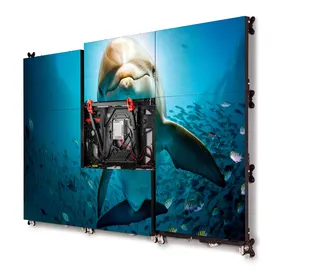
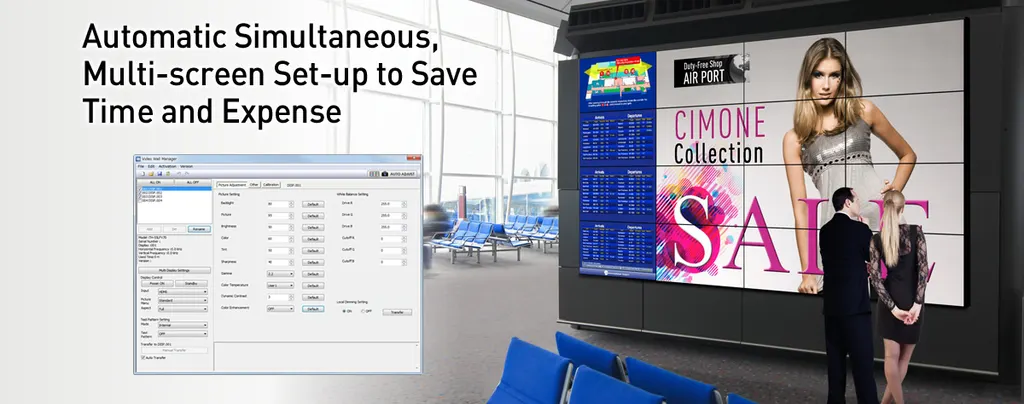
The TY-VUK10 is an upgrade kit for Panasonic video walls built from flush-mounted displays. The free Video Wall Manager software adjusts colour with a supported colour sensor and manages wall settings from a PC. The TY-VUK10 extends that software with camera-based automatic adjustment, so brightness and colour balance can be matched across the whole array rather than panel by panel.
How the automatic adjustment works
A compatible Nikon camera is positioned to cover the full screen area of the wall. Video Wall Manager then calculates a correction value for each display and applies it automatically. Once that pass is complete, you can make further detailed corrections by hand, which helps where one panel needs more attention than the rest.
- Supported cameras: Nikon D5200, D5300, D5500, D5600 and D7500
- Up to 25 displays in a 5 x 5 arrangement
- Compatible TH-series models include TH-86SQ1 and TH-98SQ1
Compatibility to check before ordering
Not every Panasonic display is covered. The target list includes TH-98SQ1, TH-86SQ1, TH-75SQ1, TH-65SQ1, TH-55SQ1 and TH-49SQ1, along with TH-80SF2H and TH-70SF2H and a range of LF, SF, AF, VF and LFV series models. Connection rules also apply: RS232C is not supported on the SQ1H, SQ2H, EQ2 and EF2 series, and LAN is not supported on the LFV9, LFV8, LFV50 and LFV5 series. Send your exact model numbers with your enquiry so we can confirm each panel before you buy.
Where it fits in Qatar
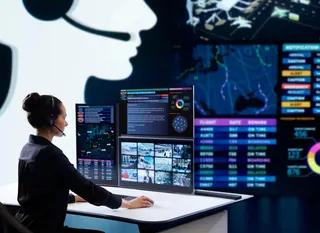
A government operations room in West Bay running a multi-panel wall needs colour that looks consistent from every seat, and the kit gives operators a repeatable setup. At a university media centre in Education City, a lobby or corridor wall can be re-balanced after a panel is moved or replaced. A logistics company near Hamad International Airport running a live dispatch board can use PC-based monitoring to keep settings consistent across its wall.
What to plan for
Prepare a PC running Windows 10 or Windows 11 that meets the listed requirements: a 1 GHz or faster processor, 2 GB of memory on a 32-bit system or 4 GB on a 64-bit system, 16 GB of free disk space, and a LAN port or RS232C serial port. Each PC needs its own licence key. The software does not operate properly under a Guest account, so use a Standard or Administrator account. The colour sensor is optional, and supported models vary by Windows version. Because the camera has to frame the whole wall, a free site survey before installation is worthwhile. The data gives no operating temperature range for this kit, so confirm room conditions with the SmartRooms Qatar team, especially near windows where summer temperatures can exceed 45°C.
Send your panel model numbers, screen count and PC details, and request a quote from SmartRooms Qatar. We usually provide quotations within one working day, and we supply against purchase orders (LPOs) and government tenders.
Highlights
- Automatic brightness and colour balance matching across video walls
- Compatible with listed Nikon D5200 to D7500 cameras
- Supports up to 25 displays in a 5x5 layout
- Video Wall Manager software is available free of charge
- Licence key required per PC; Windows 10 and 11 supported
- Manual fine-tuning available after automatic adjustment
Estimated timeline
Quotation within 1 working day · delivery timing depends on stock availability, and we confirm it with your quotation.
Specifications
General16
- Functions
- Calibration/Adjustment, Control of Display Setting/Data Control
- Target Models
- TH-98SQ1, TH-86SQ1, TH-75SQ1, TH-65SQ1, TH-55SQ1, TH-49SQ1, TH-80SF2H, TH-70SF2H, TH-55LF80, TH-49LF80, TH-42LF80, TH-65SF2, TH-55SF2, TH-49SF2, TH-43SF2, TH-55LF8, TH-49LF8, TH-42LF8, TH-55SF1H, TH-49SF1H, TH-42SF1H, TH-55AF1, TH-49AF1, TH-42AF1, TH-55VF2H, TH-55VF2, TH-55VF1H, TH-55LFV70, TH-55LFV60, TH-55LFV9, TH-55LFV8, TH-49LFV8, TH-55LFV6, TH-55LFV50, TH-55LFV5, TH-47LFV5
- OS
- Windows® 11, Windows® 10
- Applicable Color Sensors *
- [Windows® 11] KONICA MINOLTA (CA-410), Datacolor (SpyderX) [Windows® 10] KONICA MINOLTA (CA-210, CA-310, CA-410), Datacolor (Spyder4, Spyder5, SpyderX), X-Rite (i1Pro2)
- Connection
- RS232C (SQ1H, SQ2H, EQ2 and EF2 are not supported.), LAN (LFV9/LFV8/LFV50/LFV5 are not supported.)
- Max. Number of Displays
- 25 units (5 x 5)
- Function
- Automatic Color Adjustment Using Camera
- Requirement
- Video Wall Manager Software
- Activation
- License key is required per PC
- Applicable Cameras
- Nikon D5200, D5300, D5500, D5600, D7500 Lens: Nicon Normal zoom lens (Angle of view: 29-76°) AF-S DX NIKKOR 18-55mm f/3.5-5.6G VR High-power zoom lens (Angle of view: 12-76°) AF-S DX NIKKOR 18-140mm f/3.5-5.6G ED VR Normal zoom lens (Angle of view: 29-76°) AF-S DX NIKKOR 18-55mm f/3.5-5.6G VR II* 1 Normal zoom lens (Angle of view: 29-76°) AF-P DX NIKKOR 18-55mm f/3.5-5.6G VR* 1 * 2
- Operating System
- Windows® 11 Windows® 11Pro (64 bit) Windows® 10 Windows® 10 (32 bit/64 bit) Windows® 10 Pro (32 bit/64 bit) Compatible with English, Japanese or Chinese language versions of the above operating systems. For 64 bit OS, this application runs on WOW64.
- CPU
- Clock speed of 1 GHz or higher
- Memory
- 32bit OS: 2 GB or more 64bit OS: 4 GB or more
- Available disk space
- 16 GB or greater (Further available space is necessary to save display information)
- Others
- A display with a resolution of 1024 x 768 pixels or higher using High Color (16 bit) or higher LAN port for a wired LAN (10 Base-T/100Base-TX/1000 Base-T) or a serial port (RS232C compliant) USB2.0-compatible port or higher (when using the calibration and Auto Display Adjustment function)
- Note
- • Please understand that operation is not guaranteed if this software application is used in a system environment other than that specified above or on a home-built computer. • The software will not operate properly when a "Guest" account is used. Use a "Standard" or "Administrator" account.