IAdeaCare
IAdea IAdeaCare Remote Device Management Software
IAdeaCare is a web-based remote device management platform for IAdea displays. It lets IT and facilities teams deploy devices, schedule reboots and firmware updates, take playback screenshots in grid view, and receive email alerts when a screen goes offline. Standard, Premium and Enterprise plans scale from a handful of devices to mass deployments, with role-based admin for teams. Request a quote for a plan that fits your Qatar fleet.
What IAdeaCare manages across an IAdea fleet
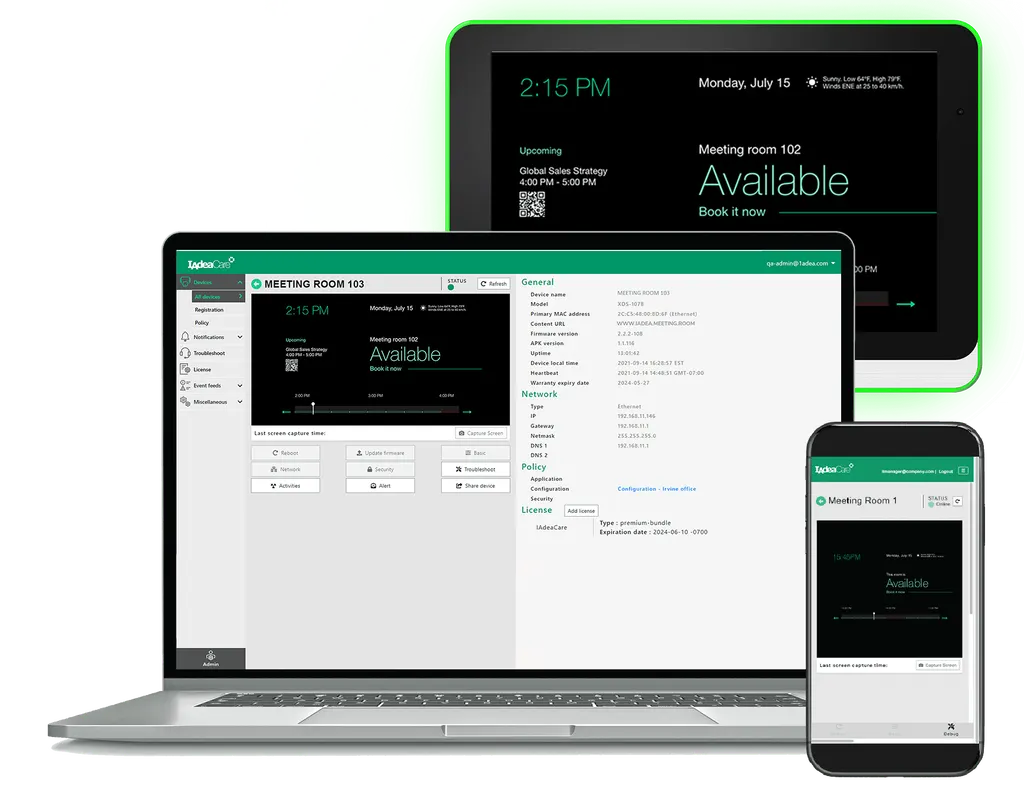
IAdeaCare is a web-based remote device management platform for IAdea displays. It brings deployment, ongoing management, monitoring and troubleshooting into one interface, so administrators see the health of every screen from a single view rather than visiting each one. Operational data from all connected devices is consolidated for detailed analysis or a quick check at a glance.
Remote configuration covers device name, application URL, output orientation, time zone and daily reboot schedule. Devices can be grouped and filtered, and group policies and configurations apply automatically to every device in a group. Commands can be sent to in-service devices in batches, which matters when a school or branch network has dozens of screens to update.
Monitoring, screenshots and alerts that catch faults early
Playback screenshots from each device appear in a grid view, so a black screen or frozen content can be spotted without a site visit. An overview of device network and licence status shows which screens need attention, and alert rules notify device managers when a device is detected as offline. Periodic field reports can be generated to track every IAdea device over time.
Administrators can also manage devices without interrupting the people using them. Firmware can be updated remotely and scheduled, silent updates can be rolled out across multiple devices, and device logs can be retrieved for diagnosis. Passwords can be set or changed on each device, and apps can be pinned to the screen to protect device integrity and keep data confidential.
Choosing the right tier for your organisation
The device licence tiers differ in depth. Standard covers essential device administration, device grouping and batch administration, and device health analytics with troubleshooting. Premium adds group-wide default configuration, full control over deployment, remote diagnostics, a power routine policy, device maintenance tools, inventory and licence management, central control of local access, and email alerts.
Enterprise accounts suit organisations that need to manage people as well as screens. They add role-based admin with Administrator, Editor and Viewer roles, assignment of device groups to user groups, third-party app management from one portal, automatic certificate issuance through SCEP, single sign-on with Azure AD, a branded interface with your company logo, and Zero Touch Deployment for pre-deployment configuration.
Where IAdeaCare fits across Qatar
- Schools: a private school in Al Wakrah with classrooms in several buildings can group displays by building and push changes before the school day starts.
- Banks and branches: a bank with branches in Doha and Lusail can review offline lobby screens from one portal and schedule firmware upgrades after branch hours.
- Clinics and waiting areas: a clinic in Doha can confirm from the office that waiting-room displays show current content, and refresh them with overnight reboots.
What to plan before you roll it out
Start by counting devices and sites, then decide which tier each group needs. Confirm that every display is an IAdea device, and agree on who will hold administrator, editor and viewer roles, noting that viewer accounts are capped at 50. Check network access from each display to the platform during planning so that deployment is not delayed on installation day.
A free site survey from SmartRooms Qatar can help plan display locations and network points before rollout. Quotations are usually issued within one working day, and purchase orders for schools and government tenders are accepted. Request a quote from SmartRooms Qatar to match the IAdeaCare licence tier to your device count, sites and admin structure.
Highlights
- Remote deployment, monitoring and troubleshooting for IAdea devices
- Playback screenshots in grid view to spot black screens quickly
- Email alerts when devices are detected as offline
- Daily reboot scheduling, display on/off and firmware upgrade scheduling
- Role-based admin with Administrator, Editor and Viewer roles
- Zero Touch Deployment and Azure AD single sign-on on Enterprise
Estimated timeline
Quotation within 1 working day · delivery timing depends on stock availability, and we confirm it with your quotation.