Thursday, 22 October 2026 · 11 Jumada I 1448 AH Sun – Thu · 9:00 – 18:00
+971 56 914 9477 العربية
WhatsApp

SignApps Express

IAdea SignApps Express Digital Signage Content Management Software

WhatsApp
Priceon request
QuotationWithin 1 working day
DeliveryConfirmed with your quote, based on stock
PDFDownload datasheet (SignApps_Brochure_2020MAR-WEB.pdf)
Overview

IAdea SignApps Express is the content management software bundled with IAdea signage devices. It is web based and built for simple demonstrations, concept development and learning a player's built-in features. The Standard tier covers looping content, multi-zone playlists, scheduling and local-network publishing. The Cloud tier, which requires a license, adds remote publishing and a layout editor. It suits Qatar schools, retailers and reception areas testing signage first.

What SignApps Express does on an IAdea display

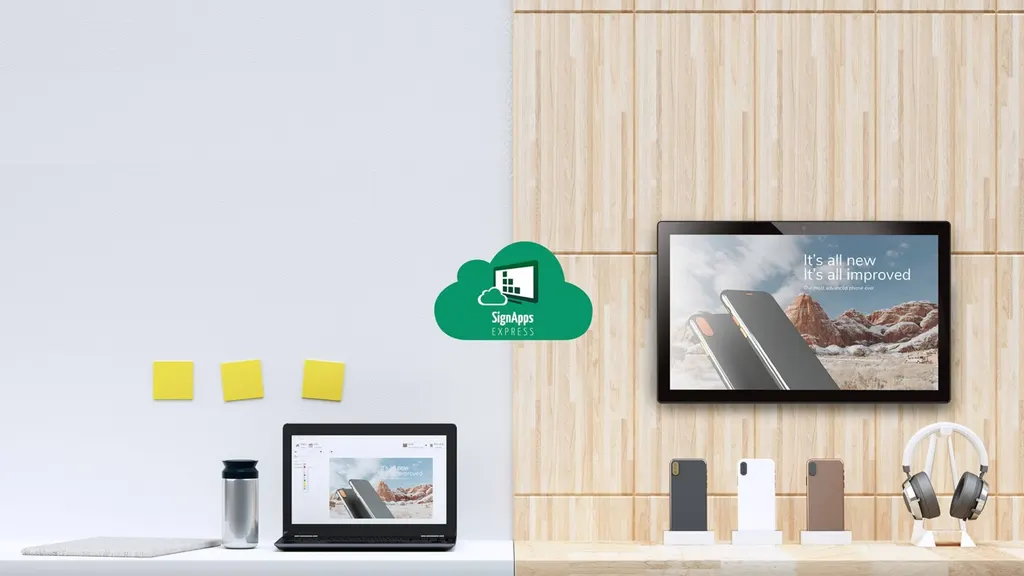
SignApps Express is web-based content management software that IAdea bundles with its signage devices. From one place you decide what appears on a screen, when it appears and which devices receive it. IAdea positions it as an accessible tool for simple demonstrations and concept development, and it is the quickest way to see what the built-in features of an IAdea device can do before you commit to a larger installation.

Because it comes bundled with IAdea devices, it is the natural starting point when you are evaluating hardware for an office, classroom or lobby.

Standard and Cloud tiers compared

The software comes in two tiers, and the difference matters when you plan a rollout. The Standard tier lets you build looping content and dynamic playlists, multi-zone and interactive layouts, live text, BrightWall and synchronized playlists, and interactive trigger events. It accepts images, media files, PowerPoint, widgets, tickers, audio and URLs, schedules playlists, and publishes them to multiple devices on your local network.

The Cloud tier requires a license and includes everything in Standard. It adds publishing to devices on non-local networks, which lets you update remote sites from one desk, and a layout editor for building reusable templates.

  • Standard: looping content, multi-zone and interactive playlists, scheduling, local-network publishing
  • Cloud (license required): all Standard features, non-local network publishing and a layout editor

Where it fits in Qatar

A private school in Al Wakrah fitting out new corridors could run timetable slides, visitor information and reception announcements from the administration office. Staff schedule each playlist in advance, so the screen changes between morning content and notices issued later in the school day. Because the school is a single site, the Standard tier covers its needs.

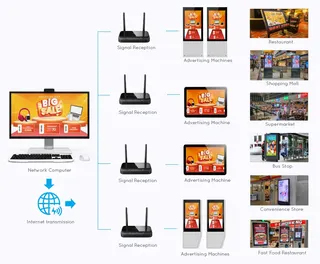
A retail team in West Bay with stores in Doha and Al Khor could schedule promotional playlists for wall screens across every branch. Using the Cloud tier, head office pushes updates straight to the devices, so store staff never copy files onto USB drives. A single screen can show shop directory information and wall advertisements in separate zones.

In a hotel lobby in Lusail, one display can be split into a check-in information zone, a local events zone and a weather widget, with each zone updated independently.

What to plan before you deploy

Settle the number of screens before installation, identify which ones sit on the local network and which are at remote sites, and decide whether you need the Cloud tier for remote publishing. Compare the content types you intend to use with the supported list, and confirm with the SmartRooms Qatar team which IAdea device suits each screen and location. IAdea states that a beginner can master the software in less than 10 minutes. That is the manufacturer's estimate, and real timing depends on how many zones and playlists your team builds.

Request a quote

Tell us how many screens you plan, the sites involved and whether you need remote publishing. The SmartRooms Qatar team will match SignApps Express to the right IAdea hardware and usually issue a quotation within one working day. Request a quote today for the software and the devices it will run on.

Highlights

  • Web-based content management bundled with all IAdea devices
  • Multi-zone, interactive and synchronized playlists in the Standard tier
  • Scheduling and publishing to multiple devices on the local network
  • Cloud tier (license required) adds non-local network publishing
  • Supports image, media, PowerPoint, widget, ticker, audio and URL content
  • Layout editor for building templates in the Cloud tier

Estimated timeline

Quotation within 1 working day · delivery timing depends on stock availability, and we confirm it with your quotation.


Specifications

Source: manufacturer · checked Oct 2026
The full specification and datasheet for this model are available on request; we send them with your quotation.

Downloads

4 files from the manufacturer

Questions about SignApps Express

What is IAdea SignApps Express used for?
IAdea SignApps Express is web-based content management software for building and scheduling digital signage content. It is aimed at simple demonstrations, concept development and a quick tour of the built-in features on IAdea devices. Beginners can build a playlist, add a schedule and publish it to a display without prior signage experience, which makes it a practical first pilot for a school, office or lobby in Doha.
Is SignApps Express included with IAdea devices?
Yes. SignApps Express is bundled with all IAdea devices, so it is the software you use when you first set up a player. The tiers differ in capability: Standard covers playlists and scheduling on the local network, while Cloud (license required) adds remote publishing and a layout editor. Ask the SmartRooms Qatar team which IAdea device suits your screen and site, and we will confirm the combination in your quotation.
What is the difference between the Standard and Cloud tiers?
Both tiers let you create looping content and dynamic playlists, multi-zone and interactive layouts, interactive trigger events and scheduled playlists. Both publish to multiple devices on the local network. The Cloud tier requires a license and adds publishing to devices on non-local networks, which is the remote content update feature, plus a layout editor for creating templates. Choose Cloud if your screens sit at more than one site or you want reusable templates.
Can I update screens at another site from my office?
Yes, with the Cloud tier. It publishes playlists to devices on non-local networks, so a manager can create, schedule and update content from a desk in Doha while the screens sit in a branch in Al Khor or Mesaieed. The Standard tier only publishes to devices on the local network. Share your site list when you request a quote so the right tier is proposed for every location.
Which content formats does SignApps Express support?
The software supports image, media, PowerPoint, widget, ticker, audio and URL content. You can combine these formats in playlists and schedule them from one place. For example, PowerPoint timetable slides can run alongside a ticker for announcements, or a playlist can show a live web page through a URL. Check your file formats with the SmartRooms Qatar team before you prepare content.
How long does it take a beginner to learn the software?
IAdea states that a beginner can master SignApps Express in less than 10 minutes, covering creating, scheduling, deploying and managing playlists. This is the manufacturer's estimate rather than a guarantee, and your team's time will depend on how many zones and playlists you build. Starting with one screen, such as a reception area, is the simplest way to learn the workflow before scaling across several sites.
Can one screen be divided into several zones?
Yes. Both tiers support multi-zone playlists, so you can split a display into sections and assign different content to each. In a Lusail hotel lobby, one zone could show check-in information, another local events and a third a weather widget, each updated independently. We will confirm with you what suits your screen before preparing the quotation.
Who is SignApps Express best suited to?
It suits organisations new to digital signage or those wanting to test concepts before a larger rollout, such as school administrators, retail managers and corporate reception teams. In Qatar, that includes government offices in Doha, private schools in Al Rayyan and clinics in Msheireb. Teams that need remote publishing across several sites should choose the Cloud tier.
How could a school in Al Wakrah use it?
A private school in Al Wakrah fitting out new corridors could manage timetable slides, reception announcements and visitor information from the administration office. Staff schedule each playlist in advance, so the screen changes automatically between morning content and later notices. Because the school is one site, the Standard tier covers local publishing. Request a quotation stating the screen count and the number of zones you need.
How could a retail team in West Bay use it?
A retail team in West Bay with branches in Doha and Al Khor can schedule promotional playlists for wall screens in every store. With the Cloud tier, head office sends updates directly to the devices, so branch staff do not need to copy files onto USB drives. The same screen can display shop directory details and advertisements in separate zones.
Can a government body or school order through a purchase order?
Yes. SmartRooms Qatar supplies against purchase orders (LPOs) for ministries, authorities, schools and companies, and accepts payment by bank transfer, cheque or purchase order. Send your LPO requirements with the software and the number of screens, and quotations are usually issued within one working day.
Which IAdea device should I pair with SignApps Express?
SignApps Express is bundled with all IAdea devices, so it is not tied to one model. The right choice depends on screen size, location, the content you plan to show and whether the site needs remote publishing. Describe your deployment to the SmartRooms Qatar team, who will match the device and tier, then confirm the combination in a quotation, usually within one working day.

Similar models

Hisense VisionInfo Hisense VisionInfo Cloud Digital Signage CMS Software
Software
IAdea IAdeaCare IAdea IAdeaCare Remote Device Management Software
Software
iiyama S2225AS-B1P iiyama ProLite S2225AS-B1P 21.5-inch Android Signage Display
22″ 1920 x 1080 (2 megapixel HD) 500 cd/m²
iiyama S2425AS-B1P iiyama ProLite S2425AS-B1P 24-inch Android Digital Signage Display
24″ 1920 x 1080 (2 megapixel HD) 500 cd/m²
Marvel Marvel Cloud CMS Marvel Cloud CMS Cloud Content Publishing Platform for Digital Signage
Software
Email Call