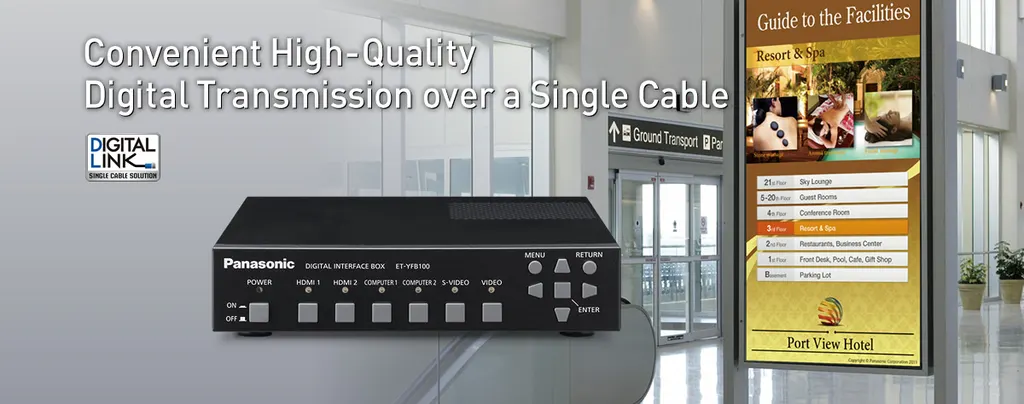
ET-YFB100G
Panasonic ET-YFB100G Digital Interface Box
The Panasonic ET-YFB100G is a digital interface box for DIGITAL LINK-ready Panasonic displays. It sends uncompressed HD video, audio and control signals up to 100 metres over a single CAT5e (STP) cable, so ceiling-mounted and permanent installations need fewer cable runs. It offers two HDMI inputs, two RGB inputs and a separate audio output, and suits schools, government offices and meeting spaces across Qatar. Request a quote.
What the ET-YFB100G does in a DIGITAL LINK system
The Panasonic ET-YFB100G is a digital interface box that connects your source equipment to a DIGITAL LINK-ready Panasonic display. Its DIGITAL LINK output uses an RJ-45 port to carry uncompressed HD video, audio and control signals, including Ethernet and RS-232C, over a single CAT5e (STP) cable or higher for up to 100 metres. One cable run replaces several separate lines, which is why the unit suits ceiling-mounted and other permanent installations.
Inputs and outputs that matter on site
- Two HDMI inputs with 19-pin connectors, HDCP compatible and supporting Deep Color
- Two RGB inputs on D-sub HD 15-pin connectors, plus composite and S-Video inputs for older sources
- A separate audio output that keeps sound running when the display is switched off
- A LAN port (10Base-T/100Base-TX) and an RS-232C serial port for external control
Image quality and automatic setup
Digital transmission keeps picture and sound quality intact over the full cable run. Interlaced motion signals are converted into smooth progressive images, and PC signals are resized to match the display panel resolution when the output is set to AUTO. The Auto Setup function identifies the incoming signal and adjusts the output for the best angle of view. 3D video passes through in Pass Through mode only. Some formats are not handled by the scaling function, so test the laptops and media players your team uses before sign-off.
Where it fits across Qatar
- A university lecture theatre in Education City with a ceiling-mounted display, while the presentation source stays in a comms cabinet at the back of the building.
- A government ministry in West Bay fitting out boardrooms that all draw sources from one central room, with one cable run per room.
- A private school in Al Wakrah equipping classrooms with permanent screens and wanting one cable per room rather than a bundle of separate video and control lines.
Planning the rack, power and environment
The unit measures 210 x 44 x 250 mm and weighs about 1.15 kg without its AC adaptor. The package includes two mounting brackets for rack or countertop use, a bracket for rack installation, four legs and the screws to fit them. Power consumption is 16 W, falling to 0.2 W with the power off. The adaptor accepts 100-240 V AC at 50/60 Hz, so it covers Qatar's 240 V supply, and three 2 m power cords are supplied. The operating range is 0-40 °C with 20-80% humidity and no condensation. Summer temperatures in Qatar often exceed 45 °C, so install the unit in an air-conditioned room or a ventilated rack, not in a hot ceiling void. Eco mode stops the DIGITAL LINK output when no signal is detected, but the time and other menu settings must be made first.
Planning the quote
Before ordering, SmartRooms Qatar can carry out a free site survey to confirm cable routes, rack space and the display model you plan to use. Tell us the number of displays, the source devices and whether the room is air-conditioned. Request a quote and our team will usually respond within one working day. Purchase orders and government tenders are welcome.
Highlights
- DIGITAL LINK output carries HD video, audio and control over one cable
- Up to 100 m over CAT5e (STP) cable or higher
- Two HDMI and two RGB inputs, plus composite and S-Video
- Separate audio output works with the display powered off
- Operating range 0-40 °C; 16 W power consumption
- Rack, countertop and leg mounting parts included
Estimated timeline
Quotation within 1 working day · delivery timing depends on stock availability, and we confirm it with your quotation.
Specifications
General2
- Power supply
- DC 16 V (DC input terminal)
- Power consumption (use with supplied AC adaptor)
- 16 W [0.2 W with the power off] (including power consumption of the AC adaptor)
AC adapter2
- Input
- 100-240 V AC, 50/60 Hz
- Output
- DC 16 V, 3.75 A
Scanning frequency4
- HDMI
- fH: 27-99 kHz, fV: 24-119.8 Hz, dot clock: 25.2-162 MHz
- RGB (analog)
- fH: 15.6-99 kHz, fV: 24-119.8 Hz, dot clock: 13.5-162 MHz
- YP B P R (YC B C R )
- fH: 15.75 kHz, fV: 60 Hz [480i (525i)] fH: 15.63 kHz, fV: 50 Hz [576i (625i)] fH: 31.50 kHz, fV: 60 Hz [480p (525p)] fH: 31.25 kHz, fV: 50 Hz [576p (625p)] fH: 45.00 kHz, fV: 60 Hz [720 (750)/60p] fH: 37.50 kHz, fV: 50 Hz [720 (750)/50p] fH: 33.75 kHz, fV: 60 Hz [1035 (1125)/60i] fH: 28.13 kHz, fV: 50 Hz [1080 (1125)/50i] fH: 28.13 kHz, fV: 25 Hz [1080 (1125)/25p] fH: 27.00 kHz, fV: 24 Hz [1080 (1125)/24p] fH: 33.75 kHz, fV: 30 Hz [1080 (1125)/30p] fH: 67.50 kHz, fV: 60 Hz [1080 (1125)/60p] fH: 56.25 kHz, fV: 50 Hz [1080 (1125)/50p]
- Video/S-Video
- fH: 15.75 kHz, fV: 60 Hz [NTSC/NTSC4.43/PAL-M/PAL60], fH: 15.63 kHz, fV: 50 Hz [PAL/PAL-N/SECAM]
Terminals14
- HDMI IN
- HDMI 19-pin x 2 (Deep Color, compatible with HDCP) 480p, 576p, 720/60p, 720/50p, 1080/60i, 1080/50i, 1080/24p, 1080/25p, 1080/30p, 1080/60p, 1080/50p, VGA (640 x 480)-WUXGA* 1 (1,920 x 1,200), audio signal: linear PCM (sampling frequencies: 48 kHz, 44.1 kHz, 32 kHz)
- COMPUTER IN
- D-sub HD 15-pin (female) x 2 (RGB/YP B P R /YC B C R x 2)
- VIDEO IN
- RCA pin x 1 (Composite VIDEO)
- S-VIDEO IN
- Mini DIN 4-pin x 1 (S-VIDEO)
- AUDIO IN
- M3 (L-R) x 1
- AUDIO OUT
- M3 (L-R) x 1 (variable)
- SERIAL IN
- D-sub 9-pin (female) x 1 for external control (RS-232C compliant)
- REMOTE IN
- D-sub 9-pin (female) x 1 for external control (parallel)
- LAN
- RJ-45 x 1, for network connection, 10Base-T/100Base-TX
- DIGITAL LINK
- RJ-45 x 1, for DIGITAL LINK connection (video, audio and control signals)
- Dimensions (W x H x D)
- 210 x 44 x 250 mm (8.3" x 1.8" x 9.9") (not including protruding parts)
- Weight
- Approximately 1.15 kg (2.54 lbs)* 2 (not including AC adaptor)
- Operating environment
- Operating temperature: 0-40 °C (32-104 °F), Operating humidity: 20 %-80 % (no condensation)
- Supplied accessories
- AC adaptor x 1, power cords (2 m) x 3, AC power cord holder x 1, AC power cord holder screw x 1, mounting brackets for rack or countertop installation x 2, mounting bracket for rack installation x 1, countersunk screws x 6, legs x 4, screws for installing legs x 4