Thursday, 22 October 2026 · 11 Jumada I 1448 AH Sun – Thu · 9:00 – 18:00
+971 56 914 9477 العربية
WhatsApp

QM55B-T

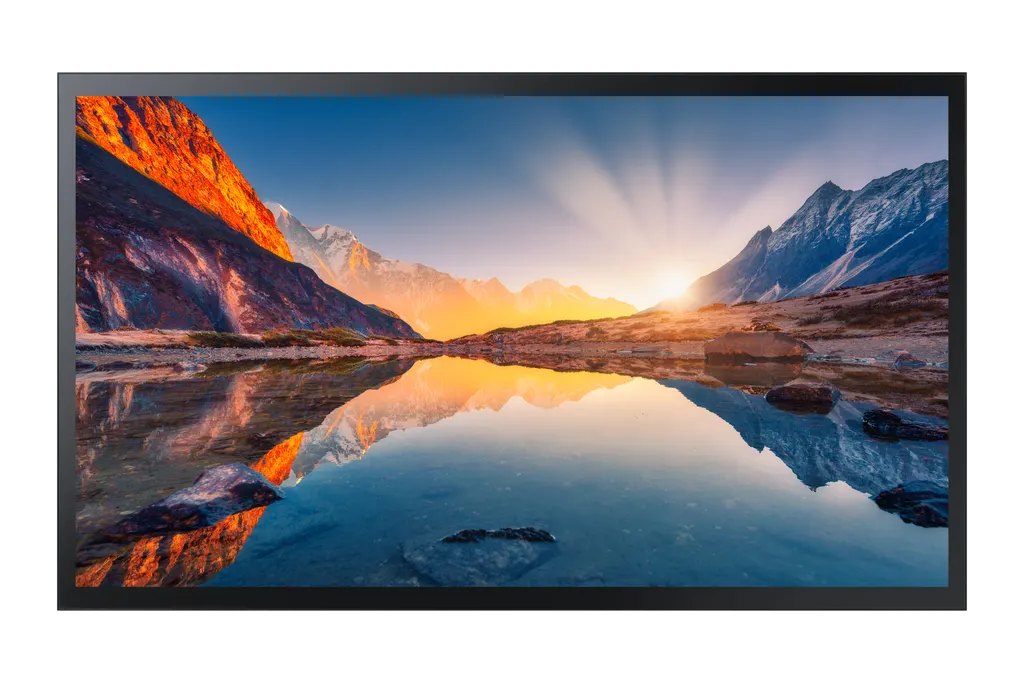
Samsung QM55B-T 55-inch UHD 4K Interactive Display

Screen size
55"
Resolution
3,840 x 2,160
Brightness
500(without Glass)
Operation
24/7
WhatsApp
Priceon request
QuotationWithin 1 working day
DeliveryConfirmed with your quote, based on stock
XLSXDownload datasheet (QM55B-T_Specifications_ae.xlsx)
Overview

The Samsung QM55B-T is a 55-inch UHD 4K touch display with a built-in Tizen media player, so it runs content without an external media player. It offers 3,840 x 2,160 resolution, capacitive touch, three HDMI 2.0 inputs and 24/7 operation support. Suited to Doha offices, corporate lobbies and classrooms that need a single interactive screen. Request a quote for delivery and installation across Qatar.

A 55-inch UHD touch display that runs its own content

The Samsung QM55B-T is a 55-inch interactive display with a 3,840 x 2,160 UHD panel and capacitive touch. Its built-in Tizen media player plays signage, presentation and touch-app content directly, so you do not need a separate media box behind the screen. That keeps cabling tidy in reception areas and meeting spaces where every extra device adds to the installation.

The panel uses VA technology with a 4,000:1 contrast ratio rated without glass, 178/178 viewing angles and an 8ms response time. Typical brightness is rated at 500 without glass and 400 with glass. The 25% glass haze and non-glare glass reduce reflections that would otherwise wash out content.

Connectivity and control for shared spaces

The rear panel offers three HDMI 2.0 inputs, one DisplayPort 1.2 input, two USB ports, an RJ45 network port, RS232 in and out, IR input and a stereo mini-jack audio output. Wi-Fi and Bluetooth are built in. HDCP 2.2 support is listed, which matters when protected content is played from a source device.

Where it fits in Qatar

  • Corporate lobbies and reception: a 55-inch screen showing wayfinding, visitor information and company content, running 24/7 in an air-conditioned building in West Bay or Lusail.
  • Meeting and training rooms: a touch display for smaller rooms where teams in Doha collaborate on a shared document, with the RJ45 port available for network-connected sources.
  • Retail and hospitality: a menu, promotion or wayfinding screen in a hotel lobby or mall unit, where the 24/7 operation rating suits long opening hours.

What to plan before you order

Check the operating range before choosing the location. The QM55B-T is specified for 0°C to 40°C and 10 to 80% humidity, non-condensing. Qatar summers can exceed 45°C, so install it in a conditioned room rather than a sun-facing atrium or an outdoor canopy, and confirm the location with the SmartRooms Qatar team during the free site survey.

Plan the wall structure for the weight. The set weighs 26.9 kg and the package 32.5 kg, and it mounts to a 200 x 200 mm VESA pattern. A wall mount (WMN4070SG) and a stand (STN-L4355G) are listed as options, so confirm which one fits your site before ordering. Allow for the 1253.8 x 734.6 x 56.7 mm footprint and cable routing to power and network points.

Power draw is 143W in operation and 0.5W in sleep mode, on an AC 100-240V, 50/60Hz supply, with energy efficiency class A. The IP5X rating listed in the manufacturer data supports use in dusty environments, which is relevant for sites near the Industrial Area.

Request a quote

SmartRooms Qatar supplies the QM55B-T across all eight municipalities, with professional installation and free site surveys. Quotations are usually issued within one working day, and we accept purchase orders and government tenders, including Monaqasat. Send us your room layout and number of units, and we will confirm the mount, stand and delivery details in your quotation. Request a quote today.

Highlights

  • 55-inch UHD 4K panel at 3,840 x 2,160 resolution
  • Built-in Tizen media player, no external player needed
  • Capacitive touch with 178/178 viewing angles
  • Three HDMI 2.0, one DisplayPort 1.2, two USB ports
  • Rated 0°C to 40°C, 10 to 80% humidity, non-condensing
  • Set weight 26.9 kg, 200 x 200 mm VESA mounting

Estimated timeline

Quotation within 1 working day · delivery timing depends on stock availability, and we confirm it with your quotation.

Specifications

49 specifications · Source: manufacturer · checked Oct 2026
Display15
Diagonal Size
55"
Panel Type
VA
Resolution
3,840 x 2,160
Pixel Pitch (HxV, mm)
0.315 x 0.315 (mm)
Brightness (Typ)
500(without Glass), 400(with glass)
Contrast Ratio
4000:1(without glass)
Viewing Angle (H/V)
178/178
Response Time
8ms
Color Gamut
92% (DCI-P3, CIE 1976)
Glass Haze
25% (without glass)
H-Scanning Frequency
30 ~ 81 kHz
Maximum Pixel Frequency
594MHz
V-Scanning Frequency
48 ~ 75 kHz
Contrast Ratio (Dynamic)
Mega
Operation Time Support
24/7
Connectivity14
HDMI In
3
DP In
1
Version of HDMI
2
Version of DP
1.2
Version of HDCP
2.2
USB
2
IR In
Yes
Audio In
No
Audio Out
Stereo Mini Jack
RS232 In
Yes
RS232 Out
Yes
RJ45 In
Yes
WiFi
Yes
Bluetooth
Yes
Power3
Power Supply
AC100-240V 50/60Hz
Power Consumption (On Mode, W)
143W
Power Consumption (Sleep Mode, W)
0.5W
Dimension2
Set Dimension (WxHxD, mm)
1253.8 x 734.6 x 56.7 mm
Package Dimension (WxHxD, mm)
1421 x 884 x 165 mm
Weight2
Set Weight (kg)
26.9 kg
Package Weight
32.5 kg
Operation Conditions2
Temperature
0℃~40℃
Humidity
10 ~ 80%, non-condensing
Mechanical Specification2
VESA Mount (mm)
200 x 200 mm
Frame Material
Non-Glossy
Optional Feature3
Touch
Yes
Mount
WMN4070SG
Stand
STN-L4355G
SoC2
OS Version
Tizen 6.5
Flash Memory Size
16GB
Eco1
Energy Efficiency Class
A
Touch1
Touch Technology
Capative
Certification and Compliance2
EMC
Class B
Safety
60950-1, 62368-1

Downloads

13 files from the manufacturer
XLSX Datasheets QM55B-T_Specifications_ae.xlsx 5 KB Samsung QM55B-T datasheets (XLSX, 5 KB) XLSX Datasheets QM55B-T_Specifications_sa_en.xlsx 5 KB Samsung QM55B-T datasheets (XLSX, 5 KB) PDF Manuals & guides BN68-15029A-00_QSG_QMB-T_EU_L25_220520.0.pdf 1.3 MB Samsung QM55B-T manuals & guides (PDF, 1.3 MB) PDF Manuals & guides BN68-15029D-00_QSG_QMB-T_ASIA MENA AFRICA_L06_220602.0.pdf 2.2 MB Samsung QM55B-T manuals & guides (PDF, 2.2 MB) PDF Manuals & guides BN68-15029H-00_QSG_QMB-T_EN_UKR_240710.0.pdf 2.3 MB Samsung QM55B-T manuals & guides (PDF, 2.3 MB) PDF Manuals & guides BN81-22493D-02_WEB_QMB QMB-N QMB-T_ASIA MENA AFRICA_ARA_250411.0.pdf 2.7 MB Samsung QM55B-T manuals & guides (PDF, 2.7 MB) PDF Manuals & guides BN81-22493D-02_WEB_QMB QMB-N QMB-T_ASIA MENA AFRICA_ENG_250411.0.pdf 2.6 MB Samsung QM55B-T manuals & guides (PDF, 2.6 MB) MSI Software & firmware · Opens on manufacturer site 1689320178917_A-MDC9GDSP-1243-20230628.msi Samsung QM55B-T software & firmware (MSI) MSI Software & firmware · Opens on manufacturer site A-CESNGDSP-1150_20240522.msi Samsung QM55B-T software & firmware (MSI) ZIP Software & firmware · Opens on manufacturer site BN81-22493B-03_WEB_QMB QMB-N QMB-T_EU CIS_L28_260331.0.zip Samsung QM55B-T software & firmware (ZIP) ZIP Software & firmware · Opens on manufacturer site BN81-22493D-02_WEB_QMB QMB-N QMB-T_ASIA MENA AFRICA_L06_250411.0.zip Samsung QM55B-T software & firmware (ZIP) ZIP Software & firmware · Opens on manufacturer site S-PTMWWC_1230.0_BEM.zip Samsung QM55B-T software & firmware (ZIP) ZIP Software & firmware · Opens on manufacturer site S-PTMWWC_1230.0_USB.zip Samsung QM55B-T software & firmware (ZIP)

Questions about QM55B-T

What is the Samsung QM55B-T designed for?
The QM55B-T is a 55-inch touch display for organisations that want interactive content and digital signage on one screen. Its 3,840 x 2,160 panel and capacitive touch suit collaborative meeting rooms, reception desks and information points where staff or visitors interact directly. It suits offices, schools and retail units in Qatar that need a single, self-contained display.
Do I need a separate media player with this display?
No. The display includes a built-in Tizen media player, so it can run content and touch apps without an external player behind the screen. Content is managed through MagicINFO, which the manufacturer describes as a solution for content creation, scheduling and management, with an early warning alert system to help avoid downtime. This simplifies cabling in lobbies and meeting rooms.
What connections does it offer for laptops and networks?
The QM55B-T has three HDMI 2.0 inputs, one DisplayPort 1.2 input, two USB ports, an RJ45 network port, RS232 in and out, IR input, and built-in Wi-Fi and Bluetooth. A stereo mini-jack audio output is also provided. In a boardroom in Doha, a laptop can connect over HDMI while the RJ45 port handles a wired network connection. Confirm the cable types your devices need before ordering.
Can it be used in Qatar's hot climate?
The manufacturer rates the QM55B-T for operating temperatures from 0°C to 40°C and 10 to 80% humidity, non-condensing. Qatar summers can exceed 45°C, so install it in an air-conditioned room rather than a sunlit atrium or outdoor canopy. Ask the SmartRooms Qatar team to confirm the location during a free site survey before the display is mounted.
Is a 55-inch screen the right size for a meeting room?
The 55-inch size suits smaller meeting rooms, huddle spaces and training rooms where attendees sit close to the screen. In a mid-sized room in West Bay, this size is enough to show a document with readable text. For larger boardrooms or lecture halls, a bigger panel would be a better choice. Measure the room and seating layout before making a decision.
How would a mall or hotel in Lusail use it?
A retail unit or hotel lobby in Lusail could use the QM55B-T for wayfinding, menus or promotions, and the touch function lets visitors browse information without staff help. The 24/7 operation support suits long opening hours. The typical brightness is rated at 400 with glass, so check the lighting at the proposed spot and confirm placement away from direct sunlight during the site survey.
How could a school use it in a classroom?
A private school in Al Wakrah fitting out a new classroom could use the QM55B-T as the main teaching screen, with touch allowing pupils to work on shared material at the board. The 55-inch size suits a smaller classroom. Non-glare glass reduces reflections from overhead lighting, which helps readability. Check where the lights and windows sit relative to the screen before mounting.
Can I manage several screens at different sites?
MagicINFO provides content creation, scheduling and management, plus an early warning alert system. For an organisation with screens in Doha and Al Khor, this helps the IT team plan content updates from one place. Tell us how many locations and units you need when requesting a quote, so the set-up and scheduling can be planned together.
What should I plan for when wall mounting it?
Plan for a set weight of 26.9 kg, a package weight of 32.5 kg and a set size of 1253.8 x 734.6 x 56.7 mm. The panel uses a 200 x 200 mm VESA pattern. The wall needs adequate structural support, and SmartRooms Qatar offers a free site survey to check the wall, the power point and the cable route before installation.
Are the wall mount and stand included?
The manufacturer data lists the WMN4070SG wall mount and the STN-L4355G stand as optional accessories, so they should be specified separately. The wall mount suits fixed meeting-room installations, while the stand suits reception desks or temporary set-ups where wall fixing is not possible. State your choice when requesting a quotation so the final configuration is confirmed in writing.
How much power does it use and does it suit Qatar mains?
The QM55B-T draws 143W in operation and 0.5W in sleep mode, with an energy efficiency class of A. Its power supply is specified at AC 100-240V, 50/60Hz, which covers the 240V, 50Hz mains used in Qatar. Power draw matters for long daily runtimes in offices and retail units, so include power outlet requirements in your quotation request.
How can I buy it through a purchase order or government tender?
SmartRooms Qatar accepts purchase orders (LPOs) and government tenders, including Monaqasat, and payment can be made by bank transfer, cheque or purchase order. Send the number of units and your mounting requirements, and a quotation is usually issued within one working day. This lets procurement teams compare the quotation against their tender specification.

Similar models

Elo 10-inch I-Series 5 with Android Elo 10-inch I-Series 5 Touchcomputer with Android 14 for Digital Signage and Self-Service
10″ 1920 x 1200 @ 60Hz LCD Panel: 450 nits
Elo 10-inch I-Series with Linux Elo I-Series 10-inch Linux Touch Computer E143205
10″ 1280 x 800 @ 60Hz LCD Panel: 300 nits
Email Call