





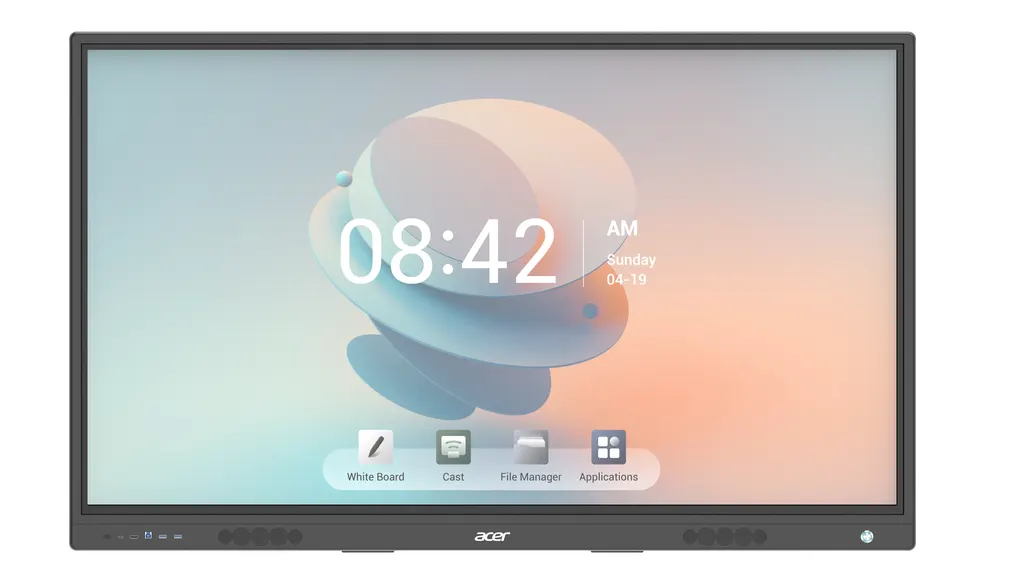
IZ75A
Acer IZ75A 75-inch 4K UHD Interactive Touch Display
- Resolution
- 3840(H) ×2160 (V)
- Touch
- 20 points (Drawing
- Memory
- 4 GB DDR4
- Storage
- 32 GB EMMC5
The Acer IZ75A is a 75-inch 4K UHD interactive touch display with 20-point touch, a 400 cd/m2 LED panel and an OPS slot for an optional Intel Core i5 PC. It runs Android 11.0 and supports Wi-Fi 6, Bluetooth 5.0 and two HDMI inputs. Suited to boardrooms, lecture halls and training rooms in Doha, it carries a 3-year manufacturer warranty. Request a quote for supply and installation.
A 75-inch 4K touch panel built for shared screens
The Acer IZ75A combines a 3840 x 2160 LED-backlit panel with 20-point IR touch. Brightness is rated at 400 cd/m2, and the viewing angle is at least 178 degrees both horizontally and vertically, so people seated at the far end of a boardroom or lecture hall can still read the slides. The anti-glare cover glass, rated 9 on the Mohs scale, helps reduce reflections from ceiling lights and windows.
Touch accuracy is rated at 1 mm, with a response time below 5 ms. Palm detection and pen-and-touch differentiation let a presenter rest a hand on the glass while writing with a stylus. Annotation works over any connected source, so a teacher can mark up a laptop slide, a web page or a video without leaving that source. Two styluses with magnetic fixtures are included, one of them extendable.
Built-in Android with an optional OPS PC
The panel runs Android 11.0 on a quad-core A55 processor at 1.55 GHz, with 4 GB DDR4 RAM and 32 GB of eMMC storage. Its built-in tools cover drawing, a browser, PDF and PPT viewers and media playback. Drawing can run across split screens, and files can be imported from email, USB drives or the internet, or saved into a private folder on the panel.
An OPS slot accepts an optional Intel Core i5 module, listed with 8 GB of memory and a 512 GB SSD. That module ships with no operating system, so your IT team should confirm the licence and software image before ordering. Compatibility is listed for Windows 11, Linux, Android and Chrome.
Connections for laptops, PCs and the network
The panel provides the ports a busy room needs:
- Two HDMI inputs, one HDMI output and one VGA input
- One DP 1.2 port for a second computer
- Four multimedia USB ports: two front USB 3.0, one rear USB 3.0 and one rear USB 2.0
- RJ-45 LAN for wired networking, plus Wi-Fi 6 and Bluetooth 5.0
- RS232, line out, a microphone input and two touch inputs
Speakers are rated at 20 W each. The power input accepts 100 to 240 V at 50/60 Hz, a range that covers Qatar's 240 V mains. The 75-inch model has a power rate of 350 W and a standby draw of 0.5 W or less.
Planning the wall mount, the room and the heat
The panel mounts to a wall using a 600 x 400 mm VESA pattern. Its package measures 1880 x 1160 x 230 mm and weighs 76 kg, so plan a two-person lift and confirm that the wall or frame can carry the load. SmartRooms Qatar offers a free site survey before installation, covering wall type, access route and cable runs.
The operating temperature range is 0 to 40 degrees Celsius. Outdoor temperatures in Qatar can exceed 45 degrees in summer, so install the panel in an air-conditioned room, away from direct sunlight through glass. If the planned spot is a lobby or semi-open area, confirm the environment with the SmartRooms Qatar team before ordering.
Where it fits in Qatar
- A boardroom in West Bay where a management team reviews reports while colleagues join from abroad
- A school in Al Wakrah fitting out a lecture room, where teachers annotate lessons on the glass and save materials to the panel
- A training room in Education City where instructors present, annotate and share sessions with a group
Schools and government bodies ordering several units can raise one LPO, and tenders including Monaqasat are supported. To request a quote, send your room size, wall position, number of units and whether you need an OPS PC. SmartRooms Qatar usually returns quotations within one working day.
Highlights
- 75-inch 4K UHD (3840 x 2160) LED-backlit display
- 400 cd/m2 brightness with 178-degree viewing angle
- 20-point IR touch with 1 mm accuracy and palm detection
- Android 11.0 with OPS slot for optional Intel Core i5 PC
- Wi-Fi 6, Bluetooth 5.0, RJ-45 LAN and two HDMI inputs
- 3-year manufacturer warranty and 600 x 400 mm VESA mount
Classroom fit
At 75″ the farthest student should sit within about 5.6 m (6× the screen height).
Estimated timeline
Quotation within 1 working day · delivery timing depends on stock availability, and we confirm it with your quotation.
Specifications
General9
- Type
- 75”" Interactive Touch Screen
- Wall mount
- VESA Standard (Wall mount)
- Input voltage
- AC:100~240V 60/50HZ
- Power rate
- 350W (75”)
- Standby
- ≤0.5W
- Operating Temperature
- 0℃~ 40℃
- Package Dimension(L*H*W) mm
- 1880*1160*230 (75”)
- G.W (kg)
- 76kgs for 75”
- VESA Mount
- 600 x 400 mm (75”)
Panel features6
- Brand
- MODEL NAME: ACER IZ75A
- Resolution
- 3840(H) ×2160 (V)
- Display Color
- 1.07Billon Colors
- Brightness
- 400cd/m2*
- LCD (with LED backlit)
- LED Backlit
- View Angle
- R/L 178 (Min.), U/D 178 (Min.)
Sound/speaker feature1
- speaker output
- 20W × 2*
Inputs & Outputs12
- HDMI Input
- 2
- HDMI Output
- 1
- Multi-Media USB
- 4 (2 Front 3.0,1x3.0 rear, 1x2.0 rear)
- RS232
- 1
- RJ-45
- Yes (LAN) / Ethernet
- Touch input
- 2
- Bluetooth
- BT 5.0
- WIFI
- WIFI 6
- VGA in
- 1
- Line Out
- 1
- MIC
- 1
- DP 1.2
- 1
Touch screen8
- Cover Glass
- Anti-glare, 9 Mohs
- Touch Resolution
- 32768x32768
- Touch Accuracy
- 1mm
- Annotation Over Any Source
- Yes
- Palm Detection
- Yes
- Pen and Touch Differentiation
- Yes
- Pens Included
- 2 Stylus with Magnetic fixtures
- Compatibility
- Windows 11/ Linux/Android /Chrome
Android5
- OS Version
- ANDROID 11.0
- Processor
- A55 Quadcore 1.55Ghz
- Flash
- 32 GB EMMC5
- RAM
- 4 GB DDR4
- Touch
- 20 points (Drawing, Annotation, Painting, Eraser, Highlighter, PDF Viewer, PPT Viewer, Browser, Movies & Image Viewer, External Source annotation) -- Files like PDF or objects can be saved in a private folder, 4 Drawing through split screens / Export and Import of files from mails / pen-drive or internet / Multimedia feature
OPS PC (Optional)1
- OPS
- Optional only (Intel Core i5) with 8GB Memory and 1TB / 512GB SATA SSD
Accessories1
- Included
- User manual, remote control, power cable, touch cables, HDMI cable, touch pens (2 stylus, 1 extendable),




