





Thursday, 22 October 2026 · 11 Jumada I 1448 AH Sun – Thu · 9:00 – 18:00
+971 56 914 9477 العربية
WhatsApp

CP8601K

BenQ CP8601K 86-inch DuoBoard Interactive Flat Panel

Screen size
86''
Resolution
UHD 3840 × 2160 pixels
Touch
Capacitive touch
System
Android 8.0
WhatsApp
Priceon request
QuotationWithin 1 working day
DeliveryConfirmed with your quote, based on stock
PDFDownload datasheet (IH_EN_260519104241.pdf)
Overview

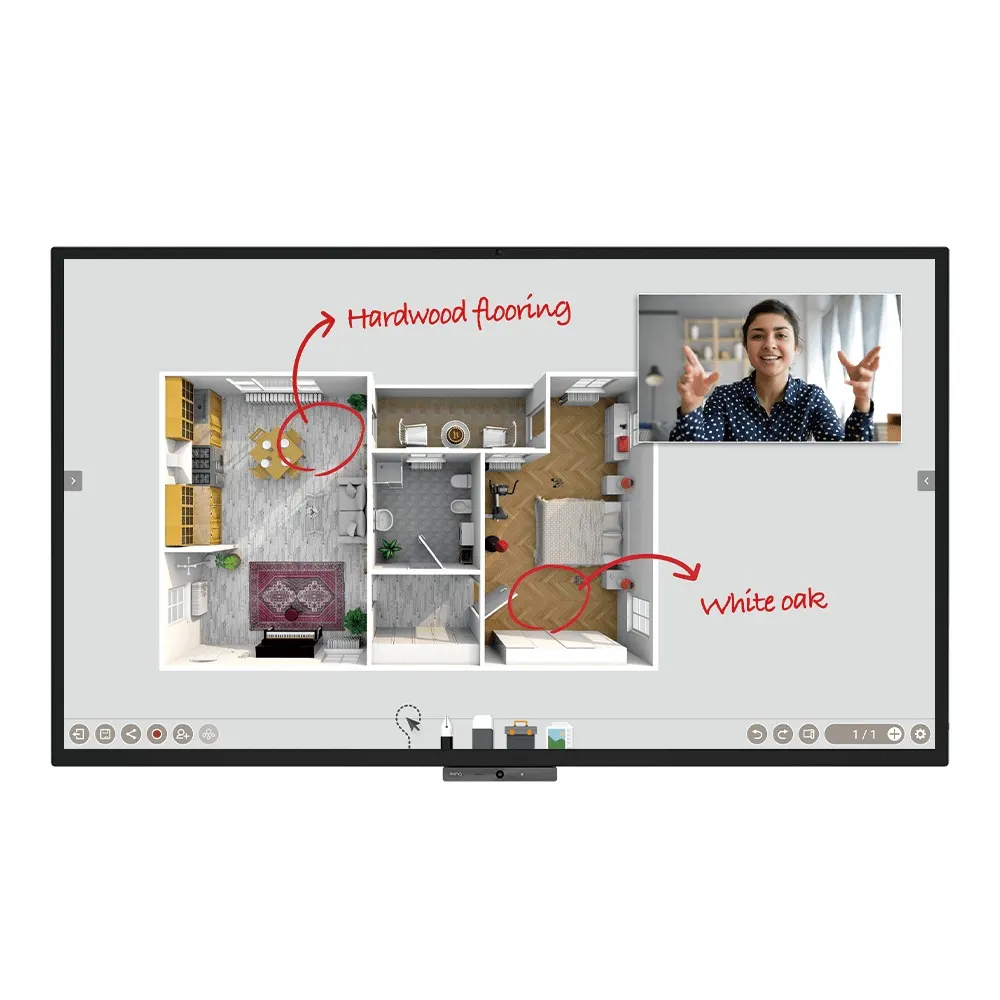
The BenQ CP8601K is an 86-inch interactive flat panel with a UHD 3840 × 2160 IPS screen, 20-point capacitive touch, a built-in camera and microphone array, and an OPS slot for a slot-in PC. It suits boardrooms and large meeting rooms in Qatar where teams in Doha and abroad join video calls, share screens wirelessly and write together on one board.

What the CP8601K is

The CP8601K is an 86-inch interactive flat panel from BenQ's DuoBoard range. Its IPS panel runs at 3840 × 2160 (UHD) with 350 nits typical brightness and 10-bit colour depth, so text and diagrams stay readable in a lit room. A 20-point capacitive touch layer sits behind 7H tempered glass, with a touch response time under 8 ms. The screen carries a nano-ionic silver germ-resistant coating.

Video calls, inputs and the OPS slot

One built-in camera, a six-microphone array with a maximum pickup range of 8 m, and two 10 W speakers with a 16 W subwoofer let a room join a call without a separate conference unit. The panel ships with TeamViewer Meeting, and the manufacturer states it is compatible with Zoom, Google Meet and Microsoft Teams. The OPS slot takes a slot-in PC, so the room can run its own computer on the board and still use the display's camera, microphones and touch screen. Inputs include three HDMI 2.0 ports, one VGA port, and seven USB-A ports across USB 2.0 and USB 3.0.

Where it fits in Qatar

In a boardroom in West Bay or Msheireb, the panel gives a leadership team one large surface for presentations, video calls with colleagues in other cities and shared annotation. A lecture or seminar room at Education City can use the two included pens and EZWrite 5.0 so two presenters write side by side. A private school in Al Wakrah fitting out a staff meeting room could use InstaShare 2 to let teachers mirror laptops and phones without cables.

Planning the room, power and mounting

The unit measures 1962.0 × 1167.0 × 85.0 mm and weighs 71.5 kg, or 97.9 kg packed. It uses a VESA 800 × 600 mm pattern with four M8 screws, and one wall mount is included. Because of the weight, book a site survey before wall fixing to check the wall structure and cable route. Power is rated AC 100-240V at 50/60Hz, with typical consumption of 187 W and standby below 0.5 W. The operating range is 0°C to 40°C with 10% to 90% non-condensing humidity. Summer temperatures in Qatar can exceed 45°C, so install the panel in an air-conditioned room and confirm the environment with the SmartRooms Qatar team.

Managing several displays

Organisations running more than one board can use BenQ's DMS, AMS and OTA update tools to install apps, update firmware and manage user accounts from one place. Flicker-Free and Low Blue Light features, a motion sensor that adjusts settings by viewing distance, and a TVOC air sensor add comfort and monitoring for daily use.

If you are planning a meeting room upgrade in Doha, Lusail or Al Khor, request a quote from SmartRooms Qatar. We supply the CP8601K across all eight municipalities of Qatar, arrange professional installation, and can work to a purchase order or LPO for schools, ministries and government tenders.

Highlights

  • 86-inch UHD IPS panel at 3840 × 2160 resolution
  • 20-point capacitive touch behind 7H tempered glass
  • Built-in camera, six-microphone array and 2 × 10 W speakers
  • OPS slot for a slot-in PC plus HDMI and VGA inputs
  • Nano-ionic silver germ-resistant screen and TVOC air sensor
  • Wall mount, two pens and remote control included

Classroom fit

At 86″ the farthest student should sit within about 6.4 m (6× the screen height).

Estimated timeline

Quotation within 1 working day · delivery timing depends on stock availability, and we confirm it with your quotation.

Specifications

63 specifications · Source: manufacturer · checked Oct 2026
Panel14
Screen size
86''
Panel type
IPS
Active area
1895.0 × 1066.0 mm
Aspect ratio
16:9
Resolution
UHD 3840 × 2160 pixels
Response time
8 ms
Color depth
10-bit
Orientation
Landscape
Operation hours
18 hours / 7 days
Panel brightness (typical)
350 nits
Contrast ratio (typical)
1200:1
Dynamic contrast ratio
30,000:1
Color gamut
68% NTSC
Backlight life (typical)
50,000 hrs
Glass3
Germ-resistant technology
Nano-ionic silver
Anti-glare
Yes | NA
Hardness
7H tempered
Touch screen3
Touch technology
Capacitive touch
Touch points
20
Touch response time
< 8 ms
System4
GPU
Mali-G51MP4
CPU
A73 × 2 + A53 × 2
Memory | Storage
4GB I 32GB
OS
Android 8.0
Connectivity10
HDMI (in | out)
3 × HDMI 2.0 | 1 × HDMI 2.0
USB-A
4 × 2.0 + 3 × 3.0
USB-B (for touch)
2 × 2.0
3.5 mm Line in (1)
Mic / PC Audio × 1_test
VGA
1 | 0
3.5 mm Line out
Earphone × 1
OPS slot (for slot-in PC)
1
S/PDIF out
0 | 1 (optical)
Ethernet
10 / 100 / 1000 Mbps (Android), 10 / 100 / 1000 Mbps (OPS) × 1
RS-232
1 | 0
Built-in peripherals7
NFC sensor
Yes
Motion sensor
1
Microphone
6 (Max. pickup range 8m)
Speaker
2 × 10 W
Camera
1
Air sensor
TVOC
Subwoofer
1 × 16 W
Power2
Power
AC 100-240V 50/60Hz
Typical power consumption
187 W
Physical4
Dimensions (W x H x D)
1962.0 × 1167.0 × 85.0 mm (77.2 × 45.9 × 3.3 inch)
Shipping dimensions (W x H x D)
2146 × 1326 × 280 mm (84.5 × 52.2 × 11.0 inch)
Weight (product I shipping)
71.5 kg | 97.9 kg (157.6 lbs | 215.8 lbs)
Mount (screws)
VESA 800 × 600 mm (4 × M8 × 25L)
Environment4
Operating temperature
0°C ~ 40°C | 32°F ~ 104°F
Storage temperature
-20°C ~ 60°C | -4°F ~ 140°F
Storage humidity
10% ~ 90% RH non-condensing
Operating humidity
10% ~ 90% RH non-condensing
Software8
Whiteboarding
EZWrite 5.0
Wireless screen sharing
InstaShare 2
Device management
DMS
Account management
AMS
Flicker Free
Yes
Quick access tool
Floating Tool
Broadcast system
X-Sign Broadcast
Low Blue Light
Yes
Accessories4
Cables
1 × VGA(5 m | 16.4 ft), 1 × HDMI (1.5 m | 4.9 ft), 1 × USB (3 m | 9.8 ft)
Wall mount
1
Pen
2
Remote control
1

Downloads

14 files from the manufacturer
PDF Manuals & guides IH_EN_260519104241.pdf 14.5 MB BenQ CP8601K manuals & guides (PDF, 14.5 MB) PDF Manuals & guides RS232_LAN Control Protocol_v20200115_Others.pdf 937 KB BenQ CP8601K manuals & guides (PDF, 937 KB) PDF Manuals & guides UM_AR_210319130853.pdf 15.0 MB BenQ CP8601K manuals & guides (PDF, 15.0 MB) PDF Manuals & guides UM_EN_210319130853.pdf 14.9 MB BenQ CP8601K manuals & guides (PDF, 14.9 MB) PDF Manuals & guides · Opens on manufacturer site AMS_EN_250819160158.pdf BenQ CP8601K manuals & guides (PDF) PDF Manuals & guides · Opens on manufacturer site DMS Cloud_EN_260929100553.pdf BenQ CP8601K manuals & guides (PDF) PDF Manuals & guides · Opens on manufacturer site DMS Local_EN_251223091035.pdf BenQ CP8601K manuals & guides (PDF) PDF Manuals & guides · Opens on manufacturer site Saffi_EN_230704164442.pdf BenQ CP8601K manuals & guides (PDF) PDF Manuals & guides · Opens on manufacturer site X-Sign-Broadcast_EN_221206164346.pdf BenQ CP8601K manuals & guides (PDF) ZIP Drawings & CAD · Opens on manufacturer site CP8601K_Display CAD_CAD_Others.zip BenQ CP8601K drawings & cad (ZIP) ZIP Drawings & CAD · Opens on manufacturer site Wallmount Drawing_1.00_Others_260922163728.zip BenQ CP8601K drawings & cad (ZIP) PDF Certificates & compliance siaa-tuv-certificates-antibacteria-simplified-2021.pdf 1.0 MB BenQ CP8601K certificates & compliance (PDF, 1.0 MB) ZIP Software & firmware · Opens on manufacturer site Camera Driver_v20210121_Windows.zip BenQ CP8601K software & firmware (ZIP) PDF Other documents cp8601k-ff-20221121.pdf 504 KB BenQ CP8601K other documents (PDF, 504 KB)

Questions about CP8601K

Who is the BenQ CP8601K designed for?
It suits boardrooms, executive meeting rooms and training rooms where one large surface must handle presentations, video calls and joint writing. The 86-inch UHD IPS panel with 20-point touch is practical for groups in Doha, West Bay or Lusail who share a room with colleagues joining from other offices. It is intended as a wall-mounted room fixture, so plan it as a permanent installation rather than a portable screen.
Does it include a camera and microphones for video calls?
Yes. The panel has one built-in camera, a six-microphone array with a maximum pickup range of 8 m, and two 10 W speakers with a 16 W subwoofer. It ships with TeamViewer Meeting, and the manufacturer states it is compatible with Zoom, Google Meet and Microsoft Teams. A team in a Doha meeting room can join a call with overseas colleagues without a separate conference unit, though you should test the specific platform your organisation uses before go-live.
What is the OPS slot used for?
The OPS slot accepts a slot-in PC, so the room can run its own computer on the board rather than on a separate desk unit. The display also provides an Ethernet connection for the OPS PC alongside its Android system port. In a ministry meeting room in the Industrial Area, staff can run their chosen computer on the board while still using the built-in camera, microphones and touch screen for calls and presentations.
Which input sources can I connect?
The CP8601K has three HDMI 2.0 inputs and one HDMI 2.0 output, one VGA input, and a 3.5 mm line input for mic or PC audio. It also has a 3.5 mm earphone output, an optical S/PDIF output and an RS-232 port. USB flash drives are supported as a source, and seven USB-A ports are provided, four at USB 2.0 and three at USB 3.0. For a lecture room in Education City that uses a laptop and a second source, the three HDMI inputs cover most setups.
How responsive is the touch, and can two people write at once?
The screen uses 20-point capacitive touch with a response time under 8 ms, and multi-touch supports several people at the glass. Two pens are included, and EZWrite 5.0 lets two users write or draw at the same time in different colours, which suits two presenters at a joint planning session. Handwriting recognition converts writing into digital text without switching modes. The front glass is rated 7H, which helps it withstand daily use in busy rooms.
Can staff share a laptop or phone screen without cables?
Yes. InstaShare 2 mirrors content from smartphones, tablets and laptops in both directions without video cables, whether the device is in the room or remote. Two-way touch control works on Windows and macOS, and the feature can show up to four attendee screens at once with central control over connected devices. In a training centre in Al Rayyan, a trainer can review several trainees' work during one session from the same board.
What software and operating system come built in?
The panel runs Android 8.0 with 4GB of memory and 32GB of storage, using an A73 and A53 processor configuration. Built-in software includes EZWrite 5.0 for whiteboarding, InstaShare 2 for wireless sharing, and the Floating Tool, which lets users annotate over any app or video and capture part of the screen. AMS brings personal settings and cloud files into the room, and DMS handles device management for procurement teams comparing platforms.
Will it fit my wall, and how heavy is it?
The product measures 1962.0 × 1167.0 × 85.0 mm and weighs 71.5 kg, while the shipping weight is 97.9 kg. It uses a VESA 800 × 600 mm mounting pattern with four M8 × 25 screws, and one wall mount is included. Because the panel is heavy and some meeting room walls are partitions, SmartRooms Qatar offers free site surveys so the wall structure and cable route are checked before fixing.
Can it go in a majlis, an entrance lobby or a room without air conditioning?
The operating range is 0°C to 40°C with 10% to 90% non-condensing humidity, and storage is rated from -20°C to 60°C. Qatar summer temperatures can exceed 45°C, so the panel should sit in an air-conditioned room rather than a lobby with open doors or a window-facing wall. Confirm the room conditions with the SmartRooms Qatar team before installation, especially for a hotel lobby near Hamad International Airport.
What are the power requirements, and does it suit Qatar's supply?
The power input is AC 100-240V at 50/60Hz. Qatar mains run at 240 V and 50 Hz, which falls inside that input range, but the plug and cord type should be confirmed with our team before ordering. Typical consumption is 187 W, and standby draw is below 0.5 W. A school fitting out several classrooms can use these figures to estimate the load on each room circuit.
How do we manage several boards across a school or office group?
BenQ's Device Management Solution (DMS) lets administrators install apps and monitor or update multiple displays remotely through DMS Cloud, and OTA updates deliver new firmware. Identity and Access Management can sync user accounts with an AD server, and the TVOC air sensor adds room air monitoring. For a school in Al Khor or a ministry with several boards, SmartRooms Qatar can quote for the full set against a purchase order or LPO.

Similar models

BenQ CM7505 BenQ Board CM7505 75-inch Interactive Display
75″ UHD 3840 × 2160 pixels Ultra Precision IR
SMART SBID-6286S-V3 SMART Board 6086S-V3 86-inch Interactive Display with iQ
86″ 4K UHD (3840 × 2160) HyPr Touch with InGlass
SMART SBID-6286S-V3-P SMART Board 6086S-V3 Pro 86-inch Interactive Display with iQ
86″ 4K UHD (3840 × 2160) HyPr Touch with InGlass
Clevertouch Clevertouch Edge 65" Clevertouch Edge 65" 4K Interactive Display with Camera and Speakers
65″ 4K UHD (3840x2160 @60Hz) Android 15
Clevertouch Clevertouch Edge 86" Clevertouch Edge 86" 4K Interactive Flat Panel
86″ 4K UHD (3840x2160 @60Hz) Android 15
Email Call




