





Thursday, 22 October 2026 · 11 Jumada I 1448 AH Sun – Thu · 9:00 – 18:00
+971 56 914 9477 العربية
WhatsApp

RE7503

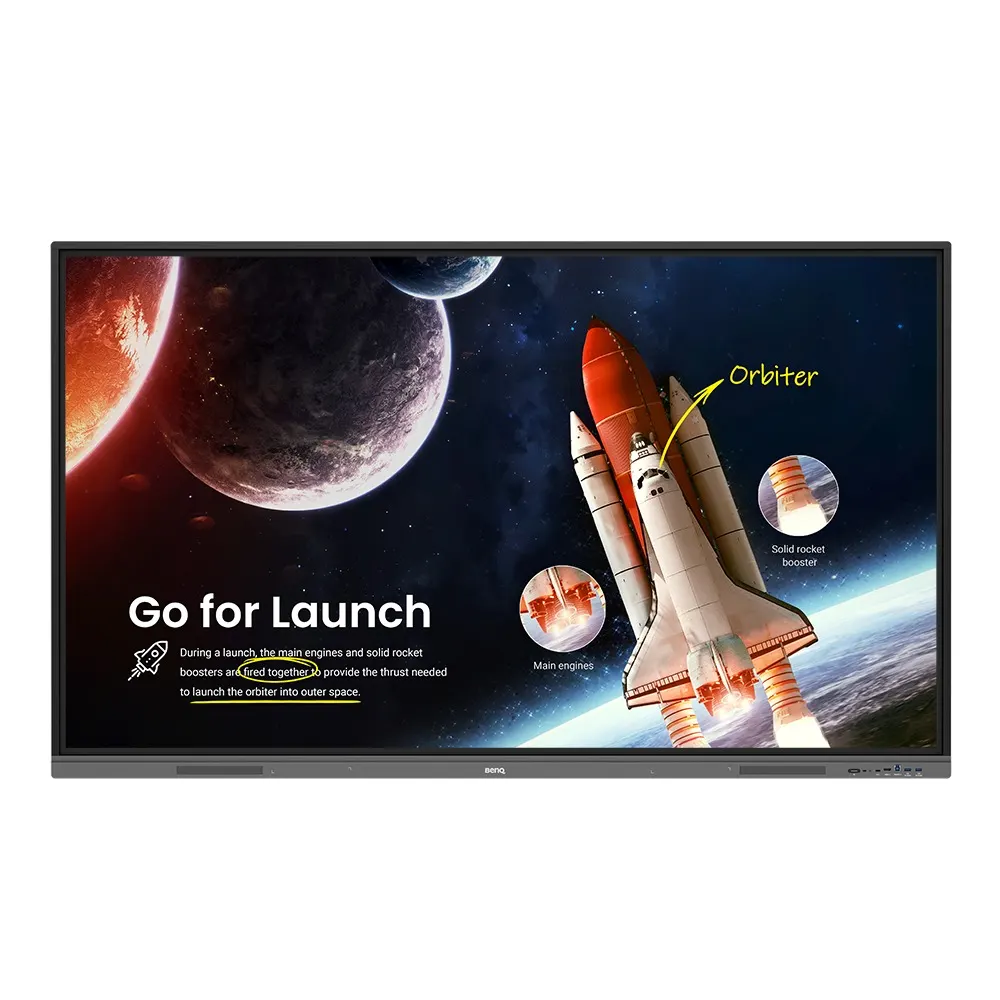
BenQ RE7503 75-inch Essential Series Interactive Display

WhatsApp
Priceon request
QuotationWithin 1 working day
DeliveryConfirmed with your quote, based on stock
PDFDownload datasheet (IH_EN_260519104241.pdf)
Overview

The BenQ RE7503 is a 75-inch interactive display from the Essential Series, built for classrooms and training rooms in Qatar. It has a 4K anti-glare screen, up to 40 touch points, built-in 2×16W speakers and Android 11. A front 65W USB Type-C port charges devices, and the display can be managed remotely for updates. It suits schools and training centres that want one screen for teaching, sharing and video calls.

What the RE7503 is built for

The BenQ RE7503 is a 75-inch interactive display in the BenQ Board Essential RE03 series. It is aimed at schools, universities and training centres that need one screen for teaching, group work and remote sessions. The 4K panel has an anti-glare finish, which helps the picture stay readable in rooms with windows or bright ceiling lights. Built-in 2×16W speakers and Android 11 mean that many lessons can run without a separate media player.

Touch, writing and sharing from the seats

The screen supports up to 40 touch points and uses Fine IR+ technology, so several pupils can work at the board at the same time. Zero-bonding technology and a quick response rate are designed to keep pen strokes smooth and accurate during long annotations. EZWrite 6 lets teachers open PDFs and images on the board and mark them up with interactive tools and templates. InstaShare 2 allows students to cast laptop or tablet screens using Miracast, AirPlay or the InstaShare app or button, so presentations can happen from their desks.

Health, eyesight and dust resistance

The touchscreen, pen and front panel button use a germ-resistant formula that the source data says TÜV recognises as 99.9% effective against common germs. Low blue light and flicker-free technologies are built in to help reduce eye strain during full school days. The display is certified IP5X dust-proof, which matters for classrooms near construction sites or in parts of Qatar where dust storms are frequent. The data does not list an operating temperature range, so confirm the room conditions with SmartRooms Qatar before placing the display anywhere other than an air-conditioned space.

Connectivity, management and where it fits

  • Front USB Type-C port with 65W charging and touchback
  • Gigabit Ethernet port for fast transfer of class files
  • Remote over-the-air updates and device management
  • IAM and AMS for user permissions and cloud account access
  • X-Sign Broadcast for campus-wide announcements

A secondary school in Al Sadd replacing an old projector could mount one RE7503 at the front of each classroom, with teachers loading lessons from their cloud accounts or Google Classroom. A university in Education City could use it in a seminar room where a lecturer hosts a guest speaker abroad through video conferencing and cloud whiteboarding, with a suitable camera added. A training centre in the Industrial Area could use it in a briefing room where safety instructions are shown on the board and announcements are pushed from a central system.

Planning the installation

Before ordering, measure the wall or stand position and check the power and network points nearby. A 75-inch panel is heavy and needs a secure wall mount or stand, so SmartRooms Qatar offers a free site survey to check the wall, sightlines and cable routes before installation. For schools and government bodies ordering several units, a purchase order (LPO) or tender reference can be included with your request, and quotations are usually sent within one working day. Lead times depend on stock and will be confirmed with your quotation.

Request a quote from SmartRooms Qatar with your room sizes, quantities and mounting preferences, and we will confirm the configuration and next steps.

Highlights

  • 75-inch 4K anti-glare screen
  • Up to 40 touch points with Fine IR+ technology
  • Built-in 2×16W speakers
  • 65W USB Type-C charging on the front ports
  • IP5X dust-proof certification
  • Remote OTA updates and central device management

Classroom fit

At 75″ the farthest student should sit within about 5.6 m (6× the screen height).

Estimated timeline

Quotation within 1 working day · delivery timing depends on stock availability, and we confirm it with your quotation.


Specifications

Source: manufacturer · checked Oct 2026
The full specification and datasheet for this model are available on request; we send them with your quotation.

Downloads

13 files from the manufacturer
PDF Manuals & guides IH_EN_260519104241.pdf 14.5 MB BenQ RE7503 manuals & guides (PDF, 14.5 MB) PDF Manuals & guides RCUM_EN_250616104132.pdf 968 KB BenQ RE7503 manuals & guides (PDF, 968 KB) PDF Manuals & guides RS232&LAN Command List_03_Others.pdf 667 KB BenQ RE7503 manuals & guides (PDF, 667 KB) PDF Manuals & guides UM_AR_231120111434.pdf 10.8 MB BenQ RE7503 manuals & guides (PDF, 10.8 MB) PDF Manuals & guides UM_EN_240423161018.pdf 11.7 MB BenQ RE7503 manuals & guides (PDF, 11.7 MB) PDF Manuals & guides · Opens on manufacturer site AMS_EN_250819160158.pdf BenQ RE7503 manuals & guides (PDF) PDF Manuals & guides · Opens on manufacturer site DMS Cloud_EN_260929100553.pdf BenQ RE7503 manuals & guides (PDF) PDF Manuals & guides · Opens on manufacturer site DMS Local_EN_251223091035.pdf BenQ RE7503 manuals & guides (PDF) PDF Manuals & guides · Opens on manufacturer site X-Sign-Broadcast_EN_221206164346.pdf BenQ RE7503 manuals & guides (PDF) ZIP Drawings & CAD · Opens on manufacturer site RE7503_Display CAD_02_Others.zip BenQ RE7503 drawings & cad (ZIP) ZIP Drawings & CAD · Opens on manufacturer site Wallmount Drawing_1.00_Others_260922163728.zip BenQ RE7503 drawings & cad (ZIP) PDF Certificates & compliance RE7503_DM_EN_220523110708.pdf 529 KB BenQ RE7503 certificates & compliance (PDF, 529 KB) ZIP Software & firmware · Opens on manufacturer site Additional Driver to Support Gesture_Mac_v07.00_60_Mac_221026103349.zip BenQ RE7503 software & firmware (ZIP)

Questions about RE7503

What is the BenQ RE7503 and who is it for?
The BenQ RE7503 is a 75-inch interactive display from the BenQ Board Essential RE03 series, designed for classrooms and training rooms. It suits school leaders, IT teams and facilities managers who want one screen for teaching, annotation and video sessions. In Qatar it fits schools in Doha or Al Rayyan that are replacing a projector and whiteboard setup with a single display.
How many touch points and what resolution does the screen offer?
The screen supports up to 40 touch points with Fine IR+ technology, allowing fast response when several students write on the board at once. The panel is 4K with an anti-glare finish. This combination helps a maths teacher working through a long problem keep lines sharp and accurate in front of the whole class.
Does the display have built-in speakers?
Yes. It includes 2×16W built-in speakers, so teachers can play audio, video or recorded lessons without an external speaker or media player. For large halls or lecture theatres, check with SmartRooms Qatar whether an additional audio system is needed for the room size before you confirm your order.
Can it be used for video conferencing with teams abroad?
The RE series supports video conferencing and cloud whiteboarding, so a lecturer in Education City can host a guest speaker from overseas or connect with students studying from home. The product data for this model does not list a built-in camera or microphone, so confirm the conferencing kit with the SmartRooms Qatar team when you request a quote.
What connections are on the front of the display?
The front includes a full-feature USB Type-C port that provides USB charging at up to 65W and touchback. The data also lists a Gigabit Ethernet port for fast transfer of class files and lesson content. For the complete port list, the SmartRooms Qatar team will confirm details with your quotation before cable routes are planned.
Can teachers use Google Classroom and their cloud accounts with it?
Yes. Teachers can load lessons from their cloud account or Google Classroom, or present from a laptop, through the multiple I/O ports and integration with cloud platforms. InstaShare 2 lets students share their screens from their seats. Check that your school network supports the sharing method you choose before installation day.
How are several displays managed across a school?
Administrators can use BenQ's device management platform, DMS, to push updates, install apps and view device analytics for all BenQ displays from one place. IAM and AMS help control user permissions and give teachers immediate access to their cloud accounts. Remote over-the-air updates reduce the need to update each classroom display by hand.
Is it suitable for the heat and dust conditions in Qatar?
The display is certified IP5X dust-proof, which helps in dust-prone environments such as classrooms near construction sites or areas affected by dust storms. The product data does not give an operating temperature range, so confirm the installation environment with SmartRooms Qatar before placing it in a non-air-conditioned space such as a hot corridor or outdoor canopy.
How does the germ-resistant surface help in a school?
The touchscreen, pen and front panel button use a germ-resistant formula that the source data says TÜV recognises as 99.9% effective against common germs. In a school where many pupils share the same board every day, this reduces concern about surface contact, but it does not replace regular cleaning. Ask your facilities team to confirm approved cleaning products with the manufacturer.
What should I plan for mounting a 75-inch panel on a wall or stand?
A 75-inch panel is heavy and needs a secure wall mount or a stand rated for its weight. Measure the room, set the mounting height so the screen suits both front and back rows, and check power and network points near the mounting position. SmartRooms Qatar offers free site surveys, useful for a meeting room in Msheireb or a boardroom in West Bay with limited wall space.
Can I order several units for a school or a government tender?
Yes. SmartRooms Qatar accepts purchase orders (LPOs) and supports government tenders, including those published on Monaqasat. For a school fitting out several classrooms, send the room list and quantities with your quote request, and the team will usually send a quotation within one working day. Payment can be made by bank transfer, cheque or purchase order.
Is the RE7503 covered by a warranty, and what support is available?
Products supplied by SmartRooms Qatar are covered by the manufacturer's warranty. The warranty duration and terms are not included in the product data we hold, so the team will confirm them with your quotation. Remote over-the-air updates and central device management help keep displays current without handling each unit by hand.

Similar models

BenQ CM7505 BenQ Board CM7505 75-inch Interactive Display
75″ UHD 3840 × 2160 pixels Ultra Precision IR
SMART SBID-6286S-V3 SMART Board 6086S-V3 86-inch Interactive Display with iQ
86″ 4K UHD (3840 × 2160) HyPr Touch with InGlass
SMART SBID-6286S-V3-P SMART Board 6086S-V3 Pro 86-inch Interactive Display with iQ
86″ 4K UHD (3840 × 2160) HyPr Touch with InGlass
Clevertouch Clevertouch Edge 65" Clevertouch Edge 65" 4K Interactive Display with Camera and Speakers
65″ 4K UHD (3840x2160 @60Hz) Android 15
Clevertouch Clevertouch Edge 86" Clevertouch Edge 86" 4K Interactive Flat Panel
86″ 4K UHD (3840x2160 @60Hz) Android 15
Email Call


