





Thursday, 22 October 2026 · 11 Jumada I 1448 AH Sun – Thu · 9:00 – 18:00
+971 56 914 9477 العربية
WhatsApp

RE9803

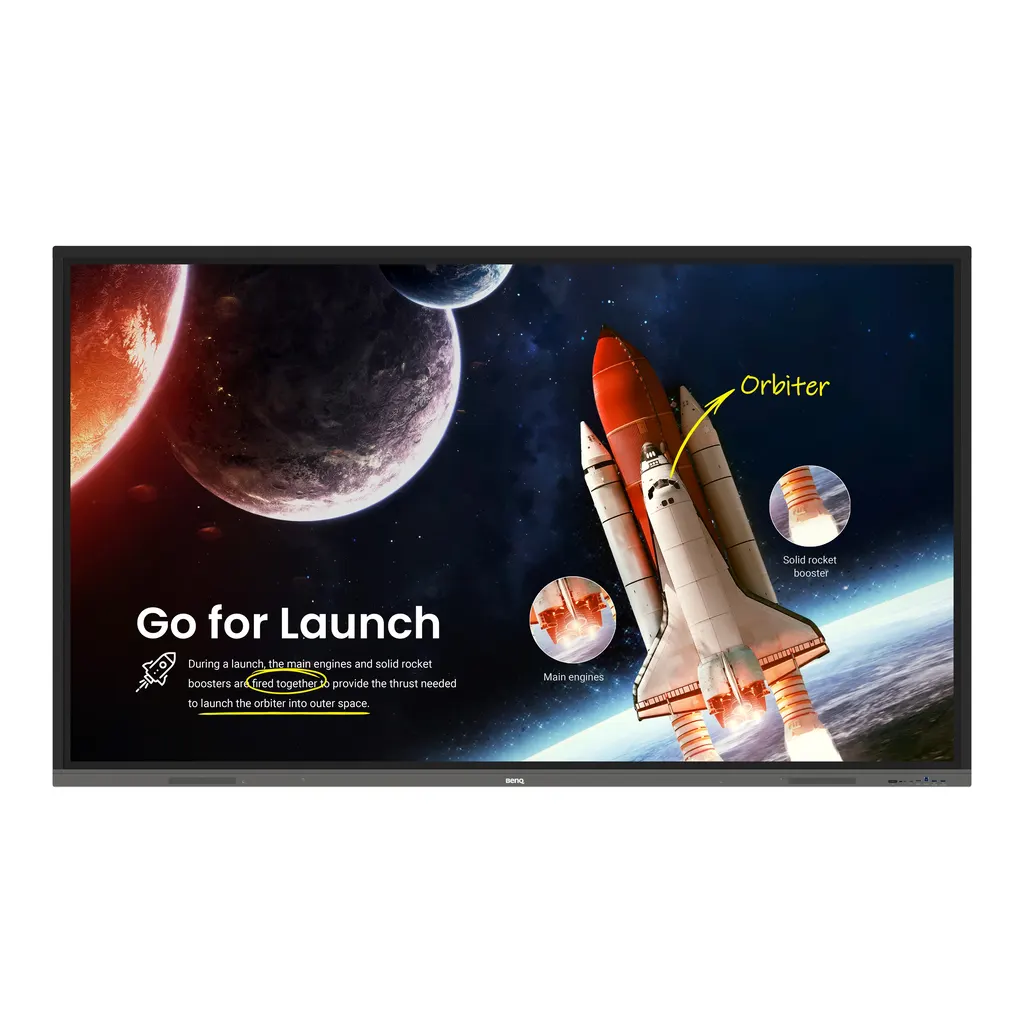
BenQ RE9803 98-inch Essential Series Interactive Display

Screen size
98''
Resolution
UHD 3840 × 2160 pixels
Touch
Infrared touch
System
Android 11.0
WhatsApp
Priceon request
QuotationWithin 1 working day
DeliveryConfirmed with your quote, based on stock
PDFDownload datasheet (IH_EN_260519104241.pdf)
Overview

The BenQ RE9803 is a 98-inch 4K interactive display for classrooms and lecture spaces that need one large touch surface. It offers up to 40 touch points, a 65 W USB-C port with touchback, an OPS slot for a slot-in PC and 2 x 16 W speakers. Android 11 runs EZWrite 6.0 whiteboarding and InstaShare 2 screen sharing. Suited to large schools and lecture halls across Qatar.

A 98-inch touch surface for large teaching rooms

The BenQ RE9803 is a 98-inch interactive display with a 3840 × 2160 IPS panel, 400 nits typical brightness and a 1,200:1 typical contrast ratio. Its infrared touch layer registers up to 40 touch points, so several students can write or move objects at the same time. In a room that seats a full class or a lecture audience, the screen size matters as much as the resolution: text stays readable at the back and a group can share one surface without crowding.

The specifications that matter when you compare

  • Panel: IPS, 10-bit colour depth, 72% NTSC colour gamut and 8 ms response time.
  • Glass: 9H tempered glass with an anti-glare finish, useful where daylight enters the room.
  • Connectivity: three HDMI 2.0 inputs, one HDMI 2.0 output, four USB 3.0 and two USB 2.0 ports, a USB-C port rated for 65 W power delivery, and an OPS slot for a slot-in PC.
  • Audio: two 16 W speakers built in, plus a 3.5 mm line out and an optical S/PDIF output.
  • Software: Android 11 with EZWrite 6.0 whiteboarding, InstaShare 2 screen sharing, and DMS, AMS and X-Sign Broadcast for remote management.

Where it fits in Qatar

In a lecture hall at Education City, the screen can serve as the main teaching surface while the lecturer's PC sits in the OPS slot, keeping the desk clear. A private school in Lusail fitting out a multipurpose hall can rely on the built-in speakers and USB-C charging for everyday lessons. A training room in the Industrial Area or a boardroom in West Bay can connect to a video conferencing setup through the HDMI, USB and Gigabit Ethernet connections to join teams abroad.

What to plan before you order

At 2244.7 × 1323.2 × 89.5 mm and 99.6 kg without packaging (129.1 kg shipped), this is a heavy item that calls for a planned lift and a check of the wall structure before installation. The VESA pattern is 800 × 600 mm with M8 screws, and one wall mount is included. Install the panel in an air-conditioned room: the operating range is 0°C to 40°C, while summer temperatures in Qatar regularly pass 45°C outdoors. Typical consumption is 183.4 W and standby draw is under 0.5 W, useful figures when you size circuits and estimate running costs.

The germ-resistant screen in the manufacturer's data is listed for the 65-, 75- and 86-inch boards only, not the 98-inch RE9803. If antimicrobial glass is a requirement for your tender, ask the SmartRooms Qatar team to confirm the surface specification before you request a quotation.

SmartRooms Qatar supplies the RE9803 to all eight municipalities of Qatar, with professional installation and a free site survey before wall mounting. Quotations usually follow within one working day. Request a quote and we will confirm wall requirements, accessories and purchase order details for your project.

Highlights

  • 98-inch 3840 × 2160 IPS panel with 10-bit colour
  • Up to 40 touch points with infrared touch technology
  • OPS slot for a slot-in PC, plus Ethernet ports
  • Two built-in 16 W speakers, no external speaker needed
  • 9H tempered anti-glare glass, 400 nits typical brightness
  • Operating range 0°C to 40°C, dust-proof to IP5X standard

Classroom fit

At 98″ the farthest student should sit within about 7.3 m (6× the screen height).

Estimated timeline

Quotation within 1 working day · delivery timing depends on stock availability, and we confirm it with your quotation.

Specifications

57 specifications · Source: manufacturer · checked Oct 2026
Panel14
Screen size
98''
Panel type
IPS
Active area
2158.85 × 1214.35 mm
Aspect ratio
16:9
Resolution
UHD 3840 × 2160 pixels
Response time
8 ms
Color depth
10-bit
Orientation
Landscape
Operation hours
18 hours / 7 days
Panel brightness (typical)
400 nits
Contrast ratio (typical)
1200:1
Dynamic contrast ratio
30,000:1
Color gamut
72% NTSC
Backlight life (typical)
50,000 hrs
Glass2
Anti-glare
Yes | NA
Hardness
9H tempered
Touch screen3
Touch technology
Infrared touch
Touch points
up to 40
Touch response time
< 10 ms
System4
GPU
G52 MP2
CPU
A55 × 4
Memory | Storage
4GB I 32GB
OS
Android 11.0
Connectivity11
HDMI (in | out)
3 × HDMI 2.0 | 1 × HDMI 2.0
USB-A
4 ×3.0 + 2 x 2.0
USB-C
1 × 3.0 (PD 65 W)
USB-B (for touch)
1 × 3.0 + 1 × 2.0
3.5 mm Line in (1)
PC Audio × 1
VGA
1 | 0
3.5 mm Line out
Earphone × 1
OPS slot (for slot-in PC)
1
S/PDIF out
0 | 1 (optical)
Ethernet
10 / 100 / 1000 Mbps (Android), 10 / 100 / 1000 Mbps (OPS) × 2
RS-232
1 | 0
Built-in peripherals1
Speaker
2 × 16 W
Power2
Power
AC 100-240V 50/60Hz
Typical power consumption
183.4 W
Physical4
Dimensions (W x H x D)
2244.7 × 1323.2 × 89.5 mm ( 88.4 × 52.1 × 3.5 inch)
Shipping dimensions (W x H x D)
2406 × 1474 × 280 mm (94.7 × 58.0 × 11.0 inch)
Weight (product I shipping)
99.6 kg I 129.1 kg ( 219.6 lbs I 284.6 lbs )
Mount (screws)
VESA 800 × 600 mm (4 × M8 × 25L)
Environment4
Operating temperature
0°C ~ 40°C | 32°F ~ 104°F
Storage temperature
-20°C ~ 60°C | -4°F ~ 140°F
Storage humidity
10% ~ 90% RH non-condensing
Operating humidity
10% ~ 90% RH non-condensing
Software8
Whiteboarding
EZWrite 6.0
Wireless screen sharing
InstaShare 2
Device management
DMS
Account management
AMS
Flicker Free
Yes
Quick access tool
Floating Tool
Broadcast system
X-Sign Broadcast
Low Blue Light
Yes
Accessories4
Cables
1 × VGA (3 m | 9.8 ft), 1 × HDMI (3 m | 9.8 ft), 1 × USB-B for touch (3 m | 9.8 ft), 1 × USB-C (1.5 m | 4.9 ft)
Wall mount
1
Pen
2
Remote control
1

Downloads

8 files from the manufacturer

Questions about RE9803

Is the BenQ RE9803 suited to a university lecture hall in Education City?
Yes, for a lecture hall that needs one large teaching surface. At 98 inches with a 3840 × 2160 IPS panel, the screen can be read from the back rows, and up to 40 touch points let students work at the board together. The built-in speakers cover lesson audio without an extra speaker, and an OPS slot can hold the lecturer's PC so the desk stays clear. Confirm the room layout during the free site survey.
How large is the active display area and how many touch points does it support?
The panel is 98 inches on the diagonal, with an active area of 2158.85 × 1214.35 mm in a 16:9 format. The infrared touch layer supports up to 40 touch points with a touch response time under 10 ms, which suits group work at the board. Touch response matters most when several students write at once, so check the room width before you finalise a quotation.
Will the screen wash out in a boardroom with large windows in West Bay?
The panel has a typical brightness of 400 nits and a 1,200:1 typical contrast ratio, and its glass is anti-glare with 9H tempered hardness. These help in a boardroom with daylight, but direct sun on the glass will still reduce contrast, so position the screen away from the brightest window. A free site survey lets the SmartRooms Qatar team check sightlines and light before mounting.
Does the RE9803 have an antimicrobial, germ-resistant screen?
Not as listed for this model. The manufacturer lists the germ-resistant screen for the 65-inch, 75-inch and 86-inch boards only, so the 98-inch RE9803 is not in that list. The pen and front panel button carry the germ-resistant formula, which TÜV recognises as 99.9% effective against common germs. Confirm the surface specification with SmartRooms Qatar if your tender requires antimicrobial glass.
What is the OPS slot and do I need to buy a computer with the display?
The RE9803 has one OPS slot for a slot-in PC, and the OPS side has two Ethernet ports rated 10/100/1000 Mbps. An OPS PC lets the lecturer's computer sit inside the display rather than on the desk. The slot-in PC is not described in this listing, so specify the computer you need when you request a quote and confirm it fits the slot before ordering.
Which inputs and outputs does it have for laptops, cameras and room systems?
Inputs include three HDMI 2.0 ports, one VGA port, a USB-C port with 65 W power delivery, a USB-B port for touch, four USB 3.0 and two USB 2.0 Type-A ports, and a 3.5 mm PC audio line in. Outputs include one HDMI 2.0, one optical S/PDIF and an earphone line out. The Android side also offers Gigabit-rated Ethernet and one RS-232 port.
How should a 98-inch panel be mounted, and what does it weigh?
It mounts on a VESA pattern of 800 × 600 mm using four M8 × 25 mm screws, and one wall mount is included with the order. The product weighs 99.6 kg, or 129.1 kg packed for shipping, and measures 2244.7 × 1323.2 × 89.5 mm. Because of the weight, the wall structure should be checked before delivery, and the free site survey from SmartRooms Qatar covers that check.
Can it run in a hall or lobby in Qatar where summer temperatures pass 45°C?
Only in an air-conditioned space. The operating range is 0°C to 40°C with 10% to 90% RH non-condensing, so the display must sit in a room kept within that range even at peak summer load. Glazed lobbies and halls with weak airflow need a closer look during the site survey. Storage is rated from -20°C to 60°C, which covers transport and warehousing.
What software comes with the panel for teaching?
The panel runs Android 11 and includes EZWrite 6.0 for whiteboarding, where you can annotate PDFs and images. The Floating Tool and Uni UI shortcuts launch frequently used apps and screen capture in one tap. Low blue light and flicker-free features support comfortable viewing during long lessons. The management tools DMS, AMS and X-Sign Broadcast are described in the remote-management answer.
Can students share their screens wirelessly from their own devices?
Yes. InstaShare 2 lets students cast laptop or tablet screens via Miracast or AirPlay, or through the InstaShare app or the button on the display, so they present from their seats. Confirm the device types used in your classes with SmartRooms Qatar before ordering, because Miracast and AirPlay compatibility depends on each student's equipment.
How can a school group or campus manage several RE9803 displays remotely?
Use DMS to push updates, install apps and generate device analytics across all BenQ displays from one platform. AMS manages user permissions, so teachers get immediate access to their cloud accounts. X-Sign Broadcast sends real-time campus-wide announcements from a central point. For a multi-campus school group or a training centre in Education City, this keeps several boards maintained without visiting each room.
What should Qatari schools and government buyers know when ordering this display?
Request a quotation and SmartRooms Qatar usually responds within one working day. Supply covers delivery to all eight municipalities of Qatar, professional installation and a free site survey. Schools and government bodies can order against a purchase order or LPO, and payment by bank transfer, cheque or purchase order is accepted. The product is covered by the manufacturer's warranty.

Similar models

BenQ CM7505 BenQ Board CM7505 75-inch Interactive Display
75″ UHD 3840 × 2160 pixels Ultra Precision IR
SMART SBID-6286S-V3 SMART Board 6086S-V3 86-inch Interactive Display with iQ
86″ 4K UHD (3840 × 2160) HyPr Touch with InGlass
SMART SBID-6286S-V3-P SMART Board 6086S-V3 Pro 86-inch Interactive Display with iQ
86″ 4K UHD (3840 × 2160) HyPr Touch with InGlass
Clevertouch Clevertouch Edge 65" Clevertouch Edge 65" 4K Interactive Display with Camera and Speakers
65″ 4K UHD (3840x2160 @60Hz) Android 15
Clevertouch Clevertouch Edge 86" Clevertouch Edge 86" 4K Interactive Flat Panel
86″ 4K UHD (3840x2160 @60Hz) Android 15
Email Call




