





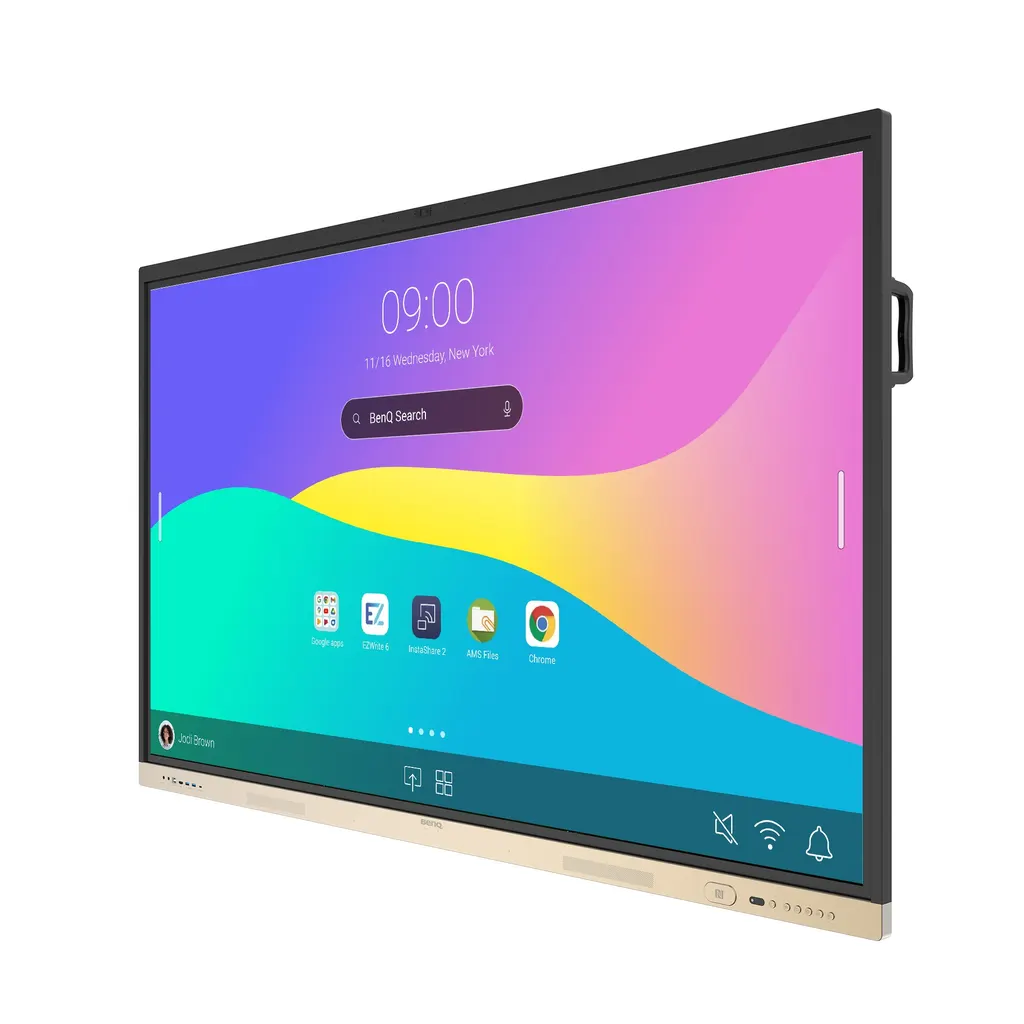
RE9804FV
BenQ Board Essential Series RE9804FV 98-inch Interactive Display
- Screen size
- 98''
- Resolution
- UHD 3840 × 2160 pixels
- Touch
- Precision IR
- System
- Android 13 (EDLA)
The BenQ RE9804FV combines a 98-inch 4K UHD IPS panel, Precision IR touch supporting up to 40 points, built-in Android 13, a 4K camera and an 8-microphone array in one unit. An OPS slot takes a slot-in Windows PC, and the board is compatible with UCaaS video conferencing platforms. It suits large boardrooms and lecture halls in Doha, Lusail and Education City where hybrid meetings are routine. Request a quote from SmartRooms Qatar.
What the BenQ RE9804FV does in a meeting room
The BenQ RE9804FV is a 98-inch all-in-one interactive display from the BenQ Board Essential Series. It brings a touchscreen, a 4K camera, a microphone array, speakers and a built-in Android 13 computer into one unit, so presentations, whiteboard sessions and video calls can run from the screen itself. It is the largest size in the series, which also includes 65-inch, 75-inch and 86-inch models.
Display, touch and audio figures that matter
The panel is an IPS UHD screen with 3840 x 2160 pixels, 10-bit colour depth and 500 nits typical brightness. Typical contrast is 1200:1, and dynamic contrast is listed at 30,000:1. Touch uses Precision IR technology with up to 40 touch points and a response time below 5 ms, so several people can write or annotate together without visible lag. Two 20 W speakers and an eight-microphone array with pickup up to 8 m are built for rooms where people sit at the back.
- Panel: 98-inch IPS, 16:9, 8 ms response time
- Glass: 9H tempered with an anti-glare finish
- Backlight: 50,000 hours typical life
Connectivity for laptops, PCs and conferencing kit
Three HDMI 2.0 inputs and one HDMI 2.0 output let the board sit inside a signal chain or feed a second display. A DisplayPort 1.2a input, VGA, a USB-C port with 65 W power delivery, USB-A ports, a micro SD reader expandable up to 512GB, an optical S/PDIF output and an RS-232 port cover both legacy and current sources. The OPS slot accepts a slot-in Windows PC for specialised software.
Where it fits in Qatar
- A boardroom in West Bay or Msheireb where a local team joins partners abroad. The camera privacy cover, microphones and speakers let the room host the call without a laptop on the table.
- A university lecture theatre in Education City or a training room in Al Sadd, where a 98-inch screen with 40 touch points lets a group work on one shared canvas and save sessions for later.
- A ministry meeting room in Doha that needs managed devices. Device, account and policy tools let the IT team control access from one place.
Planning the installation and the environment
The unit weighs 107 kg, or 137.5 kg packed, and measures 2230.8 x 1347 x 103.1 mm. It mounts on a VESA 800 x 600 mm pattern with four M8 screws, and one wall mount is included. Check wall strength, lift access and the route to the room before delivery. A free site survey from SmartRooms Qatar covers these points.
Environment matters in Qatar. The source gives an operating range of 0 to 40 degrees C and 20% to 80% relative humidity, non-condensing. Outdoor summer temperatures can exceed 45 degrees C, so install the board in an air-conditioned room, away from direct sunlight and from doors or windows that let in dust. The unit carries IP5X dust protection to IEC 60529. Its power input is rated 100-240V, 50/60Hz, with typical draw of 122.7 W and standby below 0.5 W.
Management, security and what is in the box
IT teams can onboard boards by CSV file or by scanning QR codes and barcodes, then apply device, security and app policies from one console. Usage analytics support planning decisions, and NFC login removes the need to type credentials at every session. Directory sync supports Microsoft Entra ID, Google Workspace and LDAP or SAML providers, and application control blocks unauthorised apps. The box includes 3 m VGA, HDMI and USB-B cables, a 1.5 m USB-C cable, two pens and a remote control.
Request a quote from SmartRooms Qatar for the BenQ RE9804FV. Quotations are usually issued within one working day, and our team will confirm the configuration and installation plan with your quotation.
Highlights
- 98-inch 4K UHD IPS panel at 3840 x 2160 resolution
- Precision IR touch with up to 40 touch points
- Built-in Android 13 (EDLA) with 8 GB memory and 128 GB storage
- 4K camera with privacy cover and 8-microphone array
- 2 x 20 W speakers and an OPS slot for a Windows PC
- Operating range 0°C to 40°C, non-condensing humidity
Classroom fit
At 98″ the farthest student should sit within about 7.3 m (6× the screen height).
Estimated timeline
Quotation within 1 working day · delivery timing depends on stock availability, and we confirm it with your quotation.
Specifications
Panel14
- Screen size
- 98''
- Panel type
- IPS
- Active area
- 1895.0 × 1096.0 mm
- Aspect ratio
- 16:9
- Resolution
- UHD 3840 × 2160 pixels
- Response time
- 8 ms
- Color depth
- 10-bit
- Orientation
- Landscape
- Operation hours
- 18 hours / 7 days
- Panel brightness (typical)
- 500 nits
- Contrast ratio (typical)
- 1200:1
- Dynamic contrast ratio
- 30,000:1
- Color gamut
- 68% NTSC
- Backlight life (typical)
- 50,000 hrs
Glass3
- Germ-resistant technology
- Availability dependent on region
- Anti-glare
- Yes | NA
- Hardness
- 9H tempered
Touch screen3
- Touch technology
- Precision IR
- Touch points
- up to 40
- Touch response time
- < 5 ms
System4
- GPU
- G52 MP8
- CPU
- A73 × 4 + A53 × 4
- Memory | Storage
- 8 GB | 128 GB (depends on region)
- OS
- Android 13 (EDLA)
Connectivity14
- HDMI (in | out)
- 3 × HDMI 2.0 | 1 × HDMI 2.0
- DisplayPort
- 1 × 1.2a
- USB-A
- 2 × 2.0 + 2 × 3.0
- USB-C
- 1 × 2.0 + 1 × 3.0 (PD 65 W)
- USB-B (for touch)
- 2 × 2.0
- 3.5 mm Line in (1)
- PC Audio × 1
- VGA
- 1
- 3.5 mm Line out
- Earphone × 1
- OPS slot (for slot-in PC)
- 1
- Micro SD reader
- ×1 (Expandable up to 512GB)
- S/PDIF out
- 0 | 1 (optical)
- Ethernet
- 10 / 100 / 1000 Mbps (Android), 10 / 100 / 1000 Mbps (OPS) × 2
- 3.5 mm Line in (2)
- Mic × 1
- RS-232
- 1
Built-in peripherals6
- NFC sensor
- Yes
- Ambient light sensor
- Yes
- IR sensor
- Yes
- Microphone
- 8-microphone array (range: up to 8 m | 26ft)
- Speaker
- 2 × 20 W (max)
- Camera
- 1
Power3
- ENERGY STAR®
- Yes
- Power
- AC 100-240V 50/60Hz
- Typical power consumption
- 122.7 W
Physical4
- Dimensions (W x H x D)
- 2230.8 × 1347 × 103.1 mm (87.8 × 53.0 × 4.1 inch)
- Shipping dimensions (W x H x D)
- 2095 × 185 × 1265 mm (82.5 × 7.3 × 49.8 inch)
- Weight (product I shipping)
- 107 kg | 137.5 kg (235.9 lbs | 303.4 lbs)
- Mount (screws)
- VESA 800 × 600 mm ( 4 × M8 × 20L)
Environment4
- Operating temperature
- 0°C ~ 40°C | 32°F ~ 104°F
- Storage temperature
- -10°C ~ 60°C | 14°F ~ 140°F
- Storage humidity
- 10% ~ 80% RH non-condensing
- Operating humidity
- 20% ~ 80% RH non-condensing
Software8
- Whiteboarding
- EZWrite 6.0
- Wireless screen sharing
- InstaShare 2
- Device management
- DMS
- Account management
- AMS
- Flicker Free
- Yes
- Quick access tool
- Floating Tool
- Broadcast system
- X-Sign Broadcast
- Low Blue Light
- Yes
Accessories4
- Cables
- 1 × VGA (3 m | 9.8 ft), 1 × HDMI (3 m | 9.8 ft), 1 × USB-B for touch (3 m | 9.8 ft), 1 × USB-C (1.5 m | 4.9 ft)
- Wall mount
- 1
- Pen
- 2
- Remote control
- 1




