





Thursday, 22 October 2026 · 11 Jumada I 1448 AH Sun – Thu · 9:00 – 18:00
+971 56 914 9477 العربية
WhatsApp

RM6503A

BenQ RM6503A 65-inch 4K Education Interactive Display

WhatsApp
Priceon request
QuotationWithin 1 working day
DeliveryConfirmed with your quote, based on stock
PDFDownload datasheet (IH_EN_260519104241.pdf)
Overview

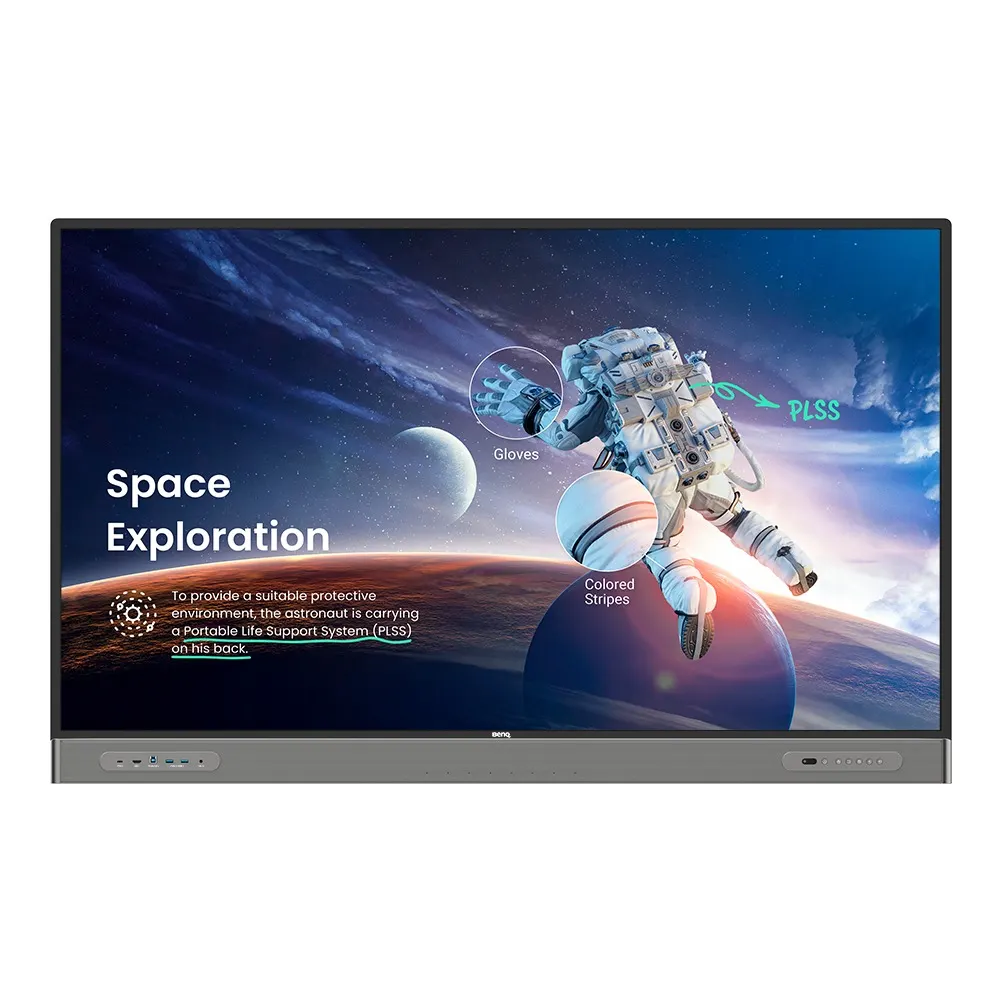
The BenQ RM6503A is a 65-inch 4K UHD interactive display for classrooms that run hybrid or remote lessons. It has built-in 2 × 16 W speakers and a smart 8-microphone array for clear audio across the room. A germ-resistant screen, pen and remote control help reduce shared-surface contact, and a front Type-C port handles connection, charging and touchback with one cable. Schools and training centres can request a quote.

A 65-inch 4K display built for hybrid and remote lessons

The BenQ RM6503A is a 65-inch interactive display with a 4K UHD screen, built-in speakers and built-in microphones. It is designed for classrooms that combine in-person teaching with remote students, so the panel, the audio and the connections work as one unit instead of a set of separate accessories. Teachers write, annotate and share content on the same surface that students watch.

Germ-resistant screen, pen and remote control

Shared surfaces matter in busy schools and training rooms, and this model addresses them directly. The touchscreen uses a TÜV-certified nano-ionic silver formula that the manufacturer rates as 99.9% effective against common germs. The pen and remote control are germ-resistant as well, and the front ports and buttons are covered by the same approach. These figures come from manufacturer data, so treat them as the manufacturer's rating rather than a replacement for everyday cleaning routines.

Audio, connectivity and sharing built in

  • Front USB Type-C: charges a notebook at 65 W, displays its screen and enables touchback over one cable.
  • Audio: 2 × 16 W speakers and a smart 8-microphone array for clear sound across the room.
  • Screen sharing: InstaShare 2 shares laptop, tablet and smartphone screens, and students can cast from their seats.
  • Video conferencing: with a slot-in PC or the InstaShare Button, the panel works with Zoom, Teams and Google Meet.
  • Software: EZWrite 6 whiteboard, the Floating Tool for annotating any app, Android 11 and Google Classroom integration.

Where it fits in Qatar

At a private school in Al Wakrah fitting out new classrooms for Grades 4 to 6, the 65-inch size lets students in the back row read the board without strain. At a university training centre in Education City running a hybrid workshop, on-site students write on the panel while colleagues join through Teams or Zoom. At a training centre in the Industrial Area, EZWrite sessions can be saved and resumed in a later course session.

What to plan before ordering

Confirm the wall, mounting height and cable route during a free site survey before installation. Check the room environment too: the data lists IP5X dust protection to IEC 60529 but gives no operating temperature range, so the SmartRooms Qatar team should confirm suitability for the room. Each unit is covered by the manufacturer's warranty. Government buyers and schools can use a purchase order or LPO, and tenders including Monaqasat are supported.

To receive a quotation, request a quote from SmartRooms Qatar with your room size and the number of units needed. Quotations are usually sent within one working day.

Highlights

  • 65-inch 4K UHD screen with built-in speakers and microphones
  • Germ-resistant screen, pen and remote control
  • 2 × 16 W speakers and a smart 8-microphone array
  • Front USB Type-C with 65 W charging and touchback
  • IP5X dust protection to IEC 60529
  • Works with Zoom, Teams and Google Meet via slot-in PC or InstaShare Button

Classroom fit

At 65″ the farthest student should sit within about 4.9 m (6× the screen height).

Estimated timeline

Quotation within 1 working day · delivery timing depends on stock availability, and we confirm it with your quotation.


Specifications

Source: manufacturer · checked Oct 2026
The full specification and datasheet for this model are available on request; we send them with your quotation.

Downloads

14 files from the manufacturer
PDF Manuals & guides IH_EN_260519104241.pdf 14.5 MB BenQ RM6503A manuals & guides (PDF, 14.5 MB) PDF Manuals & guides RCUM_EN_250616104132.pdf 968 KB BenQ RM6503A manuals & guides (PDF, 968 KB) PDF Manuals & guides RS232&LAN Command List_02_Others.pdf 695 KB BenQ RM6503A manuals & guides (PDF, 695 KB) PDF Manuals & guides UM_AR_221128132503.pdf 10.3 MB BenQ RM6503A manuals & guides (PDF, 10.3 MB) PDF Manuals & guides UM_EN_221128132503.pdf 11.1 MB BenQ RM6503A manuals & guides (PDF, 11.1 MB) PDF Manuals & guides · Opens on manufacturer site AMS_EN_250819160158.pdf BenQ RM6503A manuals & guides (PDF) PDF Manuals & guides · Opens on manufacturer site DMS Cloud_EN_260929100553.pdf BenQ RM6503A manuals & guides (PDF) PDF Manuals & guides · Opens on manufacturer site Saffi_EN_230704164442.pdf BenQ RM6503A manuals & guides (PDF) PDF Manuals & guides · Opens on manufacturer site X-Sign-Broadcast_EN_221206164346.pdf BenQ RM6503A manuals & guides (PDF) ZIP Drawings & CAD · Opens on manufacturer site RM6503A_Display CAD_1_Android.zip BenQ RM6503A drawings & cad (ZIP) ZIP Drawings & CAD · Opens on manufacturer site Wallmount Drawing_01_Others_260831140218.zip BenQ RM6503A drawings & cad (ZIP) PDF Certificates & compliance RM6503A_DM_EN_221222151050.pdf 814 KB BenQ RM6503A certificates & compliance (PDF, 814 KB) ZIP Software & firmware · Opens on manufacturer site Additional Driver to Support Gesture_Mac_10.14-newer_v07.01_199_Mac_260618103552.zip BenQ RM6503A software & firmware (ZIP) ZIP Software & firmware · Opens on manufacturer site Additional Driver to Support Gesture_Mac_OS_10.8-10.13_v06.00_771_Mac_260618103442.zip BenQ RM6503A software & firmware (ZIP)

Questions about RM6503A

Who is the BenQ RM6503A best suited for?
The BenQ RM6503A suits teachers and trainers who run in-person lessons alongside remote students. Its 65-inch 4K UHD screen works well in a standard classroom or a small meeting room at a school or training centre, where students in the back rows still need to read the board. Built-in speakers and microphones mean one panel covers display, writing and audio in the same room.
Is a 65-inch panel large enough for a lecture hall?
At 65 inches, the RM6503A is best for small and medium rooms. In a large lecture hall or boardroom where viewers sit farther away, a bigger size usually works better. Share your room plan when you request a quote from SmartRooms Qatar, and the team can compare sizes against your seating layout before you commit to a purchase order.
How does the germ-resistant screen work?
The touchscreen uses a TÜV-certified nano-ionic silver formula, which the manufacturer rates as 99.9% effective against common germs. The remote control and pens are germ-resistant too, and the front ports and buttons are included in that protection. These ratings come from the manufacturer's data and do not replace regular cleaning routines in a busy school.
What audio does the panel include?
It has built-in 2 × 16 W speakers and a smart 8-microphone array. The microphones pick up teachers and students across the room, so remote participants can follow the lesson and be heard clearly. Whether a room needs additional audio equipment is best confirmed during the free site survey, based on the room's size and layout.
Can a teacher charge a laptop and use touchback from the front?
Yes. The front USB Type-C port, rated at 65 W, charges a notebook, displays its screen on the panel, and enables touchback over a single cable. The teacher can keep the laptop at the front of the classroom and control content directly on the screen, rather than moving between the board and a desk at the back.
Which video conferencing platforms does it support?
The RM6503A is compatible with leading video conferencing software such as Zoom, Teams and Google Meet. Connection is through a slot-in PC or the InstaShare Button. This suits a training centre in the Industrial Area hosting an external speaker, or a university in Education City linking on-campus students with colleagues abroad during a hybrid workshop.
Does the RM6503A have a built-in camera?
The manufacturer's data does not list a built-in camera for this model, so SmartRooms Qatar does not state one. If your remote sessions need video from the room, the team can advise on suitable camera options with your quotation. Tell them how your room is set up so the camera choice fits the seating and the platforms you use.
How do teachers and students share content from their devices?
InstaShare 2 lets you share a laptop, tablet or smartphone screen onto the panel, and several students can cast their screens at the same time from their seats. Teachers can also control their device from the display to move between lesson materials. For a secondary science class in Al Khor, this means experiments can be shown from a student's own device without moving around the room.
Can lesson whiteboards be saved and reused?
Yes. EZWrite 6 saves whiteboard sessions so you can return to them in a later lesson. EZWrite Web integrates with Google Classroom, letting you import lesson materials, invite students and post announcements to the class Stream. The Floating Tool also lets teachers write over any app, website, document or image on a connected device.
How can a school manage several panels at once?
The device management and analytics dashboard shows the status of all BenQ devices in one place, and lets administrators manage displays and apps remotely, with over-the-air updates. X-Sign Broadcast can send a clear message to several boards at once, which is useful for safety notices or emergency announcements across a school with multiple classrooms or campuses in Doha.
Is the panel suitable for dusty conditions in Qatar?
The panel meets IP5X standards under IEC 60529 to support consistent operation in dust-prone environments. Qatar experiences dust storms, so a room near a window or a loading area should be reviewed during your site survey. The data does not list an operating temperature range, so SmartRooms Qatar will confirm suitability for the room before installation.
What should a school plan before ordering several units?
Book a free site survey to confirm wall type, mounting height and cable routes. Quotations usually arrive within one working day, and schools and government buyers can issue a purchase order or LPO. Payment can be by bank transfer, cheque or purchase order, and each unit is covered by the manufacturer's warranty. Tenders, including Monaqasat, are supported.

Similar models

BenQ CM7505 BenQ Board CM7505 75-inch Interactive Display
75″ UHD 3840 × 2160 pixels Ultra Precision IR
SMART SBID-6286S-V3 SMART Board 6086S-V3 86-inch Interactive Display with iQ
86″ 4K UHD (3840 × 2160) HyPr Touch with InGlass
SMART SBID-6286S-V3-P SMART Board 6086S-V3 Pro 86-inch Interactive Display with iQ
86″ 4K UHD (3840 × 2160) HyPr Touch with InGlass
Clevertouch Clevertouch Edge 65" Clevertouch Edge 65" 4K Interactive Display with Camera and Speakers
65″ 4K UHD (3840x2160 @60Hz) Android 15
Clevertouch Clevertouch Edge 86" Clevertouch Edge 86" 4K Interactive Flat Panel
86″ 4K UHD (3840x2160 @60Hz) Android 15
Email Call


