





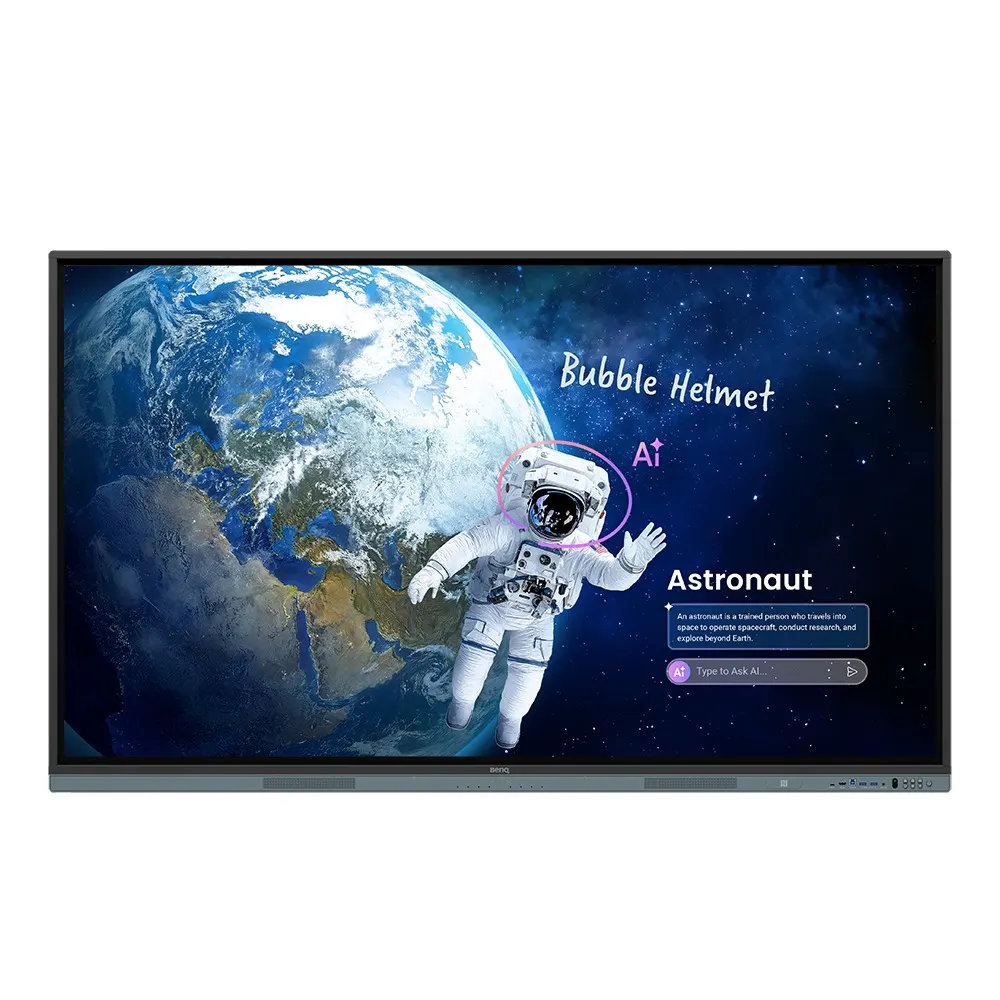
RM7505
BenQ Board Master RM7505 75-inch Interactive Display
- Screen size
- 75''
- Resolution
- UHD 3840 × 2160 pixels
- Touch
- High Precision IR
- System
- Android 15.0 (EDLA)
The BenQ Board Master RM7505 is a 75-inch 4K UHD interactive display with 50-point IR touch, 9H tempered anti-glare glass and an Android 15 system with 8GB memory and 128GB storage. It has an OPS slot for a slot-in PC, a USB-C port delivering 65 W, and 2 × 25 W speakers. Suited to classrooms, training rooms and meeting rooms in Doha.
What the RM7505 is built to do
The BenQ Board Master RM7505 is a 75-inch interactive display from the RM05 series, built for classrooms, lecture spaces and meeting rooms where one screen has to handle writing, shared content and day-to-day device management. The 3840 × 2160 IPS panel offers UHD detail across a 1650.2 × 928.2 mm active area, so a full class can read the same worked example from the back of the room.
The figures that shape everyday use
- Image: 450 nits typical brightness, 1500:1 typical contrast, 10-bit colour depth, 72% NTSC colour gamut and 8 ms response time.
- Touch: High Precision IR touch for up to 50 points, with touch response under 5 ms.
- Surface: 9H tempered anti-glare glass with nano-ionic silver germ-resistant treatment.
- Audio: two 25 W speakers and an 8-microphone array with pickup listed up to 12 m.
- System: Android 15 (EDLA), 8GB memory, 128GB storage and a 10 TOPS NPU.
Connectivity is generous for a panel of this class. There are three HDMI 2.0 inputs and one HDMI 2.0 output, a DisplayPort 1.2a input, a USB-C port rated at 65 W power delivery, and an OPS slot for a slot-in PC. Gigabit-rated Ethernet is provided for both the Android system and the OPS slot. Wi-Fi 6 and Bluetooth 5.2 are listed as optional, so confirm the configuration on your quotation.
Planning the installation: weight, wall and power
The panel weighs 40.6 kg and the shipping package weighs 52.6 kg, so the job needs two people and a wall that can carry the load. The unit uses a VESA 800 × 400 mm mounting pattern with M8 screws, and its overall dimensions are 1709.4 × 1026.8 × 98.6 mm. Before mounting, our free site survey checks the wall, the viewing distance from the back row and cable routing to the OPS and USB-C ports.
The power input is rated 100 to 240 V at 50/60 Hz, which covers Qatar's 240 V, 50 Hz supply. Typical consumption is 97.9 W and standby is under 0.5 W. The operating range is 0 to 40 °C with 10 to 90% relative humidity, which matters in Qatar, where summer temperatures often pass 45 °C. The display belongs in an air-conditioned room away from direct sunlight through windows, and our team will confirm the location during the survey.
Where it fits across Qatar
- A private school in Al Rayyan refitting Grade 4 and Grade 5 classrooms, where teachers sign in with school accounts through directory sync.
- A university lecture room in Education City, where the 75-inch surface serves students seated at the back and the microphone array supports class discussion.
- A ministry meeting room in West Bay connecting with colleagues abroad, using screen extension and an external camera or conferencing kit connected through the USB ports.
Software and accessories included
The RM7505 ships with EZWrite 6.0 for whiteboarding, InstaShare 2 for wireless screen sharing, Floating Tool for annotating over other apps, and X-Sign Broadcast. Device management runs through DMS and account management through AMS. The box includes one 3 m HDMI cable, one 3 m USB-B touch cable, one 1.5 m USB-C cable, one wall mount, two pens and one remote control.
To request a quote, send SmartRooms Qatar your room size, wall type and number of units. We supply and deliver to all eight municipalities of Qatar, arrange professional installation, and accept LPOs, tender documents and payment by bank transfer, cheque or purchase order. Quotations usually follow within one working day.
Highlights
- 75-inch 4K UHD IPS panel with 450 nits typical brightness
- High Precision IR touch supporting up to 50 points
- Android 15 (EDLA) with 8GB memory and 128GB storage
- OPS slot, three HDMI 2.0 inputs and USB-C with 65 W delivery
- Two 25 W speakers and an 8-microphone array up to 12 m
- Operating range 0 to 40 °C; install in air-conditioned rooms
Classroom fit
At 75″ the farthest student should sit within about 5.6 m (6× the screen height).
Estimated timeline
Quotation within 1 working day · delivery timing depends on stock availability, and we confirm it with your quotation.
Specifications
Panel14
- Screen size
- 75''
- Panel type
- IPS
- Active area
- 1650.2 × 928.2 mm
- Aspect ratio
- 16:9
- Resolution
- UHD 3840 × 2160 pixels
- Response time
- 8 ms
- Color depth
- 10-bit
- Orientation
- Landscape
- Operation hours
- 18 hours / 7 days
- Panel brightness (typical)
- 450 nits
- Contrast ratio (typical)
- 1500:1
- Dynamic contrast ratio
- 50,000:1
- Color gamut
- 72% NTSC
- Backlight life (typical)
- 50,000 hrs
Glass3
- Germ-resistant technology
- Nano-ionic silver
- Anti-glare
- Yes | NA
- Hardness
- 9H tempered
Touch screen3
- Touch technology
- High Precision IR
- Touch points
- up to 50
- Touch response time
- < 5 ms
Connectivity17
- HDMI (in | out)
- 3 × HDMI 2.0 | 1 × HDMI 2.0
- DisplayPort
- 1 × 1.2a
- USB-A
- 3 × 2.0 + 4 × 3.0
- USB-C
- 1 × 2.0 + 1 × 3.0 (PD 65 W)
- USB-B (for touch)
- 3 × 3.0
- 3.5 mm Line in (1)
- Mic × 1
- USB-C out
- 1 x Type-C (2.0 data / video out / audio out / touch)
- VGA
- 1
- 3.5 mm Line out
- Earphone × 1
- OPS slot (for slot-in PC)
- 1
- Micro SD reader
- 1
- Wi-Fi
- Wi-Fi 6 (optional)
- Bluetooth®
- Bluetooth 5.2 (optional)
- S/PDIF out
- 1 (optical)
- Ethernet
- 10 / 100 / 1000 Mbps (Android), 10 / 100 / 1000 Mbps (OPS) × 2
- 3.5 mm Line in (2)
- PC Audio × 1
- RS-232
- 1 | 0
Built-in peripherals10
- NFC sensor
- Yes
- Ambient light sensor
- Yes
- IR sensor
- Yes
- Motion sensor
- N/A
- Microphone
- 8-microphone array (range: up to 12 m | 39ft)
- Speaker
- 2 × 25 W
- Camera
- N/A
- Air sensor
- N/A
- Subwoofer
- N/A
- Air Ionizer
- N/A
Power3
- ENERGY STAR®
- Yes
- Power
- AC 100-240V 50/60Hz
- Typical power consumption
- 97.9 W
Physical5
- Dimensions (W x H x D)
- 1709.4 × 1026.8 × 98.6 mm (67.3 × 40.4 × 3.9 inch)
- Shipping dimensions (W x H x D)
- 1863 × 1148 × 185 mm (73.3 × 45.2 × 7.3 inch)
- Weight (product I shipping)
- 40.6 kg | 52.6 kg (89.5 lbs | 115.9 lbs)
- Mount (screws)
- VESA 800 × 400 mm (4 × M8 × 25L)
- Pen Tray
- N/A
Environment4
- Operating temperature
- 0°C ~ 40°C | 32°F ~ 104°F
- Storage temperature
- -20°C ~ 60°C | -4°F ~ 140°F
- Storage humidity
- 10% ~ 90% RH non-condensing
- Operating humidity
- 10% ~ 90% RH non-condensing
Software8
- Whiteboarding
- EZWrite 6.0
- Wireless screen sharing
- InstaShare 2
- Device management
- DMS
- Account management
- AMS
- Flicker Free
- Yes
- Quick access tool
- Floating Tool
- Broadcast system
- X-Sign Broadcast
- Low Blue Light
- Yes
Accessories4
- Cables
- 1 × HDMI (3 m | 9.8 ft), 1 × USB-B for touch (3 m | 9.8 ft), 1 × USB-C (1.5 m | 4.9 ft)
- Wall mount
- 1
- Pen
- 2
- Remote control
- 1
System5
- GPU
- Arm Mali-G57 MC2
- CPU
- Arm Cortex-A78 × 2 + A55 × 6
- NPU
- 10 TOPS
- Memory | Storage
- 8GB | 128GB
- OS
- Android 15.0 (EDLA)




