





Thursday, 22 October 2026 · 11 Jumada I 1448 AH Sun – Thu · 9:00 – 18:00
+971 56 914 9477 العربية
WhatsApp

RM8603

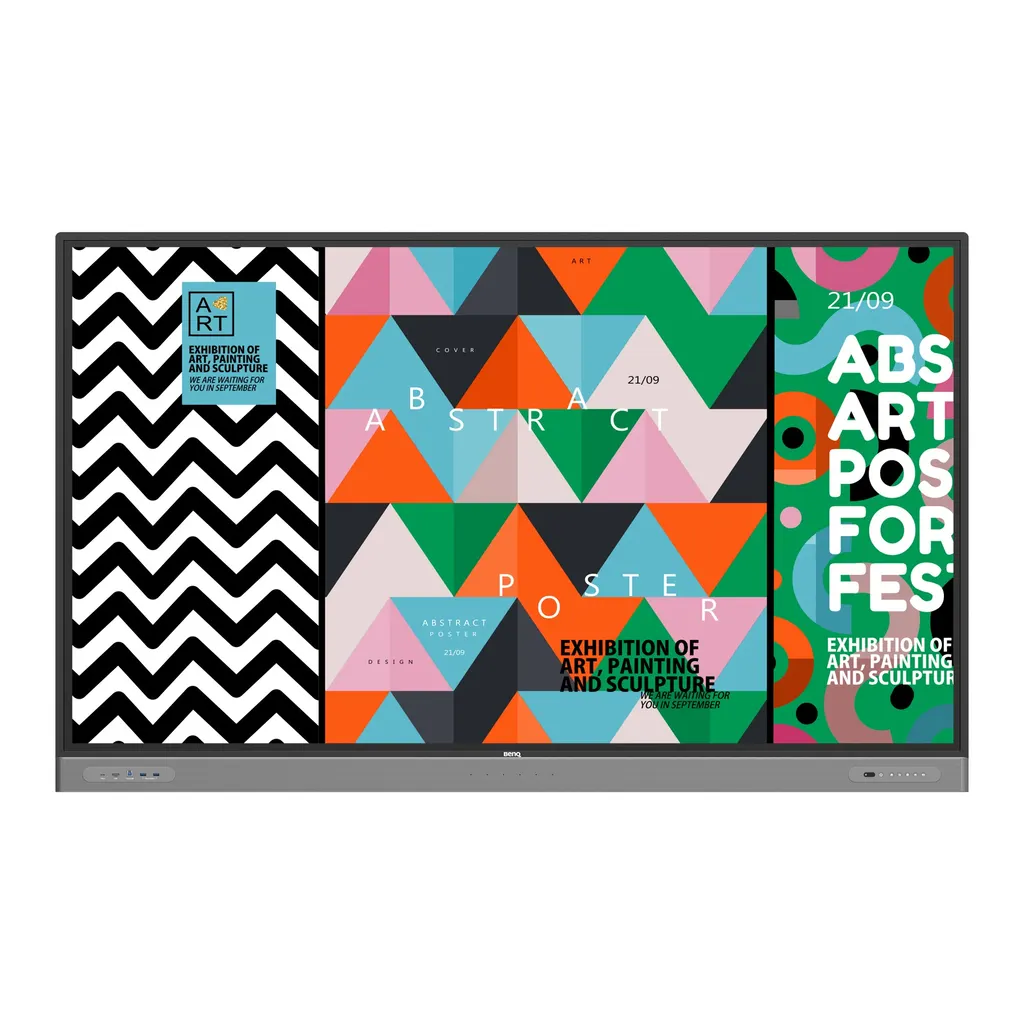
BenQ Board Master RM8603 86-inch Interactive Display

Screen size
86''
Resolution
UHD 3840 × 2160 pixels
Touch
Infrared touch
System
Android 9.0
WhatsApp
Priceon request
QuotationWithin 1 working day
DeliveryConfirmed with your quote, based on stock
PDFDownload datasheet (IH_EN_260519104241.pdf)
Overview

The BenQ Board Master RM8603 is an 86-inch interactive display with a 4K UHD IPS panel, infrared touch for up to 40 points and an OPS slot for a Windows slot-in PC. Six built-in microphones and 2 x 16 W speakers suit boardrooms, lecture halls and training rooms in Doha, Lusail and Education City that run in-room and remote meetings.

An 86-inch touch display built for team meetings

The RM8603 belongs to the BenQ Board Master RM03 series and is a landscape interactive display with an 86-inch IPS panel at 3840 × 2160 pixels. Its infrared touch layer accepts up to 40 touch points, so several people can write, move and annotate content at the same time. It is designed for meeting rooms where a whole team gathers around one screen rather than working at individual desks.

Panel, touch and processing

The panel offers 450 nits typical brightness, a 1200:1 typical contrast ratio, 10-bit colour depth and 72% NTSC colour gamut. Touch response is under 10 ms. The glass is 9H tempered with an anti-glare finish that keeps content readable from the far side of the room. The built-in system runs Android 9.0 on a four-core A73 processor with 8GB memory and 32GB storage, so whiteboarding and meeting apps run without a separate computer. The panel also lists low blue light and flicker-free operation, which matter for staff who spend long sessions in front of the screen.

Connecting laptops and video calls

  • Video inputs: three HDMI 2.0 inputs, one VGA input and one DisplayPort 1.2 input, with one HDMI 2.0 output
  • USB-C: a front USB-C 3.0 port with 65 W Power Delivery to charge a notebook while it presents
  • OPS slot: takes a Windows-ready slot-in PC so Windows apps run directly on the touchscreen
  • Audio: six microphones with a maximum pickup range of 8 m and two 16 W speakers

Where it fits in Qatar

In a boardroom in West Bay or Msheireb, an 86-inch panel lets remote attendees read slides and whiteboard notes clearly while the team in the room writes on the same glass. In a lecture hall at Education City, a lecturer can use the Floating Tool to annotate slides, take screenshots and record a session. At a government training room in Doha where staff join colleagues abroad, a slot-in PC or the InstaShare Button can run Zoom, Microsoft Teams or Google Meet with the board's own microphones, speakers and a connected camera.

Planning the installation

  • The panel weighs 68.5 kg and ships at 89.5 kg, so plan lifting equipment and access routes.
  • It uses a VESA 800 × 600 mm mount pattern with four M8 × 20L screws, and one wall mount is included.
  • The operating range is 0°C to 40°C, so keep it in air-conditioned rooms away from direct sun, since Qatar summer temperatures can exceed 45°C.
  • Power input is AC 100-240V at 50/60Hz with a typical consumption of 166.2 W.

SmartRooms Qatar offers a free site survey before an 86-inch panel is wall-mounted, which helps confirm wall structure, access and power positions. Delivery covers all eight municipalities of Qatar, and professional installation can be arranged. Schools and government buyers can order against a purchase order or tender reference, and payment is accepted by bank transfer, cheque or purchase order.

Send us the number of panels and the room locations, and our team will return a quotation usually within one working day. Request a quote today to confirm the right quantity and mounting plan for your rooms.

Highlights

  • 86-inch 4K UHD IPS panel at 3840 × 2160 pixels
  • Infrared touch supporting up to 40 touch points
  • OPS slot for a Windows-ready slot-in PC
  • Six built-in microphones and 2 × 16 W speakers
  • Front USB-C 3.0 port with 65 W Power Delivery
  • Germ-resistant nano-ionic silver glass, TÜV certified

Classroom fit

At 86″ the farthest student should sit within about 6.4 m (6× the screen height).

Estimated timeline

Quotation within 1 working day · delivery timing depends on stock availability, and we confirm it with your quotation.

Specifications

62 specifications · Source: manufacturer · checked Oct 2026
Panel14
Screen size
86''
Panel type
IPS
Active area
1895.0 × 1096.0 mm
Aspect ratio
16:9
Resolution
UHD 3840 × 2160 pixels
Response time
8 ms
Color depth
10-bit
Orientation
Landscape
Operation hours
18 hours / 7 days
Panel brightness (typical)
450 nits
Contrast ratio (typical)
1200:1
Dynamic contrast ratio
30,000:1
Color gamut
72% NTSC
Backlight life (typical)
50,000 hrs
Glass3
Germ-resistant technology
Nano-ionic silver
Anti-glare
Yes | NA
Hardness
9H tempered
Touch screen3
Touch technology
Infrared touch
Touch points
up to 40
Touch response time
< 10 ms
System4
GPU
G52 MC 2
CPU
A73 × 4
Memory | Storage
8GB | 32GB
OS
Android 9.0
Connectivity13
HDMI (in | out)
3 × HDMI 2.0 | 1 × HDMI 2.0
DisplayPort
1 × 1.2 | No
USB-A
2 × 2.0 + 5 × 3.0
USB-C
1 × 3.0 (PD 65 W)
USB-B (for touch)
3 × 3.0
3.5 mm Line in (1)
PC Audio × 1
VGA
1 | 0
3.5 mm Line out
Earphone × 1
OPS slot (for slot-in PC)
1
S/PDIF out
0 | 1 (optical)
Ethernet
10 / 100 Mbps (Android), 10 / 100 / 1000 Mbps (OPS) × 2
3.5 mm Line in (2)
Mic × 1
RS-232
1 | 0
Built-in peripherals2
Microphone
6 (Max. pickup range 8m)
Speaker
2 × 16 W
Power2
Power
AC 100-240V 50/60Hz
Typical power consumption
166.2 W
Physical5
Dimensions (W x H x D)
1962.4 × 1203.4 × 121.4 mm (77.3 × 47.4 × 4.8 inch)
Shipping dimensions (W x H x D)
2160 × 1340 × 250 mm (85.0 × 52.8 × 9.8 inch)
Weight (product I shipping)
68.5 kg | 89.5 kg (151 lbs | 197.3 lbs)
Mount (screws)
VESA 800 × 600 mm (4 × M8 × 20L)
Pen Tray
1
Environment4
Operating temperature
0°C ~ 40°C | 32°F ~ 104°F
Storage temperature
-10°C ~ 60°C | 14°F ~ 140°F
Storage humidity
10% ~ 80% RH non-condensing
Operating humidity
10% ~ 90% RH non-condensing
Software8
Whiteboarding
EZWrite 6.0
Wireless screen sharing
InstaShare 2
Device management
DMS
Account management
AMS
Flicker Free
Yes
Quick access tool
Floating Tool
Broadcast system
X-Sign Broadcast
Low Blue Light
Yes
Accessories4
Cables
1 × VGA (3 m | 9.8 ft), 1 × HDMI (3 m | 9.8 ft), 1 × USB-B for touch (3 m | 9.8 ft), 1 × USB-C (1.5 m | 4.9 ft)
Wall mount
1
Pen
2
Remote control
1

Downloads

16 files from the manufacturer
PDF Manuals & guides IH_EN_260519104241.pdf 14.5 MB BenQ RM8603 manuals & guides (PDF, 14.5 MB) PDF Manuals & guides QG_G_220419004924.pdf 28.1 MB BenQ RM8603 manuals & guides (PDF, 28.1 MB) PDF Manuals & guides RCUM_EN_250616104132.pdf 968 KB BenQ RM8603 manuals & guides (PDF, 968 KB) PDF Manuals & guides RS232 & LAN Command List_2_Others.pdf 781 KB BenQ RM8603 manuals & guides (PDF, 781 KB) PDF Manuals & guides UM_AR_230110103355.pdf 12.8 MB BenQ RM8603 manuals & guides (PDF, 12.8 MB) PDF Manuals & guides UM_EN_240412102419.pdf 12.9 MB BenQ RM8603 manuals & guides (PDF, 12.9 MB) PDF Manuals & guides · Opens on manufacturer site AMS_EN_250819160158.pdf BenQ RM8603 manuals & guides (PDF) PDF Manuals & guides · Opens on manufacturer site DMS Cloud_EN_260929100553.pdf BenQ RM8603 manuals & guides (PDF) PDF Manuals & guides · Opens on manufacturer site DMS Local_EN_251223091035.pdf BenQ RM8603 manuals & guides (PDF) PDF Manuals & guides · Opens on manufacturer site Saffi_EN_230704164442.pdf BenQ RM8603 manuals & guides (PDF) PDF Manuals & guides · Opens on manufacturer site X-Sign-Broadcast_EN_221206164346.pdf BenQ RM8603 manuals & guides (PDF) ZIP Drawings & CAD · Opens on manufacturer site Display CAD_1_Others.zip BenQ RM8603 drawings & cad (ZIP) ZIP Drawings & CAD · Opens on manufacturer site Wallmount Drawing_01_Others_260608155916.zip BenQ RM8603 drawings & cad (ZIP) PDF Certificates & compliance RM8603_DM_EN_220330062104.pdf 478 KB BenQ RM8603 certificates & compliance (PDF, 478 KB) ZIP Software & firmware · Opens on manufacturer site Additional Driver to Support Gesture_Mac_10.14-newer_v07.01_199_Mac_260618103552.zip BenQ RM8603 software & firmware (ZIP) ZIP Software & firmware · Opens on manufacturer site Additional Driver to Support Gesture_Mac_OS_10.8-10.13_v06.00_771_Mac_260618103442.zip BenQ RM8603 software & firmware (ZIP)

Questions about RM8603

Who is the BenQ RM8603 designed for?
The RM8603 suits boardrooms, meeting rooms and training rooms where a team gathers around one screen. Its 86-inch IPS panel at 3840 × 2160 pixels is large enough for several people to read slides, spreadsheets and handwritten notes at once. In Qatar it fits a head office meeting room in West Bay or a training room in Msheireb where staff join colleagues abroad. Ask our team to confirm the room layout before ordering.
How many people can touch the screen at once?
The infrared touch layer supports up to 40 touch points, and the manufacturer lists touch response under 10 ms. That allows several people to write, drag and annotate at the same time during a brainstorming session. The glass is 9H tempered, which suits busy shared rooms. Touch connects to the computer through the 3 m USB-B cable included in the box.
What is the OPS slot used for?
The OPS slot accepts a Windows-ready slot-in PC, which lets you run Windows apps and features directly on the 86-inch touchscreen. The slot-in PC is also the route for running video conferencing software such as Zoom, Microsoft Teams or Google Meet with the panel's microphones, speakers and a connected camera. Confirm the slot-in PC configuration with our team when you request your quotation.
Can a laptop charge while it presents?
Yes. The front USB-C 3.0 port provides 65 W Power Delivery, so a notebook can charge while it sends its screen to the board. Touchback lets you control the notebook from the panel during a presentation. Laptops without USB-C can connect through the HDMI or VGA inputs. The box includes a 1.5 m USB-C cable and a 3 m HDMI cable.
How do remote colleagues join meetings from this screen?
With a slot-in PC or the InstaShare Button, you can use Zoom, Microsoft Teams or Google Meet on the board. The InstaShare Button casts your screen to the panel and uses its six microphones, two 16 W speakers and a connected camera, so remote participants hear the whole room. This suits a Doha head office that holds regular meetings with teams abroad and needs clear audio across a large table.
Can it be placed near a window or in a hot lobby in Qatar?
Keep it in an air-conditioned room. The operating temperature range is 0°C to 40°C, while summer temperatures in Qatar can exceed 45°C, so a lobby or room with direct sunlight on the glass is not suitable. The storage range is -10°C to 60°C. Confirm the room environment with the SmartRooms Qatar team before the panel is mounted.
Is the glass germ-resistant, and what does that mean?
The touchscreen uses a nano-ionic silver formula with TÜV certification, and the manufacturer states it is 99.9% effective against common germs. The RM8603 also comes with germ-resistant pens, which matters because shared pens can spread germs. The manufacturer describes this as reducing surface transmission, not as a replacement for routine cleaning. Anti-glare glass and low blue light support comfortable use in long sessions.
What mounting space does the 86-inch panel need?
The panel measures 1962.4 × 1203.4 × 121.4 mm and weighs 68.5 kg, with a shipping weight of 89.5 kg. It uses a VESA 800 × 600 mm pattern with four M8 × 20L screws, and one wall mount is included. Because of its weight, SmartRooms Qatar offers a free site survey before wall mounting to check the wall, the access route and the lifting plan.
Does it work with Qatar's power supply?
The power input is AC 100-240V at 50/60Hz, which covers Qatar's 240 V, 50 Hz mains supply. Typical power consumption is 166.2 W and standby consumption is below 0.5 W. Plan socket positions with your installer so the cable route stays clear of the wall mount and the pen tray. Qatar sockets are BS 1363 Type G.
What software comes with the board?
The board runs Android 9.0 with 8GB memory and 32GB storage. It includes EZWrite 6.0 for whiteboarding, InstaShare 2 for wireless sharing of up to nine screens, and the Floating Tool for annotation, screenshots and session recording. Device management, account management and X-Sign Broadcast tools help IT teams manage several displays across an organisation.
What comes in the box?
The package includes a 3 m VGA cable, a 3 m HDMI cable, a 3 m USB-B touch cable and a 1.5 m USB-C cable. It also includes two germ-resistant pens, one remote control, one pen tray and one wall mount. Check these quantities against your room plan before ordering several units for a school or office.
How do I order several units for a school or government office?
Send the number of panels, the room locations and your purchase order or tender reference, and SmartRooms Qatar will return a quotation usually within one working day. Delivery covers all eight municipalities of Qatar, and professional installation can be arranged. Payment is accepted by bank transfer, cheque or purchase order, and the product is covered by the manufacturer's warranty.
Is this model suitable for a large lecture hall or a small meeting room?
The 86-inch format suits a lecture hall, large seminar room or boardroom where people sit several metres from the screen. For a small meeting room, a smaller BenQ Board Master size may fit better. Measure the viewing distance and wall width first, then request a quote so the right size and mounting plan are confirmed for your room.

Similar models

BenQ CM7505 BenQ Board CM7505 75-inch Interactive Display
75″ UHD 3840 × 2160 pixels Ultra Precision IR
SMART SBID-6286S-V3 SMART Board 6086S-V3 86-inch Interactive Display with iQ
86″ 4K UHD (3840 × 2160) HyPr Touch with InGlass
SMART SBID-6286S-V3-P SMART Board 6086S-V3 Pro 86-inch Interactive Display with iQ
86″ 4K UHD (3840 × 2160) HyPr Touch with InGlass
Clevertouch Clevertouch Edge 65" Clevertouch Edge 65" 4K Interactive Display with Camera and Speakers
65″ 4K UHD (3840x2160 @60Hz) Android 15
Clevertouch Clevertouch Edge 86" Clevertouch Edge 86" 4K Interactive Flat Panel
86″ 4K UHD (3840x2160 @60Hz) Android 15
Email Call




