





Thursday, 22 October 2026 · 11 Jumada I 1448 AH Sun – Thu · 9:00 – 18:00
+971 56 914 9477 العربية
WhatsApp

RP6502

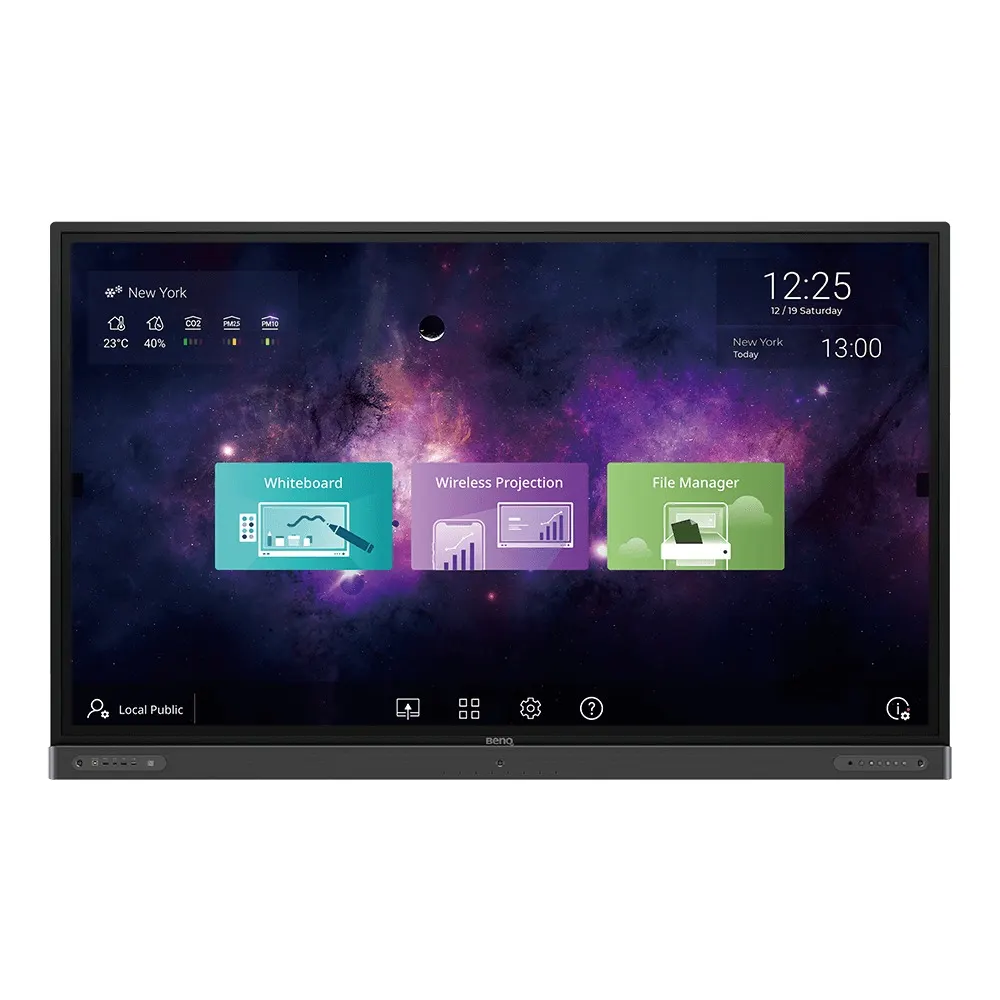
BenQ RP6502 65-inch Germ Resistant Education Interactive Flat Panel

Screen size
65''
Resolution
UHD 3840 × 2160 pixels
Touch
Infrared touch
System
Android 8.0
WhatsApp
Priceon request
QuotationWithin 1 working day
DeliveryConfirmed with your quote, based on stock
PDFDownload datasheet (2020-rp02-classroomcare-interactive-flat-panel-brochure.pdf)
Overview

The BenQ RP6502 is a 65-inch 4K UHD interactive flat panel built for classrooms and training rooms. It pairs a germ-resistant screen treated with nano-ionic silver with 20-point infrared touch, the EZWrite whiteboard app and built-in air quality sensing. An OPS slot, three HDMI inputs and a USB-C port suit schools and training centres in Doha, Al Wakrah and nearby areas that want one panel for lessons and remote teaching. Request a quote from SmartRooms Qatar.

What the RP6502 is and who it suits

The BenQ RP6502 is a 65-inch interactive flat panel designed for education. It combines a 4K UHD IPS display with infrared touch, a built-in Android system and a digital whiteboard, so one unit can handle lessons, group work and remote sessions. It suits primary and secondary classrooms, university seminar rooms and training centres that want a single teaching display instead of a projector and a separate whiteboard.

Germ-resistant screen and classroom air monitoring

The touch surface uses glass treated with nano-ionic silver, combined with an anti-glare coating and 9H tempered glass. The manufacturer reports antimicrobial testing under JIS Z 2801:2010 against Escherichia coli, Staphylococcus aureus and Pseudomonas aeruginosa, and states that the screen is certified by TÜV and SIAA. Built-in air sensing helps staff notice when a room needs ventilation.

  • Display: 3,840 × 2,160 IPS panel, 350 nits typical brightness, 10-bit colour
  • Touch: infrared, 20 touch points, response time under 4 ms
  • Eye care: low blue-light filter and flicker-free backlight

Where it fits in Qatar

A private school in Al Wakrah fitting out a new science room can use the panel for STEAM practicals, with two pens for group work and Brush Mode for art lessons. A university training centre in Education City can use EZWrite Live and one-tap video recording for blended courses that include students joining from home or abroad. An office in West Bay running Arabic and English meetings can connect laptops through three HDMI inputs or USB-C, or share screens wirelessly with InstaShare.

For a school ordering several units, DMS device management and AMS account management let IT staff manage panels across a campus without visiting each room.

What to plan before installation

The panel weighs 44 kg and the shipping package weighs 56 kg, so wall mounting needs two people and a wall that can take the load. The VESA pattern is 600 × 400 mm with M8 screws, and the box includes a wall mount. Overall dimensions are 1505.9 × 951 × 121.5 mm. The operating range is 0°C to 40°C at 10% to 90% humidity, non-condensing, so the room must be air-conditioned. Qatar summer temperatures can exceed 45°C, so confirm room conditions with the SmartRooms Qatar team before installation. The power rating is AC 100-240V at 50/60 Hz, with typical consumption of 81.4 W. An OPS slot accepts a slot-in PC when lessons need desktop software.

SmartRooms Qatar offers a free site survey to check wall structure, sightlines, power points and cable routes before the panel arrives. Request a quote and we will confirm the lead time in your quotation, usually within one working day.

Highlights

  • 65-inch 4K UHD IPS panel at 3,840 × 2,160 resolution
  • 20-point infrared touch with 9H tempered glass
  • Nano-ionic silver germ-resistant screen with TÜV and SIAA certification
  • Built-in air quality sensing for classroom environments
  • OPS slot for a slot-in PC plus three HDMI 2.0 inputs
  • Dual 16 W speakers, 15 W subwoofer and 8-microphone array

Classroom fit

At 65″ the farthest student should sit within about 4.9 m (6× the screen height).

Estimated timeline

Quotation within 1 working day · delivery timing depends on stock availability, and we confirm it with your quotation.

Specifications

65 specifications · Source: manufacturer · checked Oct 2026
Panel14
Screen size
65''
Panel type
IPS
Active area
1428.5 × 803.5 mm
Aspect ratio
16:9
Resolution
UHD 3840 × 2160 pixels
Response time
8 ms
Color depth
10-bit
Orientation
Landscape
Operation hours
18 hours / 7 days
Panel brightness (typical)
350 nits
Contrast ratio (typical)
1200:1
Dynamic contrast ratio
30,000:1
Color gamut
68% NTSC
Backlight life (typical)
50,000 hrs
Glass3
Germ-resistant technology
Nano-ionic silver
Anti-glare
Yes | NA
Hardness
9H tempered
Touch screen3
Touch technology
Infrared touch
Touch points
20
Touch response time
< 4 ms
System4
GPU
Mali-G51MP4
CPU
A73 × 2 + A53 × 2
Memory | Storage
4GB I 32GB
OS
Android 8.0
Connectivity12
HDMI (in | out)
3 × HDMI 2.0 | 1 × HDMI 2.0
USB-A
3 × 2.0 + 2 × 3.0
USB-C
1 × 3.0
USB-B (for touch)
3 × 2.0
3.5 mm Line in (1)
Mic × 1
VGA
1 | 0
3.5 mm Line out
Earphone × 1
OPS slot (for slot-in PC)
1
S/PDIF out
0 | 1 (optical)
Ethernet
10 / 100 Mbps (Android), 10 / 100 / 1000 Mbps (OPS) × 1
3.5 mm Line in (2)
PC Audio × 1
RS-232
1 | 0
Built-in peripherals6
NFC sensor
Yes
Motion sensor
3
Microphone
8 (Max. pickup range 8m)
Speaker
2 × 16 W
Air sensor
TVOC
Subwoofer
1 × 15 W
Power2
Power
AC 100-240V 50/60Hz
Typical power consumption
81.4 W
Physical5
Dimensions (W x H x D)
1505.9 × 951 × 121.5 mm (59.3 × 37.4 × 4.8 inch)
Shipping dimensions (W x H x D)
1660 × 1045 × 220 mm (65.4 × 41.1 × 8.7 inch)
Weight (product I shipping)
44 kg | 56 kg (97 lbs | 123.5 lbs)
Mount (screws)
VESA 600 × 400 mm (4 × M8 × 20L)
Pen Tray
1
Environment4
Operating temperature
0°C ~ 40°C | 32°F ~ 104°F
Storage temperature
-10°C ~ 60°C | 14°F ~ 140°F
Storage humidity
10% ~ 80% RH non-condensing
Operating humidity
10% ~ 90% RH non-condensing
Software8
Whiteboarding
EZWrite 5.0
Wireless screen sharing
InstaShare 1
Device management
DMS
Account management
AMS
Flicker Free
Yes
Quick access tool
Floating Tool
Broadcast system
X-Sign Broadcast
Low Blue Light
Yes
Accessories4
Cables
1 × VGA (3 m | 9.8 ft), 1 × HDMI (3 m | 9.8 ft), 1 × USB-B for touch (3 m | 9.8 ft), 1 × USB-C (1.5 m | 4.9 ft)
Wall mount
1
Pen
2
Remote control
1

Downloads

17 files from the manufacturer
PDF Datasheets 2020-rp02-classroomcare-interactive-flat-panel-brochure.pdf 8.0 MB BenQ RP6502 datasheets (PDF, 8.0 MB) PDF Manuals & guides IH_EN_260519104241.pdf 14.5 MB BenQ RP6502 manuals & guides (PDF, 14.5 MB) PDF Manuals & guides QG_G_220419004957.pdf 6.8 MB BenQ RP6502 manuals & guides (PDF, 6.8 MB) PDF Manuals & guides RCUM_EN_250616104132.pdf 968 KB BenQ RP6502 manuals & guides (PDF, 968 KB) PDF Manuals & guides RS232&LAN Command List_v20200507_Others.pdf 638 KB BenQ RP6502 manuals & guides (PDF, 638 KB) PDF Manuals & guides UM_AR_230110104032.pdf 10.7 MB BenQ RP6502 manuals & guides (PDF, 10.7 MB) PDF Manuals & guides UM_EN_221215150834.pdf 11.1 MB BenQ RP6502 manuals & guides (PDF, 11.1 MB) PDF Manuals & guides · Opens on manufacturer site AMS_EN_250819160158.pdf BenQ RP6502 manuals & guides (PDF) PDF Manuals & guides · Opens on manufacturer site DMS Cloud_EN_260929100553.pdf BenQ RP6502 manuals & guides (PDF) PDF Manuals & guides · Opens on manufacturer site DMS Local_EN_251223091035.pdf BenQ RP6502 manuals & guides (PDF) PDF Manuals & guides · Opens on manufacturer site Saffi_EN_230704164442.pdf BenQ RP6502 manuals & guides (PDF) PDF Manuals & guides · Opens on manufacturer site X-Sign-Broadcast_EN_221206164346.pdf BenQ RP6502 manuals & guides (PDF) ZIP Drawings & CAD · Opens on manufacturer site RP6502_Display CAD_01_Others.zip BenQ RP6502 drawings & cad (ZIP) ZIP Drawings & CAD · Opens on manufacturer site Wallmount Drawing_01_Others_260831140218.zip BenQ RP6502 drawings & cad (ZIP) PDF Certificates & compliance siaa-tuv-certificates-antibacteria-simplified-2021.pdf 1.0 MB BenQ RP6502 certificates & compliance (PDF, 1.0 MB) ZIP Software & firmware · Opens on manufacturer site Additional Driver to Support Gesture_Mac_v06.00.727_Mac.zip BenQ RP6502 software & firmware (ZIP) ZIP Software & firmware · Opens on manufacturer site Multi-touch Driver for Linux_1_Linux.zip BenQ RP6502 software & firmware (ZIP)

Questions about RP6502

Is a 65-inch panel the right size for a classroom in Al Wakrah?
For a standard classroom, tutorial room or small meeting room, 65 inches is a practical size because the display area measures 1428.5 × 803.5 mm. It suits rooms where students sit close to the board and need to read notes and touch the screen comfortably. For a large lecture hall, a larger format would normally be a better choice. Send your room dimensions with your quote request and we will advise on the fit.
How does the germ-resistant screen work and what has it been tested for?
The screen uses nano-ionic silver compounds combined with an anti-glare coating and tempered glass. The manufacturer reports antimicrobial testing under JIS Z 2801:2010 against Escherichia coli, Staphylococcus aureus and Pseudomonas aeruginosa, and states that the screen is certified by TÜV and SIAA. For upkeep, the manufacturer recommends wiping the screen with a clean, soft, lint-free cloth dampened with a neutral detergent.
What does the built-in air quality sensing measure?
The product data lists an air sensor for TVOC, and the product literature describes monitoring of classroom temperature, humidity and CO2 alongside it. Teachers can read these values on the panel and act on them, for example by opening a window or adjusting the air conditioning. The sensing helps staff judge whether a room needs more ventilation during a busy lesson.
Can I run a full PC on this panel?
Yes. The RP6502 has one OPS slot for a slot-in PC. With an OPS module fitted, the data lists a 10/100/1000 Mbps Ethernet port, compared with 10/100 Mbps for the built-in Android system. The panel itself runs Android 8.0 with 4GB memory and 32GB storage, so a slot-in PC is useful when lessons need desktop software.
Will it cope with Qatar's summer heat?
The operating range is 0°C to 40°C with 10% to 90% relative humidity, non-condensing. Summer temperatures in Doha can exceed 45°C outdoors, so the room must be air-conditioned and kept within that range. Avoid positioning the panel where direct afternoon sun falls on the screen or where dust from an open door can reach it. The storage range is -10°C to 60°C.
Does it run on Qatar's 240 V mains supply?
The power specification is AC 100-240V at 50/60 Hz, so the 240 V supply used in Qatar falls within the rated range. Typical power consumption is 81.4 W and standby consumption is below 0.5 W, which helps when planning circuits for several classrooms. Confirm the plug and cable arrangement for your sockets with the SmartRooms Qatar team when you request a quote.
Can a single technician mount it on a classroom wall?
The panel weighs 44 kg and the shipping package weighs 56 kg, so two people should handle the lift. The VESA pattern is 600 × 400 mm with four M8 screws, and a wall mount is included in the box. Check the wall construction and fixings before mounting. SmartRooms Qatar offers a free site survey to check the wall and fixings before delivery.
What dimensions should I plan for?
Overall dimensions are 1505.9 × 951 × 121.5 mm, and the shipping box measures 1660 × 1045 × 220 mm. Plan clearance for the cables that connect to the rear connectors and for the pen tray. The front of the panel has a Type-C port, a USB 2.0 port and an HDMI input, which is handy for a teacher connecting a laptop from the front of the room.
How do laptops and tablets connect to the panel?
Three HDMI 2.0 inputs, one HDMI 2.0 output, a USB-C 3.0 port and a front HDMI port connect laptops directly. The InstaShare app lets laptops, phones and tablets share screens wirelessly, supports up to nine devices in split-screen view and allows touch-back feedback. Teachers can also control which students may share content from their own devices.
Can a Doha university run a blended course with students abroad?
Yes. EZWrite Live is a web-based whiteboard and video conferencing platform that works in Firefox, Chrome and Safari. Students can join from home or from abroad while others sit in the room. One-tap video recording lets lecturers save sessions for review, and a shared cloud whiteboard lets connected participants annotate together during seminars.
What comes in the box?
The box includes a wall mount, two pens, one remote control, and four cables: one VGA cable (3 m), one HDMI cable (3 m), one USB-B cable for touch (3 m) and one USB-C cable (1.5 m). The pen tray is built into the panel. Confirm any additional cabling or accessories you need when you request a quote.
How does a school ordering several panels buy through SmartRooms Qatar?
SmartRooms Qatar supplies the RP6502 and delivers to all eight municipalities of Qatar, with professional installation available. Schools and government bodies can issue a purchase order (LPO) or reference a government tender, and payment can be made by bank transfer, cheque or purchase order. Request a quote and the quotation usually arrives within one working day, with delivery timing confirmed in it.

Similar models

BenQ CM7505 BenQ Board CM7505 75-inch Interactive Display
75″ UHD 3840 × 2160 pixels Ultra Precision IR
SMART SBID-6286S-V3 SMART Board 6086S-V3 86-inch Interactive Display with iQ
86″ 4K UHD (3840 × 2160) HyPr Touch with InGlass
SMART SBID-6286S-V3-P SMART Board 6086S-V3 Pro 86-inch Interactive Display with iQ
86″ 4K UHD (3840 × 2160) HyPr Touch with InGlass
Clevertouch Clevertouch Edge 65" Clevertouch Edge 65" 4K Interactive Display with Camera and Speakers
65″ 4K UHD (3840x2160 @60Hz) Android 15
Clevertouch Clevertouch Edge 86" Clevertouch Edge 86" 4K Interactive Flat Panel
86″ 4K UHD (3840x2160 @60Hz) Android 15
Email Call




