





Thursday, 22 October 2026 · 11 Jumada I 1448 AH Sun – Thu · 9:00 – 18:00
+971 56 914 9477 العربية
WhatsApp

RP6503

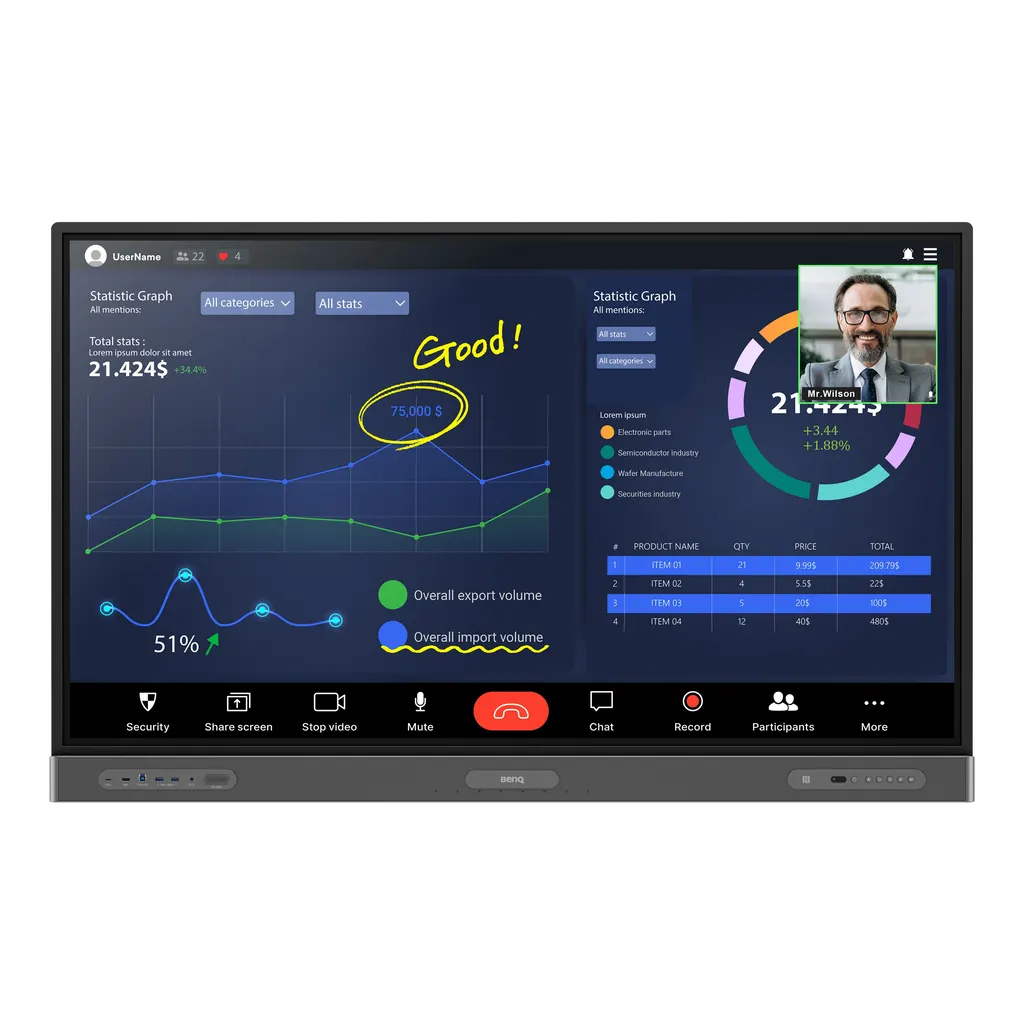
BenQ Board Pro RP6503 65-inch Interactive Display

Screen size
65''
Resolution
UHD 3840 × 2160 pixels
Touch
High Precision IR
System
Android 11.0
WhatsApp
Priceon request
QuotationWithin 1 working day
DeliveryConfirmed with your quote, based on stock
PDFDownload datasheet (IH_EN_260519104241.pdf)
Overview

The BenQ Board Pro RP6503 is a 65-inch 4K UHD interactive display built for meeting rooms, classrooms and collaboration spaces. Its IR touch layer accepts up to 40 touch points, and an OPS slot can take a slot-in PC so Windows applications run without connecting a laptop. Built-in NFC login, an 8-microphone array and Wi-Fi suit hybrid teams in Doha and Lusail. Request a quote from SmartRooms Qatar.

What the BenQ Board Pro RP6503 is

The BenQ Board Pro RP6503 is a 65-inch interactive display built around a 3840 × 2160 UHD IPS panel with 400 nits typical brightness and 10-bit colour depth. Its 16:9 active area measures 1428.5 × 803.5 mm, and the display runs Android 11.0 on an 8-core processor with 8GB memory and 64GB storage. Touch is provided by a high-precision infrared layer that recognises up to 40 points, with a touch response time below 10 ms. The panel is rated for 18 hours of operation a day, seven days a week, with a typical backlight life of 50,000 hours.

Connections that let a laptop take the lead

Meeting rooms rarely use one cable, so the RP6503 provides three HDMI 2.0 inputs, one HDMI 2.0 output, a DisplayPort 1.2a input, VGA, and a USB-C connection with 65 W power delivery that can charge a laptop while it shares its screen. Touchback lets a presenter control the connected laptop from the panel over HDMI or USB-C. Built-in Wi-Fi is fitted, Gigabit Ethernet is available on both the Android system and the OPS slot, and the OPS slot takes a slot-in PC for teams that need Windows applications on the board itself.

Collaboration tools, audio and camera

Staff sign in with an NFC card or a tap, which loads their cloud files and personal settings onto the board. EZWrite 6.0 provides the whiteboard, while InstaShare 2 lets up to nine screens appear side by side. The Floating Tool records sessions, takes screenshots and lets you write over any content on screen. The 8-microphone array picks up voices at up to 8 m with echo cancellation and noise reduction, and the 2 × 16 W speakers with a 16 W subwoofer support Dolby Digital Plus playback. A dedicated port is provided for a camera.

Health, air quality and device management

The screen, touch surface and front ports use germ-resistant nano-ionic silver technology on 9H tempered glass, and the pen and remote control are also germ-resistant. Low blue light and flicker-free operation are listed among its display features, and the screen has an anti-glare finish. An air ionizer and an air sensor are built in. For IT teams, DMS and AMS centralise device and account management, covering app installation, over-the-air updates and device analytics from one dashboard.

Where the RP6503 fits in Qatar

Three common situations suit this 65-inch model well:

  • Boardroom or meeting room in West Bay or Lusail: a hybrid meeting where remote directors join by video while the room shares a laptop, the whiteboard and the presenter's screen through one panel.
  • Training room at a university or training centre in Education City: students sign in with NFC and save their work to their own cloud storage.
  • Meeting room in a ministry or authority in Msheireb: bilingual teams use the same board, with Guest mode for visitors and Restricted mode to protect device settings.

What to plan before ordering

The panel weighs 43 kg and ships at 56 kg, so the wall and the mounting plan should be checked before installation. It mounts on a VESA 600 × 400 mm pattern with four M8 screws, and a wall mount is included. SmartRooms Qatar offers a free site survey to confirm the wall, cable routes and clearances. The operating range is 0°C to 40°C, so the panel belongs in an air-conditioned room rather than a space exposed to summer heat, where outdoor temperatures can exceed 45°C. Power input is rated at 100-240V, 50/60Hz, with typical consumption of 80.4 W and standby below 0.5 W.

Send the room size, mounting wall and quantity to SmartRooms Qatar and request a quote. Quotations are usually issued within one working day, and we accept purchase orders (LPOs) and government tenders, including Monaqasat. Delivery covers all eight municipalities of Qatar.

Highlights

  • 65-inch UHD 3840 × 2160 IPS panel, 400 nits typical brightness
  • Infrared touch with up to 40 points, under 10 ms response
  • OPS slot for a slot-in PC, plus built-in Wi-Fi and Ethernet
  • 8-microphone array, 2 × 16 W speakers and 16 W subwoofer
  • NFC login with EZWrite 6.0 and InstaShare 2 software
  • Nano-ionic silver germ-resistant glass; 0°C to 40°C operating range

Classroom fit

At 65″ the farthest student should sit within about 4.9 m (6× the screen height).

Estimated timeline

Quotation within 1 working day · delivery timing depends on stock availability, and we confirm it with your quotation.

Specifications

69 specifications · Source: manufacturer · checked Oct 2026
Panel14
Screen size
65''
Panel type
IPS
Active area
1428.5 × 803.5 mm
Aspect ratio
16:9
Resolution
UHD 3840 × 2160 pixels
Response time
8 ms
Color depth
10-bit
Orientation
Landscape
Operation hours
18 hours / 7 days
Panel brightness (typical)
400 nits
Contrast ratio (typical)
1200:1
Dynamic contrast ratio
30,000:1
Color gamut
72% NTSC
Backlight life (typical)
50,000 hrs
Glass3
Germ-resistant technology
Nano-ionic silver
Anti-glare
Yes | NA
Hardness
9H tempered
Touch screen3
Touch technology
High Precision IR
Touch points
up to 40
Touch response time
< 10 ms
System4
GPU
G52 MP8
CPU
A73 × 4 + A53 × 4
Memory | Storage
8GB I 64GB
OS
Android 11.0
Connectivity14
HDMI (in | out)
3 × HDMI 2.0 | 1 × HDMI 2.0
DisplayPort
1 × 1.2a
USB-A
2 × 2.0 + 5 × 3.0
USB-C
1 × 3.0 + 1 × 3.0 (PD 65 W)
USB-B (for touch)
3 × 3.0
3.5 mm Line in (1)
Mic × 1
VGA
1
3.5 mm Line out
Earphone × 1
OPS slot (for slot-in PC)
1
Wi-Fi
Built-in
S/PDIF out
0 | 1 (optical)
Ethernet
10 / 100 / 1000 Mbps (Android), 10 / 100 / 1000 Mbps (OPS) × 2
3.5 mm Line in (2)
PC Audio × 1
RS-232
1
Built-in peripherals8
NFC sensor
Yes
Ambient light sensor
Yes
Motion sensor
Yes
Microphone
8-microphone array (range: up to 8 m | 26ft)
Speaker
2 × 16 W
Air sensor
TVOC
Subwoofer
1 × 16 W
Air Ionizer
Yes
Power2
Power
AC 100-240V 50/60Hz
Typical power consumption
80.4 W
Physical5
Dimensions (W x H x D)
1489.3 × 934.3 × 121.5 mm (58.6 × 36.8 × 4.8 inch)
Shipping dimensions (W x H x D)
1660 × 1045 × 220 mm (65.4 × 41.1 × 8.7 inch)
Weight (product I shipping)
43 kg | 56 kg (94.8 lbs | 123.5 lbs)
Mount (screws)
VESA 600 × 400 mm (4 × M8 × 25L)
Pen Tray
Yes
Environment4
Operating temperature
0°C ~ 40°C | 32°F ~ 104°F
Storage temperature
-10°C ~ 60°C | 14°F ~ 140°F
Storage humidity
10% ~ 60% RH non-condensing
Operating humidity
20% ~ 80% RH non-condensing
Software8
Whiteboarding
EZWrite 6.0
Wireless screen sharing
InstaShare 2
Device management
DMS
Account management
AMS
Flicker Free
Yes
Quick access tool
Floating Tool
Broadcast system
X-Sign Broadcast
Low Blue Light
Yes
Accessories4
Cables
1 × VGA (3 m | 9.8 ft), 1 × HDMI (3 m | 9.8 ft), 1 × USB-B for touch (3 m | 9.8 ft), 1 × USB-C (1.5 m | 4.9 ft)
Wall mount
1
Pen
2
Remote control
1

Downloads

15 files from the manufacturer
PDF Manuals & guides IH_EN_260519104241.pdf 14.5 MB BenQ RP6503 manuals & guides (PDF, 14.5 MB) PDF Manuals & guides NFC_EN_230920143812.pdf 7.9 MB BenQ RP6503 manuals & guides (PDF, 7.9 MB) PDF Manuals & guides RCUM_EN_250616104132.pdf 968 KB BenQ RP6503 manuals & guides (PDF, 968 KB) PDF Manuals & guides RS232&LAN Command List_v20231114_Others.pdf 692 KB BenQ RP6503 manuals & guides (PDF, 692 KB) PDF Manuals & guides UM_AR_230828083527.pdf 11.2 MB BenQ RP6503 manuals & guides (PDF, 11.2 MB) PDF Manuals & guides UM_EN_230828083643.pdf 12.0 MB BenQ RP6503 manuals & guides (PDF, 12.0 MB) PDF Manuals & guides · Opens on manufacturer site AMS_EN_250819160158.pdf BenQ RP6503 manuals & guides (PDF) PDF Manuals & guides · Opens on manufacturer site DMS Cloud_EN_260929100553.pdf BenQ RP6503 manuals & guides (PDF) PDF Manuals & guides · Opens on manufacturer site DMS Local_EN_251223091035.pdf BenQ RP6503 manuals & guides (PDF) PDF Manuals & guides · Opens on manufacturer site Saffi_EN_230704164442.pdf BenQ RP6503 manuals & guides (PDF) PDF Manuals & guides · Opens on manufacturer site X-Sign-Broadcast_EN_221206164346.pdf BenQ RP6503 manuals & guides (PDF) ZIP Drawings & CAD · Opens on manufacturer site RP6503_Display CAD_02_Others.zip BenQ RP6503 drawings & cad (ZIP) ZIP Drawings & CAD · Opens on manufacturer site Wallmount Drawing_01_Others_260831140218.zip BenQ RP6503 drawings & cad (ZIP) PDF Certificates & compliance RP6503_DM_EN_221003104938.pdf 991 KB BenQ RP6503 certificates & compliance (PDF, 991 KB) ZIP Software & firmware · Opens on manufacturer site Additional Driver to Support Gesture_Mac_v07.00_68_Mac_241014092617.zip BenQ RP6503 software & firmware (ZIP)

Questions about RP6503

What is the BenQ Board Pro RP6503 used for?
The BenQ Board Pro RP6503 is a 65-inch interactive display for meetings, collaborative whiteboarding and presentations. It combines a 3840 × 2160 IPS panel with infrared touch of up to 40 points, so several people can write or annotate at the same time. In Qatar it is typically placed in offices, classrooms and meeting rooms where teams share ideas face to face and with colleagues abroad.
Who is the 65-inch RP6503 best suited to?
It suits small and mid-sized rooms where a 65-inch screen can be read comfortably from the whole table, such as huddle rooms, departmental meeting rooms and training rooms. Hybrid teams in offices across Doha, Al Sadd and Al Rayyan often choose this size for video meetings, while larger lecture halls and boardrooms usually need a bigger panel. Confirm the room layout with the SmartRooms Qatar team before you choose.
Is 65 inches the right size for a classroom or a boardroom?
A 65-inch panel with a 1428.5 × 803.5 mm active area suits medium classrooms and smaller boardrooms, where text stays readable for students in the back rows. For a large lecture hall at Education City or a full-size boardroom, a larger panel is usually the better fit. Measure the distance from the furthest seat before deciding, and ask for a free site survey to confirm the size for your room.
How do I connect a laptop to the RP6503?
Connect a laptop through one of the three HDMI 2.0 inputs, the DisplayPort 1.2a input, VGA, or a USB-C connection. The USB-C connection supplies 65 W power delivery, so the laptop can charge while sharing its screen. With touchback, a presenter can control the laptop from the panel. The package includes VGA, HDMI, USB-B and USB-C cables, with the USB-B cable used for touch.
Can the RP6503 run Windows applications without a laptop?
Yes, when a slot-in PC is fitted to the OPS slot. The slot-in PC turns the board into a Windows device, so staff can open Windows software and files without connecting a laptop. Without a slot-in PC, the panel runs its built-in Android 11.0 system with EZWrite 6.0 and InstaShare 2. Confirm with SmartRooms Qatar which slot-in PC you need for your applications before placing an order.
Does it work with Zoom, Microsoft Teams and Google Meet?
The manufacturer states compatibility with leading video conferencing software such as Zoom, Teams and Google Meet when used with a slot-in PC or the InstaShare Button. A camera connects to the dedicated camera port, and the 8-microphone array with echo cancellation and noise reduction supports calls, with the speakers carrying remote audio. Test your platform and camera model with the SmartRooms Qatar team before installation.
Can it be installed in a lobby or hall exposed to Qatar's summer heat?
Not without climate control. The RP6503 is rated for operating temperatures of 0°C to 40°C and 20% to 80% relative humidity, non-condensing. Outdoor temperatures in Qatar can exceed 45°C in summer, so the panel should sit in an air-conditioned room. Its storage range of -10°C to 60°C covers transport, but the operating range governs day-to-day use. Confirm the room's climate with the SmartRooms Qatar team.
How heavy is it and what mounting does it need?
The panel weighs 43 kg and its shipping weight is 56 kg, so a two-person lift is advisable. It mounts on a VESA 600 × 400 mm pattern using four M8 × 25 screws, and a wall mount is included with the package. Before fixing it to a wall in a Doha office or an Al Khor site, SmartRooms Qatar offers a free site survey to check wall strength, cable routes and clearance.
Is the power supply compatible with Qatar's mains?
The RP6503 is rated for AC 100-240V at 50/60Hz, which covers Qatar's 240 V, 50 Hz supply. Typical power consumption is 80.4 W and standby draw is below 0.5 W. Qatar uses BS 1363 (Type G) sockets, so confirm the power lead and socket arrangement with the team before ordering, and plan a socket near the wall mount location during the site survey.
Can a school or ministry order several units through an LPO or tender?
Yes. SmartRooms Qatar accepts purchase orders (LPOs) and government tenders, including Monaqasat, and payment by bank transfer, cheque or purchase order. For a school in Al Wakrah fitting out several classrooms, send the room list and mounting walls with the LPO request. Quotations are usually issued within one working day, and lead times are estimates confirmed in the quotation based on stock.
How does the RP6503 keep shared use secure?
Users log in by tapping an NFC card or scanning a QR code, and the panel loads their personal settings and cloud files. Guest mode gives visitors access to productivity tools without personal credentials, authentication mode locks the display to authorised accounts, and restricted mode stops logged-in users changing certain device settings. Multi-factor authentication adds one-time passwords, which suits shared meeting rooms in ministries and companies.

Similar models

BenQ CM7505 BenQ Board CM7505 75-inch Interactive Display
75″ UHD 3840 × 2160 pixels Ultra Precision IR
SMART SBID-6286S-V3 SMART Board 6086S-V3 86-inch Interactive Display with iQ
86″ 4K UHD (3840 × 2160) HyPr Touch with InGlass
SMART SBID-6286S-V3-P SMART Board 6086S-V3 Pro 86-inch Interactive Display with iQ
86″ 4K UHD (3840 × 2160) HyPr Touch with InGlass
Clevertouch Clevertouch Edge 65" Clevertouch Edge 65" 4K Interactive Display with Camera and Speakers
65″ 4K UHD (3840x2160 @60Hz) Android 15
Clevertouch Clevertouch Edge 86" Clevertouch Edge 86" 4K Interactive Flat Panel
86″ 4K UHD (3840x2160 @60Hz) Android 15
Email Call




