





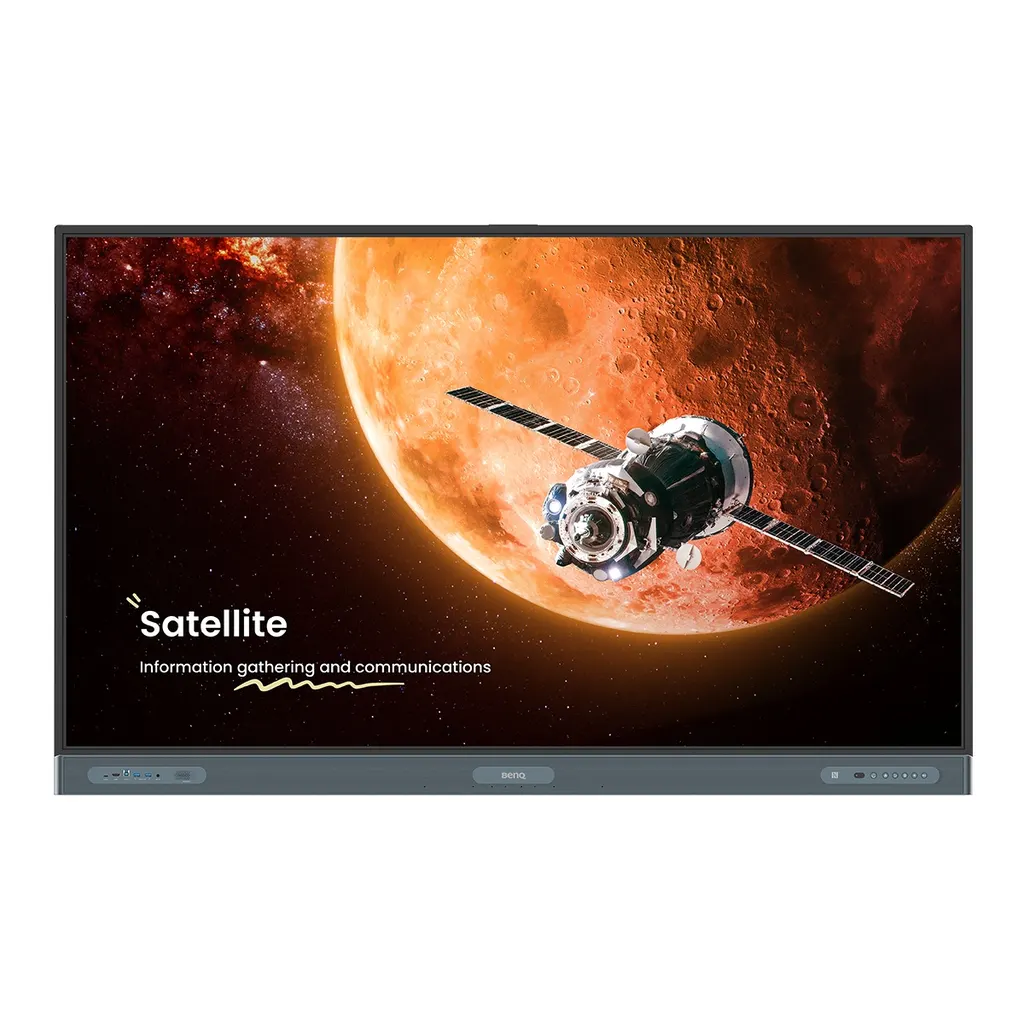
RP7504
BenQ Board Pro RP7504 75-inch Interactive Display
- Screen size
- 75''
- Resolution
- UHD 3840 × 2160 pixels
- Touch
- Ultra Precision IR
- System
- Android 15.0
The BenQ Board Pro RP7504 is a 75-inch 4K UHD interactive display with an IPS panel, 50-point Ultra Precision IR touch and Android 15 with EDLA-certified Google services. It offers four HDMI 2.0 inputs, a 100 W USB-C port, an OPS slot for a slot-in PC and a built-in 8-microphone array. It suits classrooms, lecture theatres and training rooms across Qatar that need a large shared writing surface. Request a quote from SmartRooms Qatar.
What the BenQ Board Pro RP7504 is
The RP7504 is the 75-inch model in the BenQ Board Pro RP04 series, a landscape interactive flat panel with a 3840 × 2160 IPS display, 10-bit colour and a 16:9 aspect ratio. It is built for lessons and meetings where several people write, drag and share content on the same surface. The panel is rated at 450 nits typical brightness and 1200:1 typical contrast, with an 8 ms response time.
Touch, processing and software
Ultra Precision IR touch supports up to 50 touch points with a touch response under 2.5 ms, so several users can write at the same time. The glass is 9H tempered and anti-glare. The system runs Android 15.0 on an 8-core processor (Arm Cortex-A78 × 4 and A55 × 4). The main product summary lists 8 GB memory and 128 GB storage, while the detailed system table lists 64 GB or 128 GB, so confirm the storage configuration before you order. EZWrite 6.0 handles whiteboarding, InstaShare 2 handles wireless sharing, and the board carries EDLA certification, which allows Google core apps and the Google Play Store to be used on it.
Ports and expansion
- Four HDMI 2.0 inputs and one HDMI 2.0 output
- One DisplayPort 1.2a input and one VGA input
- One USB-C 3.0 port rated PD 100 W for display, charging and touchback, plus two USB-C 3.0 and one USB-C 2.0 (PD 65 W)
- Seven USB-A 3.0 and one USB-A 2.0 port, with three USB-B ports for touch
- One OPS slot for a slot-in PC, two Ethernet ports, one RS-232 port and one optical S/PDIF output
- Wi-Fi 6, Bluetooth 5.2 and an NFC sensor for card login and phone sharing
The OPS slot matters if your school or office prefers a managed PC inside the display rather than a separate computer on a trolley. The 100 W USB-C port lets a teacher or presenter charge a laptop from the same cable that carries the picture and touch signal.
Where it fits in Qatar
A private school in Al Wakrah fitting out a classroom with a 75-inch display can use the RP7504 as the main teaching surface, with two pens and a remote supplied for the teacher and students. A university training room in Education City running hybrid sessions can use cloud whiteboarding to extend the board to remote students who take part as if they were in front of it. A ministry meeting room in Msheireb can connect staff in Doha with colleagues abroad, with the 8-microphone array and two 20 W speakers plus a 16 W subwoofer covering the room.
Summer conditions need planning. The source rates operating temperature from 0°C to 40°C, while outdoor temperatures in Qatar often exceed 45°C. Install the RP7504 in an air-conditioned room and keep it away from direct sun through glazing. The panel is rated IP5X for dust protection, which helps in offices and classrooms near building sites or during dust storms, but the room should still be sealed and cooled.
What to plan before installation
The panel weighs 52.2 kg, and the shipping weight is 64.5 kg, so plan for two people and a lift or trolley. The dimensions are 1709.4 × 1060.8 × 117.7 mm. A wall mount is included and the VESA pattern is 800 × 400 mm with M8 screws. Ask for a free site survey to check wall structure, the mounting height for your room and the route for cables before the display arrives. The mains input is 100-240 V at 50/60 Hz, typical power draw is 109.3 W, and standby is below 0.5 W.
Schools and public bodies often order several units under one purchase order. Send your LPO or tender details with your request, and SmartRooms Qatar will confirm a quotation, usually within one working day. Request a quote today to plan your RP7504 installation.
Highlights
- 75-inch 4K UHD IPS panel at 3840 × 2160 resolution
- 50-point Ultra Precision IR touch with under 2.5 ms response
- Android 15.0 with EDLA-certified Google services
- Four HDMI 2.0 inputs, 100 W USB-C and an OPS slot
- 8-microphone array with 2 × 20 W speakers and 16 W subwoofer
- Operating range 0°C to 40°C with 800 × 400 mm VESA mount
Classroom fit
At 75″ the farthest student should sit within about 5.6 m (6× the screen height).
Estimated timeline
Quotation within 1 working day · delivery timing depends on stock availability, and we confirm it with your quotation.
Specifications
Panel14
- Screen size
- 75''
- Panel type
- IPS
- Active area
- 1649.7 × 927.9 mm
- Aspect ratio
- 16:9
- Resolution
- UHD 3840 × 2160 pixels
- Response time
- 8 ms
- Color depth
- 10-bit
- Orientation
- Landscape
- Operation hours
- 18 hours / 7 days
- Panel brightness (typical)
- 450 nits
- Contrast ratio (typical)
- 1200:1
- Dynamic contrast ratio
- 50,000:1
- Color gamut
- 72% NTSC
- Backlight life (typical)
- 50,000 hrs
Glass3
- Germ-resistant technology
- Nano-ionic silver
- Anti-glare
- Yes
- Hardness
- 9H tempered
Touch screen3
- Touch technology
- Ultra Precision IR
- Touch points
- up to 50
- Touch response time
- < 2.5 ms
Connectivity16
- HDMI (in | out)
- 4 × HDMI 2.0 | 1 × HDMI 2.0
- DisplayPort
- 1 × 1.2a
- USB-A
- 7 × 3.0, 1 × 2.0
- USB-C
- 1 × 3.0 (PD 100 W), 2 × 3.0, 1 × 2.0 (PD 65 W)
- USB-B (for touch)
- 3 × 3.0
- 3.5 mm Line in (1)
- Mic × 1
- VGA
- 1
- 3.5 mm Line out
- Earphone × 1
- OPS slot (for slot-in PC)
- 1
- Micro SD reader
- N/A
- Wi-Fi
- Wi-Fi 6
- Bluetooth®
- Bluetooth 5.2
- S/PDIF out
- 1 (optical)
- Ethernet
- 2
- 3.5 mm Line in (2)
- PC Audio × 1
- RS-232
- 1
Built-in peripherals10
- NFC sensor
- Yes
- Ambient light sensor
- Yes
- IR sensor
- Yes
- Motion sensor
- Yes
- Microphone
- 8-microphone array (range: up to 8 m | 26ft)
- Speaker
- 2 × 20 W (max)
- Camera
- N/A
- Air sensor
- CO₂, PM₂.₅, PM₁₀, TVOC, CH₂O, temperature, humidity
- Subwoofer
- 1 × 16 W
- Air Ionizer
- Yes
Power3
- ENERGY STAR®
- Yes
- Power
- AC 100-240V 50/60Hz
- Typical power consumption
- 109.3 W
Physical5
- Dimensions (W x H x D)
- 1709.4 × 1060.8 × 117.7 mm (67.3 × 41.8 × 4.6 inch)
- Shipping dimensions (W x H x D)
- 1863 × 1155 × 205 mm (73.3 × 45.5 × 8.1 inch)
- Weight (product I shipping)
- 52.2 kg | 64.5 kg (115.1 lbs | 142.2 lbs)
- Mount (screws)
- VESA 800 × 400 mm (4 × M8 × 25L)
- Pen Tray
- Yes
Environment4
- Operating temperature
- 0°C ~ 40°C | 32°F ~ 104°F
- Storage temperature
- -20°C ~ 60°C | -4°F ~ 140°F
- Storage humidity
- 10% ~ 90% RH Non-Condensing
- Operating humidity
- 10% ~ 90% RH non-condensing
Software8
- Whiteboarding
- EZWrite 6.0
- Wireless screen sharing
- InstaShare 2
- Device management
- DMS
- Account management
- AMS
- Flicker Free
- Yes
- Quick access tool
- Floating Tool
- Broadcast system
- X-Sign Broadcast
- Low Blue Light
- Yes
Accessories4
- Cables
- 1 × VGA (3 m | 9.8 ft), 1 × HDMI (3 m | 9.8 ft), 1 × USB-B for touch (3 m | 9.8 ft), 1 × USB-C (1.5 m | 4.9 ft)
- Wall mount
- 1
- Pen
- 2
- Remote control
- 1
System4
- GPU
- Arm Mali-G57 MC5
- CPU
- Arm Cortex-A78 × 4 + A55 × 4
- Memory | Storage
- 8 GB | 64 GB/128 GB
- OS
- Android 15.0




