





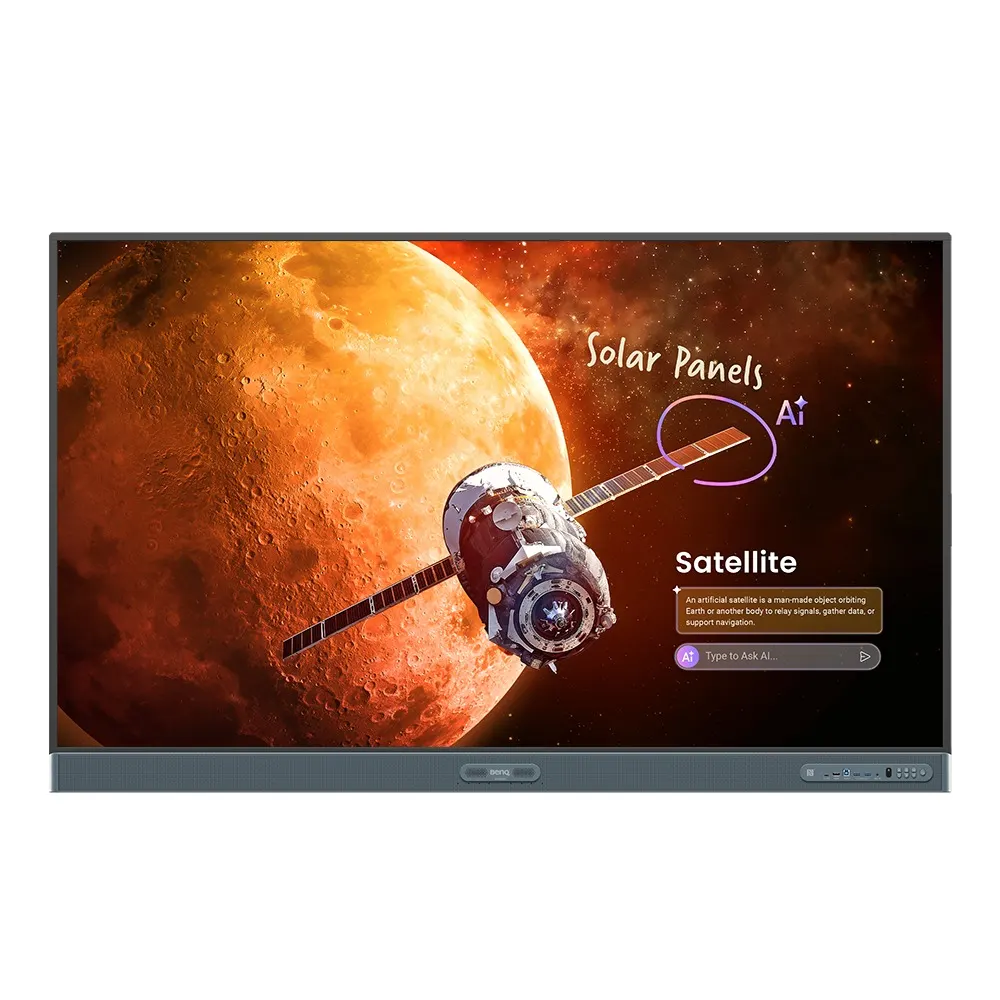
RP7505
BenQ Board Pro RP7505 75-inch Interactive Display
- Screen size
- 75''
- Resolution
- UHD 3840 × 2160 pixels
- Touch
- Ultra Precision IR
- System
- Android 15.0 (EDLA)
The BenQ Board Pro RP7505 is a 75-inch 4K interactive display for classrooms, training rooms and boardrooms in Qatar. It combines a 3840 × 2160 IPS panel with Ultra Precision IR touch for up to 50 points, Android 15 with Google Play, and a 10 TOPS NPU for on-device AI. An OPS slot, HDMI and USB-C inputs and directory sync suit schools and offices that need one managed screen. Request a quote for your site.
What the 75-inch RP7505 is built to do
The BenQ Board Pro RP7505 is a 75-inch landscape interactive display with a 3840 × 2160 IPS panel, 10-bit colour and 450 nits typical brightness. It runs Android 15 with Google EDLA certification, so teachers and staff can use Google Play apps on the large screen. A 10 TOPS NPU runs real-time AI tasks on the board itself, and the unit carries 16GB of memory and 256GB of storage.
Touch, audio and ports that matter in daily use
Touch is handled by Ultra Precision IR with up to 50 points and a response time under 2.5 ms, which supports several people writing at once. Audio comes from two 25 W speakers, a 20 W subwoofer and an 8-microphone array with pickup range up to 12 m. The connection panel is broad:
- Video inputs: three HDMI 2.0 ports, one DisplayPort 1.2a and one VGA
- USB: USB-C with 100 W Power Delivery, USB-A ports and USB-B for touch
- Expansion: one OPS slot for a slot-in PC and two Ethernet ports on the OPS side
- Wireless: Wi-Fi 6, Bluetooth 5.2 and NFC
- Other outputs: one HDMI 2.0 output, optical S/PDIF out and a micro SD reader
Managing many boards without manual account work
For IT teams, the most useful feature is account handling. Directory sync imports users from ClassLink, Clever, Google, Microsoft and other identity providers. Teachers sign in with a QR code or NFC, and their personal apps, files and cloud accounts open on the board. Devices are managed through DMS and accounts through AMS, and remote administration covers app installs, firmware updates, power schedules and settings.
Where a 75-inch installation makes sense in Qatar
A private school in Al Wakrah fitting out a mid-sized classroom can use the panel for lessons where students sit close enough to read small text, with the pen and touch tools for maths and science. A company in West Bay equipping a meeting room can receive laptop slides over HDMI or wirelessly through InstaShare 2 without anyone walking to a cable. An Education City training centre might add an OPS PC so one screen runs course software and the whiteboard together.
What to plan before installation
- Wall mount: VESA 800 × 400 mm with four M8 screws, and one wall mount included
- Weight: 45.1 kg for the panel and 58.2 kg in shipping packaging
- Environment: operating range 0°C to 40°C, so keep the room air-conditioned in summer
- Power: AC 100-240 V, 50/60 Hz, with typical consumption of 91.1 W
Book a free site survey so SmartRooms Qatar can check wall structure, cable routes and the nearest power point. Once the plan is agreed, our professional installation team handles the mounting. Request a quote for the BenQ Board Pro RP7505 and we will confirm the configuration, accessories and delivery to your municipality within one working day.
Highlights
- 75-inch 4K UHD IPS panel at 3840 × 2160 resolution
- Ultra Precision IR touch with up to 50 points
- Android 15 with Google EDLA certification and Google Play
- 10 TOPS NPU for AI features that run on the board
- One OPS slot for a slot-in PC with two OPS Ethernet ports
- Directory sync with ClassLink, Clever, Google and Microsoft
Classroom fit
At 75″ the farthest student should sit within about 5.6 m (6× the screen height).
Estimated timeline
Quotation within 1 working day · delivery timing depends on stock availability, and we confirm it with your quotation.
Specifications
Panel14
- Screen size
- 75''
- Panel type
- IPS
- Active area
- 1650.2 × 928.2 mm
- Aspect ratio
- 16:9
- Resolution
- UHD 3840 × 2160 pixels
- Response time
- 8 ms
- Color depth
- 10-bit
- Orientation
- Landscape
- Operation hours
- 18 hours / 7 days
- Panel brightness (typical)
- 450 nits
- Contrast ratio (typical)
- 1500:1
- Dynamic contrast ratio
- 50,000:1
- Color gamut
- 72% NTSC
- Backlight life (typical)
- 50,000 hrs
Glass3
- Germ-resistant technology
- Nano-ionic silver
- Anti-glare
- Yes | NA
- Hardness
- 9H tempered
Touch screen3
- Touch technology
- Ultra Precision IR
- Touch points
- up to 50
- Touch response time
- < 2.5 ms
Connectivity17
- HDMI (in | out)
- 3 × HDMI 2.0 | 1 × HDMI 2.0
- DisplayPort
- 1 × 1.2a
- USB-A
- 3 × 2.0 + 4 × 3.0
- USB-C
- 1 × 2.0 + 1 × 3.0 (PD 100 W)
- USB-B (for touch)
- 3 × 3.0
- 3.5 mm Line in (1)
- Mic × 1
- USB-C out
- 1 x Type-C (2.0 data / video out / audio out / touch)
- VGA
- 1
- 3.5 mm Line out
- Earphone × 1
- OPS slot (for slot-in PC)
- 1
- Micro SD reader
- 1
- Wi-Fi
- Wi-Fi 6
- Bluetooth®
- Bluetooth 5.2
- S/PDIF out
- 1 (optical)
- Ethernet
- 10 / 100 / 1000 Mbps (Android), 10 / 100 / 1000 Mbps (OPS) × 2
- 3.5 mm Line in (2)
- PC Audio × 1
- RS-232
- 1 | 0
Built-in peripherals10
- NFC sensor
- Yes
- Ambient light sensor
- Yes
- IR sensor
- Yes
- Motion sensor
- N/A
- Microphone
- 8-microphone array (range: up to 12 m | 39ft)
- Speaker
- 2 × 25 W
- Camera
- N/A
- Air sensor
- CO₂, PM₂.₅, PM₁₀, TVOC, CH₂O, temperature, humidity
- Subwoofer
- 1 × 20 W
- Air Ionizer
- Yes
Power3
- ENERGY STAR®
- Yes
- Power
- AC 100-240V 50/60Hz
- Typical power consumption
- 91.1 W
Physical5
- Dimensions (W x H x D)
- 1709.4 × 1060.8 × 130.0 mm (67.3 × 41.8 × 5.1 inch)
- Shipping dimensions (W x H x D)
- 1863 × 1170 × 205 mm (73.3 × 46.1 × 8.1 inch)
- Weight (product I shipping)
- 45.1 kg | 58.2 kg (99.4 lbs | 128.3 lbs)
- Mount (screws)
- VESA 800 × 400 mm (4 × M8 × 25L)
- Pen Tray
- Yes
Environment4
- Operating temperature
- 0°C ~ 40°C | 32°F ~ 104°F
- Storage temperature
- -20°C ~ 60°C | -4°F ~ 140°F
- Storage humidity
- 10% ~ 90% RH non-condensing
- Operating humidity
- 10% ~ 90% RH non-condensing
Software8
- Whiteboarding
- EZWrite 6.0
- Wireless screen sharing
- InstaShare 2
- Device management
- DMS
- Account management
- AMS
- Flicker Free
- Yes
- Quick access tool
- Floating Tool
- Broadcast system
- X-Sign Broadcast
- Low Blue Light
- Yes
Accessories4
- Cables
- 1 × HDMI (3 m | 9.8 ft), 1 × USB-B for touch (3 m | 9.8 ft), 1 × USB-C (1.5 m | 4.9 ft)
- Wall mount
- 1
- Pen
- 2
- Remote control
- 1
System5
- GPU
- Arm Mali-G57 MC2
- CPU
- Arm Cortex-A78 × 2 + A55 × 6
- NPU
- 10 TOPS
- Memory | Storage
- 16GB I 256GB
- OS
- Android 15.0 (EDLA)




