





Thursday, 22 October 2026 · 11 Jumada I 1448 AH Sun – Thu · 9:00 – 18:00
+971 56 914 9477 العربية
WhatsApp

RP8602

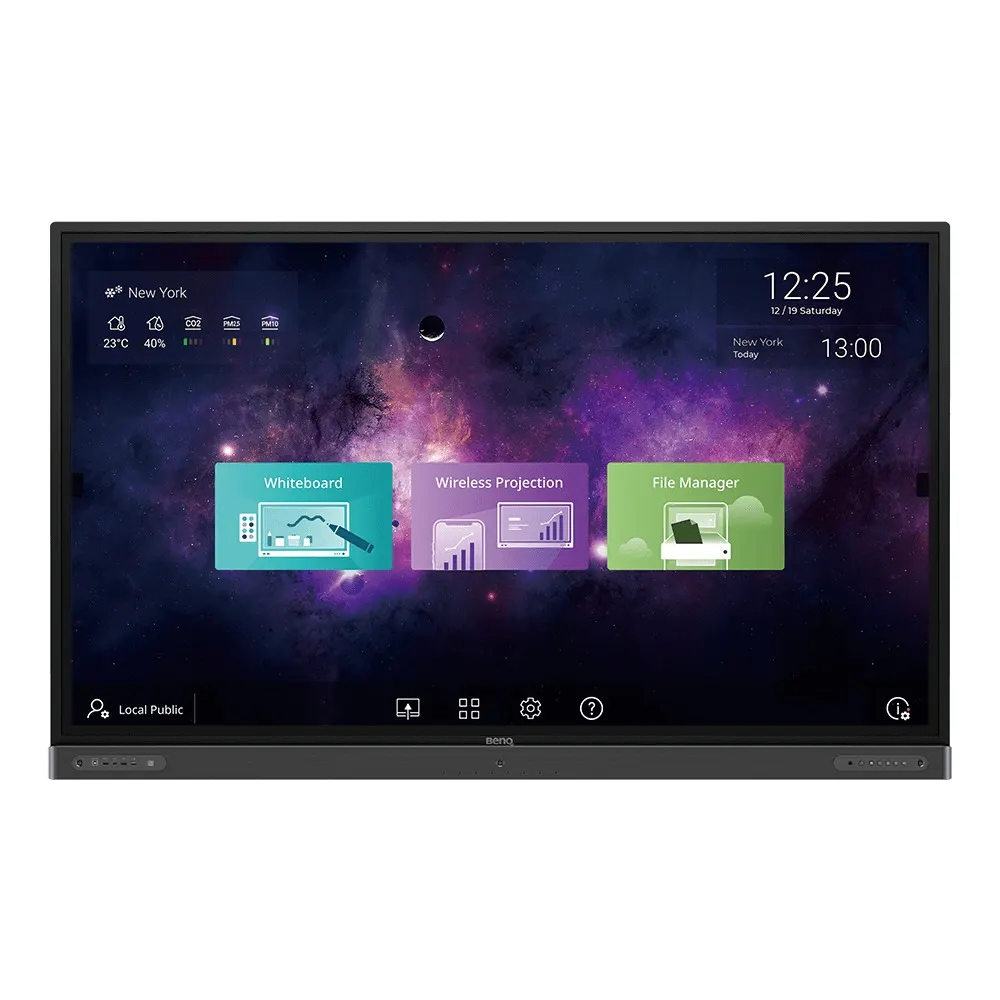
BenQ RP8602 86-inch Germ-Resistant Interactive Flat Panel

Screen size
86''
Resolution
UHD 3840 × 2160 pixels
Touch
Infrared touch
System
Android 8.0
WhatsApp
Priceon request
QuotationWithin 1 working day
DeliveryConfirmed with your quote, based on stock
PDFDownload datasheet (2020-rp02-classroomcare-interactive-flat-panel-brochure.pdf)
Overview

The BenQ RP8602 is an 86-inch 4K UHD interactive flat panel for classrooms and meeting spaces. It has a germ-resistant nano-ionic silver screen, built-in EZWrite whiteboarding and air quality sensors that track CO2, VOC and particulate levels. Its OPS slot, 20-point infrared touch and Android 8.0 platform suit school leaders and IT managers planning a large teaching room in Doha, Lusail or Al Rayyan. Request a quote for delivery and installation.

An 86-inch 4K panel built for classrooms that teach and collaborate

The BenQ RP8602 is an 86-inch interactive flat panel from the BenQ Board Pro RP02 series. Its IPS panel runs at 3840 × 2160 UHD resolution in a 16:9 landscape format, with 400 nits typical brightness, a 1200:1 typical contrast ratio and 10-bit colour depth. Infrared touch supports 20 touch points at once with a touch response time under 4 ms, so several learners can write or move objects on a large board together.

Germ-resistant glass and air quality monitoring

The screen combines nano-ionic silver compounds with an anti-glare coating and tempered glass rated 9H. The manufacturer states that the screen is certified by TÜV and SIAA. The TÜV evaluation followed the JIS Z 2801:2010 method and reported that the screen restrains Escherichia coli, Staphylococcus aureus and Pseudomonas aeruginosa. Built-in air quality sensors display temperature, humidity, PM 2.5, PM 10, CO2 and VOC levels, so a teacher can open a window or adjust ventilation. To keep the antimicrobial surface effective, the manufacturer advises wiping it regularly with a clean, soft, lint-free cloth dampened with a neutral detergent.

Where the RP8602 fits in Qatar

  • Primary and secondary classrooms in Doha, Al Sadd or Al Rayyan, where one large board replaces a projector and a whiteboard.
  • Lecture theatres and seminar rooms at universities and training centres in Education City, where content on an 86-inch screen stays readable from the back row.
  • Boardrooms in government authorities and companies in West Bay or Msheireb, where the OPS slot can house a slot-in PC inside the panel.

Lessons can also run remotely. EZWrite Live is a browser-based whiteboard that works in Firefox, Chrome and Safari, so a teacher can deliver a lesson to students at home or abroad while the class annotates the same canvas. InstaShare lets students share wirelessly from laptops, smartphones and tablets, with up to nine devices shown in split screens.

What to plan before the panel arrives

The panel measures 1988.8 × 1229.8 × 141.6 mm and weighs 79 kg. The packed shipment measures 2160 × 1340 × 225 mm and weighs 97.5 kg. Two people should handle delivery, and the wall or stand must be rated for the load. The panel mounts to a VESA 700 × 400 mm pattern with four M8 × 20 screws, and a wall mount is included. Its operating range is 0°C to 40°C with 10% to 90% RH non-condensing humidity, so install it in an air-conditioned room away from direct sunlight, especially where summer temperatures in Qatar pass 45°C. Typical power consumption is 149.8 W and standby draw is below 0.5 W.

Send your room dimensions, the number of units and the mounting height you need. The SmartRooms Qatar team will return a detailed quotation, usually within one working day, and a free site survey can be arranged before installation. Request a quote for the BenQ RP8602 today.

Highlights

  • 86-inch 4K UHD IPS panel at 3840 × 2160 resolution
  • 20-point infrared touch with response time under 4 ms
  • Nano-ionic silver germ-resistant screen with TÜV and SIAA certification
  • Built-in sensors for temperature, humidity, CO2 and VOC
  • OPS slot, Android 8.0, 4GB memory and 32GB storage
  • Wall mount, two pens and remote control included

Classroom fit

At 86″ the farthest student should sit within about 6.4 m (6× the screen height).

Estimated timeline

Quotation within 1 working day · delivery timing depends on stock availability, and we confirm it with your quotation.

Specifications

65 specifications · Source: manufacturer · checked Oct 2026
Panel14
Screen size
86''
Panel type
IPS
Active area
1895.0 × 1066.0 mm
Aspect ratio
16:9
Resolution
UHD 3840 × 2160 pixels
Response time
8 ms
Color depth
10-bit
Orientation
Landscape
Operation hours
18 hours / 7 days
Panel brightness (typical)
400 nits
Contrast ratio (typical)
1200:1
Dynamic contrast ratio
30,000:1
Color gamut
68% NTSC
Backlight life (typical)
50,000 hrs
Glass3
Germ-resistant technology
Nano-ionic silver
Anti-glare
Yes | NA
Hardness
9H tempered
Touch screen3
Touch technology
Infrared touch
Touch points
20
Touch response time
< 4 ms
System4
GPU
Mali-G51MP4
CPU
A73 × 2 + A53 × 2
Memory | Storage
4GB I 32GB
OS
Android 8.0
Connectivity12
HDMI (in | out)
3 × HDMI 2.0 | 1 × HDMI 2.0
USB-A
3 × 2.0 + 2 × 3.0
USB-C
1 × 3.0
USB-B (for touch)
3 × 2.0
3.5 mm Line in (1)
Mic × 1
VGA
1 | 0
3.5 mm Line out
Earphone × 1
OPS slot (for slot-in PC)
1
S/PDIF out
0 | 1 (optical)
Ethernet
10 / 100 Mbps (Android), 10 / 100 / 1000 Mbps (OPS) × 1
3.5 mm Line in (2)
PC Audio × 1
RS-232
1 | 0
Built-in peripherals6
NFC sensor
Yes
Motion sensor
3
Microphone
8 (Max. pickup range 8m)
Speaker
2 × 16 W
Air sensor
TVOC
Subwoofer
1 × 15 W
Power2
Power
AC 100-240V 50/60Hz
Typical power consumption
149.8 W
Physical5
Dimensions (W x H x D)
1988.8 × 1229.8 × 141.6 mm (78.3 × 48.4 × 5.6 inch)
Shipping dimensions (W x H x D)
2160 × 1340 × 225 mm (85.0 × 52.8 × 8.9 inch)
Weight (product I shipping)
79 kg | 97.5 kg (174.2 lbs | 215 lbs)
Mount (screws)
VESA 700 × 400 mm (4 × M8 × 20L)
Pen Tray
1
Environment4
Operating temperature
0°C ~ 40°C | 32°F ~ 104°F
Storage temperature
-10°C ~ 60°C | 14°F ~ 140°F
Storage humidity
10% ~ 80% RH non-condensing
Operating humidity
10% ~ 90% RH non-condensing
Software8
Whiteboarding
EZWrite 5.0
Wireless screen sharing
InstaShare 1
Device management
DMS
Account management
AMS
Flicker Free
Yes
Quick access tool
Floating Tool
Broadcast system
X-Sign Broadcast
Low Blue Light
Yes
Accessories4
Cables
1 × VGA (3 m | 9.8 ft), 1 × HDMI (3 m | 9.8 ft), 1 × USB-B for touch (3 m | 9.8 ft), 1 × USB-C (1.5 m | 4.9 ft)
Wall mount
1
Pen
2
Remote control
1

Downloads

17 files from the manufacturer
PDF Datasheets 2020-rp02-classroomcare-interactive-flat-panel-brochure.pdf 8.0 MB BenQ RP8602 datasheets (PDF, 8.0 MB) PDF Manuals & guides IH_EN_260519104241.pdf 14.5 MB BenQ RP8602 manuals & guides (PDF, 14.5 MB) PDF Manuals & guides QG_G_220419004957.pdf 6.8 MB BenQ RP8602 manuals & guides (PDF, 6.8 MB) PDF Manuals & guides RCUM_EN_250616104132.pdf 968 KB BenQ RP8602 manuals & guides (PDF, 968 KB) PDF Manuals & guides RS232&LAN Command List_v20200507_Others.pdf 638 KB BenQ RP8602 manuals & guides (PDF, 638 KB) PDF Manuals & guides UM_AR_230110104032.pdf 10.7 MB BenQ RP8602 manuals & guides (PDF, 10.7 MB) PDF Manuals & guides UM_EN_221215150834.pdf 11.1 MB BenQ RP8602 manuals & guides (PDF, 11.1 MB) PDF Manuals & guides · Opens on manufacturer site AMS_EN_250819160158.pdf BenQ RP8602 manuals & guides (PDF) PDF Manuals & guides · Opens on manufacturer site DMS Cloud_EN_260929100553.pdf BenQ RP8602 manuals & guides (PDF) PDF Manuals & guides · Opens on manufacturer site DMS Local_EN_251223091035.pdf BenQ RP8602 manuals & guides (PDF) PDF Manuals & guides · Opens on manufacturer site Saffi_EN_230704164442.pdf BenQ RP8602 manuals & guides (PDF) PDF Manuals & guides · Opens on manufacturer site X-Sign-Broadcast_EN_221206164346.pdf BenQ RP8602 manuals & guides (PDF) ZIP Drawings & CAD · Opens on manufacturer site RP8602_Display CAD_01_Others.zip BenQ RP8602 drawings & cad (ZIP) ZIP Drawings & CAD · Opens on manufacturer site Wallmount Drawing_01_Others_260608155916.zip BenQ RP8602 drawings & cad (ZIP) PDF Certificates & compliance siaa-tuv-certificates-antibacteria-simplified-2021.pdf 1.0 MB BenQ RP8602 certificates & compliance (PDF, 1.0 MB) ZIP Software & firmware · Opens on manufacturer site Additional Driver to Support Gesture_Mac_v06.00.727_Mac.zip BenQ RP8602 software & firmware (ZIP) ZIP Software & firmware · Opens on manufacturer site Multi-touch Driver for Linux_1_Linux.zip BenQ RP8602 software & firmware (ZIP)

Questions about RP8602

Is the BenQ RP8602 suited to a boardroom in West Bay or a lecture hall in Education City?
Yes, both are good fits. The 86-inch IPS panel at 3840 × 2160 resolution keeps slides and text legible across a large room, and 20-point touch lets several presenters write at once. The OPS slot can hold a slot-in PC, so the panel can run staff applications without a separate laptop. Tell us the room size and seating layout when you request a quote so we can confirm the viewing distance.
Is the screen germ-resistant, and how is that certified?
The screen uses nano-ionic silver compounds with an anti-glare coating and tempered glass. The manufacturer states it is certified by TÜV and SIAA. The TÜV evaluation followed the JIS Z 2801:2010 method and reported that the screen restrains Escherichia coli, Staphylococcus aureus and Pseudomonas aeruginosa. The manufacturer advises regular cleaning with a soft, lint-free cloth and a neutral detergent to keep the antimicrobial surface effective in busy classrooms.
Can the panel be installed in a hall in Mesaieed or Al Khor without air conditioning?
No. The operating temperature range is 0°C to 40°C, with 10% to 90% RH non-condensing humidity. Summer temperatures in Qatar can pass 45°C, so the panel should sit in an air-conditioned room, away from direct sunlight and large windows. If a hall cannot be kept within that range year-round, do not install the RP8602 there. Ask the SmartRooms Qatar team to review the space before you request a quote.
Will the RP8602 fit through the door and up the stairs of an older school building in Al Sadd?
Measure first. The panel is 1988.8 × 1229.8 × 141.6 mm and weighs 79 kg, while the packed shipment is 2160 × 1340 × 225 mm and weighs 97.5 kg. The packed unit is larger than the panel itself, so check doorways, lift sizes and corridor turns before delivery. Two people should handle it. A free site survey from SmartRooms Qatar can confirm access before the unit is ordered.
How is the panel mounted, and what comes in the box for installation?
The display supports a VESA 700 × 400 mm mounting pattern using four M8 × 20 screws, and the package includes a wall mount. Plan the mounting height for the shortest and tallest users, and confirm the wall can carry 79 kg. The package also includes a pen tray, two pens, a remote control and cables: one VGA, one HDMI, one USB-B touch cable and one USB-C cable. Wall construction and cable routing should be checked during the site survey.
What connections does the RP8602 offer for laptops, PCs and classroom equipment?
The panel offers three HDMI 2.0 inputs and one HDMI 2.0 output, plus a USB-C 3.0 port, two USB 3.0 and three USB 2.0 ports, three USB-B touch inputs, a VGA input, RS-232, an optical S/PDIF output, a 3.5 mm line out, and Ethernet. Its HDMI output supports dual display use, so the same material can appear on a second screen. Confirm your device list with us so the right cables are supplied.
What is the OPS slot for, and does the package include an OPS PC?
The OPS slot accepts a slot-in PC module, which runs a full computer inside the display so staff can use desktop software directly. The source data lists Ethernet at 10/100/1000 Mbps through OPS, compared with 10/100 Mbps on the Android system. The accessories list does not include an OPS module, so specify the module and operating system you need when you request a quote from SmartRooms Qatar.
Which whiteboarding and sharing software comes with the RP8602?
The panel runs EZWrite 5.0 for whiteboarding, with notes that can be saved and shared by email, QR code or USB stick after a lesson. EZWrite Live is a web-based whiteboard for remote teaching that works in Firefox, Chrome and Safari. InstaShare 1 supports wireless screen mirroring and touch-back feedback. Remote features depend on a stable network connection, so check the room's connectivity during planning.
Can a teacher in Doha run a lesson for students studying at home or abroad?
Yes. EZWrite Live lets a teacher run a web-based whiteboard session through Firefox, Chrome or Safari, while students join from home or another city. Teachers can switch students' editing access on or off, and one-tap video recording captures on-screen steps for review. This suits a school in Doha running a hybrid timetable, or a training centre teaching learners in several locations. A stable network connection is needed for live sessions.
Can students in an international school in Lusail share work from their own devices?
Yes. InstaShare 1 lets students mirror laptops, smartphones and tablets wirelessly, and the board can display up to nine devices in split screens for group discussions. Teachers can control which students' devices have permission to share content, and two-way mirroring lets students return feedback to the board. This suits a bring-your-own-device classroom where students use their own equipment during project-based lessons.
Does the RP8602 monitor air quality in a classroom?
Yes, it has built-in air quality sensors. The data lists sensors for temperature, humidity, PM 2.5, PM 10, CO2 and VOC concentration, which help teachers decide when to open windows or adjust ventilation during a crowded lesson. The spec sheet names a TVOC air sensor, so ask the SmartRooms Qatar team which readings appear on screen before you finalise your order. The sensors add information to the lesson without replacing a dedicated air quality monitor.
Is the RP8602 compatible with Qatar's 240 V mains supply?
The power input is listed as AC 100-240V at 50/60Hz, which covers Qatar's 240 V, 50 Hz mains supply. Typical power consumption is 149.8 W, and standby consumption is below 0.5 W. The source data does not specify the plug type, so confirm the power cord supplied with your order when you request a quote. SmartRooms Qatar can check the electrical requirements for each room before installation.
Can a school or government entity order several RP8602 units through an LPO or tender?
Yes. SmartRooms Qatar supplies against purchase orders (LPOs) and government tenders, including Monaqasat, and accepts payment by bank transfer, cheque or purchase order. For a school fitting out several classrooms, the quotation can list each unit with its wall mount and accessories, and a site survey can be scheduled for each room. Products are covered by the manufacturer's warranty. Request a quote with your room list and tender reference.

Similar models

BenQ CM7505 BenQ Board CM7505 75-inch Interactive Display
75″ UHD 3840 × 2160 pixels Ultra Precision IR
SMART SBID-6286S-V3 SMART Board 6086S-V3 86-inch Interactive Display with iQ
86″ 4K UHD (3840 × 2160) HyPr Touch with InGlass
SMART SBID-6286S-V3-P SMART Board 6086S-V3 Pro 86-inch Interactive Display with iQ
86″ 4K UHD (3840 × 2160) HyPr Touch with InGlass
Clevertouch Clevertouch Edge 65" Clevertouch Edge 65" 4K Interactive Display with Camera and Speakers
65″ 4K UHD (3840x2160 @60Hz) Android 15
Clevertouch Clevertouch Edge 86" Clevertouch Edge 86" 4K Interactive Flat Panel
86″ 4K UHD (3840x2160 @60Hz) Android 15
Email Call




