





Thursday, 22 October 2026 · 11 Jumada I 1448 AH Sun – Thu · 9:00 – 18:00
+971 56 914 9477 العربية
WhatsApp

TEY41-i7

BenQ TEY41-i7 Windows OPS Slot-in PC for BenQ Boards

Memory
8 GB DDR4 (2 x 4 GB)
Storage
256 GB
WhatsApp
Priceon request
QuotationWithin 1 working day
DeliveryConfirmed with your quote, based on stock
Overview

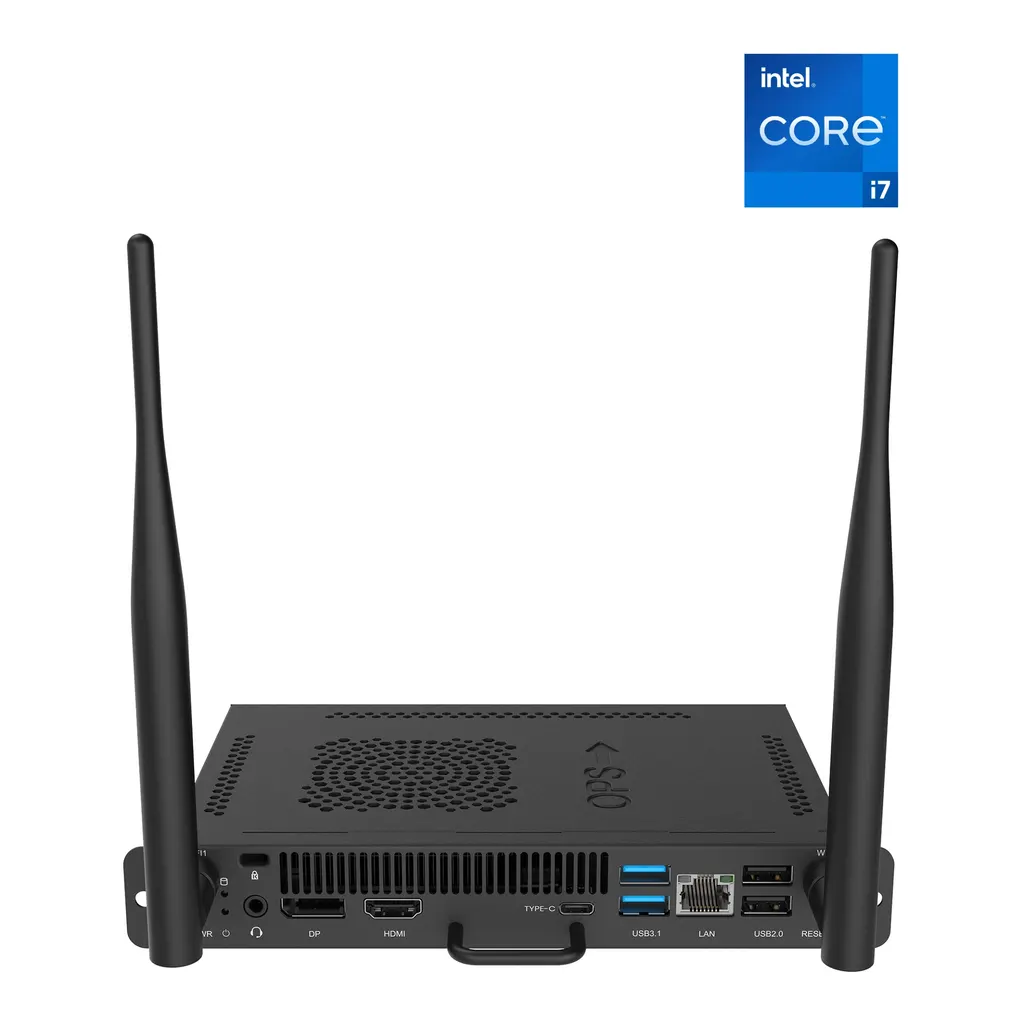
The BenQ TEY41-i7 is an OPS slot-in PC adding a 12th Gen Intel Core i7, 8 GB RAM and 256 GB storage to compatible BenQ Boards and Smart Displays. It runs Windows 11 Pro (trial version) alongside the board's Android system, with HDMI 2.0 output and Wi-Fi 6. It suits schools and offices in Qatar that want Windows apps on a large panel without a separate laptop.

What the TEY41-i7 adds to a BenQ Board

The BenQ TEY41-i7 is an OPS slot-in computer. It sits inside the OPS slot of a compatible BenQ Board or Smart Display, giving the panel its own Windows PC without a separate unit on the floor. The package includes the OPS computer and two Wi-Fi antennas. Because the module is supported only on the models named in the manufacturer's compatibility list, check your panel number before you request a quote.

Processor, memory and storage

The module is built around a 12th Gen Intel Core i7-1255U processor with Intel Iris Xe graphics. It carries 8 GB of DDR4 memory in two 4 GB modules and a 256 GB storage drive. Windows 11 Pro is pre-installed as a trial version, so IT managers should confirm the licence position for their organisation before rollout. The unit measures 180 × 30 × 119 mm and weighs 1.23 kg, which keeps it light enough to handle during fitting.

Windows alongside Android on one panel

In Duo OS mode the built-in EZWrite whiteboard runs on the board's Android side while a full Windows system runs at the same time. A teacher can annotate on the whiteboard and open Windows-based lesson files without switching between devices. Shortcuts to favourite programs, a sidebar with recent apps and the Capture Tool, and a quick settings panel for network and screen sharing keep daily use straightforward.

Schools can also install their preferred video conferencing and hybrid learning applications on the Windows side. That allows a teacher to start a remote class directly from the board, which suits schools linking classrooms with partners abroad.

Ports, wireless and security

The module provides an HDMI 2.0 output supporting 4K UHD at 60Hz with 3.5 mm audio. Its USB ports include one USB 3.1 Type-C, two USB 3.1, one USB 3.0 and one USB 2.0. A 1GbE Ethernet port gives a wired connection, and Wi-Fi 6 covers both the 5 GHz band (802.11 a/n/ac/ax) and the 2.4 GHz band (802.11 b/g/n/ax).

A TPM 2.0 chip supports stronger encryption on Windows and helps protect login credentials and lesson files. The Intel vPro platform adds hardware-based security features and remote management capabilities, which matter when an IT team looks after several panels across a campus or office estate.

Where it fits in Qatar and what to plan for

A private school in Al Rayyan refitting several classrooms can give each teacher Windows access on the board without moving a laptop between rooms. A boardroom in West Bay where presenters bring Windows documents can run them on the panel while the whiteboard stays on the Android side. A training centre in Education City running Windows-based courses can use the module as the classroom computer, provided the chosen board is on the compatibility list.

Before ordering, confirm the board model, check that your software runs on Windows 11 Pro, and plan the network connection, choosing between Wi-Fi 6 and the Ethernet port. The product data does not list an operating temperature range, so confirm the room's cooling with the SmartRooms Qatar team before installing in a hot space. SmartRooms Qatar offers free site surveys, professional installation and delivery to all eight municipalities of Qatar. Request a quote and the SmartRooms Qatar team will confirm the details in your quotation, usually within one working day.

Highlights

  • 12th Gen Intel Core i7-1255U processor with Iris Xe graphics
  • 8 GB DDR4 memory and 256 GB storage
  • Windows 11 Pro pre-installed as a trial version
  • Runs Windows alongside Android in Duo OS mode
  • HDMI 2.0 output at 4K UHD 60Hz plus USB 3.1 Type-C
  • Wi-Fi 6 with two antennas included, plus 1GbE Ethernet
  • TPM 2.0 chip for login credential and file protection

Estimated timeline

Quotation within 1 working day · delivery timing depends on stock availability, and we confirm it with your quotation.

Specifications

15 specifications · Source: manufacturer · checked Oct 2026
Main specifications7
CPU
12th Gen Intel® Core™ i7-1255U Processor
Graphics
Intel® Iris® Xe Graphics
Memory
8 GB DDR4 (2 x 4 GB)
Storage
256 GB
Dimensions (W × H × D)
180 × 30 × 119 mm (7.09 × 1.18 × 4.69 in)
Box Size (L * W * H)
254 x 196 x 77 mm (10 x 7.72 x 3.03 in)
Gross Weight
1.23 kg (2.71 lbs)
Connectivity5
Output
HDMI 2.0 (4K UHD @ 60Hz, 3.5 mm audio)
Input
3.5 mm audio
USB
USB 3.1 Type-C, 2 × USB 3.1, USB 3.0, USB 2.0
Ethernet
1GbE
Wireless
Wi-Fi 6, IEEE 802.11 a/n/ac/ax 5 GHz, IEEE 802.11 b/g/n/ax 2.4 GHz
Package content1
Included
Intel OPS slot-in computer, 2 × Wi-Fi antennas
Compatibility2
BenQ Boards
CP6501K, CP8601K, RP6504, RP7504, RP8604, RM6504, RM7504, RM8604, RE6504, RE7504, RE8604, RP6503, RP7503, RP8603, RP6501K, RP7501K, RP8601K, RM6503, RM7503, RM8603, RM5502K, RM6502K, RM7502K, RM8602K, RM5501K, RM6501K, RM7501K, RM8601K, RM6502S, RM7502S, RM8602S, RE6501, RE7501, RE8601, RE9801, IL4301, IL5501
Smart Displays
CS6501, CS7501, CS8601 ST4302, ST5502, ST6502, ST7502, ST8602 ST6502S, ST7502S, ST8602S

Downloads

0 files from the manufacturer
No downloadable files are listed for this model yet. Ask us and we will send the datasheet.

Questions about TEY41-i7

Is the TEY41-i7 right for a school or office in Doha that already has a BenQ Board?
Yes, provided the panel appears on the compatibility list. The module adds a computer with a 12th Gen Intel Core i7-1255U processor, 8 GB DDR4 memory and 256 GB storage, so teachers and staff can open Windows files and apps on the same screen without carrying a laptop. Confirm your exact model number before requesting a quote.
Which BenQ models is the TEY41-i7 compatible with?
The manufacturer lists compatible BenQ Boards including CP8601K, RP8604, RM8604, RE8604, RM8602S and IL5501, and Smart Displays including CS8601, ST8602 and ST8602S, among other models. Check your complete model number against that list before requesting a quote, because the list defines which panels this module is supported on.
Can Windows and Android run at the same time on the panel?
Yes, through the Duo OS mode. The built-in EZWrite whiteboard runs on the Android side while a fully functional Windows system runs alongside it. A teacher can therefore load and use Windows-based files and apps during a lesson, and use the whiteboard without leaving the Windows session.
Does the TEY41-i7 include a full Windows licence?
The product data states that Windows 11 Pro is pre-installed as a trial version. Organisations planning wider deployment should verify licence terms and activation before rollout. Include your licence requirements in the quotation request so the quote reflects the full scope of the project and avoids surprises when units are set up across several rooms.
What ports and wireless connections does the module provide?
The module offers an HDMI 2.0 output at 4K UHD and 60Hz with 3.5 mm audio, one USB 3.1 Type-C port, two USB 3.1 ports, one USB 3.0 port and one USB 2.0 port. It also has a 1GbE Ethernet port and Wi-Fi 6 on both the 5 GHz and 2.4 GHz bands. Two Wi-Fi antennas are included in the package.
How does the TEY41-i7 protect login details and lesson files?
It includes a TPM 2.0 chip, which the manufacturer describes as providing stronger encryption on Windows and safeguarding login credentials and lesson files. The Intel vPro platform adds hardware-based security features and advanced remote management, which helps IT teams that look after several panels across a school campus or office building.
How much space does the module need, and what should I check before installation?
The module measures 180 × 30 × 119 mm and weighs 1.23 kg, and its shipping box measures 254 × 196 × 77 mm. Before installation, confirm the location of the OPS slot on your board and how the panel is mounted. SmartRooms Qatar offers free site surveys and professional installation, which is especially useful for large panels fixed to walls.
Can it be installed in a hot lobby or an unairconditioned room in Doha?
The product data does not list an operating temperature range or environmental rating for the TEY41-i7, so it should not be assumed suitable for unconditioned or sun-exposed spaces. Summer temperatures in Doha regularly exceed 45°C, so confirm the room's cooling and airflow with the SmartRooms Qatar team before you request a quote.
Would a private school in Al Rayyan refitting several classrooms benefit from this module?
Yes, if the boards it uses are on the compatibility list and teachers need Windows software during lessons. Each board gets its own Windows computer, so a teacher does not have to move a laptop between classrooms. Installation can be scheduled around the school timetable after a site survey confirms the OPS slot and mounting arrangements in each room.
Is the module useful for a boardroom in West Bay where presenters bring Windows files?
Yes. Presenters can open Windows-based documents and run the software they already use on the Windows side, while the EZWrite whiteboard remains available in Duo OS mode. The HDMI 2.0 output supports 4K UHD at 60Hz, which matters when the panel is connected to other displays or presentation equipment in the room.
Can teachers run remote lessons with partner schools abroad from this board?
The manufacturer states that schools can install their preferred video conferencing and hybrid learning applications on the Windows side and start remote classes directly from the board. Check that your chosen platform runs on Windows 11 Pro and that your network meets its requirements, using either Wi-Fi 6 or the 1GbE Ethernet port.
How do we order units for several classrooms or a government tender?
Send the board model and quantity for each room, and the SmartRooms Qatar team usually replies with a quotation within one working day. We accept purchase orders and LPOs, support government tenders including Monaqasat, and accept payment by bank transfer, cheque or purchase order. Each compatible board needs its own module, so list every panel model in your request.

Similar models

Hisense OPS72D/72E Hisense OPS72D/72E OPS On Board Computer for Interactive Displays
8GB
Clevertouch OPS i5 Clevertouch OPS i5 PC Module with Intel Core i5 and 256GB SSD
Windows 11 - Home / Pro /… Memory: 16GB DDR4
Clevertouch OPS i7 Clevertouch OPS i7 PC Module with Intel Core i7 13620H
Windows 11 - Home / Pro /… 16GB DDR4
Hikvision DS-D5AC12G5-8S2 Hikvision DS-D5AC12G5-8S2 OPS Module for Interactive Panels
8G 256G
Hikvision DS-D5AC13G7-16S5 Hikvision DS-D5AC13G7-16S5 OPS Module with Intel Core i7-13620H
16G 512G
Email Call



