CleverCam
Clevertouch CleverCam 4K ePTZ Camera for Video Conferencing
- Resolution
- Main Stream: 3840×2160 @30fps
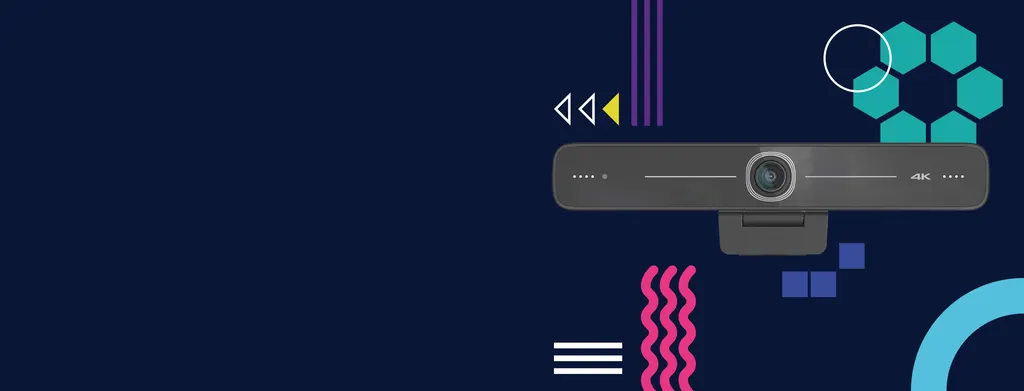
The Clevertouch CleverCam is a 4K ePTZ camera for video conferencing rooms. It records 3840×2160 at 30fps from an 8.28MP sensor, with an 83° horizontal view, two omnidirectional microphones and auto framing that adjusts to the number of people in the scene. USB 3.0 connects it to Windows, macOS and Linux computers. It suits boardrooms and classrooms in Qatar that link up with partners abroad.
What the CleverCam is and why resolution matters
The CleverCam is a 4K ePTZ camera built for video conferencing. ePTZ means the camera captures a wide image and pans, tilts and zooms electronically, so the framing is handled without a motorised head. Its 1/2.8-inch CMOS sensor delivers 8.28MP at 16:9, with a main stream of 3840×2160 at 30fps. In a boardroom in West Bay or a lecture room in Education City, that detail helps remote participants read faces and presented material clearly.
Imaging figures that shape the picture
The lens has a 3.24mm focal length and an F2.1 iris. The view angle is 95° diagonal, 83° horizontal and 46° vertical, which gives a wide frame suited to a conference table when the camera sits at the head of the table. Low-light performance is rated at 0.1 lux at F1.8 with AGC on, and the camera offers 10X digital zoom. Focus can be set to auto, manual or one push, and white balance can be automatic, manual or fixed between 3000K and 7000K. The signal-to-noise ratio is rated above 55dB.
Connecting to meeting software and networks
The CleverCam uses a USB 3.0 Type B output and follows the UVC and UAC protocols, so compatible conferencing applications can recognise it as a video and audio device without a separate driver. Its two omnidirectional microphones use a noise suppression algorithm, and auto framing adjusts the shot according to how many people are in the scene, giving more weight to those near the middle. Supported compression formats include YUY2, NV12, MJPG, H.264 and H.265.
- Operating systems: Windows 7 (1080P or lower), Windows 8.1, Windows 10, macOS 10.10 or later, Linux with UVC support, and Android.
- 4K over USB: needs a USB 3.0 input and a host computer with at least a 2.4 GHz Intel Core 2 Duo processor and 2GB capacity.
- LAN variant: a 10M/100M/1000M adaptive Ethernet port with H.264 and H.265 streaming and a 48V PoE power supply. The default model is listed without LAN, so confirm the variant before ordering.
Where it fits in Qatar
- Ministry boardroom in West Bay or Msheireb: officials join calls with teams abroad, and auto framing keeps the active speakers in shot as participants change seats.
- Private school in Al Wakrah: a teacher presents to a partner campus or to remote parents from a classroom or staff room, with the camera set on a tripod or screen.
- Training centre in Education City: an instructor delivers remote sessions from a lectern with a laptop, using the clamp mount on the laptop screen and the included remote control.
What to plan before you order
The body measures 180mm × 42.5mm × 46.3mm and weighs around 0.3kg. The mould clamp suits a screen edge, laptop, table or tripod, so agree the mounting position and cable route before installation. The working temperature is rated from -10°C to +50°C, with 20% to 80% working humidity. Qatar summers can pass 45°C, so place the camera in an air-conditioned room, away from direct sunlight and window glare. For any outdoor or unconditioned location, confirm the environment with the SmartRooms Qatar team first.
The box includes a user manual, a USB 3.0 cable and a remote control. A free site survey helps confirm camera height and sightlines to the seating area. SmartRooms Qatar delivers to all eight municipalities of Qatar and offers professional installation. Quotations are usually issued within one working day. Request a quote from SmartRooms Qatar and we will confirm the variant, mounting and cabling for your room.
Highlights
- 4K main stream at 3840×2160 and 30fps
- 83° horizontal, 95° diagonal view angle
- Auto framing based on the number of people
- Two omnidirectional microphones with noise suppression
- USB 3.0 plug and play with UVC and UAC protocols
- LAN variant with 10/100/1000 Ethernet and 48V PoE
Estimated timeline
Quotation within 1 working day · delivery timing depends on stock availability, and we confirm it with your quotation.
Specifications
Technical Specification18
- View Angle
- 95°(D) / 83°(H) / 46°(V)
- Focal Length
- f=3.24mm
- Iris
- F2.1
- Image Sensor
- 1/2.8 Inch High Quality 4K CMOS Sensor
- Effective Pixels
- 8.28MP, 16:9
- Video Output
- USB3.0(Type B), audio video outputs LAN: 10M/100M/1000M adaptive Ethernet port,au- dio output supported (The default model without LAN)
- Video Compression
- USB 3.0:YUV2, NV12, MJPG, H.264, H.265 LAN:H.264, H.265
- Audio Input
- 2 Micro omnidirectional pickups
- Video Resolution
- Main Stream: 3840×2160 @30fps, 1920×1080P @30fps / 25fps, 1280×720P @30fps / 25fps Sub Stream:1280×720P @30fps / 25fps, 640×480P @30fps / 25fps 320×172P@30fps / 25fps
- Digital Zoom
- 10X
- Illumination
- 0.1Lux (F1.8, AGC ON)
- DNR
- 2D&3D DNR
- Super Low Illumination
- On/Off
- Focus
- Auto / Manual / One Push
- White Balance
- Auto / Manual / One Push//3000K/3500K/4000K/4500K/5000K/5500K/60 00K/6500K/7000K
- Exposure
- Auto / Manual
- Backlight Contrast
- On/Off
- SNR
- >55db
USB6
- Video Compression
- YUY2, NV12, MJPG, H.264, H.265
- Operation Systems
- Windows 7 (1080P or lower), Windows 8.1, Windows 10; macOS™, 10.10 or higher, Linux (UVC support); Android
- USB Audio
- Support
- USB Protocol
- UVC, UAC
- USB Control
- EPTZ
- Hardware Requests
- 2.4 GHz Intel@ Core 2 Duo Processor or better, 2GB Capacity or more, USB 2.0 Input (USB3.0 for 4K)
Other Perameters9
- Working Voltage and Current
- POE power supply 48V USB power supply 1A (max)
- Power Consumption
- POE power supply 0.104A (max) 5W (max)
- Stored Temperature
- -10°C ~ +60°C
- Stored Humidity
- 20% ~ 95%
- Working Temperature
- -10°C ~ +50°C
- Working Humidity
- 20% ~ 80%
- Dimension (W*H*D)
- 180mm × 42.5mm × 46.3mm
- Weight
- Around 0.3kg
- Accessory
- User Manual, USB3.0 cable, Remote Control