Thursday, 22 October 2026 · 11 Jumada I 1448 AH Sun – Thu · 9:00 – 18:00
+971 56 914 9477 العربية
WhatsApp

CleverInk

Clevertouch CleverInk Writing Technology for Interactive Displays

WhatsApp
Priceon request
QuotationWithin 1 working day
DeliveryConfirmed with your quote, based on stock
Overview

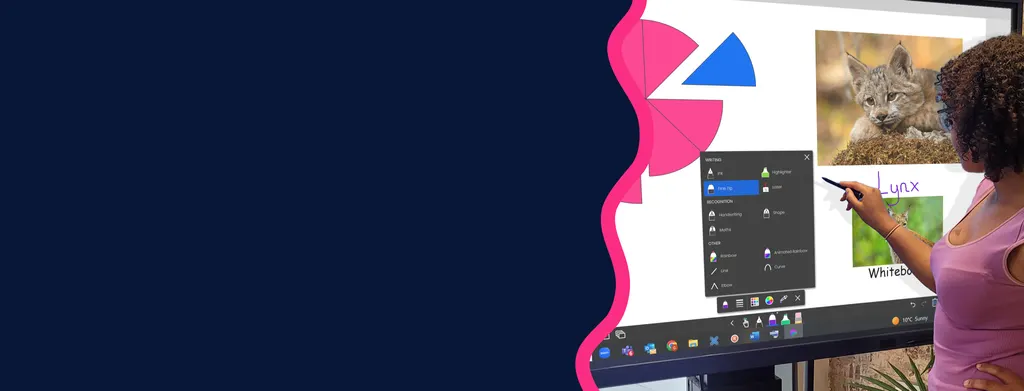
CleverInk is Clevertouch's writing technology for interactive displays. It is built to feel like writing with a pen or pencil on paper, so teachers and students can write, draw and annotate on the screen. Erasing takes just one flip, and PowerPoint annotations are saved inside the file. CleverInk is included with IMPACT Lux and LUX for Enterprise displays, suiting classrooms and meeting rooms in Qatar.

What CleverInk does on a Clevertouch display

CleverInk is the writing technology built into selected Clevertouch interactive displays. It gives a natural writing experience: the feel and responsiveness of the screen resemble writing with a pen or pencil on paper. That makes it easier for teachers and students to write and draw on the screen during a lesson or meeting.

Writing, erasing and scrolling without changing modes

The main practical benefit is continuity. Writing, erasing, scrolling and commenting can all be done without switching between modes, so a lesson or meeting keeps its flow. A presenter can jot a quick note on a slide, erase it with a single flip, scroll to the next section and add a comment, all within the same session.

Erasing is designed to be accurate and hygienic, which matters in shared rooms where the same display is touched by many people in a day.

PowerPoint annotation and Windows use

Annotations added to PowerPoint slides are saved inside the PowerPoint file, in their correct position. Marked-up decks therefore stay aligned with the content they refer to when they are shared, reopened or reused in a later session. Writing, scrolling and commenting are described for the Windows operating system, so confirm your platform before ordering.

Where CleverInk fits in Qatar

Three realistic settings show where the feature adds value:

  • A primary school classroom in Al Wakrah where a teacher works through maths problems on the board and students come up to write their answers while the class follows along, without pausing the lesson to change tools.
  • A boardroom in West Bay where a project team reviews a shared presentation during a call with colleagues abroad, adds notes and saves the revised file for follow-up.
  • A lecture room in Education City where a lecturer sketches a diagram, scrolls through a long reference document and saves the annotations for students after the session.

What to plan for before you order

CleverInk is included within the Education Solution and Enterprise Solution configurations, and with the IMPACT Lux and LUX for Enterprise displays. Your first decision is the display itself: choose the screen size for the room, then confirm the configuration that includes CleverInk. Large interactive panels are heavy, so SmartRooms Qatar carries out a free site survey before wall mounting to check the wall structure and sightlines.

Schools and government buyers can order through a purchase order (LPO) or a tender, and pay by bank transfer, cheque or purchase order. Plan a short familiarisation period at the start of term so staff are comfortable with the writing feel before lessons begin. Products are covered by the manufacturer's warranty.

Request a quote from SmartRooms Qatar and we will confirm the display model, configuration and installation plan for your room.

Highlights

  • Writing feel modelled on pen and paper
  • Erase with a single flip
  • Write, erase, scroll and comment without switching modes
  • PowerPoint annotations saved in the file, in place
  • Included with IMPACT Lux and LUX for Enterprise displays
  • Writing, scrolling and commenting described for Windows OS

Estimated timeline

Quotation within 1 working day · delivery timing depends on stock availability, and we confirm it with your quotation.


Specifications

Source: manufacturer · checked Oct 2026
The full specification and datasheet for this model are available on request; we send them with your quotation.

Downloads

0 files from the manufacturer
No downloadable files are listed for this model yet. Ask us and we will send the datasheet.

Questions about CleverInk

What is CleverInk?
CleverInk is a writing technology built into selected Clevertouch interactive displays. It is designed to make writing and drawing on the screen feel close to using a pen or pencil on paper, which suits teachers and students who write at the board throughout a lesson. Its functions include writing, erasing, scrolling and commenting, all usable from the same display.
Is CleverInk sold separately from the display?
The manufacturer lists CleverInk as included within specific Clevertouch display configurations rather than as a stand-alone item, so it arrives with those configurations. If you want it on a different Clevertouch model, request a quote and the SmartRooms Qatar team will confirm what your chosen display includes before you place an order.
Which Clevertouch displays include CleverInk?
According to the manufacturer's listing, CleverInk is included within the Education Solution and Enterprise Solution configurations, and with the IMPACT Lux and LUX for Enterprise displays. Choose the configuration that matches your type of organisation, then request a quote so we can confirm the exact display model and its contents before you issue a purchase order.
How does erasing work with CleverInk?
Erasing is done with a single flip, and the manufacturer describes it as accurate and hygienic. In a school or office where one display is used all day by different people, marks can be cleared quickly without changing tools or moving into a separate menu. Ask the SmartRooms Qatar team to confirm the input setup for your chosen display when you request a quote.
Are PowerPoint annotations saved in the presentation file?
Yes. Annotations added to PowerPoint slides are saved within the PowerPoint file, in their correct position on the slide. A teacher or presenter can share the marked-up deck, reopen it on another day and keep the notes linked to the content they refer to. Dynamic comments in PowerPoint are also supported.
Can I write, scroll and comment without switching modes?
That is the core of the feature. Writing, erasing, scrolling and commenting can all be used without moving between modes, so a lesson or meeting does not stop while the presenter changes tools. The manufacturer describes these functions for Windows OS, so confirm your platform before ordering.
Which operating systems does CleverInk support?
The manufacturer's description specifies Windows OS for writing, scrolling and commenting. The data available to us does not list other operating systems, so do not assume support for any platform that is not named. Tell us which computers and software your school or office uses, and the SmartRooms Qatar team will confirm compatibility as part of your quotation.
How could a primary school classroom in Al Wakrah use CleverInk every day?
A teacher can solve maths problems on the board, write working steps, erase a mistake with one flip and scroll to a worked example without leaving the flow of the lesson. Students can come up and write their answers while the rest of the class follows. Because the lesson never pauses to switch tools, it suits busy timetables with short, back-to-back sessions.
Is CleverInk useful in a West Bay boardroom that joins calls with teams abroad?
Yes, when the room has a larger Clevertouch display. A project team can open a shared presentation, mark up figures, add comments in PowerPoint and save the annotated file for follow-up after the call. Annotations stay in their correct positions inside the file, so the next meeting starts from the same markup. For corporate use, ask about the Enterprise Solution or LUX for Enterprise configuration.
How would a lecturer in Education City use CleverInk for a diagram-heavy lecture?
The lecturer can draw and label a diagram, scroll through a long reference document and annotate a slide without stopping to change modes. Because annotations are saved inside the PowerPoint file in their correct place, notes can be shared with students after the session. The SmartRooms Qatar team offers a free site survey to confirm the display size and room layout.
Can CleverInk help a training centre in Lusail run workshops with mixed groups?
Workshops that move between brainstorming, working through material and reviewing feedback suit this feature. Participants can write ideas on the screen, the facilitator can erase and regroup with one flip, and annotated slides can be saved in PowerPoint for the next session. Confirm the group size and room dimensions so the SmartRooms Qatar team can recommend the right display.
Would CleverInk suit a hotel conference room in The Pearl?
It suits hotel and serviced apartment conference rooms that host board meetings, training and client presentations. Annotations remain inside the presentation file, so the revised deck can be sent to attendees afterwards. Check that the configuration in your quotation includes CleverInk, and book the free site survey early so the wall mount can be planned around event timings.

Similar models

Clevertouch CleverCam Clevertouch CleverCam 4K ePTZ Camera for Video Conferencing
Main Stream: 3840×2160 @30fps
Clevertouch Intelligent Sensor Module Clevertouch Intelligent Sensor Module for Interactive Flat Panels
Accessories
Clevertouch LUX Mini Clevertouch LUX Mini Android 13 OPS Upgrade Module
8GB 64GB
Dahua PKC-ASP30 Dahua PKC-ASP30 Omnidirectional Digital Microphone Speakerphone
Accessories
Email Call