





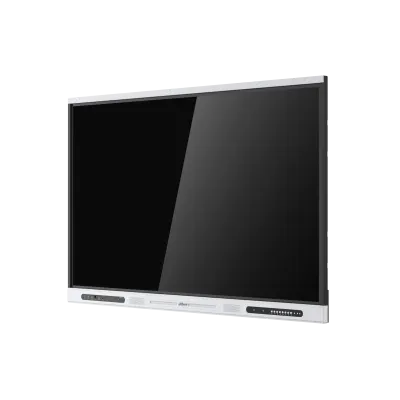
LPH65-ST420-S3
Dahua LPH65-ST420-S3 65-inch Interactive Whiteboard
- Resolution
- 3840 (H) × 2160 (V)
- Touch
- Infrared
- System
- Android 14
- Memory
- 8 GB
The Dahua LPH65-ST420-S3 is a 65-inch 4K interactive whiteboard for classrooms and meeting rooms, built on Android 14 with 8 GB RAM and 32 GB storage. Infrared touch supports 21 touch points on Android and 40 on Windows, with finger or stylus input. Two 20 W speakers, Wi-Fi 6 and a rear OPS slot suit schools and offices in Qatar needing one panel for teaching and presenting.
What the LPH65-ST420-S3 is built to do
The Dahua LPH65-ST420-S3 pairs a 65-inch 4K display with an onboard Android 14 system, so teachers and presenters can write, annotate, open files and run apps without a separate computer. The 3840 × 2160 panel uses DLED backlighting, a 16:9 aspect ratio and 10-bit colour, giving 1.07 billion displayable colours. Typical brightness is 400 cd/m², and the 178° viewing angle keeps content visible to students seated at the sides of the room.
Under the glass sit a quad-core A55 processor running at 1.9 GHz, 8 GB of RAM and 32 GB of storage. The panel has a rated lifespan of 50,000 hours, which matters for a board that runs through long school days and extended meetings.
Touch, writing and sharing
Touch uses infrared sensing with a zero air gap attachment. It accepts finger and stylus input, with a 2 mm valid touch distance, 3 mm touch height and ±1 mm accuracy. Touch supports 21 points on Android and 40 points on Windows. The front is 4 mm anti-dazzle tempered glass with a surface hardness of at least 9H. The board includes AI recognition of drawings, and QR-code file sharing lets a participant send a file to the board from a phone without a cable.
Connectivity for lessons and meetings
The front carries a USB-C port that accepts DisplayPort input at 4K 60 fps, provides USB 3.0 host and USB 2.0 device functions and delivers 65 W power, and it also supports wired network sharing. Alongside it are an HDMI input, two USB 3.2 Gen1 Type-A ports, a USB touch port and a 3.5 mm microphone input. The rear adds two HDMI inputs and an HDMI output at 4K 60 Hz, a VGA input, three USB touch ports, RS-232 on a DB9 port, two RJ-45 ports and an OPS slot.
Wireless connectivity covers Wi-Fi 6 on 2.4 GHz and 5 GHz, Bluetooth and NFC card swiping. The board can run a hotspot and Wi-Fi at the same time.
Where it fits in Qatar
In a private school classroom in Al Wakrah, or an Arabic-curriculum classroom in Doha, the 65-inch size suits a room where students sit relatively close to the board. A training room at a Doha training centre can use the Android system for slide decks and video, with a laptop connected through USB-C. A Sunday-to-Thursday team meeting in a West Bay office can connect a laptop over HDMI and share a handout by QR code.
Summer temperatures in Qatar push outdoor readings above 45 °C, so the room must be air-conditioned. The operating range is 0 °C to +40 °C, so avoid placing the board where direct sun from a window reaches the screen.
What to plan before you order
- Wall mounting: the board weighs 36.5 kg net and 47 kg gross, so it needs a sound wall and two people to lift it.
- Mounting holes measure 500 mm × 400 mm, and a wall mount bracket comes already installed on the board.
- Dimensions are 1,485.2 mm × 121.3 mm × 924.5 mm, so check wall space and clearances first.
- Power is rated 100–240 VAC, 50/60 Hz, with typical consumption of 120 W and a maximum of 215 W.
- The box includes a power cord, two passive stylus pens, an HDMI cable, a remote control and a quick start guide.
Book a free site survey before installation so the team can check wall construction, power points and cable routes. SmartRooms Qatar supplies and delivers to all eight municipalities of Qatar, provides professional installation, and accepts purchase orders (LPOs) and government tenders, including Monaqasat. Request a quote with your room sizes and quantities, and our team will reply with a quotation, usually within one working day.
Highlights
- 65-inch 4K display at 3840 × 2160 with 400 cd/m² typical brightness
- Android 14 with quad-core A55 processor at 1.9 GHz
- 8 GB RAM and 32 GB storage for onboard apps and files
- Infrared touch: 21 points on Android, 40 on Windows
- Two 20 W speakers, Wi-Fi 6, Bluetooth and NFC card swiping
- OPS slot, RS-232 and two RJ-45 ports for integration
Classroom fit
At 65″ the farthest student should sit within about 4.9 m (6× the screen height).
Estimated timeline
Quotation within 1 working day · delivery timing depends on stock availability, and we confirm it with your quotation.
Specifications
Built-in System6
- Operating System
- Android 14
- CPU
- Quad-core A55
- CPU Frequency
- 1.9 GHz
- GPU
- ARM Mali-G52 MP2 (2EE)
- RAM
- 8 GB
- ROM
- 32 GB
LCD Panel11
- Panel Dimensions
- 65 inch
- Backlight
- DLED
- Aspect Ratio
- 16:9
- Brightness
- 400 cd/m² (typ.)
- Static Contrast
- VA: 4000; IPS: 1200
- Resolution
- 3840 (H) × 2160 (V)
- Viewing Angle
- 178° (H); 178° (V)
- Lifespan
- 50,000 hrs
- Display Color
- 1.07 Billion colors (10 Bit)
- Response Time
- 8 ms (typ.)
- Refresh Rate
- 60 Hz
Device Ports15
- Light Sensor
- Yes
- Front Button
- 8 buttons: Whiteboard, volume, curtain, touch lock, signal source, navigation bar, homepage, power supply
- Front Ports
- 1 × Type -C 1 × HDMI IN 1 × USB Touch 2 × USB 3.2 Gen1 Type-A 1 × 3.5 mm Mic in 1 × Type-C (DP IN (4K@60 fps) + USB 3.0 Host+USB 2.0 device (touch) + PD 65 W); supports wired network sharing
- Rear Port
- 1 × Type -C 2 × HDMI IN (4K@60 Hz) 1 × VGA IN 1 × HDMI OUT (4K@60 Hz) 3 × USB Touch 2 × USB3.2 Gen1 Type-A Audio In: 1 × 3.5 mm Line In Audio Out: 1 × SPDIF and 1 × 3.5 mm Line out RS-232: 1 × DB9 port Micro: 1 × USB 2 × RJ-45 1 × OPS slot
- Wi-Fi
- Yes
- Wi-Fi Standard
- 802.11b/g/n/a/ac/ax
- Wi-Fi Frequency Range
- 2.4 GHz/5 GHz
- MAX Power Transmission (Wi-Fi)
- CE EIRP: ≤20 dBm@2400–2483.5 MHz; ≤23 dBm@5150–5250 MHz; ≤20 dBm@5250–5350 MHz; ≤27 dBm@5470–5725 MHz; ≤14 dBm@5725–5850 MHz
- Bluetooth
- Yes
- Bluetooth Standard
- EDR, BT2.1/4.2/5.2/5.3
- Bluetooth Frequency Range
- 2400–2483.5 MHz
- MAX Power Transmission (Bluetooth)
- CE EIRP: ≤20 dBm@2400–2483.5 MHz;
- RFID Modulation Method
- ASK
- RFID Frequency Range
- 13.56 MHz
- MAX Power Transmission (RFID)
- 42 dBuA/m @10 m
Function3
- IR Receiver
- 1
- Card Swiping with NFC
- Yes
- Wireless Access Point
- Wi-Fi 6, 2.4 GHz/5 GHz, supports 802.11 a/b/g/n/ac/ax₩WIFI 5, 2.4 GHz/5 GHz; Supports enabling Hotsport and WIFi at the same time
Touchscreen12
- Response Time
- <10 ms
- Touch Technology
- Infrared
- Attachment Method
- Zero Air Gap
- Touch Points
- 21 points for Android, and 40 points for Windows
- Touch Accuracy
- ±1 mm (0.04")
- Valid Touch
- 2 mm (0.08")
- Touch Height
- 3 mm (0.12")
- Writing Mode
- Finger and stylus pen
- Communication Mode
- USB
- Anti-light Interference
- Anti-dazzle
- Surface Hardness
- ≥9 H
- Touch Resolution
- 32,767 × 32,767
Speaker2
- Built-in Speaker
- 2 × full-frequency speaker
- Power
- 2.0 sound channel, front-end: 2 × 15 W₩2.0 sound channel, front-end: 2 × 20 W
General18
- Power Supply
- 100–240 VAC, 50/60 Hz
- Power Consumption
- 65-inch: 120 W (typ.); 215 W (max, without OPS and Quicker Changer)
- Standby Power Consumption
- ≤0.5 W
- Operating Temperature
- 0 °C to +40 °C (+32 °F to +104 °F)
- Storage Temperature
- –10 °C to +50 °C (+14 °F to +122 °F)
- Operating Humidity
- 10%–90% (RH)
- Storage Humidity
- 10%–90% (RH)
- Product Material
- Metal
- Glass
- 4 mm anti-dazzle tempered glass
- Casing Color (Frame/Rear)
- Black frame for left and right, silver frame for top and bottom and black frame for back
- Product Dimensions
- 1,485.2 mm × 121.3 mm × 924.5 mm (58.47" × 4.48" × 36.40") (L × W × H)
- Frame Size
- Top frame: 27 mm (1.06"); Left and right frame: 16.5 mm (0.65"); Bottom frame: 68 mm (2.68")
- Packaging Dimensions
- 1,580.0 mm × 200.0 mm × 1030.0 mm (62.20" × 7.87" × 40.55") (L × W × H)
- Net Weight
- 36.5 kg (80.47 lb)
- Gross Weight
- 47 kg (103.62 lb)
- Holes Distance
- 500 mm × 400 mm (19.69" × 15.75")
- Installation
- Wall mount or mobile bracket
- Packing List
- 1 × Smart interactive whiteboard; 1 × Power cord; 2 × Passive stylus pen; 1 × HDMI cabe; 1 × Quick start guide; 1 × Wall mount bracket (already installed on the whiteboard); 1 × Accessory package; 1 × Remote control; 1 × Legal and Regulatory Information
Certification1
- Certifications
- CE




