





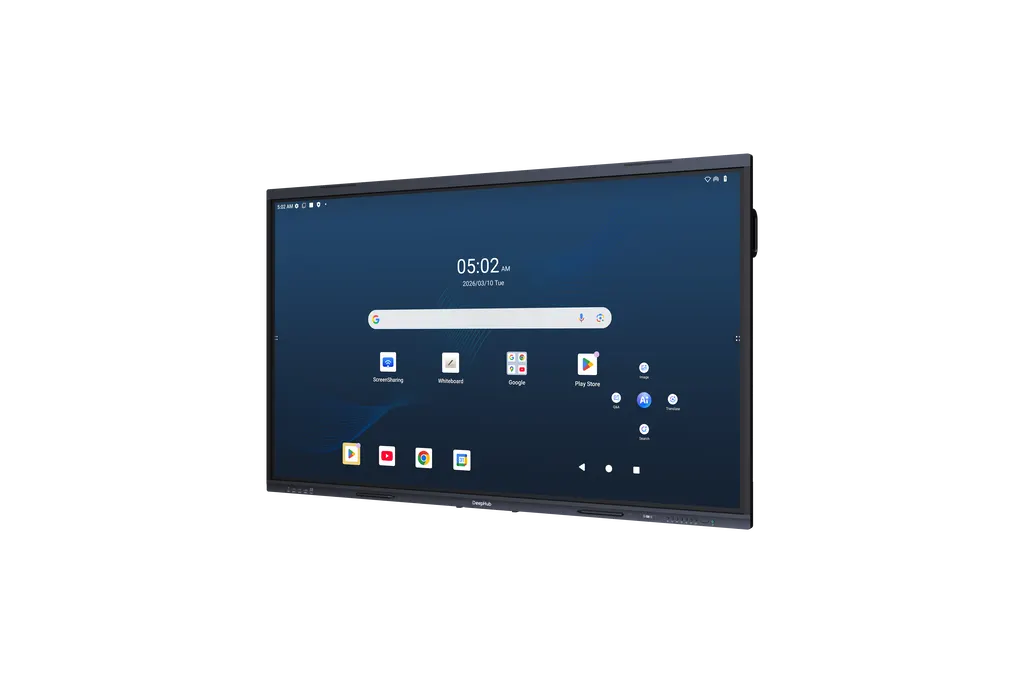
LPH86-ST480-U-S2
Dahua LPH86-ST480-U-S2 86-inch Smart Interactive Whiteboard
- Screen size
- 86 inch
- Resolution
- 3840 (H) × 2160 (V)
- Touch
- Infrared
- System
- Android 15
The Dahua LPH86-ST480-U-S2 is an 86-inch interactive whiteboard with a 3840 × 2160 display, infrared touch with 64 touch points, and Android 15 built in. It runs on 8 GB RAM and 128 GB storage, with Wi-Fi 6, Bluetooth 5.4, a 16-microphone array and 4 speakers. Built for lecture halls and boardrooms in Qatar's schools, universities and offices, it is sold by quotation from SmartRooms Qatar.
An 86-inch board with its own Android 15 computer
The LPH86-ST480-U-S2 pairs a large 4K LCD panel with a built-in Android 15 system, so a lesson or meeting can start straight from the board. The processor runs at 2.4 GHz and the unit includes 8 GB of memory and 128 GB of storage. It belongs to Dahua's ST480 Series within the Education Series, and it ships with a remote control and two stylus pens.
Display and touch figures that matter day to day
- 3840 × 2160 resolution on a 16:9 DLED panel refreshing at 60 Hz
- 400 cd/m² typical brightness with a 1200:1 typical static contrast ratio
- Infrared touch with a zero air gap, covering over 90% of the screen
- 64 touch points on both Android and Windows
- 3.2 mm anti-glare tempered glass with a surface hardness of 9H or higher
Brightness and contrast are typical values, not guarantees for every room, so test the board in the actual space where possible. The anti-glare glass reduces reflections from ceiling lights, but a window behind the presenter will still wash out the picture. Position the panel away from direct sun and check the lighting before fixing it to the wall.
Connections for teachers, presenters and visiting devices
The front panel offers an HDMI input, two USB 3.2 Gen1 Type-A ports and a USB-C input rated for 100 W fast charging, which also carries data and network traffic for bring-your-own-device use. The rear panel adds three HDMI inputs and an HDMI output, a DisplayPort input, a 4K USB-C output, VGA, audio line in and out, S/PDIF, RS232 and two gigabit RJ45 ports. Wi-Fi 6 in dual-band mode, Bluetooth 5.4 and NFC quick unlock complete the wireless set, and a microSD slot expands storage up to 512 GB.
Where it fits in Qatar
In a private school in Al Rayyan refitting its classrooms, one unit on the front wall lets teachers move between Arabic and English materials on one surface, while the 16-microphone array with a pick-up distance of up to 12 m captures student questions from the back of the room. In a boardroom in West Bay or Msheireb, the 86-inch screen shows documents to a full table, and a laptop can be connected through HDMI or USB-C. A seminar room in Education City or a training centre in the Industrial Area can use the same surface for group work, with pen input and palm rejection supporting hands-on problem solving.
Planning the installation
The board weighs 58.6 kg net and 73.5 kg with packaging, and its dimensions are 1,914.9 mm by 116.2 mm by 1,177.2 mm. Wall mounting uses rear holes spaced 800 mm by 400 mm, and the kit includes a wall mount bracket and screw pack; a mobile bracket is also an option. Because of its weight, we recommend a free site survey to check the wall, the cable route and the power point before the unit arrives. The operating range is 0 °C to +40 °C with 10% to 90% non-condensing humidity, so the room must be air-conditioned, since Qatar summer temperatures can exceed 45 °C. Power draw is 130 W typical and 390 W maximum, and the supply accepts 100 to 240 VAC at 50 or 60 Hz.
Send SmartRooms Qatar your room dimensions, mounting wall and quantity, and request a quote. We supply across all eight municipalities of Qatar, accept purchase orders and government tenders, and usually return quotations within one working day.
Highlights
- 86-inch 3840 × 2160 DLED panel at 60 Hz
- Built-in Android 15 with 8 GB RAM and 128 GB storage
- Infrared touch, 64 points, 3.2 mm tempered glass
- 100 W fast-charge USB-C input on the front
- 16-microphone array with up to 12 m pick-up
- Wi-Fi 6, Bluetooth 5.4, NFC and 13.56 MHz RFID
Classroom fit
At 86″ the farthest student should sit within about 6.4 m (6× the screen height).
Estimated timeline
Quotation within 1 working day · delivery timing depends on stock availability, and we confirm it with your quotation.
Specifications
Built-in System6
- Operating System
- Android 15
- CPU
- Quad-core A76 + Quad-core A55
- CPU Frequency
- 2.4 GHz
- GPU
- Mali-G610 MC4
- RAM
- 8 GB
- ROM
- 128 GB
LCD Panel12
- Screen Size
- 86 inch
- Backlight
- DLED
- Aspect Ratio
- 16:9
- Brightness
- 400 cd/m² (typ.)
- Resolution
- 3840 (H) × 2160 (V)
- Viewing Angle
- 178° (H)/178° (V)
- Lifespan
- ≥50,000 hrs
- Refresh Rate
- 60 Hz
- Display Color
- 1.07 Billion (10 bits)
- Color Gamut
- 90% NTSC
- Static Contrast Ratio
- 1200:1 (typ.)
- Response Time
- 8 ms
Device Ports16
- Light Sensor
- 1
- Front Button
- 8 buttons: custom, volume down, volume up, curtain control, touch lock, input source selection, home and power
- Front Ports
- 2 × USB 3.2 Gen1 Type-A , 1 × HDMI IN, 1 × USB Type-C IN (100 W fast charge, data transmission, local area network, BYOD), 1 × TOUCH USB 2.0 Type-B
- Rear Port
- 3 × HDMI IN (4K@60 Hz) , 1 × HDMI OUT (4K@60 Hz) , 1 × DP IN (4K@60 Hz), 1 × USB 2.0 Type-A Android, 2 × USB 3.2 Gen1 Type-A Follow, 1 × USB Type-C IN (15 W charge, data transmission), 1 × USB Type-C OUT (4K@60 Hz), 3 × TOUCH USB 2.0 Type-B, 1 × VGA IN , 1 × VGA AUDIO IN (3.5 mm port), 1 × LINE IN (3.5 mm port), 1 × LINE OUT (3.5 mm port), 1 × SPDIF OUT, 1 × RS232, 1 × microSD card slot, 1 × RJ45 IN (10/100/1000 Mbps), 1 × RJ45 OUT (10/100/1000 Mbps)
- Wi-Fi
- Wi-Fi 6, 1 × Station, 1 × AP
- Wi-Fi Standard
- Station: 802.11b/g/n/a/ac/ax AP: 802.11b/g/n/a/ac/ax
- Wi-Fi Frequency Range
- 2400–2483.5 MHz, 5150–5350 MHz, 5470–5725 MHz, 5725–5850 MHz
- MAX Power Transmission (Wi-Fi)
- ≤20 dBm@2400–2483.5 MHz; ≤23 dBm@5150–5250 MHz; ≤20 dBm@5250–5350 MHz; ≤27 dBm@5470–5725 MHz; ≤14 dBm@5725–5850 MHz
- Bluetooth
- Yes
- Bluetooth Standard
- BR/EDR/BLE, BT5.4
- Bluetooth Frequency Range
- 2400–2483.5 MHz
- MAX Power Transmission (Bluetooth)
- ≤20 dBm@2400–2483.5 MHz
- RFID Modulation Method
- ASK
- RFID Frequency Range
- 13.56 MHz
- MAX Power Transmission (RFID)
- 42 dBuA/m @10 m
- TF Card Slot
- 1 microSD card slot, expandable up to 512GB
Function3
- NFC
- Supports quick unlock via NFC.
- Wireless Access Point
- Wi-Fi 6, 2.4 GHz and 5 GHz dual band, 802.11b/g/n/a/ac/ax
- IR Receiver
- 1
Touchscreen11
- Response Time
- ≤1.67 ms
- Touch Technology
- Infrared
- Attachment Method
- Zero Air Gap
- Touch Points
- Android: 64 pionts, Windows: 64 pionts
- Valid Touch
- 1.5 mm (0.06") (over 90% touch area)
- Writing Mode
- Finger + Pen (attaches magnetically)
- Touch Height
- ≤0.99 mm (average)
- Anti-light Interference
- Anti-dazzle tempered glass
- Surface Hardness
- ≥9H
- Touch Resolution
- 32768 × 32768
- Other Functions
- Pen Writing, Finger Dragging, Dual-Color Pen, Multi-Touch, Palm Erasing, and Palm Rejection.
Speaker3
- Frequency
- 90 Hz–20 kHz
- Power
- 2 × 10 W + 2 × 20 W
- Built-in Speaker
- 4 (CH2.2)
Microphone6
- Microphone
- 16 arrays
- Pick-up Distance
- 0 m–12 m (0 ft–39.37 ft)
- AGC
- Yes
- Echo Cancellation
- Yes
- Polar Pattern
- Omnidirectional
- Intelligent Noise Filtering
- YES
General20
- Power Supply
- 100–240 VAC, 50/60 Hz
- Power Consumption
- 130 W (basic), 390 W (max)
- Standby Power Consumption
- ≤0.5 W
- Operating Temperature
- 0 °C to +40 °C (+32 °F to +104 °F)
- Storage Temperature
- –20 °C to +60 °C (–4 °F to +140 °F)
- Operating Humidity
- 10%–90% (RH), non-condensing
- Storage Humidity
- 10%–90% (RH), non-condensing
- Product Material
- Metal casing
- Protective Glass
- 3.2 mm anti-glare tempered glass
- Casing Color (Frame/Rear)
- Black on the left and right, Lunar Rock Gray on the top and bottom.
- Product Dimensions
- 1,914.9 mm × 116.2 mm × 1177.2 mm (75.39" × 4.57" × 46.35") (L × W × H)
- Frame Size
- Top border: 35.9 mm (1.41"), left and right borders: 17.5 mm (0.69"), bottom border: 40.7mm (1.6")
- Packaging Dimensions
- 2,090 mm × 227 mm × 1,315 mm (82.28" × 8.94" × 51.77") (L × W × H)
- Operating System of External Module
- Windows 7/8/10/11
- Net Weight
- 58.6 kg (129.19 lb)
- Gross Weight
- 73.5 kg (162.04 lb)
- Holes Distance
- 800 mm × 400 mm (31.50" × 15.75")
- Installation
- Wall mount or mobile bracket
- Packing List
- 1 × Smart interactive whiteboard, 1 × Power cord, 2 × Stylus pen, 1 × Quick start guide, 1 × Wall mount bracket, 1 × Remote control, 1 × Legal and regulatory information, 1 × Wall-mount screw pack, 1 × Wireless plug-in module
- Glass Thickness
- 3.2 mm




