





Thursday, 22 October 2026 · 11 Jumada I 1448 AH Sun – Thu · 9:00 – 18:00
+971 56 914 9477 العربية
WhatsApp

C7520QT

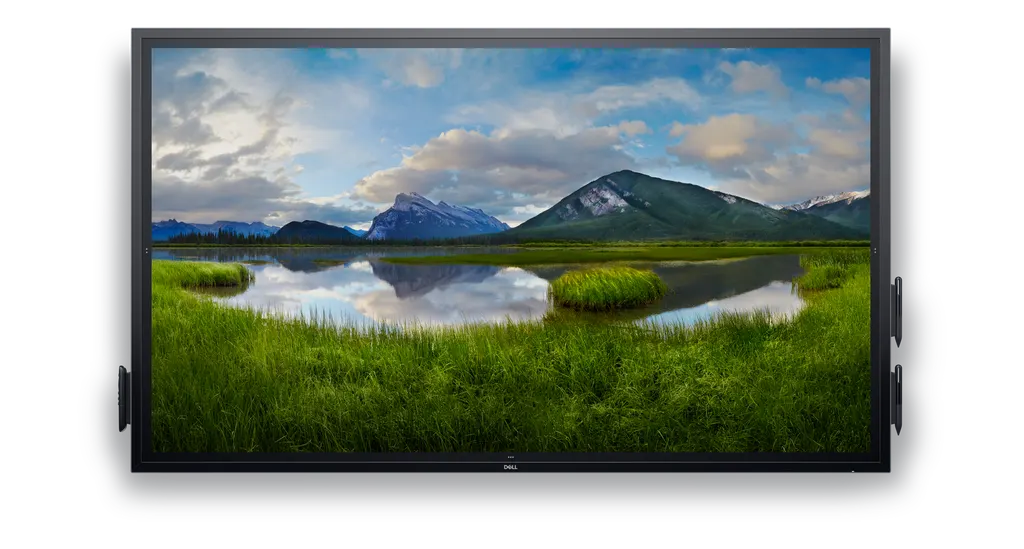
Dell C7520QT 75-inch 4K Interactive Touch Monitor

Screen size
75"
Resolution
3840 x 2160
Brightness
350 cd/m²
Speakers
2 speakers
WhatsApp
Priceon request
QuotationWithin 1 working day
DeliveryConfirmed with your quote, based on stock
PDFDownload datasheet (Dell C7520QT External Control Guide.pdf)
Overview

The Dell C7520QT is a 75-inch interactive touch monitor with a 3840 x 2160 IPS panel, 20-point touch and built-in 2x20W speakers. It offers three HDMI 2.0 inputs, DisplayPort and VGA, plus RS232 and RJ45 for remote IT management. Suited to boardrooms, lecture halls and training rooms across Qatar. Request a quote from SmartRooms Qatar.

What the Dell C7520QT is built for

The Dell C7520QT is a 75-inch interactive touch monitor from the Dell C Series, designed for meetings, teaching and presentations where several people write or annotate on the same screen. Its 3840 x 2160 IPS panel delivers 4K UHD resolution, and the 20-point touch layer lets multiple users interact at the same time. The panel is rated at 350 cd/m² brightness with a 178° viewing angle, so people seated at the sides of a large room see consistent colour.

Touch, display and eye comfort

Touch input works with fingers and the two styluses included with the monitor, and the palm can erase written content. The anti-glare, 9H hard coating helps in rooms with windows or strong overhead lighting. ComfortView reduces blue-light emissions, which matters in sessions that run for hours. Dell Screen Drop lets users raise, lower and mark up the image at three height settings using buttons on the side of the panel, which helps shared spaces used by people of different heights.

Connectivity and IT management

  • Video inputs: three HDMI 2.0, one DisplayPort 1.2 and one VGA
  • Audio: line-in and line-out
  • USB: three USB 3.0 upstream and three downstream, plus a dedicated charging port
  • Control: RS232, RJ45 network and HDMI CEC for remote management

Lock mode lets IT restrict menu and power options in high-traffic rooms. An optional Dell OptiPlex Micro PC can be integrated, so an organisation can choose a computer that fits its security and service standards and upload its corporate image. Easy Arrange templates in Dell Display Manager and Auto-restore presentation layouts help staff start sessions faster.

Where it fits in Qatar

A lecture hall in Education City might use the 75-inch panel for presentations and group tasks in front of a large class. A meeting room in West Bay or The Pearl could use it to review shared documents and join video calls with teams abroad, while the RJ45 connection lets IT manage the display remotely. A private school in Al Wakrah fitting out new classrooms could use it for interactive lessons, with lock mode keeping settings fixed for teaching staff.

What to plan before ordering

At 64 kg without a stand, the panel needs a wall structure and bracket rated for its weight. The VESA mounting interface is 400 x 400 mm, and overall dimensions without stand are 173.5 cm wide, 101.74 cm high and 7.91 cm deep. SmartRooms Qatar offers free site surveys to check wall construction, viewing distances and cable routing before installation. The source lists a nominal input of AC 120/230 V, so confirm the power arrangement against Qatar's 240 V, 50 Hz supply and BS 1363 sockets with the SmartRooms Qatar team. The source gives no operating temperature range, so confirm the installation environment before placing the monitor near windows or in a hot lobby. Listed power draw is 140 W in on mode and 270 W maximum.

Warranty and ordering

The monitor comes with a 3-year Advanced Exchange Service and a 3-year Limited Hardware Warranty from the manufacturer. Ask SmartRooms Qatar for a quotation covering the panel, cables and installation. Quotations are usually issued within one working day, and we accept purchase orders (LPOs) and government tenders, with payment by bank transfer, cheque or purchase order. Request a quote for the Dell C7520QT.

Highlights

  • 75-inch 4K UHD (3840 x 2160) IPS display
  • 20-point touch with InGlass technology
  • 350 cd/m² brightness and 178° viewing angle
  • Built-in 2 x 20W speakers, 40W total output
  • Three HDMI 2.0, DisplayPort 1.2 and VGA inputs
  • RS232 and RJ45 for remote IT management

Classroom fit

At 75″ the farthest student should sit within about 5.6 m (6× the screen height).

Estimated timeline

Quotation within 1 working day · delivery timing depends on stock availability, and we confirm it with your quotation.

Specifications

53 specifications · Source: manufacturer · checked Oct 2026
General23
Product Type
LED-backlit LCD flat panel display
Energy Class
Class G
Power Consumption (Max)
270 Watt
Power Consumption Operational
270 Watt
Power Consumption (On mode)
140 Watt
Power Consumption (On mode) (2)
140 Watt
Diagonal Class
75"
Diagonal Size
74.52"
Commercial Use
Yes - interactive
Bundled with
3 years Advanced Exchange
Combined With
Touchscreen (multi touch)
TV Tuner
No tuner
TV Tuner Presence
No
Video Interface
HDMI
HDMI Ports Qty
3 ports
PC Interface
VGA (HD-15), DisplayPort
Picture Enhancements
72% Color Gamut (CIE 1931)
Dimensions
Without stand
Width
173.5 cm
Depth
7.91 cm
Height
101.74 cm
Weight
64 kg
Adjustability
NA
Display13
Display Format
4K UHD (2160p)
Image Aspect Ratio
16:09
LCD Backlight Technology
LED backlight
Coating
Anti-glare, 9H Hard
Image Contrast Ratio
50.00069444
Brightness
350 cd/m²
Viewing Angle
178 °
Viewing Angle (Vertical)
178 °
Touchpoints Qty
20
Response Time
8 ms
Features
Security lock slot (cable lock sold separately), Flatfrog InGlass Touch Technology, 0.429 mm pixel pitch
LCD Display Technology
IPS
Resolution
3840 x 2160
Stands & Mounts2
Flat Panel Mount Interface
400 x 400 mm
VESA Compatibility
Yes
Media Player1
USB Port
Yes
Remote Control1
Type
Remote control
Audio System3
Speaker System
2 speakers
Output Power / Total
40 Watt
Speakers
2 x speaker - 20 Watt
Connections1
Connector Type
DisplayPort VGA input 3 x HDMI input Network 3 x USB 3.0 downstream Audio line-in Serial Audio line-out 3 x USB 3.0 upstream USB (power only)
Miscellaneous3
Included Accessories
2 styluses, cable holder, 3 cable clips
Cables Included
USB cable DisplayPort cable HDMI cable VGA cable
Compliant Standards
UL, RoHS
Environmental Standards1
ENERGY STAR Certified
Yes
Power4
Nominal Voltage
AC 120/230 V (50/60 Hz)
Power Consumption Stand by
0.3 Watt
Power Consumption (Off Mode)
0.3 Watt
Power Consumption (On mode)
140 Watt
Dimensions & Weight (Shipping)1
Weight (Shipping)
76 kg

Downloads

15 files from the manufacturer
PDF Manuals & guides Dell C7520QT External Control Guide.pdf 454 KB Dell C7520QT manuals & guides (PDF, 454 KB) PDF Manuals & guides Dell C7520QT Monitor Simplified Service Manual.pdf 2.8 MB Dell C7520QT manuals & guides (PDF, 2.8 MB) PDF Manuals & guides Dell C7520QT Monitor Teardown Instructions.pdf 7.8 MB Dell C7520QT manuals & guides (PDF, 7.8 MB) PDF Manuals & guides Dell C7520QT Monitor Users Guide.pdf 7.2 MB Dell C7520QT manuals & guides (PDF, 7.2 MB) PDF Manuals & guides Dell C7520QT Product Handling Instructions.pdf 89 KB Dell C7520QT manuals & guides (PDF, 89 KB) PDF Manuals & guides Dell C7520QT Setup Guide.pdf 2.4 MB Dell C7520QT manuals & guides (PDF, 2.4 MB) PDF Manuals & guides Dell C7520QT Users Guide (2).pdf 8.0 MB Dell C7520QT manuals & guides (PDF, 8.0 MB) PDF Manuals & guides Dell C7520QT Users Guide.pdf 6.0 MB Dell C7520QT manuals & guides (PDF, 6.0 MB) EXE Manuals & guides · Opens on manufacturer site DDPM-Setup_2.3.0.17.exe Dell C7520QT manuals & guides (EXE) URL Manuals & guides · Opens on manufacturer site Dell Large Conference Monitor Room Kit for Microsoft Teams Rooms Setup Guide Dell C7520QT manuals & guides (URL) PDF Drawings & CAD Dell C7520QT Product Outline Dimensions.pdf 4.1 MB Dell C7520QT drawings & cad (PDF, 4.1 MB) EXE Software & firmware · Opens on manufacturer site DELL_C7520QT-MONITOR_A00-00_DRVR_HW0KD.exe Dell C7520QT software & firmware (EXE) ZIP Software & firmware · Opens on manufacturer site Network Firmware v0.22 Update.zip Dell C7520QT software & firmware (ZIP) PDF Other documents Dell C7520QT Statement of Volatility.pdf 165 KB Dell C7520QT other documents (PDF, 165 KB) EXE Other documents · Opens on manufacturer site Dell_C7520QT_FWUpdate_M2T107_Windows.exe Dell C7520QT other documents (EXE)

Questions about C7520QT

What is the Dell C7520QT used for?
The Dell C7520QT is a 75-inch interactive touch monitor for presentations, annotation and group work. Its 3840 x 2160 IPS panel and 20-point touch let several people write or interact at once, which suits meeting rooms, classrooms and workshops. It works as a display for a connected computer, and an optional Dell OptiPlex Micro PC can be integrated.
How many touch points does the C7520QT support?
The monitor supports 20-point touch, so up to 20 touch points can register at the same time. Input works with fingers and the two styluses included with the monitor, and the palm can be used to erase written content. The touch layer suits workshops and planning sessions where several people write on the same screen.
Are the built-in speakers enough for a training room in the Industrial Area?
The monitor has two built-in 20 W speakers, giving 40 W total output. That suits video clips and lesson audio in a medium-sized training room. For a large hall or event space, plan an external audio system instead. SmartRooms Qatar can assess room size and acoustics during a free site survey before you choose the setup.
Which ports and inputs does it have?
The C7520QT has three HDMI 2.0 inputs, one DisplayPort 1.2 and one VGA input, plus audio line-in and line-out. It also has three USB 3.0 upstream and three USB 3.0 downstream ports, a dedicated USB charging port, RS232 and an RJ45 network port. The box includes HDMI, VGA, DisplayPort and USB 3.1 cables, plus two power cords.
Can IT manage the monitor remotely?
Yes. The source lists RS232, RJ45 and HDMI CEC connectivity for remote management. Lock mode lets IT control menu and power options, which is useful in a ministry reception area or a school corridor where staff should not change settings. Ask SmartRooms Qatar to confirm the control method your network team plans to use before ordering.
Is it suitable for a lecture hall in Education City?
It suits a small to medium lecture room. The 75-inch 4K panel with a 178-degree viewing angle keeps text and images readable for students seated at the sides, and the anti-glare coating reduces reflections. Brightness is 350 cd/m², so check daylight from windows during the site survey, and confirm sightlines before choosing a position.
Can it host video calls from a boardroom in West Bay?
The monitor can display video from a laptop or conferencing system through HDMI or DisplayPort. The source data does not list a built-in camera or microphone, so plan a separate conferencing camera and microphone for calls with teams abroad. The 75-inch screen suits boardroom seating, and the RJ45 connection lets IT manage it remotely.
How heavy is it and what mounting does it need?
The panel weighs 64 kg without a stand and measures 173.5 cm wide, 101.74 cm high and 7.91 cm deep. It uses a 400 x 400 mm VESA mounting interface. The wall structure and bracket must be rated for that weight. Book a free site survey with SmartRooms Qatar before installation to confirm wall construction and cable routing.
Will it work on Qatar's power supply?
The source lists a nominal input of AC 120/230 V at 50/60 Hz. Qatar mains is 240 V, 50 Hz with BS 1363 (Type G) sockets, so do not assume compatibility. Ask SmartRooms Qatar to confirm the power arrangement in your quotation. Listed power draw is 140 W in on mode, 270 W maximum and 0.3 W on standby.
Can it go near windows or in a hot lobby?
The source data does not give an operating temperature range, so confirm the environment before installation. Summer temperatures in Qatar can exceed 45°C, so ask SmartRooms Qatar to review direct sunlight, ventilation and air conditioning for windows or lobbies. The anti-glare, 9H hard coating helps reduce reflections from glazing.
Can a private school in Al Wakrah order several units on an LPO?
Yes. SmartRooms Qatar accepts purchase orders (LPOs), and quotations are usually issued within one working day. For new classrooms, request one quotation covering every panel, mounting option and cable plan. Payment can be made by bank transfer, cheque or purchase order. Government bodies can also tender for this model through Monaqasat.
What warranty comes with the C7520QT?
The manufacturer provides a 3-year Advanced Exchange Service and a 3-year Limited Hardware Warranty with this monitor. Products are covered by the manufacturer's warranty, and SmartRooms Qatar can confirm the coverage details when preparing your quotation. For a school or government office planning long-term use, these terms help with budgeting and asset planning.

Similar models

BenQ CM7505 BenQ Board CM7505 75-inch Interactive Display
75″ UHD 3840 × 2160 pixels Ultra Precision IR
SMART SBID-6286S-V3 SMART Board 6086S-V3 86-inch Interactive Display with iQ
86″ 4K UHD (3840 × 2160) HyPr Touch with InGlass
SMART SBID-6286S-V3-P SMART Board 6086S-V3 Pro 86-inch Interactive Display with iQ
86″ 4K UHD (3840 × 2160) HyPr Touch with InGlass
Clevertouch Clevertouch Edge 65" Clevertouch Edge 65" 4K Interactive Display with Camera and Speakers
65″ 4K UHD (3840x2160 @60Hz) Android 15
Clevertouch Clevertouch Edge 86" Clevertouch Edge 86" 4K Interactive Flat Panel
86″ 4K UHD (3840x2160 @60Hz) Android 15
Email Call




