





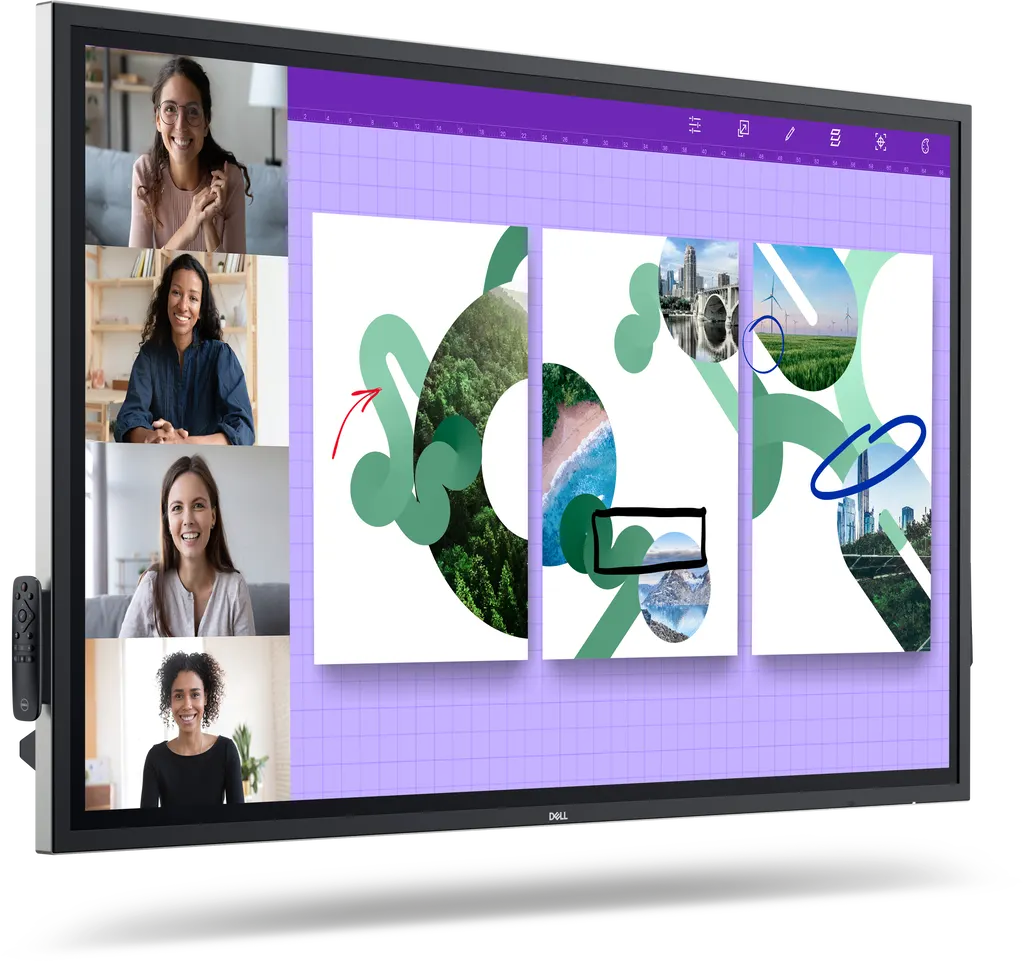
P6524QT
Dell P6524QT 65-inch 4K Interactive Touch Monitor
- Screen size
- 65"
- Resolution
- 3840 x 2160
- Brightness
- 350 cd/m²
- Speakers
- Yes
The Dell P6524QT is a 65-inch class 4K UHD touch monitor with 20-point touch, palm rejection, an IPS panel and USB-C input delivering up to 90W laptop charging. It suits meeting rooms, training suites and classrooms where staff share one large display. Its 3-year limited warranty and RS232 and RJ45 ports help IT manage it remotely. Request a quote from SmartRooms Qatar.
What the P6524QT is built for
The Dell P6524QT is a 65-inch class interactive touch monitor from the Dell Pro Plus range, with a 4K UHD IPS panel at 3840 x 2160 pixels and a viewable area of 163.8 cm (64.5 inches). It is designed for rooms where one large surface must carry presentations, handwritten notes and video calls at the same time. A laptop connects over USB-C or HDMI, so the screen becomes the shared display for whoever is presenting.
Touch, writing and picture quality
The screen recognises 20 touchpoints at once, so several people can annotate without waiting for their turn. Palm rejection lets a presenter rest a hand on the glass while writing. The package includes two styluses and two spare nibs, and the dual-tip stylus magnetically attaches to the side of the display so it stays in the room. The IPS panel holds consistent colour across 178 degree horizontal and vertical viewing angles, with 350 cd/m² brightness, a 1,300:1 contrast ratio, 72% NTSC colour gamut and 1.07 billion colours. The anti-glare surface treatment reduces reflections in rooms with daylight, and the glass is rated 9H for hardness.
Ports, power and remote control
- Three HDMI ports, one DisplayPort 1.2 input and a USB Type-C port
- USB-C delivers up to 90W of laptop charging power alongside video and audio
- Built-in USB hub with three upstream and four downstream USB 3.1 ports
- RS232 and RJ45 connections for remote management and network control
- HDMI CEC support, an audio line-out and two speakers rated 2 x 10 W
Lock mode lets IT restrict menu and power options in busy rooms, and Dell's device management console can oversee Dell peripherals from a single cloud-based console.
Where it fits in Qatar
At 65 inches, the P6524QT suits a smaller classroom or meeting room rather than a large lecture hall. Three scenarios show where it makes sense:
- A private school in Al Wakrah fitting out new classrooms, where teachers project lesson material and annotate it with their fingers while pupils work at the board.
- A consultancy office in Msheireb or West Bay, where a meeting room runs video calls with teams in other countries from a laptop that also charges through USB-C.
- A training centre in Education City or the Industrial Area, where IT controls several rooms through RJ45 and locks the menus so settings stay consistent.
What to plan before you order
Check the wall and the room before installation. The panel measures 894.1 mm high, 1518.9 mm wide and 78.7 mm deep, weighs 45.20 kg (46.40 kg with stand) and supports VESA 400 x 400 mounting. Wall mounting is easier with a second person to help lift the panel, and a stand or mobile cart is an alternative. The operating range is 0 to 40°C with 10 to 80% non-condensing humidity, so during Qatar summers the screen should sit in an air-conditioned room, away from direct sun through glazing. The input range of 100 to 240 V AC at 50 or 60 Hz covers Qatar's mains supply, typical operating consumption is 101 W, and a power cable is included.
A free site survey from SmartRooms Qatar lets us check wall structure, cable routes and socket positions before you buy. Quotations are usually issued within one working day, and we supply against purchase orders (LPO) and government tenders, including Monaqasat. Request a quote and we will confirm the mounting option, accessories and delivery estimate with it.
Highlights
- 65-inch class 4K UHD IPS panel at 3840 x 2160 pixels
- 20-point touch with palm rejection and two styluses
- USB-C input delivering up to 90W laptop charging
- Two built-in speakers rated 2 x 10 W
- RS232 and RJ45 ports for remote management
- Three-year limited warranty and Energy Star listed
Classroom fit
At 65″ the farthest student should sit within about 4.9 m (6× the screen height).
Estimated timeline
Quotation within 1 working day · delivery timing depends on stock availability, and we confirm it with your quotation.
Specifications
General Information7
- Manufacturer
- Dell Technologies
- Manufacturer Part Number
- 4K3VW
- Brand Name
- Dell
- Product Line
- Pro Plus
- Product Model
- P6524QT
- Product Name
- Pro 65 Plus 4K Touch Monitor - P6524QT
- Product Type
- LED Touchscreen Monitor
Technical Information13
- Screen Size Class
- 65"
- Viewable Screen Size
- 163.8 cm (64.5")
- Screen Mode
- 4K UHD
- Panel Technology
- In-plane Switching (IPS) Technology
- Pixel Pitch
- 0.37200 mm x 0.37200 mm
- Aspect Ratio
- 16:9
- Horizontal Viewing Angle
- 178 °
- Vertical Viewing Angle
- 178 °
- Mount Type
- Panel Mount
- Backlight Technology
- LED
- Features
- Anti-glare Cable Lock Slot On/Off Switch Security Lock
- Glass Hardness
- 9H
- Surface Treatment
- Anti-glare
Video6
- Maximum Resolution
- 3840 x 2160
- Colour Supported
- 1.07 Billion Colors
- Dynamic Contrast Ratio
- 1,300:1
- Brightness
- 350 cd/m²
- Color Gamut
- 72% NTSC
- Native Contrast Ratio
- 1,300:1
Audio3
- Speakers
- Yes
- Number of Speakers
- 2
- Speaker Output Power
- 2 x 10 W
Touchscreen Information3
- Multi-touch Screen
- Yes
- Number of Simultaneous Touchpoints
- 20
- Touchscreen
- Yes
Interfaces/Ports9
- HDMI
- Yes
- USB
- Yes
- DisplayPort
- Yes
- USB Type-C
- Yes
- Total Number of HDMI Ports
- 3
- Number of USB Ports
- 8
- Number of USB 3.1 Upstream Ports
- 3
- Number of USB 3.1 Downstream Ports
- 4
- Audio Line Out
- Yes
Built-in Devices1
- Built-in Devices
- USB Hub
Environmental Conditions2
- Operating Temperature Range
- 0 ° C to 40 ° C
- Operating Humidity Range
- 10% to 80% (Non-condensing)
Power Description6
- Frequency
- 50 Hz 60 Hz
- Operating Power Consumption
- 101 W
- Standby Power Consumption
- 400 mW
- Off-Mode Power Consumption
- 300 mW
- Maximum Power Consumption
- 370 W
- Input Voltage Range
- 100V AC to 240V AC
Physical Characteristics7
- VESA Mount Compatible
- Yes
- VESA Mount Standard
- 400 x 400
- Height
- 894.1 mm
- Width
- 1518.9 mm
- Depth
- 78.7 mm
- Weight (Approximate)
- 45.20 kg
- Weight with Stand (Approximate)
- 46.40 kg
Miscellaneous9
- Energy Star
- Yes
- Package Contents
- Pro 65 Plus 4K Touch Monitor - P6524QT 2 x Batteries USB-C cable HDMI cable SuperSpeed USB cable DisplayPort cable Remote control 2 x Styluses Remote control holder 3 x Wire saddles 2 x Stylus nibs 1 x PC box holder
- Additional Information
- USB-C 3.0 3 x USB 3.1 upstream 4 x USB 3.1 downstream DisplayPort 3 x HDMI Audio line-out RJ45 for remote management RS-232
- Country of Origin
- China
- Remote Control Included
- Yes
- Environmentally Friendly
- Yes
- Environmental Compliance
- Restriction of Hazardous Substances (RoHS)
- Cable Type Included
- USB-C cable HDMI cable SuperSpeed USB cable DisplayPort cable
- Regulatory Declaration
- Importer: Dell International Services India Private Limited Crystal Downs, Survey no. 7/1, 7/2, 7/3, Embassy Golf Links Business Park, Off-Intermediate Ring Road, Domlur, Challaghatta Village, Varthur Hobli, Bengaluru-560071, Karnataka, India Manufacturer Country of Origin: China Product Type: Monitor Net Quantity: 1 Consumer Complaints: grievanceofficer@dell.com
Network & Communication1
- Connectivity Technology
- Wired
Battery Information2
- Batteries Required
- Yes
- Number Of Batteries Included
- 2
Warranty2
- Limited Warranty
- 3 Year
- Additional Warranty Information
- 3-Years Advanced Exchange Service




