





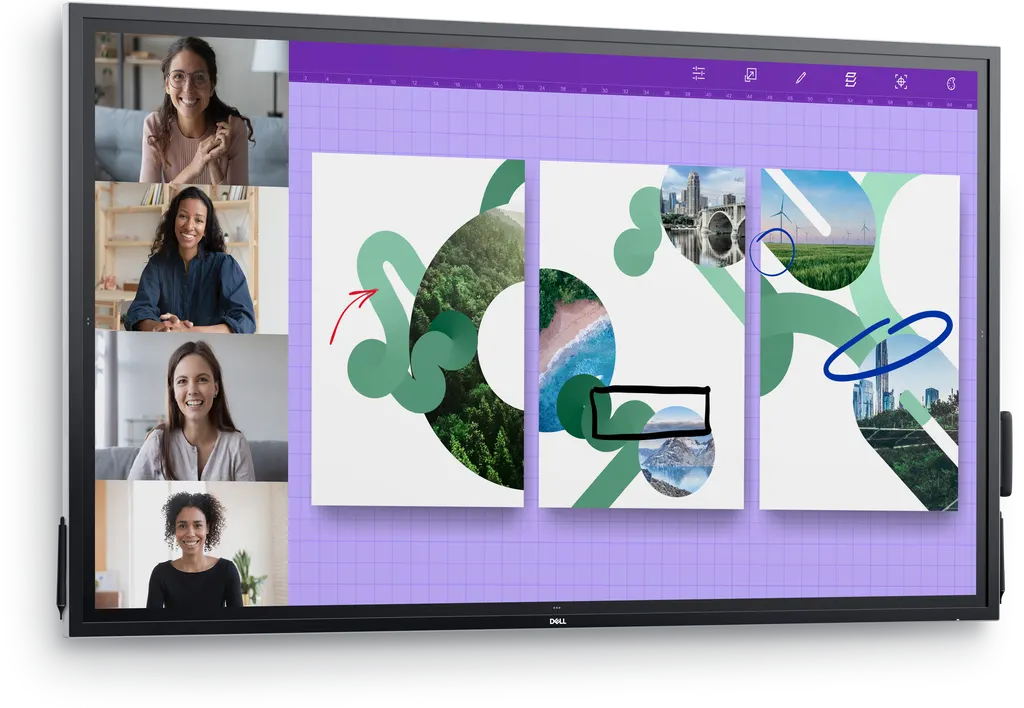
P7524QT
Dell P7524QT 75-inch 4K UHD Interactive Touch Monitor
- Screen size
- 75"
- Resolution
- 3840 x 2160 at 60Hz
- Brightness
- 350 cd/m²
- Speakers
- 2 speakers
The Dell P7524QT is a 75-inch 4K UHD interactive touch monitor with 20-point touch, palm rejection and built-in dual 20W speakers, designed for meeting rooms and training spaces. Its 3840 x 2160 IPS panel shows 1.07 billion colours, and three HDMI inputs plus DisplayPort and VGA connect laptops, PCs and conferencing systems. It suits boardrooms, classrooms and government meeting rooms in Doha, Lusail and Education City that need one large shared display. Request a quote from SmartRooms Qatar.
A 75-inch touch display for shared work
The Dell P7524QT is a 75-inch class LED-backlit LCD with an IPS panel, a 3840 x 2160 resolution at 60 Hz and a 1,200:1 contrast ratio. Its diagonal measures 74.52 inches. The touch layer tracks 20 points at once, so several people can annotate, drag and write on the same glass during a session.
Palm rejection lets a presenter rest a hand on the surface while writing. Two styluses come in the box, along with a holder and extra nibs, and each stylus attaches magnetically to the side of the panel so it stays with the display.
Specifications that matter for planning
- Brightness: 350 cd/m² with an anti-glare, 9H hard coating, which helps in rooms with windows.
- Viewing angle: 178 degrees horizontal and vertical, so colours hold up from the side of the room.
- Audio: two built-in 20W speakers, 40W total output.
- Connections: three HDMI, DisplayPort, VGA input, audio line-in and line-out, LAN, RS-232, four USB 3.0 downstream and three USB 3.0 upstream.
- Power: AC 100-240 V at 50/60 Hz, 290 W operational consumption, ENERGY STAR certified.
- Size and weight: 173.502 cm wide, 101.744 cm high and 7.91 cm deep without stand; 64 kg for the panel alone and 65.2 kg with stand.
- Operating range: 0 to 40 °C and 10 to 80% humidity, non-condensing.
Where it fits in Qatar
In a boardroom in West Bay or Msheireb, the panel can host a call with colleagues abroad while the room annotates a shared document. The three HDMI inputs let a laptop, a PC and a conferencing codec stay connected at the same time.
- University training room in Education City: an instructor writes on the screen while students follow from their seats, and the RS-232 and LAN ports allow room control.
- Government meeting room in Doha: a ministry team reviews documents in Arabic and English side by side, and lock mode restricts menu and power changes in a busy office.
- Medium lecture hall or boardroom in Lusail: the 75-inch screen gives a larger audience a readable view, and the built-in speakers handle short video clips.
Qatar summers push indoor temperatures and dust hard. The rated operating range tops out at 40 °C, so keep the panel in an air-conditioned room and confirm the planned location with the SmartRooms Qatar team before installation.
What to plan before installation
At 64 kg without stand, the panel needs a wall or cart that can carry the load. It supports a VESA 400 x 400 mm mounting pattern, so you can choose a wall mount, a stand or a mobile cart. A free site survey from SmartRooms Qatar checks wall construction, power and cable routing before anything is drilled.
An optional Dell OptiPlex Micro can sit in the powered compartment at the back of the display, keeping the PC out of sight and the cables tidy. Plan two people for lifting and handling, and allow room for the remote control holder and wire saddles included in the box.
Request a quote
Send the SmartRooms Qatar team your room size, mounting plan and the sources you need to connect, and request a quote. Quotations usually arrive within one working day, and we handle purchase orders and government tenders, including Monaqasat, for schools and public bodies ordering several units.
Highlights
- 75-inch 4K UHD IPS panel at 3840 x 2160 resolution
- 20-point touch with palm rejection and two styluses included
- Two built-in 20W speakers, 40W total output
- Three HDMI, DisplayPort, VGA, LAN and RS-232 connections
- VESA 400 x 400 mm mounting, panel weight 64 kg
- 3-year Advanced Exchange Service with the manufacturer warranty
Classroom fit
At 75″ the farthest student should sit within about 5.6 m (6× the screen height).
Estimated timeline
Quotation within 1 working day · delivery timing depends on stock availability, and we confirm it with your quotation.
Specifications
General18
- Product Type
- LED-backlit LCD flat panel display
- Power Consumption Operational
- 290 Watt
- Power Consumption (On mode)
- 140 W
- Diagonal Class
- 75"
- Diagonal Size
- 74.52"
- Commercial Use
- Yes - interactive
- Combined With
- Touchscreen (multi touch)
- TV Tuner
- No tuner
- TV Tuner Presence
- No
- Video Interface
- HDMI
- HDMI Ports Qty
- 3 ports
- PC Interface
- VGA (HD-15), DisplayPort
- Picture Enhancements
- 72% Colour Gamut NTSC
- Dimensions
- Without stand
- Width
- 173.502 cm
- Depth
- 7.91 cm
- Height
- 101.744 cm
- Weight
- 64 kg
Display17
- LCD Display Technology
- IPS
- Pixel Pitch
- 0.429 mm
- Colour Support
- 1070000000 colours
- Resolution
- 3840 x 2160 at 60Hz
- Display Format
- 4K UHD (2160p)
- Image Aspect Ratio
- 16:9
- Frame Rate & Enhancement Technology
- 60 Hz Refresh Rate
- LCD Backlight Technology
- LED backlight
- Coating
- Anti-glare, 9H Hard
- Image Contrast Ratio
- 1200:1
- Dynamic Contrast Ratio
- 1200:1
- Brightness
- 350 cd/m²
- Viewing Angle
- 178 °
- Viewing Angle (Vertical)
- 178 °
- Touchpoints Qty
- 20
- Response Time
- 8 ms
- Features
- Security lock slot (cable lock sold separately), built-in USB hub
Stands & Mounts2
- Flat Panel Mount Interface
- 400 x 400 mm
- VESA Compatibility
- Yes
Remote Control5
- Type
- Remote control
- Battery Form Factor
- AAA type
- Battery Included
- Yes
- Battery Included Qty
- 2
- Battery Required Qty
- 2
Audio System3
- Speaker System
- 2 speakers
- Output Power / Total
- 40 Watt
- Speakers
- 2 x speaker - 20 Watt
Connections1
- Connector Type
- 4 x USB 3.0 downstream 3 x USB 3.0 upstream VGA input DisplayPort 3 x HDMI Audio line-out Audio line-in LAN RS-232
Miscellaneous4
- Security Slot Type
- Kensington security slot
- Included Accessories
- 2 styluses, remote control holder, 3 x wire saddles, 2 stylus nibs, 1 x PC box holder
- Cables Included
- VGA cable HDMI cable SuperSpeed USB cable DisplayPort cable
- Compliant Standards
- RoHS
Sustainability Information1
- ENERGY STAR Certified
- Yes
Power4
- Input Voltage
- AC 100-240 V (50/60 Hz)
- Power Consumption Stand by
- 0.5 Watt
- Power Consumption (Off Mode)
- 0.3 Watt
- On / Off Switch
- Yes
Manufacturer Warranty1
- Bundled Services
- 3 years Advanced Exchange Service
Dimensions & Weight Details1
- Dimensions & Weight Details
- Panel without stand - 173.502 cm x 7.91 cm x 101.744 cm x 64 kg Panel with stand - 65.2 kg
Dimensions & Weight (Shipping)1
- Weight (Shipping)
- 76.6 kg
Environmental Parameters3
- Min Operating Temperature
- 0 °C
- Max Operating Temperature
- 40 °C
- Humidity Range Operating
- 10 - 80% (non-condensing)




