





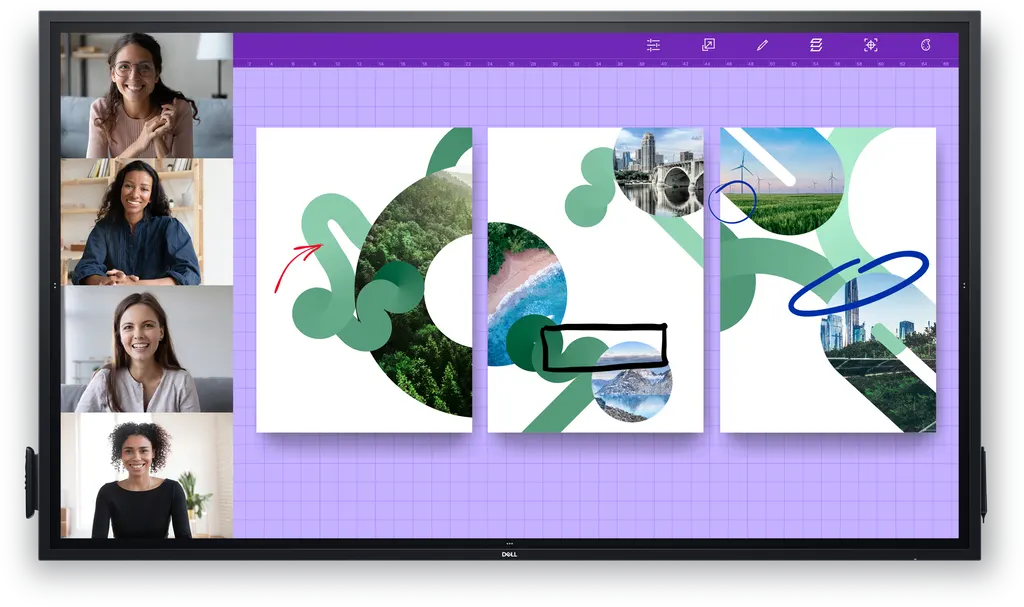
P8624QT
Dell P8624QT 86-inch 4K UHD Interactive Touch Monitor
- Screen size
- 86"
- Resolution
- 3840 x 2160
- Brightness
- 350 cd/m²
- Speakers
- 2 speakers
The Dell P8624QT is an 85.6-inch interactive touch monitor with a 4K UHD IPS panel at 3840 x 2160 resolution. It supports 20-point touch with palm rejection, USB-C power delivery of up to 90W for laptops, and two 20W speakers. Built for boardrooms, lecture rooms and collaboration spaces in Qatar where people write, present and join remote colleagues from one screen. Request a quote from SmartRooms Qatar.
What the P8624QT is and how it is built
The Dell P8624QT is an 86-class interactive touch monitor with an 85.6-inch IPS panel at 3840 x 2160 resolution, the 4K UHD standard. It is an LED-backlit LCD designed for meeting rooms, classrooms and collaboration spaces where people write, annotate and share from the same screen. Its 20-point touch lets several people work on the glass at the same time, and palm rejection allows a presenter to rest a hand on the surface while writing.
Specifications that matter for a room decision
- Display: 350 cd/m² brightness, 1200:1 contrast, 178° viewing angles, 8 ms response time, 60 Hz refresh rate and an anti-glare, 9H hard coating.
- Audio: two 20W speakers built into the frame, giving 40W total output.
- Connectivity: four HDMI inputs, DisplayPort 1.2, a USB-C port that supplies up to 90W to a laptop, audio line-out, RS-232 and an RJ45 LAN port.
- Control: RS-232 and RJ45 connections work with remote management tools and a network control system, and lock mode lets IT restrict menu and power options.
- Power: 100-240 V, 50/60 Hz input, 170 W in on mode and 0.5 W in standby. The unit is ENERGY STAR certified.
Where it fits in Qatar
A university seminar room in Education City seating 30 to 40 people can use this panel as the single display, replacing a projector and whiteboard. A hybrid meeting in a ministry boardroom in Doha can take a video conferencing feed over HDMI while staff write on the glass, and IT can manage the display over the network. A private school in Al Wakrah refitting a senior classroom can use the large, readable screen for shared lesson work, with Dell Screen Drop helping users working from different heights reach the display.
What to plan before installation
- Weight: the panel weighs 87 kg without a stand and ships at 102 kg, so plan lifting, delivery access and the load capacity of the wall or cart.
- Mounting: the display is VESA compatible with a 600 x 400 mm mounting interface, suiting a mobile cart, stand or wall mount.
- Environment: the operating range is 0 to 40 °C at 10 to 80% humidity, non-condensing. Qatar summer temperatures can exceed 45°C, so install it in an air-conditioned room and confirm that the room holds its temperature.
- Optional computer: a Dell OptiPlex Micro can sit in a powered compartment at the back of the display, keeping cables tidy and the computer out of reach.
Warranty, supply and quotation
The manufacturer's warranty bundle includes 3 years of Advanced Exchange Service. SmartRooms Qatar supplies the P8624QT, delivers to all 8 municipalities of Qatar, arranges professional installation and offers a free site survey before wall mounting. We accept purchase orders (LPOs) and government tenders, including Monaqasat. Request a quote and our team will usually respond within one working day with a quotation for your room.
Highlights
- 85.6-inch 4K UHD IPS display at 3840 x 2160 resolution
- 20-point touch with palm rejection and stylus input
- USB-C port supplies up to 90W laptop charging
- Two 20W speakers with 40W total output
- RS-232 and RJ45 LAN for network control
- Operating range 0 to 40 °C; input 100-240 V
Classroom fit
At 86″ the farthest student should sit within about 6.4 m (6× the screen height).
Estimated timeline
Quotation within 1 working day · delivery timing depends on stock availability, and we confirm it with your quotation.
Specifications
General18
- Product Type
- LED-backlit LCD flat panel display
- Power Consumption Operational
- 430 Watt
- Power Consumption (On mode)
- 170 W
- Diagonal Class
- 86"
- Diagonal Size
- 85.6"
- Commercial Use
- Yes - interactive
- Combined With
- Touchscreen (multi touch)
- TV Tuner
- No tuner
- TV Tuner Presence
- No
- Video Interface
- HDMI
- HDMI Ports Qty
- 4 ports
- PC Interface
- DisplayPort
- Picture Enhancements
- 72% Colour Gamut NTSC
- Dimensions
- Without stand
- Width
- 198.264 cm
- Depth
- 8.28 cm
- Height
- 115.663 cm
- Weight
- 87 kg
Display17
- LCD Display Technology
- IPS
- Pixel Pitch
- 0.4935 mm
- Colour Support
- 1070000000 colours
- Resolution
- 3840 x 2160
- Display Format
- 4K UHD (2160p)
- Image Aspect Ratio
- 16:9
- Frame Rate & Enhancement Technology
- 60 Hz Refresh Rate
- LCD Backlight Technology
- LED backlight
- Coating
- Anti-glare, 9H Hard
- Image Contrast Ratio
- 1200:1
- Dynamic Contrast Ratio
- 1200:1
- Brightness
- 350 cd/m²
- Viewing Angle
- 178 °
- Viewing Angle (Vertical)
- 178 °
- Touchpoints Qty
- 20
- Response Time
- 8 ms
- Features
- Security lock slot (cable lock sold separately), built-in USB hub
Stands & Mounts2
- Flat Panel Mount Interface
- 600 x 400 mm
- VESA Compatibility
- Yes
Media Player1
- USB Port
- Yes
Remote Control5
- Type
- Remote control
- Battery Form Factor
- AAA type
- Battery Included
- Yes
- Battery Included Qty
- 2
- Battery Required Qty
- 2
Audio System3
- Speaker System
- 2 speakers
- Output Power / Total
- 40 Watt
- Speakers
- 2 x speaker - 20 Watt
Connections1
- Connector Type
- 4 x USB 3.1 downstream 3 x USB 3.1 upstream USB DisplayPort 4 x HDMI Audio line-out RS-232 LAN
Miscellaneous4
- Security Slot Type
- Kensington security slot
- Included Accessories
- 2 styluses, remote control holder, 3 x wire saddles, 2 stylus nibs, 1 x PC box holder
- Cables Included
- SuperSpeed USB cable DisplayPort cable USB-C cable HDMI cable
- Compliant Standards
- RoHS
Sustainability Information1
- ENERGY STAR Certified
- Yes
Power4
- Input Voltage
- AC 100-240 V (50/60 Hz)
- Power Consumption Stand by
- 0.5 Watt
- Power Consumption (Off Mode)
- 0.3 Watt
- On / Off Switch
- Yes
Manufacturer Warranty1
- Bundled Services
- 3 years Advanced Exchange Service
Dimensions & Weight Details1
- Dimensions & Weight Details
- Panel without stand - 198.264 cm x 8.28 cm x 115.663 cm x 87 kg Panel with stand - 88.2 kg
Dimensions & Weight (Shipping)1
- Weight (Shipping)
- 102 kg
Environmental Parameters3
- Min Operating Temperature
- 0 °C
- Max Operating Temperature
- 40 °C
- Humidity Range Operating
- 10 - 80% (non-condensing)




