





Thursday, 22 October 2026 · 11 Jumada I 1448 AH Sun – Thu · 9:00 – 18:00
+971 56 914 9477 العربية
WhatsApp

Smart Podium

eZon Smart Podium Interactive Lectern

WhatsApp
Priceon request
QuotationWithin 1 working day
DeliveryConfirmed with your quote, based on stock
Overview

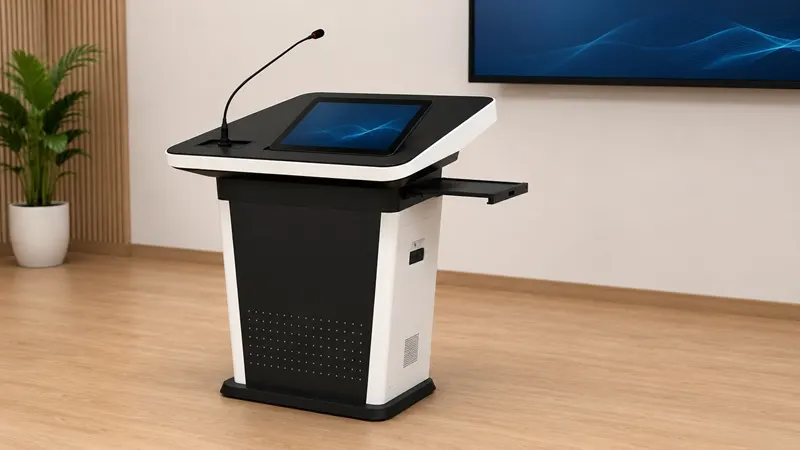
The eZon Smart Podium is an all-in-one interactive lectern that combines smart controls with integrated display technology in one unit. It gives a presenter a single station for lessons, meetings and briefings. Suited to classrooms, boardrooms and public venues in Qatar. Panel size, ports and mounting details are not listed here, so request a quote and we will confirm the full specification.

What the Smart Podium is built to do

The eZon Smart Podium is an all-in-one interactive podium from the eZon portfolio of interactive display products. It brings presenter controls and integrated display technology into one lectern, so the person speaking can manage content, interact with the screen and stay at the front of the room. It sits in the interactive flat panel category, which makes it a fit for presenters who want the display and the desk to work as one unit.

The manufacturer describes it as a tool for presentations, collaboration and engagement, with smart controls placed at the presenter's position. That is the main difference between this unit and a traditional lectern that relies on a separate projector and laptop set up in the same room.

Facts that matter when you compare it

The specification points below are not listed on this page: screen size, resolution, brightness, port layout, power consumption and operating temperature range. We do not estimate them. Before you compare the Smart Podium with another lectern or panel, ask SmartRooms Qatar for the full manufacturer specification, because these figures decide whether the unit fits your room, your cabling and your environment.

  • Integrated design: the display and presenter controls sit in one podium.
  • Smart controls: built for lessons, meetings and briefings led by one presenter.
  • Device connection: the manufacturer describes easy device connection for communication in different environments.
  • Content management: the design aims to simplify managing content and interacting with it.

Where it fits in Qatar

Three situations show where a smart podium earns its place.

  • A university lecture hall in Education City where one lecturer runs slides, annotations and live teaching from a clear station at the front, rather than from a table crowded with cables.
  • A boardroom in West Bay where a presenter briefs senior managers while a team joins from abroad, with the podium giving the presenter one place to run the session.
  • A private school in Al Wakrah fitting out new classrooms where a common setup helps teachers move between rooms without learning different equipment in each one.

What to plan before installation

Measure the front of the room before you choose a position for the podium. It needs space for the presenter, a clear sightline from every seat and a sensible route for cables back to the network and power points. Qatar summers regularly pass 45 degrees Celsius, so for any room with a window or a lobby entrance, confirm the environment with the SmartRooms Qatar team, because the operating temperature range is not listed here. A free site survey from SmartRooms Qatar checks these points before the unit arrives.

When you are ready, request a quote from SmartRooms Qatar. Send us the room type, the number of units and your connection needs, and our team will prepare a quotation, usually within one working day, with the full specification for the eZon Smart Podium.

Highlights

  • All-in-one interactive podium with integrated display technology
  • Smart controls designed for presenter-led sessions
  • Designed for classrooms, boardrooms, retail and public venues
  • Device connection described as simple across different environments
  • Full specification provided with your quotation

Estimated timeline

Quotation within 1 working day · delivery timing depends on stock availability, and we confirm it with your quotation.


Specifications

Source: manufacturer · checked Oct 2026
The full specification and datasheet for this model are available on request; we send them with your quotation.

Downloads

0 files from the manufacturer
No downloadable files are listed for this model yet. Ask us and we will send the datasheet.

Questions about Smart Podium

What is the eZon Smart Podium?
The eZon Smart Podium is an all-in-one interactive podium, listed under interactive flat panels with the subcategory interactive lectern. It combines smart presenter controls with integrated display technology in a single unit, so the presenter works from one station at the front of the room. It is intended for presentations, collaboration and engagement in classrooms, boardrooms and public venues. Ask SmartRooms Qatar for the full specification before comparing it with other options.
Which rooms in Qatar suit a smart podium best?
A smart podium suits rooms where one person leads most of the session. The manufacturer names classrooms, boardrooms, retail spaces, airports and public venues as intended settings. In Doha that could mean a lecture theatre in Education City, a meeting room in West Bay or a training room near Hamad International Airport. Check that the room has space for the podium and a clear view of the screen from every seat.
What screen size and resolution does the Smart Podium have?
The screen size, resolution and brightness of the eZon Smart Podium are not included in the source data we hold, so we do not state them here. Confirm the panel size and resolution in the full manufacturer specification before you finalise the room layout. SmartRooms Qatar will confirm the details with your quotation, so you can check viewing distance, seating and the wall or floor space the unit needs.
Does the Smart Podium support Arabic and English content?
Language support for this model is not stated in the manufacturer data we hold, so we cannot confirm it. Many offices and schools in Qatar work in Arabic and English side by side, so ask about this before ordering. Check how the on-screen interface, menus and content tools handle both languages, and request the answer in writing with your quotation. The SmartRooms Qatar team can help you check it before you buy.
How do I connect a laptop and other devices to it?
The manufacturer describes the podium as designed to connect devices easily for communication in different environments. Input types, ports and wireless options are not listed in the data we hold, so we will not name them. Before ordering, list the devices your presenters use, such as laptops, tablets and document cameras, and ask our team to match them against the connection options. This prevents surprises on installation day.
Can the Smart Podium be used in a hot or dusty area?
Summer temperatures in Qatar regularly exceed 45 degrees Celsius, and dust storms are common, so this question matters. The data for the Smart Podium gives no operating temperature range and no dust or enclosure rating. Plan it for an indoor, air-conditioned room, and confirm the environment with the SmartRooms Qatar team before recommending a position near a window, a lobby entrance or an outdoor event area.
How is it different from a standalone interactive flat panel?
A standalone interactive flat panel is mounted on a wall or stand, while the Smart Podium is an all-in-one podium that combines the display with smart presenter controls in a lectern form. Choose the podium when the presenter needs a fixed station at the front of the room. Choose a standalone panel when the room needs a large display with a separate teaching desk. Compare panel sizes in the full specification before deciding.
What should a university lecture hall in Doha plan for?
A lecture hall needs a podium position that gives clear sightlines to the back rows, a safe route for cables and lighting that keeps the screen readable. Because the Smart Podium is designed for presenter-led sessions, check the front-of-room footprint and whether the lecturer must move between the podium and a second display. A free site survey from SmartRooms Qatar lets us measure these points before equipment is supplied.
What should a school in Al Wakrah check before fitting out several classrooms?
Start with one standard layout so every classroom uses the same podium position, device connections and teaching routine. Teachers who move between rooms benefit from that consistency. Measure each room separately, because wall space, window positions and front-of-room clearance can differ. Ask for the full specification to confirm the display size for each room type, and request one quotation covering all units so the classrooms match.
Is it suitable for a boardroom in West Bay?
A boardroom suits the Smart Podium when one presenter leads briefings or updates and the meeting includes people joining from abroad. The manufacturer names boardrooms among the intended settings. Check the seating plan, the distance from the podium to the furthest chair, and where any camera and microphone for remote participants will sit relative to the presenter. These points shape the placement more than the podium itself.
How do I request a quote for the Smart Podium?
Send SmartRooms Qatar the room type, the number of units, the intended use and your connection requirements. Quotations are usually issued within one working day. Payment can be made by bank transfer, cheque or purchase order, and we accept LPOs and government tenders, including Monaqasat. We deliver to all eight municipalities of Qatar, and lead times are confirmed in the quotation based on stock.
Do you offer installation and a site survey?
Yes. SmartRooms Qatar offers professional installation and free site surveys. For a podium, the survey checks the presenter position, cable routes, power points and the sightline from every seat before any work starts. This reduces the risk of rerouting cables or moving the unit after it is fixed in place. Request a quote and we will arrange the survey with your facilities team.

Similar models

BenQ CM7505 BenQ Board CM7505 75-inch Interactive Display
75″ UHD 3840 × 2160 pixels Ultra Precision IR
SMART SBID-6286S-V3 SMART Board 6086S-V3 86-inch Interactive Display with iQ
86″ 4K UHD (3840 × 2160) HyPr Touch with InGlass
SMART SBID-6286S-V3-P SMART Board 6086S-V3 Pro 86-inch Interactive Display with iQ
86″ 4K UHD (3840 × 2160) HyPr Touch with InGlass
Clevertouch Clevertouch Edge 65" Clevertouch Edge 65" 4K Interactive Display with Camera and Speakers
65″ 4K UHD (3840x2160 @60Hz) Android 15
Clevertouch Clevertouch Edge 86" Clevertouch Edge 86" 4K Interactive Flat Panel
86″ 4K UHD (3840x2160 @60Hz) Android 15
Email Call


