





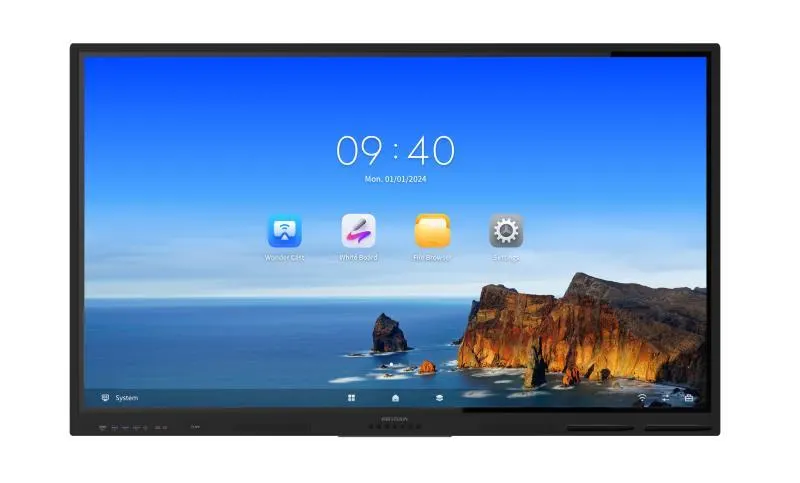
DS-D5B75RB/EL
Hikvision DS-D5B75RB/EL 75-inch 4K Interactive Display
- Screen size
- 75 inch
- Resolution
- 3840 × 2160 @60 Hz
- Touch
- 40-point multi-touch
- Memory
- 8 GB
The Hikvision DS-D5B75RB/EL is a 75-inch 4K interactive display from the WonderHub Value Series, built for teaching and meeting spaces. It combines a 3840 × 2160 IPS panel with 40-point infrared touch, Android 13 on 8 GB memory and 64 GB storage, and an optional Windows system via a 195 × 30 × 180 mm OPS module. It suits schools, universities and offices across Qatar that want one large, responsive board.
A 75-inch 4K board for teaching and collaborative meetings
The Hikvision DS-D5B75RB/EL is a 75-inch interactive display from the WonderHub Value Series. Its 16:9 screen covers a display area of 1650.24 mm by 928.76 mm and renders 3840 × 2160 pixels at 60 Hz, so slides, spreadsheets and handwritten notes stay crisp when viewed up close. It suits rooms where several people write, annotate and share from the same wall, rather than one presenter working from a laptop.
Picture quality and touch performance
The IPS panel is rated at 400 cd/m² typical brightness with a 1200:1 static contrast ratio, and its 178° horizontal and vertical viewing angles keep colours readable for people seated at the sides of the room. The 3.2 mm anti-glare glass with 25% haze reduces reflections from ceiling lights and windows. The infrared touch layer tracks up to 40 points at once, responds within 5 ms, detects objects from 2 mm, and holds touch precision of ±1 mm across at least 90% of the touching area. Two styluses are included in the box.
Software, ports and sound
Android 13 runs on a quad-core Cortex-A55 processor at 1.92 GHz, with 8 GB memory and 64 GB built-in storage. For a Windows environment, the optional OPS module measuring 195 × 30 × 180 mm adds a second system, and the manufacturer recommends running video conferencing software on Windows. Inputs include two HDMI 2.0 ports and one audio input, with one audio output, a TOUCH-USB 2.0 port and an RS232 control port. Three USB 3.0 ports, two USB 2.0 ports and a Type-C port (USB 2.0 only) handle peripherals. Two 100 Mbps LAN ports sit alongside Wi-Fi on 2.4 GHz and 5 GHz, and the built-in speakers are rated 2 × 20 W. The unit has no built-in camera or microphone, so video calls need separate devices.
Where this model fits in Qatar
- A classroom in a private school: a school in Al Wakrah fitting out a mid-sized classroom can use the 75-inch surface for lessons, with the touch layer letting students work through problems at the board.
- A training centre meeting room: a training provider in the Industrial Area or Msheireb can run workshops where several trainees write on the screen at once, using up to 40 touch points.
- A corporate or government boardroom: an office in West Bay or Lusail can show a laptop screen through HDMI for meetings, with a separate camera and microphone added for calls with teams abroad.
Planning the installation and power
The panel weighs 49.15 kg net and 63.0 kg gross, so the wall or structure must be checked before fixing. The VESA pattern is 800 × 400 mm with four M8 fixing points, and a wall mount bracket is supplied. A free site survey lets our team check the wall, the bracket position and cable routes before installation day. The operating range is 0 °C to 40 °C at 10% to 90% relative humidity, and summer temperatures in Qatar can pass 45 °C, so the panel belongs in an air-conditioned room, away from direct sun and hot window glare. Rated input is 100 to 240 VAC at 50/60 Hz, averaging 175 W and peaking at 217 W. The supplied 1.5 m power cable is the European standard type, so confirm the plug arrangement against BS 1363 sockets before ordering.
If you need one panel for a classroom or several for a school or office, request a quote from SmartRooms Qatar. We supply, deliver to all eight municipalities, install professionally, and accept purchase orders, LPOs and government tenders. Quotations usually follow within one working day.
Highlights
- 75-inch IPS panel at 3840 × 2160 resolution
- Infrared touch with up to 40 simultaneous points
- Android 13 with 8 GB memory and 64 GB storage
- Optional Windows system via 195 × 30 × 180 mm OPS module
- Two 20 W speakers and two HDMI 2.0 inputs
Classroom fit
At 75″ the farthest student should sit within about 5.6 m (6× the screen height).
Estimated timeline
Quotation within 1 working day · delivery timing depends on stock availability, and we confirm it with your quotation.
Specifications
Product Model1
- Product Model
- DS-D5B75RB/EL
Display21
- Screen Size
- 75 inch
- Backlight
- DLED
- Pixel Pitch
- 0.143 (H) mm × 0.430 (V) mm
- Resolution
- 3840 × 2160 @60 Hz
- Brightness
- 400 cd/m² (Typ.)
- Color Depth
- 10 bit (8 bit + FRC)
- Display Color
- 1.07G
- Response Time
- 5ms
- Panel Type
- IPS
- Contrast Ratio
- 1200:1 (Static) 15,000:1 (Dynamic)
- Color Gamut
- 72% NTSC (CIE1931) (Typ.)
- Refresh Rate
- 60 Hz
- Viewing Angle
- 178°(H)/178°(V)
- Aspect Ratio
- 16:9
- Surface Haze
- 25% Haze
- Display Area
- 1650.24 mm × 928.76 mm
- Working Duration
- 7 × 16H
- Surface Hardness
- 9H (Pencil) 7 (Mohs)
- Surface Glass
- 3.2 mm Anti-Glare Glass
- Transmittance
- 88% ± 3
- Lifespan
- 50,000 hours
Touch6
- Type
- Infrared Touch Screen
- Touch Point
- 40-point multi-touch
- Touch Response Time
- < 5 ms
- Minimum Touch Object
- ≥ 2 mm (≥ 90% touching area)
- Touch Precision
- ± 1 mm (≥ 90% touching area)
- Touch Resolution
- 32767 × 32767
Built-in System6
- Operation System
- Android 13.0
- Memory
- 8 GB
- Built-in Storage
- 64 GB
- CPU
- Cortex-A55 × 4 (1.92 GHz)
- HDCP Version
- Support 1.4/2.2/2.3
- GPU
- Mali-G52 MP2 (2EE)
Internal Function5
- Loudspeaker
- Built-in 2 × 20 W
- Speaker Frequency
- 200-20Khz
- Bluetooth
- Built-in BLE (Bluetooth Low Energy) module supports Bluetooth 5.2
- NFC
- Support card reader
- Light Sensor
- Yes
Interface5
- Video & Audio Input
- HDMI In (HDMI 2.0) × 2, Audio In × 1
- Video & Audio Output
- Audio Out × 1
- Control Interface
- TOUCH-USB 2.0 × 1, RS232 × 1
- Network Interface
- LAN (100 Mbps) × 2 WIFI AP&Station,2.4G/5G WIFI AP:IEEE 802.11 a/b/g/n/ac 2 × 2 MIMO (2.4 GHz and 5 GHz) authentication protocols WEP, WPA, WPA2, PSK and 802.1X EAP WIFI Station:IEEE 802.11 a/b/g/n/ac/ax 1 × 1 MIMO (2.4 GHz and 5 GHz) authentication protocols WEP, WPA, WPA2, PSK and 802.1X EAP
- Data Transmission Interface
- USB 3.0 × 3, USB 2.0 × 2, Type-C × 1 (Type-C supports USB 2.0)
Power4
- Power Supply
- 100 to 240 VAC, 50/60 Hz
- Standby Consumption
- ≤ 0.5 W
- Max. Consumption
- 217 W
- Average Consumption
- 175 W
Working Environment2
- Working Temperature
- 0 °C to 40 °C (32 °F to 104°F)
- Working Humidity
- 10%~90% RH
General6
- Product Dimensions
- 1713.23 mm × 1023.04 mm × 82.5 mm
- Package Dimensions (W × H × D)
- 1907 mm × 1160 mm × 223 mm
- VESA
- 800 mm × 400 mm (4 × M8-25 mm)
- Net Weight
- 49.15 kg
- Gross Weight
- 63.0 kg
- Accessary
- Wall mount bracket, hook, user manual, stylus × 2, packing list,1.5 m power cable (European standard), remote controller




