





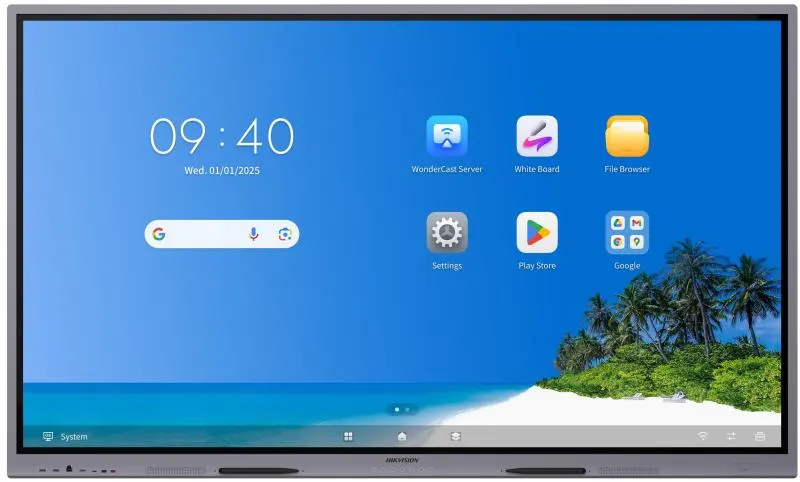
DS-D5B75RB/EP
Hikvision DS-D5B75RB/EP 75-inch 4K Interactive Display
- Screen size
- 75 inch
- Resolution
- 3840 × 2160 @60 Hz
- Touch
- Up to 50-point multi-touch
- Memory
- 8 GB + Max 8 GB Virtual RAM
The Hikvision DS-D5B75RB/EP is a 75-inch 4K interactive display from the WonderHub Performance Series, with a 3840 × 2160 UHD panel, up to 50-point infrared touch and Android 16.0 built in. It pairs 8 GB RAM and 128 GB storage with an optional Windows OPS slot, and offers three HDMI inputs. Suited to classrooms, training rooms and boardrooms in Qatar that need a large, touch-enabled screen.
What the DS-D5B75RB/EP does in a room
The DS-D5B75RB/EP is an all-in-one 75-inch interactive display from Hikvision's WonderHub Performance Series. Its 16:9 VA panel shows 3840 × 2160 pixels at 60 Hz, and the front glass is anti-glare and anti-fingerprint. Teachers, trainers and presenters can write, annotate and share content directly on the screen instead of balancing a laptop beside a projector.
Typical brightness is 450 cd/m², with 5000:1 static contrast and 30,000:1 dynamic contrast. The panel covers 72% NTSC colour with 10-bit colour depth (8-bit plus FRC), and its 178° viewing angle keeps the picture readable from the sides of a room. The infrared touch layer supports up to 50 touch points, responds in 2 ms or less and registers objects from 1.5 mm, which suits fine handwriting. The rated lifespan is 50,000 hours.
Android 16.0 with an optional Windows system
The display runs Android 16.0 with 8 GB of RAM and 128 GB of storage. Built-in tools include a whiteboard with handwriting and graphics recognition, WonderCast screen casting for up to nine devices at once, and AI Assistant, AI Identify and AI Notes features. AI Notes comes with 6,000 minutes, free for a one-year validity period. For video conferencing, Windows is the better platform: an optional OPS module measuring 195 × 30 × 180 mm adds a Windows system, and video conference software is recommended on that side.
Connectivity for classrooms and meeting rooms
Three HDMI 2.1 inputs, one at the front and two at the rear, let a laptop, document camera and media player connect at the same time. There is one USB-C port at the front and one at the rear, each rated for 65 W charging and supporting DP IN 1.4, so a laptop can charge while it displays. Two 1000 Mbps LAN ports sit at the rear, and a built-in network switch chip removes the need for an external switch. Wi-Fi 6 with 2 × 2 MIMO works on 2.4 GHz and 5 GHz. The unit has no built-in camera or microphone, so video calls need external equipment.
Where it fits across Qatar
A private school in Al Wakrah fitting out new classrooms can use the front multi-button layout for daily teaching, and the Arabic and English language options suit a bilingual timetable. A training centre near Education City running short courses can use the multi-point touch for group exercises. In a company meeting room in West Bay, a Windows OPS module with an external camera and microphone can host calls with colleagues abroad, while the screen shows shared documents in full 4K detail.
Planning the room and ordering through SmartRooms Qatar
The panel weighs 45.1 kg net and 62.4 kg gross, and with its wall attachment it measures 1709.83 × 1017.34 × 107.1 mm. The VESA pattern is 800 × 400 mm with four M8 holes, and a wall mount bracket is included. Because the screen is large and heavy, book a free site survey to check wall structure, cable routes and viewing height. Power is 100 to 240 VAC at 50/60 Hz, averaging under 189 W, with standby at 0.5 W or less. Keep the room air-conditioned: the operating range is 0 °C to 40 °C with 10% to 90% humidity, and summer temperatures in Qatar can exceed 45 °C. Request a quote and SmartRooms Qatar will usually issue quotations within one working day. We supply and deliver to all eight municipalities, install professionally, and accept LPOs, government tenders including Monaqasat, and payment by bank transfer, cheque or purchase order. Products are covered by the manufacturer's warranty.
Highlights
- 75-inch 3840 × 2160 4K UHD VA panel at 60 Hz
- Infrared touch with up to 50 simultaneous touch points
- Android 16.0 with 8 GB RAM and 128 GB storage
- Optional Windows system through a 195 × 30 × 180 mm OPS slot
- Three HDMI 2.1 inputs and two 65 W USB-C ports
- Built-in network switch chip with Wi-Fi 6 and 1000 Mbps LAN
Classroom fit
At 75″ the farthest student should sit within about 5.6 m (6× the screen height).
Estimated timeline
Quotation within 1 working day · delivery timing depends on stock availability, and we confirm it with your quotation.
Specifications
Product Model1
- Product Model
- DS-D5B75RB/EP
Display22
- Screen Size
- 75 inch
- Backlight
- DLED
- Pixel Pitch
- 0.143 (H) × 0.429 (V) mm
- Resolution
- 3840 × 2160 @60 Hz
- Brightness
- 450 cd/m² (Typ.)
- Color Depth
- 10 bit (8 bit + FRC)
- Display Color
- 1.07 G
- Response Time
- 5 ms
- Panel Type
- VA
- Contrast Ratio
- 5000:1 (Static) 30,000:1 (Dynamic)
- Color Gamut
- 72% NTSC (CIE1931) (Typ.)
- Refresh Rate
- 60 Hz
- Viewing Angle
- 178° (H)/178° (V)
- Aspect Ratio
- 16:9
- Surface Hardness
- 9H (Pencil) 7 (Mohs)
- Surface Glass
- Anti-Glare & Anti-Fingerprint glass
- Surface Haze
- 25% Haze
- Glass Bonding Method
- Zero Lamination
- Display Area
- 1650.24 (H) × 928.26 (V) mm
- Working Duration
- 7 × 16 H
- Transmittance
- 88% ± 3
- Lifespan
- 50,000 hours
Touch6
- Type
- Infrared Touch Screen
- Touch Point
- Up to 50-point multi-touch
- Touch Response Time
- ≤ 2 ms
- Minimum Touch Object
- ≥ 1.5 mm (≥ 90% touching area)
- Touch Precision
- ± 0.5 mm (≥ 90% touching area)
- Touch Resolution
- 32768 × 32768
Built-in System7
- Operation System
- Android 16.0
- Memory
- 8 GB + Max 8 GB Virtual RAM
- Built-in Storage
- 128 GB
- Processor
- Quad-core Cortex-A72 × 4(2.2 GHz)and quad-core Cortex-A53 × 4(1.8 GHz)
- GPU
- Mali-G52 MC3
- HDCP Version
- 2.3 & 2.2 & 1.4
- NPU
- 6TOPs
Internal Function8
- Loudspeaker
- Built-in 2 × 20 W + 25 W loudspeaker;
- Bluetooth
- Built-in BLE (Bluetooth Low Energy) module supports Bluetooth 5.4
- NFC
- Support card reader 13.56 MHz, (ISO 14443A/ ISO 14443B)
- Light Sensor
- Yes
- AI Function
- AI Assistant, AI Identify, and AI Notes. Free for a 1-year validity period with 6,000 minutes for AI Notes.
- Whiteboard
- Built-in whiteboard supports handwriting recognition, graphics recognition, document insertion, and more.
- ScreenCast
- Built-in WonderCast software supports screen casting for up to 9 devices simultaneously.
- Language Supported
- Simplified Chinese, German, Italian, Arabic, Portuguese, Dutch, French, Indonesian, Thai, Vietnamese, Japanese, Spanish, English, Czech, Danish, Hungarian, Polish, Turkish, Russian, Romanian, Slovak, Korean, Uzbek, Bulgarian, Greek, Swedish, Norwegian, Finnish, Croatian, Slovenian, Serbian, Hebrew, Ukrainian, Traditional Chinese (HK), Traditional Chinese (TW), Hindi, Latvian, Kazakh, Nepali
Interface5
- Video & Audio Input
- HDMI 2.1 TMDS × 3(Front x 1; Rear x 2; Support HDCP2.3 & 2.2 & 1.4;HDMI1 Support CEC&ARC protocol) VGA × 1(Rear) Audio × 1(Rear)
- Video & audio output
- HDMI 2.1 TMDS × 1(Rear) Audio × 1(Rear) SPDIF × 1(Rear)
- Control interface
- TOUCH-USB 3.0 × 1(Front × 1) TOUCH-USB 2.0 × 2(Rear × 2) RS232 × 1(Rear)
- Network Interface
- LAN (1000 Mbps) × 2(Rear) Wi-Fi AP & Station, 2.4 G/5 G Wi-Fi 6, IEEE 802.11 a/b/g/n/ac/ax 2 × 2 MIMO (2.4 GHz and 5 GHz) authentication protocols WEP, WPA, WPA2, PSK and 802.1X EAP
- Data Transmission Interface
- USB 3.0 × 3(Front × 2; Rear × 1) USB 2.0 × 2(Rear × 2) Type-C × 1 (Front × 1:Support USB 3.0, 65 W charging functions; support DP IN 1.4) Type-C × 1 (Rear × 1:Support USB 2.0, 65 W charging functions; support DP IN 1.4)
Power3
- Power Supply
- 100 to 240 VAC, 50/60 Hz
- Standby Consumption
- ≤ 0.5 W
- Average Consumption
- < 189 W
Working Environment2
- Working Temperature
- 0 °C to 40 °C (32 °F to 104 °F)
- Working Humidity
- 10%~90% RH
General7
- VESA
- 800 mm × 400 mm (4 × M8-25 mm)
- Accessory
- Wall mount bracket, hook, user manual, touch writing pen, packing list, 3M touch USB cable, 3.5 M HDMI cable (2.0), power cable, remote control, screen cleaning cloth.
- Package Dimensions (W × H × D)
- 1907.0 × 1160.0 × 223.0 mm
- Net Weight
- 45.1 ± 0.5 kg
- Gross Weight
- 62.4 ± 0.5 kg
- Product Dimensions (With Wall Attachment)
- 1709.83 × 1017.34 × 107.1 mm
- Product Dimensions (Without Wall Attachment)
- 1709.83 × 1017.34 × 83.1 mm




