





Thursday, 22 October 2026 · 11 Jumada I 1448 AH Sun – Thu · 9:00 – 18:00
+971 56 914 9477 العربية
WhatsApp

DS-D5D65RB/C

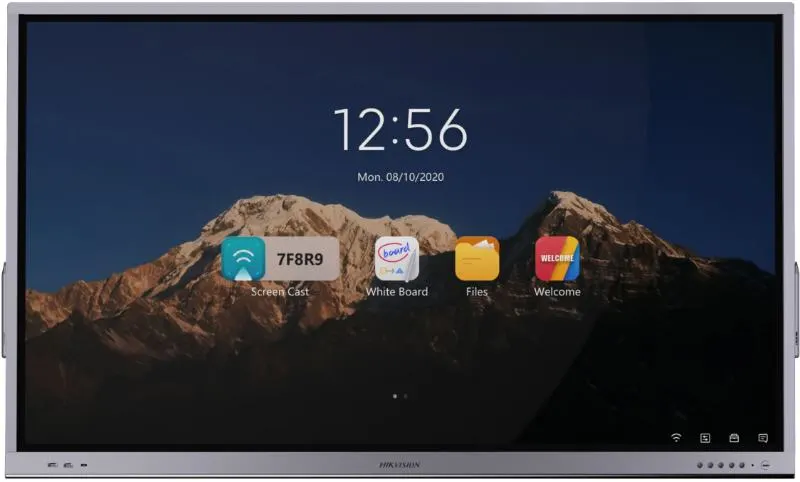
Hikvision DS-D5D65RB/C 65-inch 4K Interactive Display

WhatsApp
Priceon request
QuotationWithin 1 working day
DeliveryConfirmed with your quote, based on stock
PDFDownload datasheet (Datasheet-of-DS-D5D65RB_C西班牙220412.pdf)
Overview

The Hikvision DS-D5D65RB/C is a 65-inch 4K touch interactive display from the Pro Series, built for meetings and teaching. Its 1 mm touch precision suits detailed handwriting, up to 20 simultaneous touch points let several presenters annotate at once, and wireless mirroring from laptops, PCs, phones and tablets removes cable clutter. It suits meeting rooms and classrooms in Doha, West Bay and Lusail that want writing and sharing on one screen.

What the DS-D5D65RB/C is and where it fits

The Hikvision DS-D5D65RB/C is a 65-inch interactive display from the Pro Series, combining a 4K panel and a touch layer in one unit. It belongs to the conference flat panel range, so it is built for rooms where a group gathers around one screen to write, annotate and share, rather than for a single desk user. At 65 inches it suits a small to medium meeting room or classroom where everyone can read the screen from their seats.

Writing, annotation and sharing for several people

The touch layer offers 1 mm touch precision, which keeps handwriting and fine diagrams clean. It registers up to 20 simultaneous touch points, so a team can mark up the same plan together, or a teacher can have several students work at the board at once. The built-in annotation application lets users draw over any connected input and save notes instantly, so a brainstorm does not need to be retyped afterwards.

Wireless mirroring works from laptops, desktop PCs, phones and tablets, so presenters do not have to swap cables at the start of a meeting. The screen can be split by half or by quarter, which helps a team compare up to four documents, spreadsheets or designs side by side. Once annotations are finished, they can be shared with attendees by QR code or by email, so people leave with the notes on their own devices.

Image quality and controls in bright rooms

The 4K resolution keeps small text and chart detail sharp at this size. The panel has an anti-glare, fingerprint-resistant surface and is described as blocking strong light, which matters in rooms with large windows. The manufacturer places its brightness in the 500 to under 1,000 nit band, so window position and blinds still deserve attention. A set of front panel buttons handles power on and off, volume up and down, and switching between signal sources, so staff can control the screen directly at the panel.

Planning a installation in Qatar

A private school in Al Wakrah fitting out several classrooms can order one unit per room under a single LPO, with each room reviewed during a free site survey. A ministry team in Msheireb or a consultancy office in West Bay may use it for document reviews where colleagues share from different laptops. A training centre in Education City can use the front controls to change sources quickly between presenters.

  • Daylight: Check window positions, blinds and glare sources before choosing the final viewing position.
  • Mounting: Confirm whether a wall mount or stand suits the room. Dimensions and weight are confirmed with the quotation before installation.
  • Power and cabling: Identify the nearest outlets and the route for signal cables before the installation day.
  • Environment: Ask the SmartRooms Qatar team to confirm that the room conditions suit this model, especially in lobbies or areas exposed to heat.

To check whether this 65-inch model fits your room, mounting plan and procurement cycle, request a quote from SmartRooms Qatar. Our team usually responds within one working day and can arrange a free site survey before installation.

Highlights

  • 65-inch 4K touch display from the Pro Series
  • 1 mm touch precision for detailed handwriting
  • Up to 20 simultaneous touch points
  • Wireless mirroring from laptops, PCs, phones and tablets
  • Annotation sharing by QR code or email
  • Front panel buttons for power, volume and source switching

Classroom fit

At 65″ the farthest student should sit within about 4.9 m (6× the screen height).

Estimated timeline

Quotation within 1 working day · delivery timing depends on stock availability, and we confirm it with your quotation.


Specifications

Source: manufacturer · checked Oct 2026
The full specification and datasheet for this model are available on request; we send them with your quotation.

Downloads

3 files from the manufacturer

Questions about DS-D5D65RB/C

Who is the DS-D5D65RB/C built for?
It suits meeting rooms, boardrooms and classrooms where a group needs to write, annotate and share on one 65-inch 4K screen. The 1 mm touch precision and wireless mirroring make it practical for brainstorming sessions and document reviews in Doha offices, schools and training centres. If your room seats a small to medium group, this size is a good match.
How many people can write on the screen at the same time?
The display registers up to 20 simultaneous touch points, so several presenters can mark up the same chart or plan without waiting for a turn. Its 1 mm touch precision keeps handwriting and small diagrams clear. This suits a design team in West Bay reviewing a floor plan, or a teacher having several students work through problems at the board together.
Can I share my laptop screen without cables?
Yes. Wireless screen mirroring works from laptops, desktop PCs, mobile phones and tablets, so presenters avoid cable swaps at the start of a meeting. The screen can also be split by half or by quarter, letting a team compare up to four documents, spreadsheets or designs side by side. This helps when engineers in the Industrial Area present from different devices in one review.
How do attendees get the notes after a meeting?
Annotations can be shared with attendees by QR code or by email, so each person receives the notes on their own device. This helps a project team in Lusail where colleagues from several companies attend a review and need the markups afterwards. The built-in annotation application saves notes instantly on any connected interface, so nothing needs to be retyped.
Will the screen work in a room with strong daylight?
The panel has an anti-glare, fingerprint-resistant surface and is described as blocking strong light, which helps in rooms with large windows. The manufacturer places its brightness in the 500 to under 1,000 nit range. For a glass-fronted boardroom in Msheireb, check window positions and blinds during the site survey before choosing the final mounting point.
What controls are on the front of the panel?
The front panel has buttons for power on and off, volume up and down, and switching between signal sources. These are useful when the display is wall-mounted and a teacher or receptionist needs to change the input quickly without walking to a computer.
Is it suitable for a classroom at a private school in Al Wakrah?
Yes, a 65-inch panel suits a medium-sized classroom where students can read text and diagrams from their seats. A private school in Al Wakrah equipping several rooms can order the set under one purchase order, with each classroom reviewed in a free site survey to check wall space, power outlets and sightlines before installation.
What software comes with the display?
The source data lists a built-in annotation application that works on any interface and saves notes instantly. The full list of bundled software is not in the manufacturer data we hold, so the SmartRooms Qatar team will confirm it in your quotation before you commit to the order. Ask for that list if your IT team needs to approve software in advance.
Do I need a site survey before mounting a 65-inch panel?
A survey is recommended because a 65-inch panel needs a suitable wall or stand, nearby power and a clear route for signal cables. SmartRooms Qatar offers free site surveys, which check wall construction, lighting and viewing distance from the seats before professional installation. Mention any glass walls or noisy areas so the team can plan for them.
How long does it take to receive a quotation?
Quotations are usually issued within one working day. Government buyers can submit a purchase order (LPO) or take part in tenders, including Monaqasat, and payment can be made by bank transfer, cheque or purchase order. Lead times are estimates based on stock and are confirmed with the quotation.
Is this model covered by a warranty?
The product is covered by the manufacturer's warranty. The warranty period and terms are not listed in the source data available to us, so SmartRooms Qatar states the warranty details in the quotation. Facilities managers should confirm them before issuing an LPO, so the terms can be filed with the project records.
What should I send when requesting a quote?
Include the room type, the number of panels required, the intended mounting location and whether the purchase is an LPO or part of a government tender. With this information, the team can recommend a suitable installation approach and confirm availability for your schedule. Delivery is available to all eight municipalities of Qatar.

Similar models

BenQ CM7505 BenQ Board CM7505 75-inch Interactive Display
75″ UHD 3840 × 2160 pixels Ultra Precision IR
SMART SBID-6286S-V3 SMART Board 6086S-V3 86-inch Interactive Display with iQ
86″ 4K UHD (3840 × 2160) HyPr Touch with InGlass
SMART SBID-6286S-V3-P SMART Board 6086S-V3 Pro 86-inch Interactive Display with iQ
86″ 4K UHD (3840 × 2160) HyPr Touch with InGlass
Clevertouch Clevertouch Edge 65" Clevertouch Edge 65" 4K Interactive Display with Camera and Speakers
65″ 4K UHD (3840x2160 @60Hz) Android 15
Clevertouch Clevertouch Edge 86" Clevertouch Edge 86" 4K Interactive Flat Panel
86″ 4K UHD (3840x2160 @60Hz) Android 15
Email Call


