





Thursday, 22 October 2026 · 11 Jumada I 1448 AH Sun – Thu · 9:00 – 18:00
+971 56 914 9477 العربية
WhatsApp

65MR61DE-E

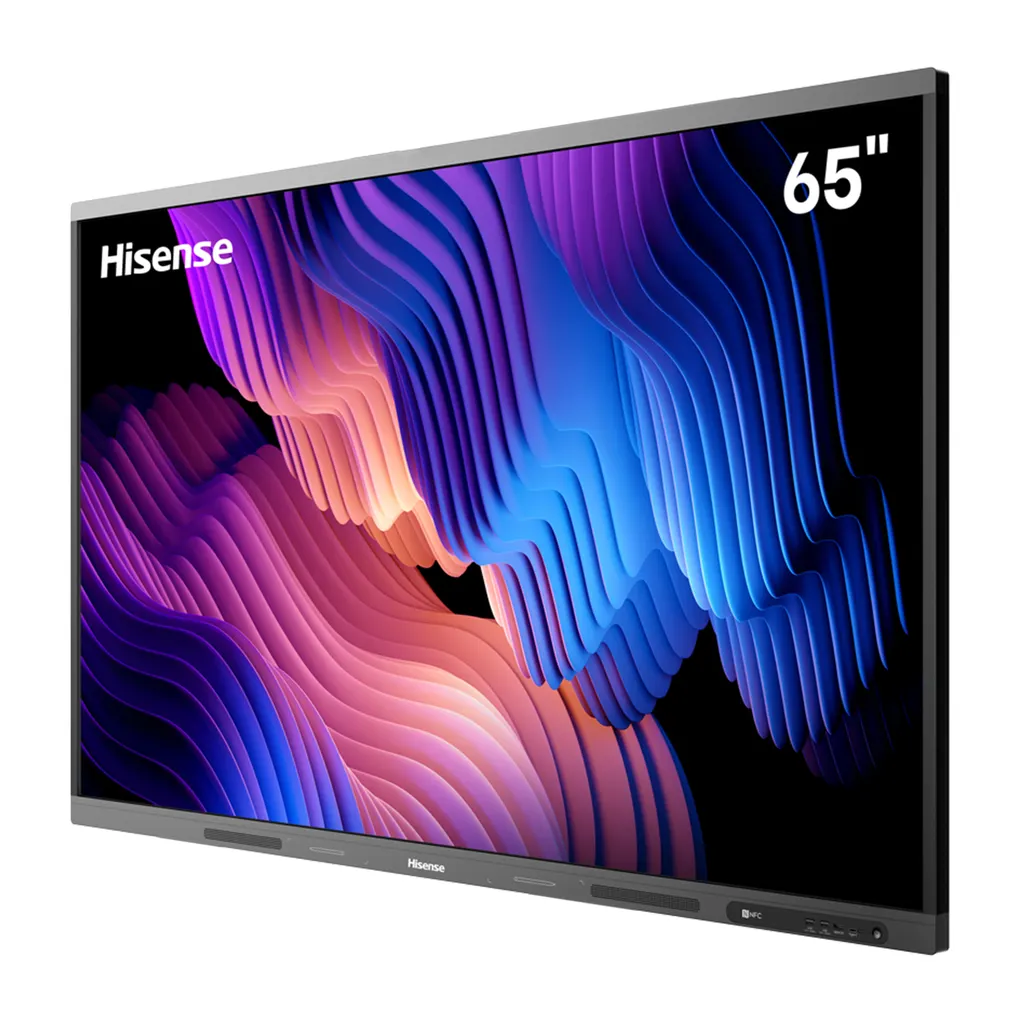
Hisense 65MR61DE-E 65-inch GoBoard Pro Interactive Display

Screen size
65’’
Resolution
3840 x 2160
System
Android 13.0
Memory
8GB
WhatsApp
Priceon request
QuotationWithin 1 working day
DeliveryConfirmed with your quote, based on stock
PDFDownload datasheet (65MR61DE-E_Datasheet_V3.pdf)
Overview

The Hisense 65MR61DE-E is a 65-inch GoBoard Pro interactive display combining a 4K Ultra HD panel, an infrared touch frame supporting 20 touch points, and Android 13 with 8GB RAM and 128GB storage. It offers three HDMI 2.0 inputs, a USB-C port rated for 65W power delivery, dual Wi-Fi modules and an optional OPS slot. It suits classrooms, boardrooms and training rooms across Doha and the rest of Qatar.

What the 65MR61DE-E does in a room

The Hisense 65MR61DE-E belongs to the MR61DE-E series, sold as GoBoard Pro. It brings a large touch screen, whiteboard software, an Android computer and wireless screen sharing into one unit, so a teacher or presenter does not need a separate laptop, projector or screen for each session. The panel has a 3840 x 2160 resolution and a 400-nit brightness rating, with a typical contrast ratio of 1,200:1 and viewing angles of 178 degrees both horizontally and vertically.

Touch, writing and whiteboard use

The touch layer is an infrared frame with anti-glare glass. It supports up to 20 touch points with a stated accuracy of 90 percent within plus or minus 1 mm. The minimum touch object is 2 mm, and the stated writing height is under 1.5 mm with Quatro Sense support. In practice this means pen-tip writing, palm erasing and moving objects with a finger. The box includes two pens and a remote control, and the built-in toolkit offers protractors, triangles and rulers for maths and science lessons.

Processing, connectivity and wireless sharing

The system runs Android 13 on an ARM A73 processor with four cores at 2.2 GHz and 2.0 GHz, backed by 8GB RAM and 128GB storage. Three HDMI 2.0 inputs, a Type-C port supporting 65W power delivery, three USB 3.0 ports, a wired 1000baseT LAN port and an optional OPS slot cover most source devices. Wireless options include Wi-Fi with 802.11 a/b/g/n/ac/ax on 2.4G and 5G, Bluetooth 5.1, NFC, and screen sharing through Miracast, DLNA and a dongle transfer method. Dual Wi-Fi modules let the panel run a sharing hotspot and join a network at the same time.

Where it fits in Qatar

  • Primary and secondary classrooms: a private school in Al Wakrah fitting out a classroom, where a 65-inch panel suits a room of this size and Google apps let teachers manage assignments from the screen.
  • Meeting rooms: an office in West Bay where Doha staff present to colleagues in other cities. Plan a separate camera, because the panel has no built-in camera.
  • Training centres and bilingual offices: a training centre in the Industrial Area or a government office in Msheireb working in English and Arabic. Confirm the menu language options before ordering.

What to plan before ordering

The net weight is 34.7 kg and the packed weight is 44.7 kg, so installation needs a team to lift the panel and a wall that can carry it. The VESA pattern is 600 x 400 mm with four M8 screws, and a wall mount bracket is included. A mobile cart is listed as an optional accessory for rooms where wall mounting is not suitable. Maximum consumption is 240 W without an OPS module and under 0.5 W on standby. The 100 to 240 V, 50/60 Hz supply range covers Qatar's 240 V, 50 Hz mains. The operating temperature range is not in the data we hold, so confirm the installation environment with SmartRooms Qatar before fixing the unit near a window or in a hot lobby during summer. SmartRooms Qatar supplies this model across Qatar with delivery to all eight municipalities, professional installation and a free site survey before wall mounting. Schools and government bodies can order against a purchase order or tender. Request a quote and our team will confirm the configuration, accessories and an estimated lead time based on stock.

Highlights

  • 65-inch 4K Ultra HD panel at 3840 x 2160 resolution
  • Android 13 with 8GB RAM and 128GB storage
  • Infrared touch frame supporting up to 20 touch points
  • Three HDMI 2.0 inputs plus one optional OPS slot
  • USB-C port supporting 65W power delivery
  • Dual Wi-Fi modules with 802.11ax on 2.4G and 5G

Classroom fit

At 65″ the farthest student should sit within about 4.9 m (6× the screen height).

Estimated timeline

Quotation within 1 working day · delivery timing depends on stock availability, and we confirm it with your quotation.

Specifications

42 specifications · Source: manufacturer · checked Oct 2026
Interactive Display panel11
Size
65’’
Backlight
D-LED
Resolution
3840 x 2160
Brightness
400nits
Contrast ratio
1200:1(typ.)
Response Time
8ms
Refreshing Frequency
60Hz
Viewing angle
178°(H) / 178°(V)
Lifetime
50,000hrs
Color Gamut
72%
Display Colours
1.07B(10bit)
System6
OS
Android 13.0
CPU
Architecture - ARM A73(4) / Working Frequency - 2.2GHz + 2.0GHz
GPU
MaliG52
RAM
8GB
ROM
128GB
Language
Chinese, English, Polish, German,French, Italian, Spanish, Finnish, Norwegian, Swedish, Thai, Indonesian, Japanese
Speaker1
Built in speaker
2x15W+20W
Connectivity6
WI-FI
IEEE 802.11a/b/g/n/ac/ax(2.4G and 5G), IEEE 802.11a/b/g/n/ac(2.4G and 5G)
Bluetooth
BT5.1
NFC
Yes
Input
HDMI(2.0) IN x3, OPS (Optional) x1, LAN x1 (1000baseT R), USB3.0 x3, Type-C x1 (Support PD 65W), Touch x1, Audio In x1, RS-232 In x1(RJ45)
Output
RS232 OUT x2 (RJ45), HDMI Out x1, S/PDIF Out x1, Audio Out x1
Camera
No
Power3
Power Requirements
AC 100 V ~ 240 V, 50/60 Hz
Power Consumption Without OPS
240W (Max)
OPS Power
DC18V/5A
Touch7
Sensing Type
Infrared Touch Frame
Surface Protection
Anti-Glare Glass
Infrared Touch
≤20 points
Touch Accuracy
90%(±1mm)
Theory Clicks
Unlimited
Minimum Touch Object
≥2mm
Windows 10/8/7,Android
Multi Touch
Physical6
Housing Color
Black & Tarnish
Product Size (W x H x D)
1488.1 × 899.6 x 114 mm / 58.6 × 35.4 × 4.5inch
Package Size (W x H x D)
1629 × 1040 x 240 mm / 64.1 × 40.9 × 9.4 inch
Net Weight
34.7kg / 76.5lb
Packed Weight
44.7kg / 98.5lb
VESA
600x400mm, 4-M8 screw
Optional1
Basic
Mobile cart, OPS
What’s in the box1
Value
User manual Pen x 2 Remote control Wireless Cast x 1 (optional) Power Cable Battery x 2 Wall Mount Bracket x 1


Downloads

1 file from the manufacturer

Questions about 65MR61DE-E

Who is the 65MR61DE-E best suited to?
The 65-inch size and 4K panel suit classrooms, seminar rooms and medium boardrooms where people sit a few metres from the screen. It is built for teachers and presenters who want touch writing, annotation and wireless sharing without a separate projector. Examples include a private school in Al Wakrah refitting a classroom, or a West Bay meeting room for a team of six to ten. Larger lecture halls usually need an 86-inch unit instead.
Does it have a built-in camera for video calls?
No. The product data lists no camera, so video calls need a separate camera and microphone. If a meeting room in West Bay connects with colleagues abroad, plan for those peripherals and confirm compatibility with the SmartRooms Qatar team before ordering. The panel does offer Wi-Fi, Bluetooth 5.1 and three USB 3.0 ports, which help when mapping out connections. Include any conferencing equipment you need in the quotation request.
Will it run on Qatar's 240 V mains supply?
Its power specification is 100 to 240 V at 50/60 Hz, which includes the 240 V, 50 Hz supply used across Qatar. Maximum consumption without an OPS module is 240 W, and standby draw is below 0.5 W, which matters for schools that leave equipment switched on overnight. A power cable is included in the box. Before ordering, confirm the cable plug type with SmartRooms Qatar so it matches the sockets in your building.
How many touch points are supported, and what can be written on the screen?
The infrared touch frame supports up to 20 touch points, with a stated accuracy of 90 percent within plus or minus 1 mm. The minimum touch object is 2 mm and the stated writing height is under 1.5 mm. Pen-tip writing, moving objects with a finger and palm erasing are all supported, and two pens come in the box. For group activities at the board, compare the 20-point figure with the number of students who will touch the screen at once.
Can we share screens from laptops and phones without cables?
Yes, through its wireless options. The panel supports Miracast, DLNA, Webcast and dongle transfer, and dual Wi-Fi modules allow a sharing hotspot and a network connection at the same time. Wi-Fi covers 802.11 a/b/g/n/ac/ax on 2.4G and 5G, with Bluetooth 5.1 and NFC also included. Ask your IT team to check that the sharing method works with the mix of staff or student devices before rolling it out.
Does the Android system suit a Google-based school?
The panel runs Android 13, and the manufacturer states it carries Google certification. It gives access to Google Classroom, Google Drive, Google Docs, Gmail, Google Chrome and the Play Store. For a school in Doha that already uses Google accounts, teachers can open assignments on the panel without bringing another device to class. Check which apps your school needs in practice before ordering.
Does the on-screen menu support Arabic for an Arabic-curriculum school?
The language list in the product data covers Chinese, English, Polish, German, French, Italian, Spanish, Finnish, Norwegian, Swedish, Thai, Indonesian and Japanese, and it does not include Arabic. An Arabic-curriculum school or government office should therefore confirm the on-screen language options before ordering. The SmartRooms Qatar team will check this with you before the quotation is issued, so you know whether the interface suits bilingual teaching.
Can it be wall-mounted in a West Bay boardroom, and what should we check first?
Yes. A wall mount bracket is included, and the VESA pattern is 600 x 400 mm with four M8 screws. The net weight is 34.7 kg and the packed weight is 44.7 kg, so the wall must be able to carry that load safely. Before installation, SmartRooms Qatar offers a free site survey to check wall construction, cable routes and the sightline from the seats, which helps set the mounting height.
Can it be placed near a window during a hot Doha summer?
The product data does not give an operating temperature range, so we cannot confirm performance in high heat. Summer temperatures in Qatar can exceed 45 degrees Celsius, and dust storms are common. Keeping the unit out of direct sunlight in an air-conditioned room is the sensible plan. Ask the SmartRooms Qatar team to confirm the right environment for your room before installation is booked.
How does the eye comfort rating help during long sessions?
The manufacturer states that the GoBoard display has been certified by TÜV Rheinland for eye comfort, with a claimed reduction in blue light ratio during long viewing. An ambient light sensor adjusts brightness to the room, and the product is listed as Energy Star certified. For a training centre in the Industrial Area running full-day courses, these features matter. The stated brightness is 400 nits, so test the screen under your own lighting before deciding.
What is the difference between the optional wireless cast unit and the OPS slot?
The data lists the wireless cast unit as an optional item rather than a standard part of the box. The OPS slot is a single optional port that accepts a compatible OPS computing module, powered at DC 18 V and 5 A. The 240 W consumption figure excludes an OPS module, so check total power draw when adding one. Specify which of these two options you need in your quotation request.
How do we order for a school project or a government tender?
SmartRooms Qatar supplies on quotation and accepts purchase orders (LPOs) and government tenders, including Monaqasat. Payment can be made by bank transfer, cheque or purchase order, and quotations are usually issued within one working day. When fitting out several classrooms with this model, list the quantity, mounting type and accessories such as the mobile cart in a single request so the quotation covers the full set. Request a quote today.

Similar models

BenQ CM7505 BenQ Board CM7505 75-inch Interactive Display
75″ UHD 3840 × 2160 pixels Ultra Precision IR
SMART SBID-6286S-V3 SMART Board 6086S-V3 86-inch Interactive Display with iQ
86″ 4K UHD (3840 × 2160) HyPr Touch with InGlass
SMART SBID-6286S-V3-P SMART Board 6086S-V3 Pro 86-inch Interactive Display with iQ
86″ 4K UHD (3840 × 2160) HyPr Touch with InGlass
Clevertouch Clevertouch Edge 65" Clevertouch Edge 65" 4K Interactive Display with Camera and Speakers
65″ 4K UHD (3840x2160 @60Hz) Android 15
Clevertouch Clevertouch Edge 86" Clevertouch Edge 86" 4K Interactive Flat Panel
86″ 4K UHD (3840x2160 @60Hz) Android 15
Email Call


