





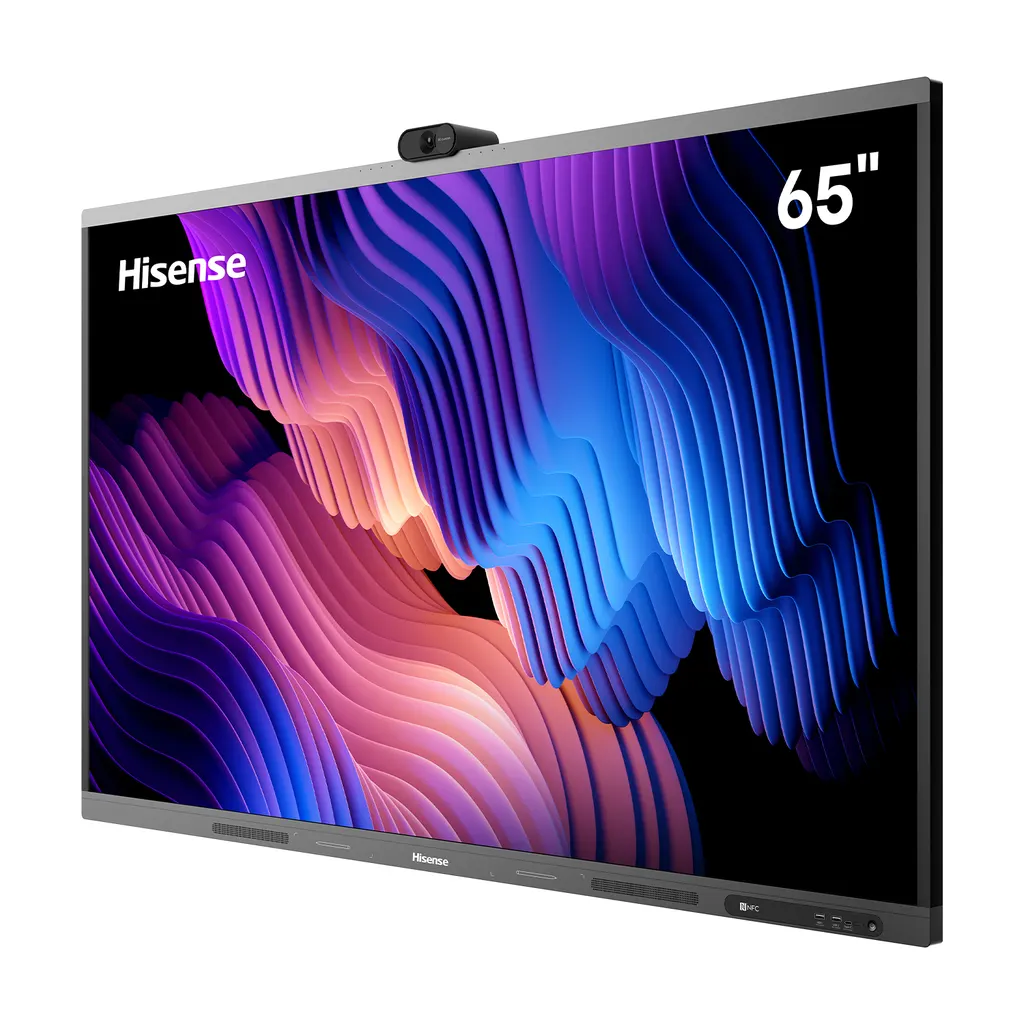
65WM6FE-A
Hisense 65WM6FE-A 65-inch GoBoard Live Pro Interactive Display
- Resolution
- 3840 x 2160
- System
- Android 13.0
- Memory
- 8GB
- Storage
- 128GB
The Hisense 65WM6FE-A is a 65-inch interactive display from the GoBoard Live Pro range. It combines a 3840 x 2160 4K panel, touch with up to 55 points, a built-in 4K camera with a physical privacy cover, a microphone array, speakers rated 2x18W+25W and Android 13 in one unit. It suits meeting rooms, classrooms and team huddle spaces across Qatar. Request a quote and the SmartRooms Qatar team will confirm the configuration and installation for your site.
A 65-inch 4K screen with touch and whiteboard in one unit
The Hisense 65WM6FE-A brings a display, a touch layer and a whiteboard function into a single 65-inch panel, so a room does not need a projector, a separate whiteboard and a laptop on a trolley. The 3840 x 2160 D-LED panel is rated at 400 nits typical brightness, with a 1200:1 typical contrast ratio and 10-bit colour from a palette of 1.07 billion shades. Its anti-glare glass helps keep the picture readable when daylight reaches the screen.
The infrared touch frame supports up to 55 points on Android and records writing from a height below 1.5mm, with a minimum touch object of 2mm. Presenters can annotate slides, sketch diagrams and convert handwriting to standard text without leaving the presentation.
Camera, microphones and speakers for hybrid meetings
A 4K camera is built into the panel, with a physical cover for privacy and a working light. A microphone array and built-in speakers rated 2x18W+25W are also included, and the product data lists Dolby Atmos support. In a meeting room in Doha where part of the team joins from abroad, this can remove the need for a separate camera bar and speakerphone. Wi-Fi supports 802.11 a/b/g/n/ac/ax on 2.4G and 5G bands, Bluetooth 5.3 and NFC are included, and the USB-C port is rated for Power Delivery up to 65W.
Where the 65WM6FE-A fits across Qatar
Three kinds of setting suit this size and feature set:
- Meeting rooms and boardrooms in West Bay, Lusail or Msheireb, where a 65-inch screen serves a medium-sized table and a remote call can run from the same panel.
- Classrooms and training rooms at private schools in Al Wakrah or Al Rayyan, where the touch surface supports interactive lessons and the on-screen language can be set to Arabic or English.
- Team huddle spaces in offices in the Industrial Area or The Pearl, where a small group needs to present, write and video call from one screen.
Planning the installation
The panel weighs 35.0kg net and 45.0kg packed, and measures 1488.1 x 935.1 x 121.7mm. It uses a 600 x 400mm VESA pattern with four M8 screws, and a wall mount bracket is included. A free site survey from SmartRooms Qatar helps confirm fixing points, cable routes and the position of the panel relative to windows before installation is planned. The rated operating temperature is 0 to 40°C at 20% to 80% humidity, so the panel should sit in an air-conditioned room. Power input is AC 100-240V at 50/60Hz, with typical consumption of 159.5W and a maximum of 240W. The power cable is country dependent, so confirm the plug type when you order.
Request a quote from SmartRooms Qatar for the Hisense 65WM6FE-A. Our team will confirm the configuration, the accessories supplied, and delivery to all eight municipalities of Qatar. For several units, send your purchase order or tender reference with the request.
Highlights
- 65-inch 4K UHD display at 3840 x 2160 resolution
- Touch with up to 55 points and writing height below 1.5mm
- Built-in 4K camera with physical privacy cover
- Android 13 with access to Google Play Store
- Speakers rated 2x18W+25W with Dolby Atmos support
- Wi-Fi 802.11ax, Bluetooth 5.3, USB-C with 65W Power Delivery
Classroom fit
At 65″ the farthest student should sit within about 4.9 m (6× the screen height).
Estimated timeline
Quotation within 1 working day · delivery timing depends on stock availability, and we confirm it with your quotation.
Specifications
Interactive Display panel11
- LCD Size
- 65"
- Backlight Type
- D-LED
- Resolution
- 3840 x 2160 (Pixels)
- Brightness
- 400nits(typ.)
- Contrast Ratio
- 1200:1(typ.)
- Response Time
- 8ms(typ.)
- Refreshing Frequency
- 60Hz
- Viewing Angle
- 178°(H) / 178°(V)
- Lifetime
- 50,000 hrs (min.)
- Colour Gamut (X% NTSC)
- 72%
- Display Colours
- 1.07B(10bit)
System6
- CPU
- Architecture - A73x4 + A53x4 Octa-core // Working Frequency - 2.2GHz + 2.0GHz
- GPU
- MaliG52
- RAM
- 8GB
- ROM
- 128GB
- Operating System
- Android 13.0
- Language
- English (default), Chinese, French, Spanish, German, Italian, Polish, Finnish, Norwegian, Swedish, Thai, Indonesian, Japanese, Russian, Arabic, Vietnamese, Serbian, Kazakh; Croatian, Slovenian, Czech, Slovak, Hungarian, Romanian, Bulgarian, Albanian, Macedonian, Greek, Turkish, Afrikaans, Malay
Power3
- Power Requirements
- AC 100V ~ 240V, 50/60Hz
- Power Consumption Without OPS
- 240W (Max) / 159.5W (Typ.)
- Built in Speaker
- 2x18W+25W
Connectivity7
- OPS Power
- DC 18V/5A
- Wi-Fi
- IEEE 802.11a/b/g/n/ac/ax(2.4G and 5G) // IEEE 802.11a/b/g/n/ac(2.4G and 5G)
- Bluetooth
- BT5.3
- NFC
- Yes
- Camera
- Yes
- Input
- - HDMI (2.0) IN x3 - OPS (Optional) x1 - LAN x1 (1000baseT R) - USB2.0 x1 - USB3.0 x3 - Type-C x1 (Support PD 65W) - Touch x1 - Audio In x1 - RS-232 In x1 (RJ45)
- Output
- - RS232 OUT x1 (RJ45) - HDMI Out x1 - S/PDIF (COAX) Out x1 - Audio Out x1
Touch6
- Sensing Type
- Infrared Touch Frame
- Surface Protection
- Anti-Glare Glass
- Touch Accuracy
- 90%(+1mm)
- Theory Clicks
- Unlimited
- Minimum Touch Object
- 2mm
- Windows 11/10/8/7, Android
- Multi Touch
Physical7
- Product Size (W x H x D)
- 1488.1 x 935.1 x 121.7mm // 58.6 x 36.8 x 4.8 inch
- Package Size (W x H x D)
- 1629 x 1040 x 240mm // 64.1 x 40.9 x 9.4 inch
- Net Weight
- 35.0kg / 77.2lbs
- Packed Weight
- 45.0kg / 99.2lbs
- Housing Material
- Front Shell: Aluminium // Rear Shell: Plastic
- Housing Colour
- Black + Tarnish
- VESA
- 600 x 400mm, 4-M8 Screw
Environment2
- Operation Temperature
- 0 - 40°C
- Operation Humidity
- 20% - 80%
Certification1
- Standard Certification
- CB/CE/ERP/SouthAfrica Energy Efficiency/cTUVus/CEC/UKCA/FCC/IC/RCM/Energy Star/EDLA
Accessories2
- Basic
- - User Manual ×1 - Pen ×2 - Remote Control ×1 - Power Cable ×1 (Country Dependent) - Battery ×2 - Wall Mount Bracket ×1
- Optional
- - Mobile Cart - Wireless Casting Dongle - OPS




