





Thursday, 22 October 2026 · 11 Jumada I 1448 AH Sun – Thu · 9:00 – 18:00
+971 56 914 9477 العربية
WhatsApp

86MR6DE-E

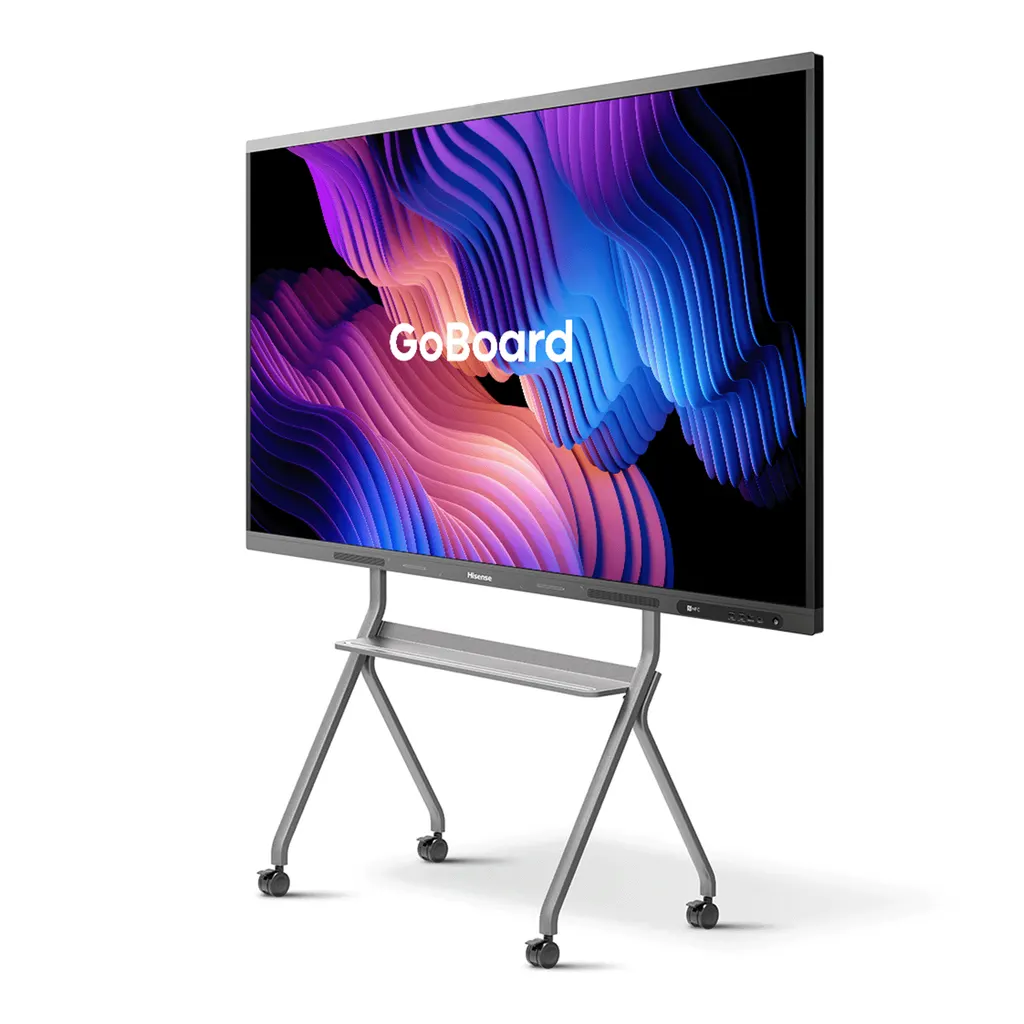
Hisense 86MR6DE-E 86-inch GoBoard Interactive Display

Screen size
86’’
Resolution
3840 x 2160
System
Android 13.0
Brightness
350cd/m²(typ.)
WhatsApp
Priceon request
QuotationWithin 1 working day
DeliveryConfirmed with your quote, based on stock
PDFDownload datasheet (86MR6DE-E_Datasheet_v17.pdf)
Overview

The Hisense 86MR6DE-E is an 86-inch GoBoard interactive display with a 4K panel and Android 13. It pairs touch writing with three HDMI inputs, an optional OPS slot and built-in wireless casting through dual Wi-Fi modules. Schools, ministries and meeting rooms in Doha will find it suited to lessons and boardroom presentations. Request a quote from SmartRooms Qatar.

An 86-inch GoBoard that combines display, whiteboard and video device

The Hisense 86MR6DE-E is an 86-inch member of the MR6DE-E GoBoard series. It brings a large touch display, an electronic whiteboard and a conferencing-ready endpoint into one enclosure, so a room does not need a separate projector, screen and tablet. Its 3840 x 2160 panel and 10-bit colour produce sharp text and images for rooms where people read from the back as well as the front.

Panel, touch and brightness figures to check on the datasheet

The panel is rated at 350 cd/m² typical brightness with a 4000:1 typical contrast ratio, an 8 ms response time and a 60 Hz refresh rate. Viewing angles are 178 degrees horizontally and vertically, so people seated at the sides can read the same content. The D-LED backlight carries a rated lifetime of 50,000 hours, and colour gamut is listed at 72%. The display is certified by TÜV Rheinland for eye comfort, with a reduced blue light ratio, and carries Energy Star certification.

Touch is handled by an infrared frame with up to 20 touch points, a minimum detectable object size of 2 mm and a stated accuracy of 90% within ±1 mm. Anti-glare glass reduces reflections from ceiling lights and windows. Pen tip writing, cap erasing, finger-moved objects and palm erasing let teachers and presenters write naturally and clear the board with the hand.

Connecting laptops, sources and room systems

Three HDMI 2.0 inputs, three USB 3.0 ports, a USB-C port with power delivery up to 65 W, a LAN port and a touch input cover most rooms. A single HDMI output lets you feed a second display, while S/PDIF and audio outputs and two RS-232 outputs help when the panel sits inside an automated AV system. Dual Wi-Fi modules let one radio host a screen-sharing hotspot while the other joins a network, and Bluetooth 5.1 and NFC are built in.

Where it fits in Qatar

  • Primary and secondary classrooms: a school in Al Wakrah or Msheireb fitting out teaching spaces, where staff want a large writing surface and Google Classroom access on the same screen.
  • Boardrooms: a meeting room in West Bay or Lusail where a Doha team joins colleagues overseas, uses the USB-C port to keep a laptop charged while presenting, and lets guests share wirelessly.
  • Training and government spaces: a training room in Education City or a ministry meeting room where Arabic and English materials sit side by side.

What to plan before the panel arrives

At 58.7 kg net, with a 1000 x 600 mm VESA pattern and four M8 fixings, the 86MR6DE-E needs a wall that can carry its load. SmartRooms Qatar offers free site surveys before wall mounting, so the wall, the bracket and the cable route can be checked first. The box includes one wall mount bracket, two pens, a remote control, two batteries, a power cable and the user manual. A mobile cart and an OPS module are optional extras. Power input is rated 100 to 240 V AC at 50/60 Hz, with a maximum draw of 430 W without OPS and standby below 0.5 W.

Ask for a quote on the Hisense 86MR6DE-E and our team will confirm the accessories your room needs and propose an installation plan. Quotations usually come within one working day, and purchase orders (LPOs) and Monaqasat tenders are accepted.

Highlights

  • 86-inch 4K UHD panel at 3840 x 2160 resolution
  • Android 13 with Google certification and Google app access
  • Three HDMI 2.0 inputs plus USB-C with 65W power delivery
  • Infrared touch with up to 20 points and anti-glare glass
  • Dual Wi-Fi modules with 802.11ax and Bluetooth 5.1
  • Built-in 2x15W+20W speakers and an optional OPS slot

Classroom fit

At 86″ the farthest student should sit within about 6.4 m (6× the screen height).

Estimated timeline

Quotation within 1 working day · delivery timing depends on stock availability, and we confirm it with your quotation.

Specifications

36 specifications · Source: manufacturer · checked Oct 2026
Interactive Display panel11
Size
86’’
Backlight
D-LED
Resolution
3840 x 2160
Brightness
350cd/m²(typ.)
Contrast ratio
4000:1(typ.)
Response Time
8ms
Refreshing Frequency
60Hz
Viewing angle
178°(H) / 178°(V)
Lifetime
50,000hrs
Color Gamut
72%
Display Colours
1.07B(10bit)
System2
OS
Android 13.0
Language
Chinese, English, Polish, German,French, Italian, Spanish, Finnish, Norwegian, Swedish, Thai, Indonesian, Japanese
Speaker1
Built in speaker
2x15W+20W
Connectivity5
WI-FI
IEEE 802.11a/b/g/n/ac/ax(2.4G and 5G), IEEE 802.11a/b/g/n/ac(2.4G and 5G)
Bluetooth
BT5.1
NFC
Yes
Input
HDMI(2.0) IN x3, OPS (Optional) x1, LAN x1 (1000baseT R), USB3.0 x3, Type-C x1 (Support PD 65W), Touch x1, Audio In x1, RS-232 In x1(RJ45)
Output
RS232 OUT x2 (RJ45), HDMI Out x1, S/PDIF Out x1, Audio Out x1
Power2
Power Requirements
AC 100 V ~ 240 V, 50/60 Hz
Power Consumption Without OPS
430W (Max)
Touch7
Sensing Type
Infrared Touch Frame
Surface Protection
Anti-Glare Glass
Infrared Touch
≤20 points
Touch Accuracy
90%(±1mm)
Theory Clicks
Unlimited
Minimum Touch Object
≥2mm
Windows 10/8/7,Android
Multi Touch
Physical6
Housing Color
Black & Tarnish
Product Size (W x H x D)
1954.7 × 1162.1 x 118.2mm / 77 × 45.8 x 4.7 inch
Package Size (W x H x D)
2095 × 1303 × 240mm / 82.5 x 51.3 × 9.4 inch
Net Weight
58.7kg / 129.4lb
Packed Weight
76.2kg / 168lb
VESA
1000x600mm, 4-M8 screw
Optional1
Basic
Mobile cart, OPS
What’s in the box1
Value
User manual Pen x 2 Remote control Wireless Cast x 1 (optional) Power Cable Battery x 2 Wall Mount Bracket x 1


Downloads

2 files from the manufacturer

Questions about 86MR6DE-E

Is the Hisense 86MR6DE-E suitable for a classroom?
Yes, for classrooms that need a large writing and display surface. A private school in Al Wakrah fitting out a new primary or science room can use the 86-inch panel, whose 3840 x 2160 resolution lets students at the back read diagrams and text. Pen tip writing and palm erasing let teachers write naturally, and the Google Classroom and Chrome access listed in the source data supports lesson planning. For a small room, ask our team to check viewing distance before you request a quote.
Can it be used in a boardroom where teams join from abroad?
A boardroom in West Bay or Lusail where a Doha team meets colleagues overseas can use the GoBoard as a shared screen. Its three HDMI 2.0 inputs can take a laptop, a media player and a room PC, the USB-C port delivers up to 65 W to keep a presenter's laptop charged, and wireless casting features such as Miracast and DLNA let guests share without cables. The source data does not list a built-in camera or microphone, so plan separate conferencing peripherals if you need them.
How many video inputs and outputs does it have?
The panel has three HDMI 2.0 inputs, one HDMI output, one touch input, one LAN port (1000baseT), three USB 3.0 ports, one USB-C port with power delivery up to 65 W, one audio input and one RS-232 input (RJ45). Outputs include two RS-232 ports (RJ45), an S/PDIF output and an audio output. The HDMI output lets you feed a second display from the same source. Check cable lengths for your room with the SmartRooms Qatar team when you request a quote.
What is the OPS slot and is an OPS module included?
OPS stands for Open Pluggable Specification, a standard slot that lets a compatible computer module run inside the display. The 86MR6DE-E has one OPS slot, which the source data lists as optional. The box contents in the source data do not include an OPS module, so it must be ordered separately. Power consumption without OPS is 430 W maximum, so the figure changes when a module is fitted. Ask us to confirm which module suits your software.
How accurate is the touch, and what can it detect?
The touch uses an infrared frame rated for up to 20 points at once. The source lists touch accuracy of 90% within ±1 mm and a minimum touch object of 2 mm, enough for a fine pen tip. Anti-glare glass limits reflections under bright lighting. Two pens are included, and the touch supports pen tip writing, cap erasing, finger-moved objects and palm erasing. Multi-touch is listed for Android. Ask our team how the touch performs under your room's lighting before you commit.
Does it run Android 13, and which Google apps can staff use?
The panel runs Android 13 and carries Google certification. The source data says GoBoard gives access to Google Classroom, Google Chrome, Play Store, Gmail, Google Drive and Google Docs through Google Education, which helps staff manage assignments in one place. Android 13 also gives users more control over which apps can reach their information, a useful point for school IT teams. Confirm your account and licensing requirements with our team before ordering.
Does the on-screen interface support Arabic?
The source data lists the system languages as Chinese, English, Polish, German, French, Italian, Spanish, Finnish, Norwegian, Swedish, Thai, Indonesian and Japanese. Arabic is not on that list. Offices and schools in Qatar that work in Arabic and English side by side should therefore confirm the interface language with the SmartRooms Qatar team before requesting a quote. Arabic documents and slides can still be shown from a connected laptop.
How well does it cope with bright rooms or large windows?
The panel is rated at 350 cd/m² typical brightness. A built-in ambient light sensor adjusts screen brightness to the room light, and anti-glare glass reduces reflections. In a room with a large window facing strong sunlight, position the panel so direct sun does not fall on the screen, and ask our team to review glare during the site survey. The source data does not give an ambient light tolerance figure, so we cannot state one.
What power supply does it need in Qatar?
The source data gives an input of 100 to 240 V AC at 50/60 Hz, which covers Qatar's 240 V, 50 Hz mains supply. Maximum consumption without an OPS module is 430 W, and standby consumption is below 0.5 W. A power cable is included in the box. Confirm that the supplied plug suits the wall socket in your room before ordering, and ask our team how to resolve any mismatch.
How heavy is it, and what wall mount does it need?
The net weight is 58.7 kg and the packed weight is 76.2 kg, so plan for a team to lift it and check the wall before mounting. The VESA pattern is 1000 x 600 mm with four M8 screws, and one wall mount bracket is in the box. The product measures 1954.7 x 1162.1 x 118.2 mm. SmartRooms Qatar offers free site surveys, which we recommend before mounting an 86-inch panel in a lecture hall or boardroom.
Can a school in Al Wakrah buy several units through an LPO?
Yes. SmartRooms Qatar accepts purchase orders (LPOs), and government tenders including Monaqasat. A school fitting out several classrooms can request one quotation covering every 86MR6DE-E, the wall brackets and installation. Payment can be made by bank transfer, cheque or purchase order. Each unit is covered by the manufacturer's warranty. Give us the number of rooms and the mounting type so the quotation covers the full order.
Does it carry eye-comfort or energy certifications?
Yes. The source data states that the GoBoard is certified by TÜV Rheinland for eye comfort, with a reduced blue light ratio for long periods of viewing. It is also listed as Energy Star certified. A built-in ambient light sensor adjusts brightness to the room, and standby consumption is below 0.5 W. These points matter for long staff meetings and all-day lessons where screens are in use for hours.

Similar models

BenQ CM7505 BenQ Board CM7505 75-inch Interactive Display
75″ UHD 3840 × 2160 pixels Ultra Precision IR
SMART SBID-6286S-V3 SMART Board 6086S-V3 86-inch Interactive Display with iQ
86″ 4K UHD (3840 × 2160) HyPr Touch with InGlass
SMART SBID-6286S-V3-P SMART Board 6086S-V3 Pro 86-inch Interactive Display with iQ
86″ 4K UHD (3840 × 2160) HyPr Touch with InGlass
Clevertouch Clevertouch Edge 65" Clevertouch Edge 65" 4K Interactive Display with Camera and Speakers
65″ 4K UHD (3840x2160 @60Hz) Android 15
Clevertouch Clevertouch Edge 86" Clevertouch Edge 86" 4K Interactive Flat Panel
86″ 4K UHD (3840x2160 @60Hz) Android 15
Email Call


