





Thursday, 22 October 2026 · 11 Jumada I 1448 AH Sun – Thu · 9:00 – 18:00
+971 56 914 9477 العربية
WhatsApp

HBT55E

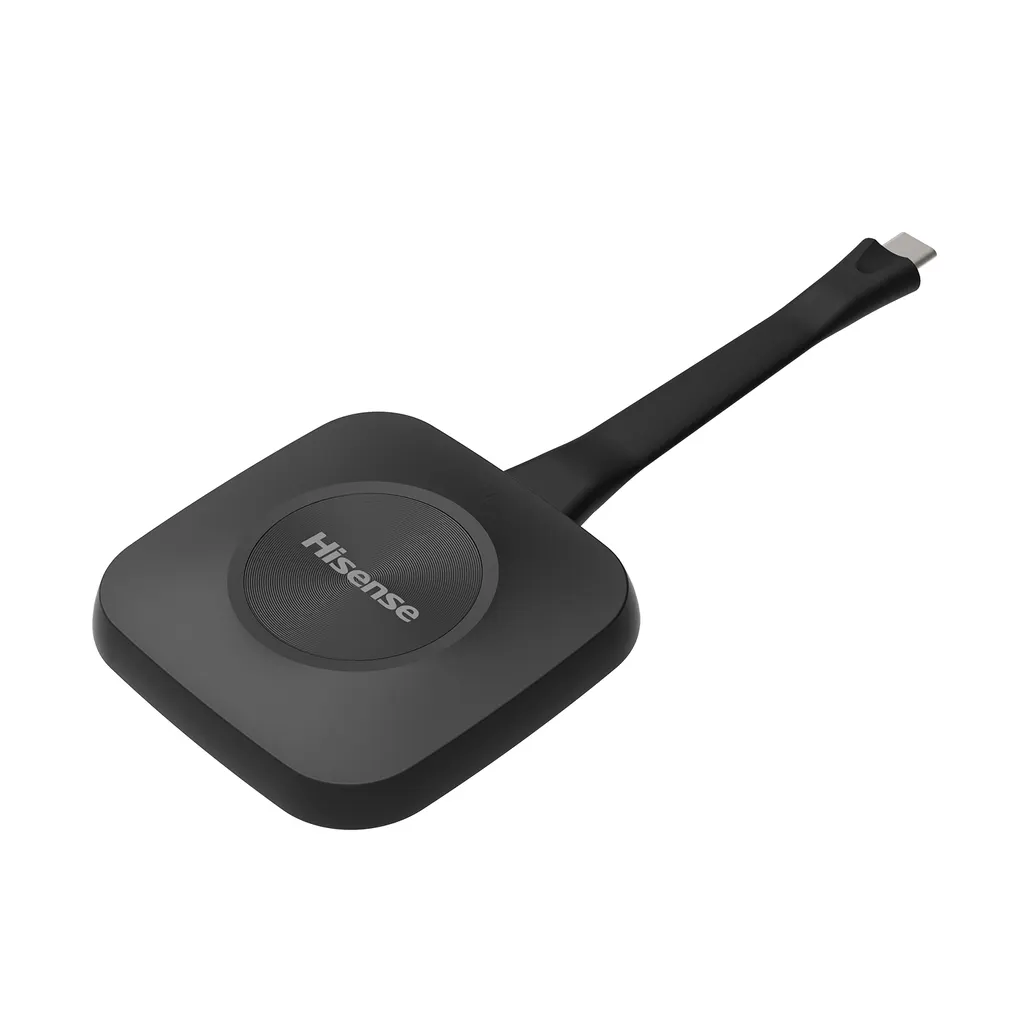
Hisense HBT55E USB-C Wireless Screen Sharing Dongle

WhatsApp
Priceon request
QuotationWithin 1 working day
DeliveryConfirmed with your quote, based on stock
PDFDownload datasheet (HBT55E_Datasheet.pdf)
Overview

The Hisense HBT55E is a USB-C wireless dongle that shares a connected device's screen to a display without cables. It supports 4K at 30Hz over Wi-Fi 6 on 2.4 GHz and 5 GHz, and works with Windows 10/11 and macOS 10.9 or later with no driver installation. Built for WE6GE series displays in 65, 75, 86 and 100 inch sizes, it suits meeting rooms and classrooms. Request a quote.

What the HBT55E does in a meeting room

The HBT55E is a compact wireless screen-sharing dongle with a single USB-C plug. A presenter plugs it into a Windows or macOS laptop, presses the one button, and the laptop screen appears on a compatible display. No cable runs to the screen, so the presenter can move around the room and the front of the room stays tidy.

Specifications that shape the buying decision

Video output is 4K UHD at 30Hz, and the product information also quotes 2K at 60Hz, so test the result with your own content before committing. The unit uses Wi-Fi 6 with IEEE 802.11 a/b/g/n/ac/ax and operates on both the 2.4 GHz and 5 GHz bands. The key figures are:

  • Casting startup time: 3 seconds
  • Simultaneous connections: up to 9 devices
  • Transmission range: 15 m line-of-sight, direct facing
  • Operating conditions: 5°C to 35°C and 20% to 80% humidity
  • Dimensions: 160.9 x 68 x 15.8 mm, black finish

Supported systems are Windows 10/11 and later, and macOS 10.9 and later. Setup needs no driver, software or network configuration, but IT teams should still check their policy on USB devices on managed laptops.

Where it fits across Qatar

A private school in Al Wakrah fitting out classrooms with 75-inch WE6GE displays can let teachers share lesson content from their own laptops without walking to a fixed computer. The dongle stays at the front of each room, and teachers avoid losing time to cable changes before every lesson.

A government ministry in Msheireb with an 86-inch display in its boardroom suits this setup when meetings run Sunday to Thursday and presenters arrive with both Windows and macOS laptops. The 3-second startup keeps agenda items moving, and up to nine devices can connect when several presenters share one item.

A training room in Education City with a 100-inch display may see facilitators switch between Windows and Mac laptops within a single session. A dongle that starts quickly and needs no cable changes at the screen helps those transitions stay short.

Planning before you request a quote

Confirm the display first. The HBT55E is listed as compatible only with the WE6GE series in 65, 75, 86 and 100 inch sizes, so match the model before ordering. Also consider the following:

  • Room conditions: the device is rated for 5°C to 35°C, so keep it inside air-conditioned rooms, away from hot parked cars and sun-exposed lobbies where outdoor temperatures can pass 45°C in summer.
  • Seating distance: the 15 m range applies line-of-sight, so test the signal from the furthest seat.
  • Accessories: the listed accessory is one user manual, so confirm any extra cables or mounting needs when you request your quote.
  • Power: the product data does not state the power input, so confirm it with the SmartRooms Qatar team before installation.

SmartRooms Qatar delivers to all 8 municipalities of Qatar, offers professional installation and free site surveys, and accepts purchase orders (LPOs) for multi-room projects. Request a quote and the team will confirm availability and lead time with your order. The product is covered by the manufacturer's warranty.

Highlights

  • 4K UHD video output at 30Hz
  • Wi-Fi 6 on 2.4 GHz and 5 GHz bands
  • 3-second casting startup time
  • Up to nine simultaneous connections
  • Windows 10/11 and macOS 10.9 or later
  • Designed for WE6GE 65, 75, 86 and 100-inch displays

Estimated timeline

Quotation within 1 working day · delivery timing depends on stock availability, and we confirm it with your quotation.

Specifications

19 specifications · Source: manufacturer · checked Oct 2026
General19
Color
Black
Product Dimensions
160.9 x 68 x 15.8 mm
Package Dimensions
198 x 93 x 23 mm
Supported OS
Windows 10/11 and above, macOS 10.9 and above
Video Output
4K UHD (3840 x 2160) @ 30Hz
Port
USB-C (Type-C) x1
Number of Buttons
1
Processor
ARM Cortex-A53 x4
Max Number of Simultaneous Connections
9
Transmission Range
15 m (line-of-sight, direct facing)
Wireless Frequency Band
2.4 GHz, 5 GHz
Operating Temperature
5°C - 35°C
Operating Humidity
20% to 80%
Wireless Connectivity
Wi-Fi 6
Casting Startup Time
3s
Wireless Transmission Protocol
IEEE 802.11 a/b/g/n/ac/ax
Certifications
REACH, RoHS, CE, CB, cTUVus, FCC, IC, UKCA
Compatible Displays
65/75/86/100 WE6GE only
Accessories
User Manual x1

Downloads

1 file from the manufacturer

Questions about HBT55E

What is the Hisense HBT55E used for?
The HBT55E is a USB-C wireless dongle that shares the screen of a connected Windows or macOS device on a compatible display. It suits meeting rooms, classrooms and training rooms where presenters want to avoid cables at the front of the room. The presenter plugs it in, presses the single button and starts sharing. The product data lists no driver or software installation as required.
Which displays is the HBT55E compatible with?
According to the product data, the HBT55E is compatible only with the WE6GE series, in 65, 75, 86 and 100 inch sizes. Other displays are not listed as compatible, so match your screen model to the WE6GE series before ordering. When you request a quote, send the display model and the SmartRooms Qatar team will confirm compatibility for your order.
Does it support 4K resolution?
Yes. The video output is 4K UHD at 3840 x 2160 with a 30Hz refresh rate, and the product information also quotes 2K at 60Hz. For slides, documents and everyday video calls on a 75-inch classroom display, 30Hz is a practical target. Still, play your own fast-moving video on the actual screen during a test before relying on it for demonstrations.
Which operating systems and devices are supported?
The HBT55E supports Windows 10/11 and later, and macOS 10.9 and later. The listed setup needs no drivers, software or network configuration, so a presenter can plug in and share directly. Mobile devices, tablets and Linux are not listed as supported, so confirm your devices before ordering a set for a classroom or meeting room.
Does it need a Wi-Fi network to work?
The HBT55E uses its own Wi-Fi 6 link on the 2.4 GHz and 5 GHz bands under IEEE 802.11 a/b/g/n/ac/ax, and the product data lists no network setup. Because wireless performance depends on walls and surrounding traffic in the building, ask SmartRooms Qatar to review your room layout before a multi-room order and test the connection in the actual room during installation.
How far can a presenter be from the display?
The rated transmission range is 15 m, measured line-of-sight with the dongle directly facing the receiver. In a large lecture hall at Education City, a presenter near the front has a short path, but seats at the far back should be tested because walls, furniture and people can block the signal. Walk to the furthest seat during setup before accepting the room as ready.
How many devices can connect at once?
According to the specification, up to nine devices can be connected at the same time. That helps in a training room in Education City where several participants take turns presenting from their Windows or macOS laptops during one workshop. Casting startup time is 3 seconds, so sessions keep moving between speakers instead of stopping for cable changes.
Can it handle Qatar's summer heat?
The operating range is 5°C to 35°C with 20% to 80% humidity, so it is not designed for outdoor or unconditioned spaces. Outdoor temperatures in Qatar can exceed 45°C in summer, so keep the dongle in air-conditioned rooms, not in parked cars or in lobbies exposed to sun and dust. Confirm your installation environment with the SmartRooms Qatar team before ordering.
Which certifications and warranty apply?
The product data lists REACH, RoHS, CE, CB, cTUVus, FCC, IC and UKCA certifications. Products supplied by SmartRooms Qatar are covered by the manufacturer's warranty. The data does not state a warranty duration, so ask the team for the current warranty terms when you request a quote, and keep the certification list for your procurement file.
What should a government ministry in Msheireb consider for a boardroom?
Start with the display: an 86-inch WE6GE panel suits a larger boardroom, and the HBT55E lets presenters share from Windows or macOS laptops without cables. Book a free site survey to check seat distances against the 15 m range, and use an LPO or a tender route if the purchase follows government procurement. Request a quote for a compatible setup.
How do we order for several classrooms at a private school in Al Wakrah?
Order one HBT55E per classroom, matched to a WE6GE display in 65, 75, 86 or 100 inches. SmartRooms Qatar accepts purchase orders (LPOs), offers a free site survey before installation and delivers to all 8 municipalities. Quotations are usually issued within one working day, and lead times are confirmed with the quote based on stock. Send your classroom sizes and display models when you request a quote.

Similar models

BenQ CM7505 BenQ Board CM7505 75-inch Interactive Display
75″ UHD 3840 × 2160 pixels Ultra Precision IR
SMART SBID-6286S-V3 SMART Board 6086S-V3 86-inch Interactive Display with iQ
86″ 4K UHD (3840 × 2160) HyPr Touch with InGlass
SMART SBID-6286S-V3-P SMART Board 6086S-V3 Pro 86-inch Interactive Display with iQ
86″ 4K UHD (3840 × 2160) HyPr Touch with InGlass
Clevertouch Clevertouch Edge 65" Clevertouch Edge 65" 4K Interactive Display with Camera and Speakers
65″ 4K UHD (3840x2160 @60Hz) Android 15
Clevertouch Clevertouch Edge 86" Clevertouch Edge 86" 4K Interactive Flat Panel
86″ 4K UHD (3840x2160 @60Hz) Android 15
Email Call




