





Thursday, 22 October 2026 · 11 Jumada I 1448 AH Sun – Thu · 9:00 – 18:00
+971 56 914 9477 العربية
WhatsApp

HT008E

Hisense HT008E Wireless Screen Transmission Dongle for Interactive Displays

Resolution
3840 x 2160 @ 30 Hz
WhatsApp
Priceon request
QuotationWithin 1 working day
DeliveryConfirmed with your quote, based on stock
PDFDownload datasheet (HT008E_Datasheet_V1.2.pdf)
Overview

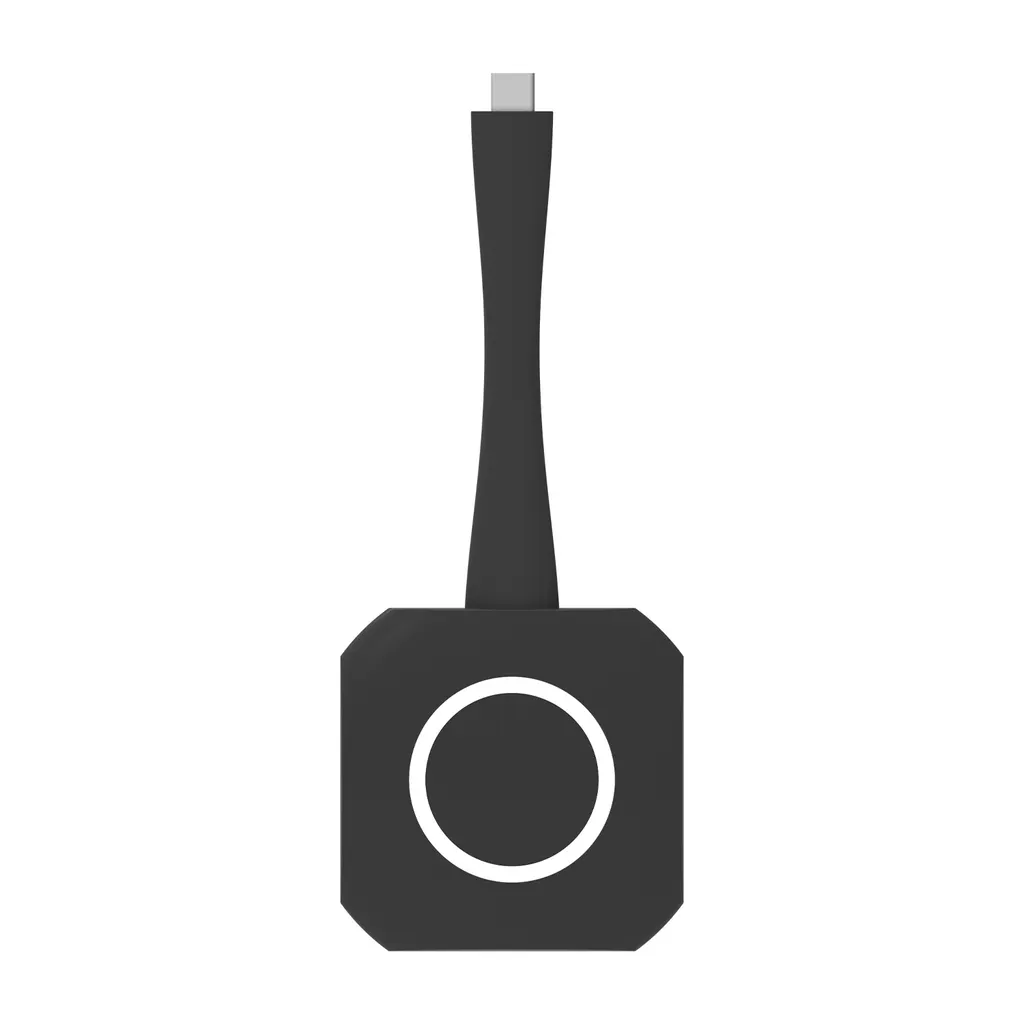
The Hisense HT008E is a wireless screen transmission dongle that plugs into a device's USB-C port and shows its screen on a compatible Hisense interactive display. Press its button and content appears on the board, with 3840 x 2160 at 30 Hz video and a 15 m transmission distance. It suits schools, universities and meeting rooms in Qatar using 65, 75 or 86-inch MR6DE, MR61DE-E or WM6FE panels.

How the HT008E puts a laptop screen on a Hisense board

The HT008E is a small wireless screen transmission dongle. It plugs into the USB-C port of a Windows or Mac device, and one press of its button sends that device's screen to the compatible Hisense interactive display so the whole room can follow along. No cable has to run from the presenter's seat to the board, and the manufacturer states that no app is needed on the sending device.

Specifications that decide whether it suits your room

Video output is listed at 3840 x 2160 at 30 Hz, which is 4K resolution at a 30 Hz refresh rate. That suits slides, documents and spreadsheets. The transmission distance is rated at 15 m, and one received device can be connected at the same time. The dongle includes a WiFi 6 module, supports plug and play and hot plug, and its indicator light blinks while connecting and turns white when in use.

  • Working voltage: 5V
  • Working temperature: -10°C to +45°C
  • Working humidity: up to 95%
  • Certifications: cTUVus, CB, IC, CE-RED, UKCA and CE

Where it fits in Qatar

In a lecture hall in Education City with an 86-inch board, a lecturer can share from the front bench by pressing the dongle button, without walking to a cabled input. In a private school classroom in Al Wakrah fitted with a 65-inch panel, teachers can share lesson material from their own devices and keep the front of the room free of cable clutter. In a ministry meeting room in Msheireb with a 75-inch panel, a presenter can share a document from their seat during a working session, with one device connected at a time.

The dongle is rated to +45°C, and summer temperatures in Qatar can exceed that outdoors and in poorly cooled spaces. Keep it in the air-conditioned meeting room with the display, not in a hot cabinet, on a sunlit window ledge or in an outdoor enclosure. Confirm the exact mounting point with the SmartRooms Qatar team during a site survey.

What to plan before you order

  • Match the panel: confirm your board is one of the listed 65, 75 or 86-inch MR6DE, MR61DE-E or WM6FE models.
  • Check the devices: the sending device needs a USB-C port and Windows 10/11 or Mac 10.9 and later.
  • Plan the seating: keep the presenter within the 15 m rated range of the board.
  • Plan the sessions: each board receives one device at a time, so agree a sharing order for group sessions.

To confirm compatibility with your panel and request a quotation, request a quote from SmartRooms Qatar. We supply and deliver to all 8 municipalities of Qatar, offer free site surveys, and usually issue quotations within one working day. We accept purchase orders, LPOs and government tenders, and the product is covered by the manufacturer's warranty.

Highlights

  • Wireless sharing at 3840 x 2160 resolution and 30 Hz
  • Rated transmission distance of 15 m
  • USB-C transmitter with one button press to display
  • WiFi 6 module with plug and play and hot plug support
  • Listed for 65, 75 and 86-inch MR6DE, MR61DE-E and WM6FE panels
  • Supports Windows 10/11 and Mac 10.9 or later

Estimated timeline

Quotation within 1 working day · delivery timing depends on stock availability, and we confirm it with your quotation.

Specifications

16 specifications · Source: manufacturer · checked Oct 2026
General16
Color
Black
Connect Number
1 received device (same time)
Button
1
Port
Type-C
Working Voltage
5V
Video Resolution
3840 x 2160 @ 30 Hz
Transmission Distance
15m
Plug and Play
Support
WiFi Module
WiFi 6
Indicator Light
1. Blinking when connecting / 2. White color when using
Certification
cTUVus+CB / IC / CE-RED / UKCA / CE
Hot Plug
Support
Working Temperature
-10°C ~ +45°C
Working Humidity
≤95%
Adaptive Model
65MR6DE / 75MR6DE / 86MR6DE / 65MR61DE-E / 75MR61DE-E / 86MR61DE-E / 65WM6FE / 75WM6FE / 86WM6FE
OS Supported
Windows 10/11 and above, Mac 10.9 and above

Downloads

2 files from the manufacturer

Questions about HT008E

What is the Hisense HT008E and who is it for?
The HT008E is a wireless screen transmission dongle. It plugs into a device's USB-C port and, when you press its button, shows that device's screen on a compatible Hisense interactive display. It suits organisations that already own a listed Hisense board and want presenters to share from their own laptops without running a cable to the front of the room. Schools, universities and meeting rooms in Qatar are typical buyers.
Which Hisense boards is the HT008E compatible with?
The manufacturer lists compatibility with 65MR6DE, 75MR6DE and 86MR6DE, 65MR61DE-E, 75MR61DE-E and 86MR61DE-E, and 65WM6FE, 75WM6FE and 86WM6FE. Check your panel's exact model code against this list before ordering. If your board is a different size or variant, ask the SmartRooms Qatar team to confirm compatibility before the order is placed.
Do I need cables, apps or a Wi-Fi network to share my screen?
The manufacturer states that no HDMI or USB-C cable to the board is needed, and that no apps are required on the sending device. The dongle is supported on Windows 10/11 and above, and on Mac 10.9 and above. It includes a WiFi 6 module and supports plug and play and hot plug. Your IT team should still review how it operates within your network policy before wider rollout.
What video resolution and refresh rate does it support?
The HT008E transmits video at 3840 x 2160 at 30 Hz, which is 4K resolution at a 30 Hz refresh rate. This suits slides, documents, spreadsheets and lesson content that is mostly static. If most of your content is fast-moving video, ask the SmartRooms Qatar team to review the best setup for your use before you buy.
How far can the presenter be from the board, and how many devices can connect?
The listed transmission distance is 15 m, and the specification lists one received device at the same time. That means only one presenter's screen can appear on the board at any moment. In a lecture hall, plan where the presenter stands within that range, and agree a clear order of speakers for sessions where several people take turns.
Could a clinic training room in Doha use it for staff sessions?
Yes, provided the room has a listed Hisense board. Picture a training room in a Doha clinic where nurses show protocols and case notes from their own laptops. The dongle connects to a USB-C port, needs no cable run to the board, and supports Windows and Mac. Confirm the board model and the devices staff will use, then request a quote so the panel and dongle can be matched.
Is it suitable for hot rooms in Qatar where summer temperatures exceed 45°C?
The manufacturer rates the dongle for operating temperatures from -10°C to +45°C, with humidity up to 95%. Outdoor and poorly cooled spaces in Qatar can exceed that limit in summer, so keep the dongle inside the air-conditioned room with the board, away from hot cabinets and sunlit window ledges. Confirm the mounting point with the team during the site survey.
What about an 86-inch board in a lecture hall in Education City?
An 86-inch model from the listed series suits a large lecture hall where students at the back need to read slide text. The lecturer can present from the front bench and press the dongle button to share, without moving to a cabled input. Check the sightlines, and make sure the distance from the presenter's position to the board stays within the 15 m rated range.
Is a 65-inch panel right for a classroom in Al Wakrah?
A listed 65-inch panel suits smaller classrooms and teacher-led group rooms. Teachers can share lesson material from their own devices while the front of the room stays free of cables. Check the room's width and viewing distance, and request a free site survey if the room is being refitted with new furniture or lighting.
Can a ministry meeting room in Msheireb use a 75-inch model?
A listed 75-inch panel suits a mid-size meeting room used for working sessions. A presenter can share a document from their seat onto the board. Because the board receives one device at a time, agree a clear order for sharing files in the room. Place the dongle within 15 m of the board and inside the air-conditioned area.
Would it work for client presentations in a West Bay hotel conference room?
Yes, in a West Bay hotel conference room that uses a listed 75 or 86-inch board, the dongle mirrors the presenter's laptop screen. With a 15 m transmission distance, arrange the board and the speaker's position so they remain within range. The dongle is designed to work with listed Hisense boards, so confirm the board model before ordering.
How do I order the HT008E for a school buying several boards?
Send the board model codes and quantities, and SmartRooms Qatar will issue a quotation, usually within one working day. Schools can order by purchase order (LPO), and government tenders including Monaqasat are supported. Delivery covers all 8 municipalities of Qatar. Include your board list with the request so the team can confirm that every board is a listed model.

Similar models

BenQ CM7505 BenQ Board CM7505 75-inch Interactive Display
75″ UHD 3840 × 2160 pixels Ultra Precision IR
SMART SBID-6286S-V3 SMART Board 6086S-V3 86-inch Interactive Display with iQ
86″ 4K UHD (3840 × 2160) HyPr Touch with InGlass
SMART SBID-6286S-V3-P SMART Board 6086S-V3 Pro 86-inch Interactive Display with iQ
86″ 4K UHD (3840 × 2160) HyPr Touch with InGlass
Clevertouch Clevertouch Edge 65" Clevertouch Edge 65" 4K Interactive Display with Camera and Speakers
65″ 4K UHD (3840x2160 @60Hz) Android 15
Clevertouch Clevertouch Edge 86" Clevertouch Edge 86" 4K Interactive Flat Panel
86″ 4K UHD (3840x2160 @60Hz) Android 15
Email Call



